Metadata Presets
A preset is an ordered list of IF/THEN rules. Each rule says "for every container / video track / audio track / subtitle track that satisfies these conditions, do these things". Analysis runs the whole list against every file and shows the result; nothing is written until you apply.
This page is about writing rules. Running them is Metadata Mode. The complete field, token, operator and function catalogue is Metadata Reference. Ready-made recipes are in Examples: Metadata.
Presets are JSON files in:
<data dir>/.remux-forge/presets/metadata/
The dropdown in Metadata mode lists what is in that folder, and the editor writes there. You never browse to a preset path in the WebUI: the name you give a preset becomes its filename. The CLI, by contrast, takes an explicit path: --preset /path/to/preset.json.
Presets are portable: copy the JSON file to another machine's preset folder and it appears in the dropdown.
Press F3 (or File ▸ Load preset…) in Metadata mode.
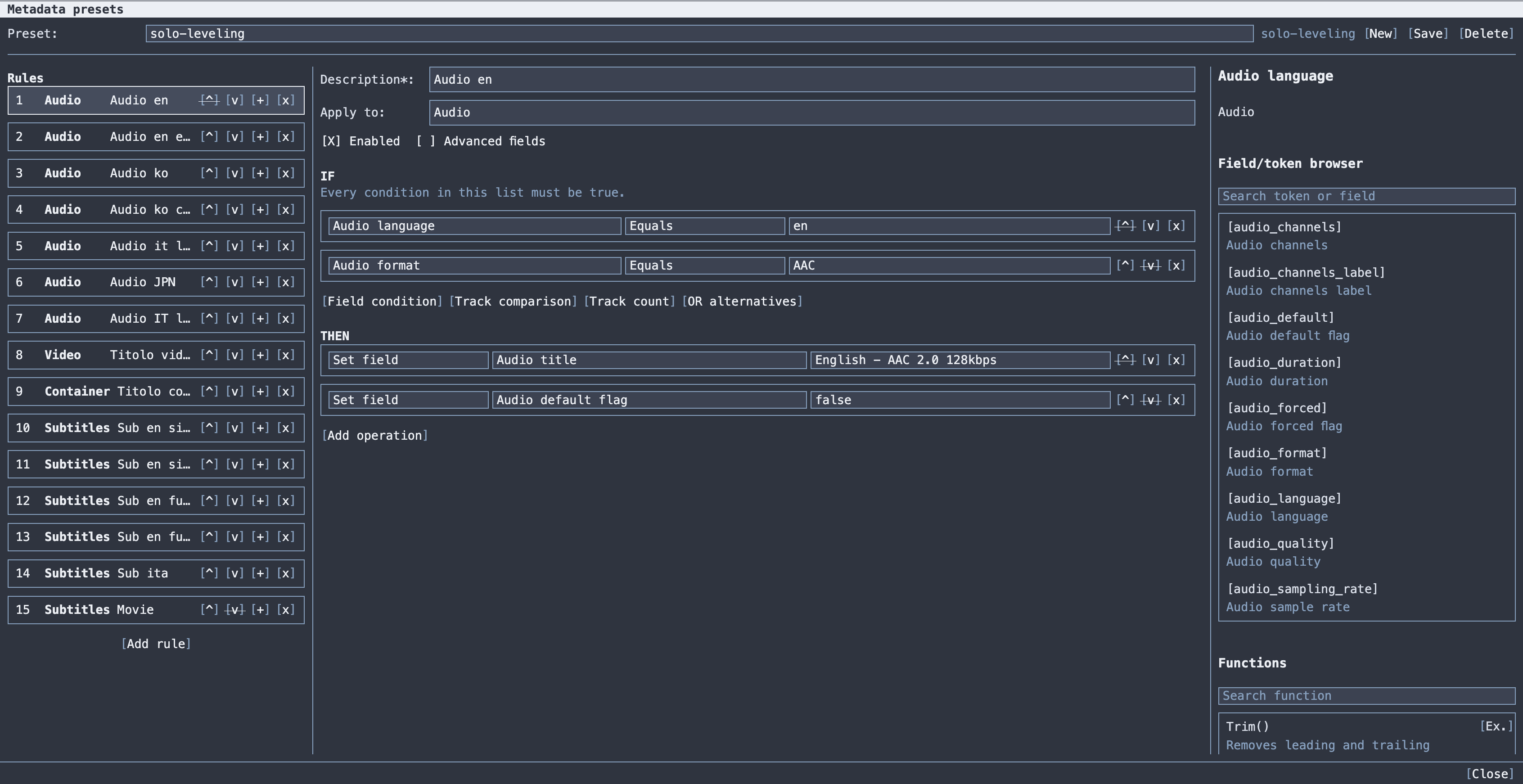
Three columns:
-
Left: the rule list, in execution order. Buttons per rule:
^move up,vmove down,+duplicate,xdelete. Add rule at the bottom. - Centre: the selected rule, with its header fields, then the IF section, then the THEN section.
- Right: the token browser and function browser, both filterable, which insert into whichever value field you last focused.
At the top: the preset selector, the name field, and New / Save / Delete. A name is required before you can save. It becomes the JSON filename and has nothing to do with what the rules do.
Hovering any control shows its explanation in the help area, the same way the Remux configuration dialog does.
Rules run top to bottom, and each rule sees the file as modified by the rules before it.
This is the source of both the power and the confusion:
Rule 1: IF audio title is not empty        THEN Clear field audio_title
Rule 2: IF audio language equals ita      THEN Set audio_title = "Italian [audio_format]"
Rule 2's condition is evaluated against the state Rule 1 left behind. If Rule 2 had tested audio_title is not empty, it would never match, because Rule 1 just emptied it.
Two consequences:
-
Order determines the result. Use
^/vto put the rules in the sequence they must run. - When you need the value a field had before any rule touched it, use the
original.prefix,[original.audio_title]. See Reading values.
The snapshot model behind this, and why re-running analysis is deterministic, is in Internals.
| Field | Notes |
|---|---|
| Description* | Required. It is the readable identifier for the rule everywhere else, in the change list, and in the hover tooltip that tells you which rule changed a field. Describe what the rule does. |
| Enabled | Untick to disable a rule without deleting it. Handy for bisecting a preset that is doing something unexpected. |
| Advanced fields | Reveals less common but still editable fields. Genuinely dangerous fields stay excluded regardless. If a preset already uses advanced fields you cannot untick this until you remove them. |
| Apply to | The rule's scope: Container, Video, Audio or Subtitles. |
Apply to determines everything else. It decides what the rule iterates over, which condition fields exist, and which fields you can edit:
| Scope | Runs | Typical fields |
|---|---|---|
Container |
once per file |
container_title, container_date, file tags |
Video |
once per video track |
video_title, video_language, flags, video properties |
Audio |
once per audio track |
audio_title, audio_language, flags, audio properties |
Subtitles |
once per subtitle track |
subtitle_title, subtitle_language, flags, subtitle properties |
Picking a mismatched field for the scope is a validation error: field is not compatible with scope X.
Every condition in the IF list must be true; the list is an AND. An empty IF list means the rule always applies (Always true), which is the correct form for a rule that must reach every file or every track.
Four things you can add:
The most common condition type. Four parts:
| Part | Notes |
|---|---|
| Field | Read from the current pipeline snapshot: i.e. as modified by earlier rules. |
| Operator | See the table below. |
| Value | A literal, or a template with tokens and functions. |
| Unit | For numeric, size and duration comparisons. Normalises the value before comparing. Size: KB, MB, GB, KiB, MiB, GiB. Duration: ms, s, min, h. |
Operators:
| Group | Operators |
|---|---|
| Equality |
Equals, Not equals
|
| Text |
Contains, Does not contain, Starts with, Ends with
|
| Regex |
Regex, Not regex
|
| Presence |
Empty, Not empty
|
| Lists |
In list, Not in list
|
| Numeric |
Greater than, Greater or equal, Less than, Less or equal
|
| Ranges |
Between, Not between
|
| Boolean |
True, False
|
In list needs at least one value; Between needs both bounds; a bad regex is rejected at save time with the position.
The Unit field is what makes size and duration comparisons readable. audio_stream_size Greater than 200 MB is a condition you can maintain; the same thing in raw bytes is not.
A nested group where at least one inner condition must be true. This is how you express OR inside an otherwise-AND list:
IF  subtitle_language equals ita
AND OR alternatives:
      subtitle_title contains Signs
      subtitle_title contains Songs
      subtitle_title contains Forced
Matches Italian subtitles whose title mentions any of the three.
Compares the current track's field against the other tracks in a group. This is how you express "the biggest one" without knowing any absolute sizes.
| Comparison | True when the current track's value is… |
|---|---|
Equals at least one |
equal to at least one other track's |
Different from all |
different from every other track's |
Greater than all |
greater than every other track's |
Greater or equal to all |
≥ every other track's |
Less than all |
less than every other track's |
Less or equal to all |
≤ every other track's |
Largest in group |
the maximum in the group |
Smallest in group |
the minimum in the group |
Rank |
at position N when the group is ordered (rank must be > 0) |
The group is chosen separately:
| Track group | Members |
|---|---|
Same language |
tracks in scope sharing the current track's language |
Same format |
tracks in scope sharing the current track's format |
Same language and format |
both |
All in scope |
every track of this type in the file |
subtitle_stream_size + Largest in group + Same language is the canonical "this is the full subtitle track, the small one is signs and songs" test.
Not valid in Container scope. There are no other tracks to compare with.
Counts the tracks in the selected group and compares that number with a value. Track count, Same language, Equals, 1 means "this is the only track in this language", which is a useful guard before setting a default flag.
Also not valid in Container scope.
Add one or more operations. They run in listed order, and can be reordered with ^/v.
| Operation | Effect |
|---|---|
| Set field | Set an editable field to a value (literal or template) |
| Clear field | Empty a clearable field |
| Set exclusive flag | Set a boolean flag on this track and clear it on the rest of a group |
| Remove track | Delete the track from the file. requires a remux, so this is the operation that turns a fast job into a slow one. Track scopes only. |
| Add/update statistics | Add or refresh the track statistics tags |
| Delete statistics | Remove the track statistics tags |
| Set tag | Set a managed Matroska tag |
| Clear tag | Clear one managed Matroska tag |
| Clear managed tags | Clear every managed tag on the target. requires explicit confirmation via a toggle in the operation, otherwise validation refuses it |
Set field and Clear field are not one action per field: the field is chosen from a dropdown filtered to what is valid for this rule's scope, and to non-advanced fields unless Advanced fields is enabled.
This operation solves a problem that plain Set field cannot.
Matroska's default flag is supposed to be unique. Setting it on one track with Set field leaves any other default track set too, and players then pick arbitrarily. Set exclusive flag sets it on the current track and clears it on every other track in the chosen group:
| Exclusive group | Cleared on |
|---|---|
Same language |
other tracks with the same language |
Same format |
other tracks with the same format |
Same language and format |
both |
All in scope |
every other track of this type |
"Exactly one default audio per language" is Set exclusive flag on the default flag with group Same language. Trying to use it on a non-boolean field is a validation error.
Tag target decides where a tag lands:
| Target | Writes to |
|---|---|
File |
the container's tags |
Current track |
the current track's tags |
All tracks |
every track's tags |
Tag keys are chosen from a list; free-form tag XML is not available. Which keys are offered depends on the scope:
| Available on | Keys |
|---|---|
| Container and tracks |
TITLE, SUBTITLE, DESCRIPTION, COMMENT, LANGUAGE
|
| Container only |
SUMMARY, SYNOPSIS, DATE_RELEASED, GENRE, PART_NUMBER, PART_TOTAL, DIRECTOR, PRODUCER, WRITTEN_BY, COMPOSER, ENCODER, SOURCE, ORIGINAL_MEDIA_TYPE
|
For a note on an individual track use DESCRIPTION, COMMENT or SUBTITLE. Attempting a container-only key on a track fails validation with metadata is not managed by the UI: X.
PART_NUMBER, PART_TOTAL, DIRECTOR, PRODUCER, WRITTEN_BY, COMPOSER, ENCODER, SOURCE, LANGUAGE and ORIGINAL_MEDIA_TYPE are advanced: turn on Advanced fields to see them.
LANGUAGE tag values must be ISO 639-2 (eng, ita, jpn, und). MediaInfo often reports track languages as two-letter codes (en, it, ja), so converting is on you:
{[audio_language]:ToLower():Replace("en","eng"):Replace("it","ita"):Replace("ja","jpn")}
Both condition values and operation values are templates: they accept tokens and function expressions as well as literal text.
Square brackets, substituted with the field's current value:
[audio_language] - [audio_format] [audio_channels_label]
→ ita - DTS 5.1
The token browser on the right lists every token available in the current scope, filterable, and inserts at the cursor. It needs a focused value field first, otherwise you get Select a value field in IF or THEN first.
Three prefixes change which snapshot a token reads:
| Prefix | Reads |
|---|---|
| (none) | the current pipeline value, as modified by earlier rules |
current. |
the same thing, written explicitly |
original. |
the value before any rule ran |
original. is how a rule reads a value that an earlier rule has overwritten. To clear a title and then rebuild it from the previous value:
Rule 1: THEN Clear field audio_title
Rule 2: THEN Set audio_title = "{[original.audio_title]:NormalizeSpaces()} - [audio_format]"
Five further prefixes read MediaInfo's raw field names directly for fields the catalogue does not model: mi.current.*, mi.video.*, mi.audio.*, mi.text.* and mi.general.*. Use them only when no catalogued field covers the value required; they bypass the type normalisation that catalogued fields receive.
An unknown token is a validation error naming the token and its position.
Functions wrap a value in braces and can be chained with : or with dots:
{[file_name]:TrimEnd(4)}
{[audio_title].Trim().NormalizeSpaces()}
{[audio_sampling_rate]:Div(1000):Format(0.#)} kHz
| Function | Example | Input → Output |
|---|---|---|
Trim() |
{[audio_title]:Trim()} |
ITA Full → ITA Full
|
TrimEnd(4) |
{[file_name]:TrimEnd(4)} |
Bleach - 001.mkv → Bleach - 001
|
ToUpper() |
{[audio_language]:ToUpper()} |
ita → ITA
|
ToLower() |
{[audio_language]:ToLower()} |
ITA → ita
|
Replace(old,new) |
{[audio_title]:Replace(FLAC,LPCM)} |
FLAC 2.0 → LPCM 2.0
|
RegexReplace(pat,repl) |
{[audio_title]:RegexReplace(\d+,02)} |
Audio 01 → Audio 02
|
Substring(0,3) |
{[audio_language]:Substring(0,3)} |
Italiano → Ita
|
Left(3) |
{[audio_language]:Left(3)} |
Italiano → Ita
|
Right(3) |
{[audio_language]:Right(3)} |
Italiano → ano
|
NormalizeSpaces() |
{[subtitle_title]:NormalizeSpaces()} |
ITA Full → ITA Full
|
Add(1000) |
{[audio_bitrate]:Add(1000)} |
24000 → 25000
|
Sub(1000) |
{[audio_bitrate]:Sub(1000)} |
25000 → 24000
|
Mul(2) |
{[video_frame_count]:Mul(2)} |
24 → 48
|
Div(1000) |
{[audio_bitrate]:Div(1000)} |
1536000 → 1536
|
Round(1) |
{[video_fps]:Round(1)} |
23.976 → 24
|
Floor() |
{[video_fps]:Floor()} |
23.976 → 23
|
Ceil() |
{[video_fps]:Ceil()} |
23.001 → 24
|
Format(0.#) |
{[audio_sampling_rate]:Div(1000):Format(0.#)} kHz |
48000 → 48 kHz
|
Division by zero is reported at validation time.
The function browser on the right inserts a function around whatever is already in the focused field, so put the token in first, then apply the function. Otherwise you get Insert a token or expression in the value first. Each function has an Ex. button that opens a worked example showing input, expression, output and notes, including argument order.
For long expressions, both IF and THEN values have a text editor dialog, a larger multi-line box, easier than editing a chain of five functions in a narrow input.
Save-time validation is strict and its messages name the exact rule and operation:
| Message | Meaning |
|---|---|
Duplicate Description: X |
two rules share a description. They must be unique |
Metadata rule without Description at index N |
Description is required |
Metadata rule without operations at index N |
a rule needs at least one THEN operation |
field is not compatible with scope X |
wrong field for the rule's Apply to |
SetExclusiveFlag requires a boolean field |
exclusive flag used on a non-boolean |
field is not clearable |
Clear field on a field that cannot be emptied |
metadata is not managed by the UI: X |
tag key not available for that target |
RemoveTrack requires a track scope |
Remove track in Container scope |
ClearTags requires explicit confirmation |
tick the confirmation toggle |
unknown condition field X |
typo, or a field from the wrong scope |
comparison with other tracks is not valid for Container |
track comparison in Container scope |
rank must be greater than zero |
Rank needs a positive value |
list requires at least one value |
In list with an empty list |
range requires both minimum and maximum values |
Between with one bound |
invalid regex: X |
the pattern does not compile |
Unsupported metadata preset schema version: X |
the JSON is from a newer version |
Validation runs before the preset is written, so a rejected preset has never been applied to a file.
Keep rules narrow, and use several. One rule per intention, with a description that says what it does. A rule doing four unrelated things is impossible to debug when one of them misfires.
Order the rules. Clear before you set. Set languages before rules that condition on language. Put Remove track rules last so earlier rules are not operating on tracks that are about to disappear.
Guard your conditions. IF nothing THEN Set audio_title = "Italian" also labels the Japanese track. Condition on language, format or size.
Always analyze, then read the Simulation detail. Open the dialog, hover the changed fields, confirm the right rule changed the right thing. Presets are cheap to iterate on because analysis is free.
Check the Execution column. MkvMerge means the preset contains a structural change. That may be intended, but it changes the cost of the job substantially on a large library.
Test on a copy first. Set the output policy to Output folder, apply to a handful of files, inspect them, and only switch to Overwrite once you trust the preset.
Disable rather than delete while iterating. Untick Enabled, re-analyze and compare the result to identify which rule produced a given change.
The editor is the supported way to author presets. The JSON is readable, diffable and portable. A minimal example:
{
  "SchemaVersion": 1,
  "Name": "audio-titles",
  "Rules": [
    {
      "Description": "Normalize Italian audio titles",
      "Enabled": true,
      "Scope": "Audio",
      "When": {
        "Conditions": [
          { "Field": "audio_language", "Operator": "Equals", "Value": "ita" }
        ]
      },
      "Operations": [
        {
          "Type": "SetField",
          "Field": "audio_title",
          "Value": "Italiano - [audio_format] [audio_channels_label]"
        }
      ]
    }
  ]
}
The full schema is in Metadata Reference.
- Examples: Metadata: twelve worked presets
- Metadata Reference: the complete field, token and function catalogue
- Metadata Mode: analysing and applying