Media Provenance
Documentation media must come from the current AC-Legacy source tree or from an explicitly recorded current-version capture. Historical Fandom media is excluded unless its individual license and authorship are reviewed.
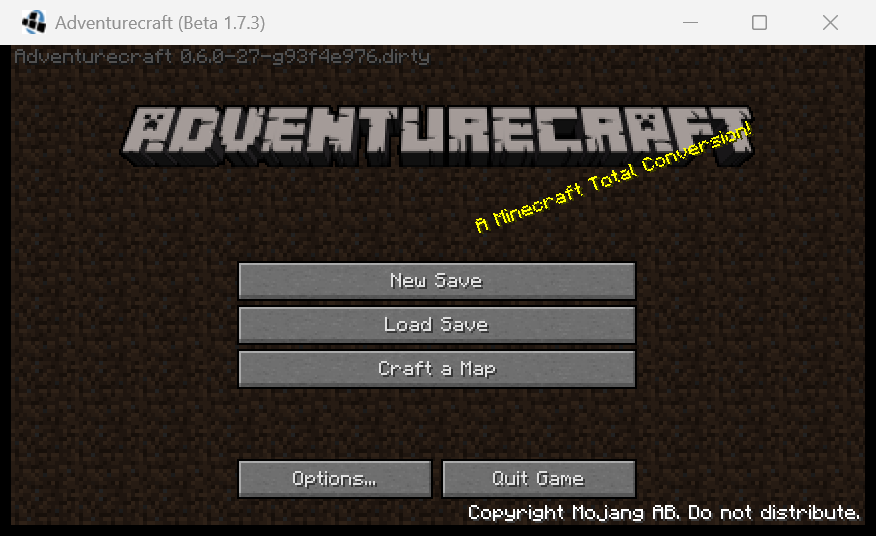
This screenshot was captured from a locally built AC-Legacy 0.6.0 client at source commit 93f4e97671214a06d3ee4b060fa2c61341ac804b on 2026-07-15. It contains no loaded community map. Machine-readable capture details live in wiki/assets/media.json.

The documentation logo is a lossless 320×31 composition of the two source-sprite rectangles used by MixinTitleScreen: 256×31 pixels from (0, 0) followed by 64×31 pixels from (0, 128). This preserves the in-game title exactly without exposing the sprite-sheet spacing. The application icon is copied during generation from src/main/resources/assets/adventurecraft/icon.png. Both are derived from the MIT-licensed project source.
Block and item pages use PNGs exported by the AC-Legacy client from the current registries, textures, and render code. Blocks use the native block renderer; items use the native inventory renderer. A grouped page shows a gallery when several registry fields share one localized name.
Every committed render set is described by wiki/assets/registry/render-manifest.json. The wiki build accepts the set only when it covers every current AdventureCraft block and item registration, each image is a fixed-size 8-bit RGBA PNG, and its SHA-256 matches the manifest. This makes stale, partial, or manually substituted images a build error.
The exporter initializes a synthetic render scene rather than loading a world. Registry renders therefore contain no community map geometry, textures, or artwork. The manifest must record contains_community_maps as false; map screenshots and legacy map images remain prohibited.
A screenshot is accepted only when its provenance record contains:
- The AC-Legacy commit and configured mod version
- The screen, block, item, or workflow shown
- Capture date and operating system
- A descriptive Markdown alt text
- Confirmation that it contains no third-party map artwork
Screenshots of community-built maps are prohibited. Prefer a newly created blank test world when documenting in-game behavior.