Repository navigation
Installation
CueDeck has two halves that find each other by themselves:
- a Stream Deck plugin, installed on the computer your Stream Deck is plugged into, and
- a small grandMA3 plugin, imported into your show file. It runs inside grandMA3 and answers the Stream Deck.
There is no OSC to configure and there are no IP addresses to type in.
| File | What it is |
|---|---|
app.cuedeck.streamDeckPlugin |
The Stream Deck plugin. |
grandMA3/CueDeck.xml and grandMA3/CueDeck.lua
|
The grandMA3 plugin. Always keep the two files together. |
Profiles/CueDeck Plus.streamDeckProfile |
A starter profile for Stream Deck +. Optional. |
Profiles/CueDeck 15.streamDeckProfile |
A starter profile for the 15-key Stream Deck. Optional. |
Profiles/CueDeck XL.streamDeckProfile |
A starter profile for Stream Deck XL. Optional. |
Profiles/CueDeck Neo.streamDeckProfile |
A starter profile for Stream Deck Neo. Optional. |
Profiles/CueDeck Mini.streamDeckProfile |
A starter profile for Stream Deck Mini. Optional. |
INSTALL.md |
This guide. |
- Elgato Stream Deck software 7.1 or newer, on Windows 10 or newer or macOS 13 or newer. CueDeck is developed on Windows; on macOS it has not been tried yet. A Stream Deck + is recommended for the dials.
- What you get depends on the model. Only the Stream Deck + has dials and a touch strip, so the Encoder, the Fader with its cue list, the Cue Picker and the Parameter Wheel need that model. On the small keys of a 15-key Stream Deck, a Module 15 or a Mini, an executor key shows less — name, current and next cue, level — in larger text.
- grandMA3 2.5 or newer: onPC (Windows or macOS) or a console.
- If grandMA3 runs on another machine than the Stream Deck, both must be on the same network (same subnet).
- Double-click
app.cuedeck.streamDeckPlugin. The Stream Deck app opens and asks whether to install it. - The actions appear under CueDeck in the action list on the right.
- Drag the Connection action onto a key. That key shows whether grandMA3 has been found, and its settings repeat the steps below.
Copy CueDeck.xml and CueDeck.lua from the grandMA3 folder of the download into the plugin folder of the
grandMA3 you want to control. Create the folders if they do not exist.
| grandMA3 | Folder |
|---|---|
| onPC on Windows | C:\ProgramData\MALightingTechnology\gma3_library\datapools\plugins |
| onPC on macOS | ~/MALightingTechnology/gma3_library/datapools/plugins |
| Console | A USB stick, in grandMA3/gma3_library/datapools/plugins (the grandMA3 folder sits at the top level of the stick) |
ProgramData is a hidden folder on Windows: paste the path into the address bar of File Explorer. On macOS, use
Go > Go to Folder… in Finder.
Lost the download? Open the settings of the Connection key in the Stream Deck app and click Save to Desktop.
It writes the same two files to a folder called CueDeck for grandMA3 on your Desktop.
- In grandMA3, open a Plugins pool window.
- Press Edit and tap an empty pool object. The plugin editor opens.
- Tap Import. Choose the drive — Internal, or the USB stick on a console — select CueDeck and tap Import again.
- Close the editor. The pool object is now called CueDeck.
The plugin is stored inside the show file. Once it is imported, the files and the USB stick are no longer needed, and the plugin follows the show to any other console or onPC.
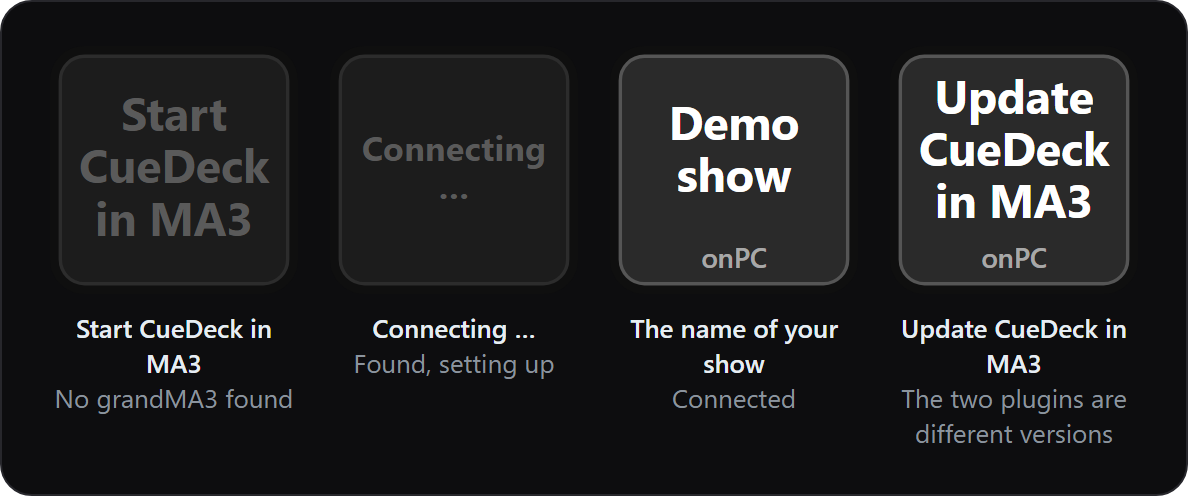
Tap the CueDeck plugin. It answers "Running", and within a few seconds the Connection key on the Stream Deck shows the name of your show. From here on every CueDeck key and dial is live.
The plugin keeps running until grandMA3 closes or another show is loaded.
- Tap the CueDeck plugin again while it is running. A small menu opens.
- Choose Turn autostart on.
- Save the show.
CueDeck now starts by itself every time this show is loaded. The same menu has Restart, Stop and Turn autostart off.
What autostart adds to your show: one macro and one DMX remote, both named CueDeck Autostart. grandMA3 has no
"run on show load" setting, so the DMX remote does the job — it fires once when the show has finished loading and
runs the macro, which starts the plugin. It also switches DMX Remotes on (Menu > In & Out > DMX Remotes).
Turn autostart off removes both objects again.
CueDeck is made for building your own layout: every action is a building block. The starter profiles are a working example to begin from — nothing in them is tied to a particular show. They show whatever is in the show that is open in grandMA3.
Double-click the profile for your Stream Deck. It is added as a new profile; your own profiles are not changed. Change it like any other profile, or delete it.
| Profile | For | What it has |
|---|---|---|
| CueDeck Plus | Stream Deck + | Five pages: Encoder, Playbacks, Sequences, Groups, Pools. Swipe the touch strip to change page. |
| CueDeck 15 | 15 keys | One page. The top row picks what the ten keys below show: Playbacks, Sequences, Groups or presets. |
| CueDeck XL | XL, 32 keys | Two pages: three rows of executors with shortcuts, and a mode row with the show's pools. Not tried on a real deck yet. |
| CueDeck Neo | Neo, 8 keys | Five pages of eight: Playbacks, Sequences, Groups, Presets, Keys. Not tried on a real deck yet. |
| CueDeck Mini | Mini, 6 keys | One page: a mode key, four keys that follow it, and the Connection key. Not tried on a real deck yet. |
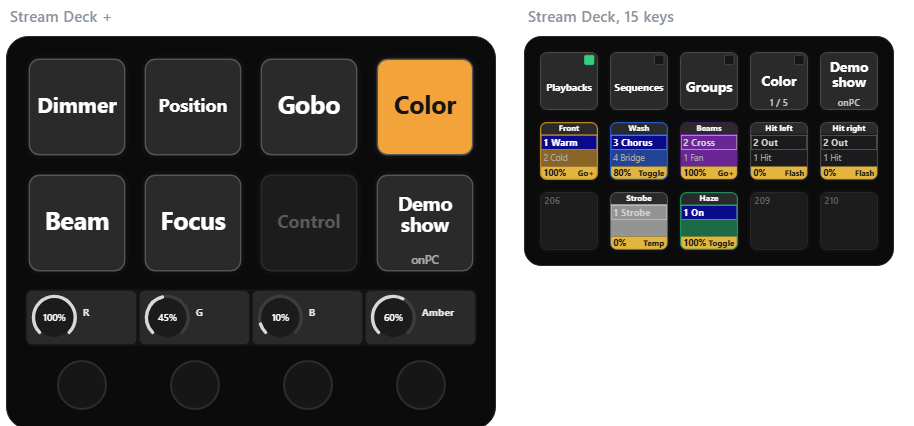
Every page with a picture, and how to make the profiles start on your own executor, sequence and preset numbers: Starter profiles.
CueDeck uses two UDP ports:
| Port | Where | Used for |
|---|---|---|
| UDP 8002 | on the grandMA3 machine | commands and requests from the Stream Deck |
| UDP 8001 | on the Stream Deck computer | answers from grandMA3, and the broadcast grandMA3 sends so it can be found |
- When grandMA3 onPC and the Stream Deck are on the same computer, nothing needs to be set up.
- Across a network, a firewall on either computer must allow these ports. If Windows or macOS asks whether Stream Deck or grandMA3 onPC may use the network, allow it (on Windows: for private networks).
- grandMA3 announces itself with a broadcast every two seconds. Some networks — managed switches, guest Wi-Fi, VPNs — do not pass broadcasts. In that case open the settings of the Connection key and type the IP address of the grandMA3 machine into Fixed IP.
- With several grandMA3 stations on the network, pick the one to control in the same settings.
- Install the new
app.cuedeck.streamDeckPlugin(double-click it). - Copy the new
CueDeck.xmlandCueDeck.luato the plugin folder, as above. - In grandMA3: delete the old CueDeck plugin from the Plugins pool, then import the new one into the empty pool object, exactly as in Import it into your show. Tap it to start it, and save the show. Autostart keeps working — it finds the plugin by its name.
If the two halves are of different versions, the Connection key says "Update CueDeck in MA3". When grandMA3 onPC runs on the same computer as the Stream Deck, the Stream Deck plugin updates the running grandMA3 plugin by itself for the current session — but the show file still holds the old version until you import the new one.
The Connection key says "Start CueDeck in MA3". The grandMA3 plugin is not running, or cannot be heard. Tap the CueDeck plugin in grandMA3. If it does run (tap it again — the menu says "Running"), see Network and firewall above and try Fixed IP.
It worked, but not after I loaded the show again. The plugin stops when a show is loaded. Tap it again, or turn on autostart — and save the show afterwards.
Autostart is on, but it does not start.
- Was the show saved after autostart was turned on?
- Menu > In & Out > DMX Remotes: is the remote
CueDeck Autostartstill there, and are DMX Remotes enabled? - The remote listens on DMX input address 99.512 and fires when that input is 0. If your show receives DMX on that address, move the remote to an unused address.
- In a session with several stations, the remote fires on the session master.
- If you renamed the CueDeck plugin, tap it once by hand; that repairs the autostart macro.
CueDeck is not in the list when I tap Import.
The two files are not in the folder grandMA3 is looking in. Check the folder path above, and that the right drive
is selected in the import window. On a USB stick the grandMA3 folder must be at the top level.
"Could not open port 8002". Another program is using UDP port 8002, or a second grandMA3 on the same computer already runs CueDeck.
The Connection key says "Update CueDeck in MA3". The grandMA3 plugin and the Stream Deck plugin are different versions. See Updating.
Images from my Appearances do not show on the keys. Colours and names always come through. Appearance images are read from the grandMA3 machine's disk, so they only show when grandMA3 onPC runs on the same computer as the Stream Deck.
CueDeck is an independent product and is not affiliated with or endorsed by MA Lighting or Elgato. grandMA3 is a trademark of MA Lighting Technology GmbH; Stream Deck is a trademark of Elgato / Corsair.