Repository navigation
Grabbing text
Grab text reads the words in a region, a window, or the image you already have open. The text is copied to the clipboard and stored in the library as a text entry you can search for later. A notice confirms it. Nothing is sent off the machine unless you point text recognition at a local language-model server yourself.
- Click the Grab text tile (Select area), or the grab-text button in the top bar.
- Drag a region, or click a window. Esc or a right-click cancels.
- screenIt recognises the text, copies it, saves a library entry, and shows a notice: Text copied to the clipboard and saved in the library.
Use this for an error dialog, a paragraph in a window you cannot select, or a slide.
In the editor, Grab text reads the image on the canvas rather than the live screen. The button's tooltip is Copy text from the image. The same clipboard and library result follows. The status line reports how many characters were copied and which engine produced them, or No text found.
Open Settings → Text recognition.
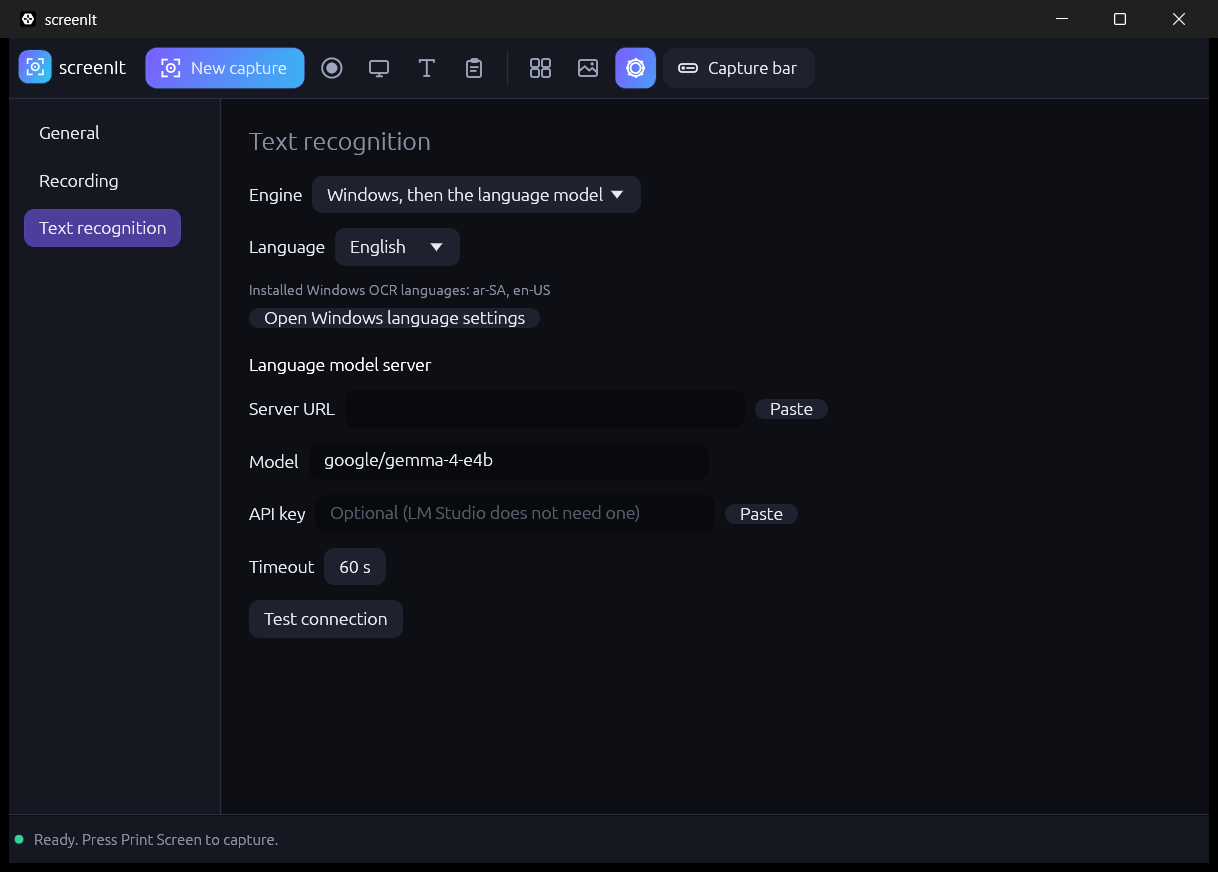
| Engine | When to use it |
|---|---|
| Windows (offline) | The default path. Uses the Windows OCR language packs. No network. |
| Language model (LM Studio) | A local OpenAI-compatible server, typically LM Studio. Better on hard layouts, slower, and only as good as the model you loaded. |
| Windows, then the language model | Windows OCR first. The model runs as a fallback. |
Language is Automatic, English, or Arabic. The page lists the OCR languages Windows actually has installed, for example en-US, ar-SA. Open Windows language settings jumps to the Windows language page when a pack is missing. Arabic recognition needs the Arabic language pack with the optical character recognition feature. If it is missing, screenIt says so instead of returning empty text.
Windows returns Arabic words in visual order. screenIt reverses each right-to-left run so the copied text is in reading order.
| Field | Meaning |
|---|---|
| Server URL | The server root, usually http://127.0.0.1:1234. Paste fills it from the clipboard. |
| Model | The model id, such as google/gemma-4-e4b. Empty means the model currently loaded in LM Studio. |
| API key | Optional. LM Studio's local server does not need one. If you set one, it is sent as a Bearer token and stored in plain text in %LOCALAPPDATA%\screenIt\settings.json. Do not put a cloud secret here. |
| Timeout | How long a request may take, in seconds. The default is 60. The image is downscaled so the longest side is at most 2048 pixels before it is sent. |
| Test connection | Lists the models the server reports. Success looks like Connected, N model(s) available. |
The request stays on the machine if the URL is a loopback address. screenIt does not ship a cloud account and does not phone home for OCR.
Library search matches text entries as well as image titles. Open the entry to read what was captured. See Library and files.