Repository navigation
Overview
screenIt captures a region, a window or the whole screen, keeps the result editable, and can record that same area to an MP4. It is a Windows desktop application written in Rust: one native executable, using Windows Graphics Capture, Media Foundation and Windows OCR. It does not bundle Electron, a web view, or ffmpeg.
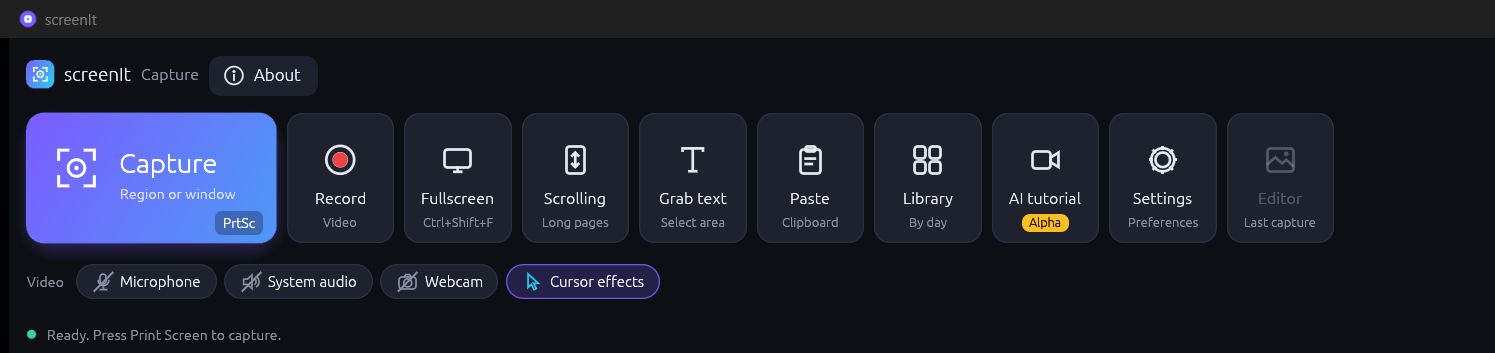
The application is a single window with five views.
| View | What it is for |
|---|---|
| Capture bar | The compact launcher. Capture, record, full screen, scrolling, grab text, paste, library, the experimental AI tutorial, settings, and the last capture. |
| Editor | Annotate the open image, copy it, export a PNG, or save an editable .scit project. |
| Library | Everything you have captured, grouped by day, with search. |
| Settings | Language, behaviour after a capture, recording quality, and text recognition. |
| AI tutorial | An alpha screen. A local model plans a task on the live app, then screenIt records it. Still being tested. See AI tutorial. |
Closing the window does not quit. screenIt stays in the notification area so Print Screen keeps working. Quit in the tray menu exits. Starting screenIt again while it is already running brings the existing window forward. A second copy does not start.
- Press Print Screen, or click Capture.
- Drag a rectangle, or click a window. Esc or a right-click cancels.
- The image opens in the editor (unless you chose silent save).
- screenIt writes an editable
.scitfile underPictures\screenItand adds it to the library. That folder follows OneDrive if Pictures is redirected. - Mark it up, then Export PNG, Copy, or Save.
Grab text does the same kind of selection, then copies the recognised text to the clipboard and stores it in the library. Record uses the same selection, counts down from three, and writes an MP4. The floating pause/stop bar is kept out of the video.
Version 0.2.14 puts the capture bar, scrolling capture, the editor, recording, the library, settings, text recognition, and the experimental AI tutorial in the window. Image effects, smart redaction, background removal, and video trim/cut/combine are commands on the same engine, reached from screenit-cli or the automation channel. They are documented in Automation, not as buttons.
| If you want to… | Read |
|---|---|
Install the .msi or the portable zip |
Installation |
| Take a screenshot | Capturing the screen |
| Draw on an image | Editing and annotation |
| Copy text off the screen | Grabbing text |
| Record video with sound | Recording |
| Have a local model record a tutorial | AI tutorial |
| Find an older capture | Library and files |
| Change language or OCR | Settings and languages |
| Drive screenIt from a script | Automation |
| Look up a key | Keyboard shortcuts |
screenIt is an independent project. Snagit is a trademark of TechSmith Corporation. screenIt is not affiliated with or endorsed by TechSmith.