Repository navigation
Lasers
Lasers on GRBL (an Ortur Laser Master, most diode lasers) are driven by a port of LaserFoundry v0.6.0. In v2 the laser is a device of the agent, reporting only so far (#163); its buttons and jobs through the agent come with #164.
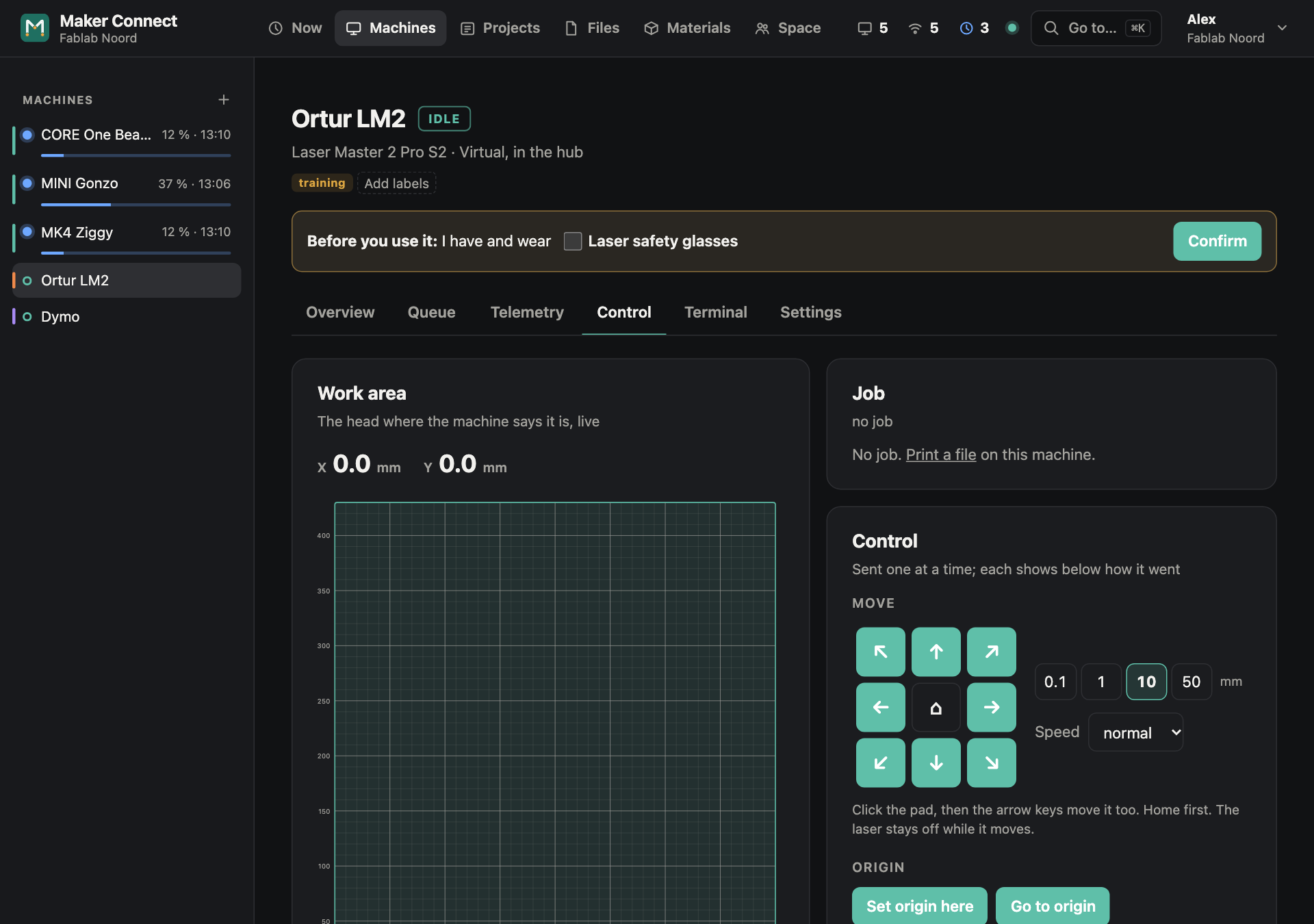
On the agent's page (The Agent) choose the laser's serial port on its card and turn it on; then add it on the hub with the code it shows. Its profile gives the work area. So far the agent reports the laser's state; the buttons below and jobs through the agent come with #164, framing on a real laser through it with #91.
Work area: the head where the laser says it is, live, on the work area of its profile.
Move, the jog pad:
- Eight directions round ⌂ Home (
$H). Up is the back of the machine (Y+), right is X+. - The step: 0.1, 1, 10 or 50 mm a press. The speed: slow (600 mm/min), medium, normal, fast (6000).
- The arrow keys move it too, once the pad has been clicked; Home homes. A move goes when the one before it has been sent, so holding a key does not pile them up.
- Every move is GRBL's own jog (
$J=): the laser stays off, and GRBL checks it against the travel.
Origin: where a job starts from.
- Move the head to the corner of what you work on, then Set origin here (
G92 X0 Y0): that point is X0 Y0 for the jobs after it. - Go to origin brings the head back to it, with the laser off.
- GRBL forgets the origin when it restarts: after switching it off, an alarm, or Stop (a stop is a soft reset). Set it again then.
Machine: Unlock after an alarm ($X). There is no separate "Laser off": the laser is off whenever it is not burning a job, and its Stop is the soft reset.
Commands are sent one at a time; each shows below how it went, and the Terminal tab shows every line and GRBL's answers.
A laser never starts a job by itself. A file sent to a laser is loaded, not started, and a person at the laser starts it.
- Make the G-code in your laser software (LaserFoundry, LightBurn, LaserGRBL…), for GRBL, in mm. examples/laser has two to start with. Or design it in the browser: see Laser design below.
- Drop it on the Files page and send it to the laser. The hub reads where its moves go and how much power it asks. It is now the laser's loaded job, shown on the laser's machine page, Control tab.
- Frame runs the outline of the loaded job with the laser off: see where it will burn.
- Not right yet? Set origin and jog, then frame again. After every Set origin the job must be framed again.
- When it is framed, a person at the laser presses Start burn. It needs permission to operate the laser, safety glasses confirmed, laser mode on (
$32=1), and a confirm. - While it runs: progress and time left, Pause (feed hold), Resume, and the laser's stop, Emergency stop (soft reset): LaserFoundry's own Stop, the laser off at once.
- Take it off removes the loaded job.
A laser has one loaded job and no queue. Sending another replaces it only after you confirm.
Prepare in the top menu (after Files) holds the tools that make the work. Today that is Laser design: LaserFoundry's web version (our fork, without Web Serial), which opens in a new tab. It is shown to members who may use a laser.
- Design the work there.
- File → Send to a laser…, then Send to : the design is now that laser's loaded job.
- Choose Open 's page to frame and start it, as above.
A laser can start a fire and hurt eyes. Frame a job and start at low power; wear the glasses that go with it; stay with it while it runs. The jog pad keeps the beam off, but it moves a real head: home first, and keep hands out of the work area.
A GRBL controller keeps its settings itself: $130 and $131 are its travel, $30 full power, $32 laser mode. A laser without a profile takes its work area from its controller, so its Control draws it and files are checked against it; $I's build info gives its name where the maker put one in, and a profile whose name matches is chosen by itself.
The controller does not know the module's watts (S1000 is full power, whether 5 W or 20 W): set them on the laser's Machine tab. Empty uses the profile's.
Profiles by hand, from the makers' published specs (values marked # check until confirmed on a machine): Ortur Laser Master 2 Pro S2 and Laser Master 3, Creality Falcon2 22W, Sculpfun S30 Pro and S30 Pro Max, Atomstack X20 Pro and S20 Pro, Longer Ray5 10W and 20W, Two Trees TS2. There is no open list of lasers as there is of printers: LightBurn's is its own, and FluidNC's configs describe boards.
Tried on a real Ortur Laser Master 2 Pro S2: homing, jogging, setting the origin and framing. No burning yet. The origin is not yet drawn on the work area, and the position shown is the machine's, not the job's.