Repository navigation
The Agent
The agent is the small program on a computer beside your machines: a Raspberry Pi, a Mac, a PC. One agent drives every device plugged into that computer. It talks to the hub the way a Prusa printer talks to Prusa Connect: it starts the connection itself, so it works behind any router or firewall.
| Device | How it is plugged in | The one reference it follows |
|---|---|---|
| DYMO LabelManager PnP (tape) | USB HID, no driver | labelle |
| DYMO LabelWriter 450 (labels) | USB, no driver | DYMO's CUPS driver 1.4.0, with DYMO Connect's catalogue of rolls |
| A 3D printer on Marlin | USB serial | OctoPrint 1.11.8's serial layer |
| A laser on GRBL (reporting only so far) | USB serial | the gnea/grbl wiki, and LaserFoundry v0.6.0 where it is silent |
Each device's port is proved against its reference by an audit: see docs/audits. A GRBL laser is on the agent, reporting only so far (#164 brings its buttons and jobs). Ported and proved but not yet on the agent: DYMO scales (usbscale) and USB webcams (nokhwa). A Prusa MK3 (PrusaLink) is still to be ported. The roadmap has the order.
./maker-connect-agent| Option | What |
|---|---|
--dir <folder> |
Where it keeps its settings (default: ~/.maker-connect-agent) |
--listen <address> |
Where its own page is served (default: 0.0.0.0:8470) |
--version |
Which build this is |
It needs nothing else on the command line: everything is set on its page.
Open http://<that computer>:8470 in a browser.
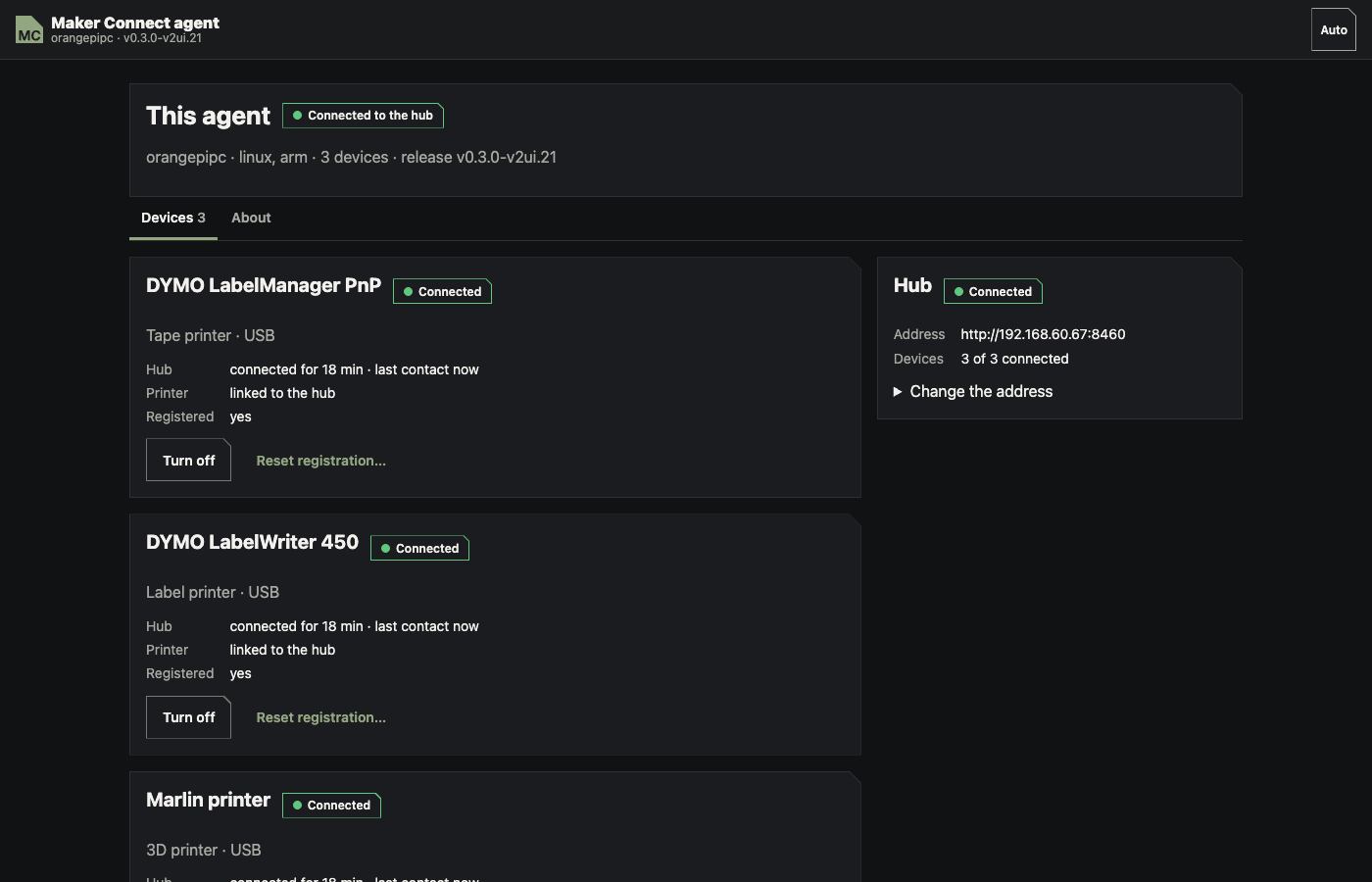
-
Hub: the hub's address and port (
192.168.1.20,8460), and TLS if the hub is behind HTTPS. Every device on this agent uses this hub. - One card per device: switch its module on for a device that is plugged in. It then registers with the hub and shows a code. On the hub, open Add machine (the + next to "Machines"), choose A machine on USB, and enter that code. From then on the card shows the link's state.
- A Marlin printer or a laser: while it is off, choose its serial port (and, for a Marlin, the baud rate), then press Turn on: the port opens with the module. To choose another port, turn it off first. The agent remembers the USB device behind the port, so it finds the printer again when the port's name changes after a replug.
- Reset the registration: the device forgets its token, and is no longer known at the hub until it is added again with a new code.
- This agent, Load and Computer: which build it is, how busy it is, and what it runs on.
Not in a release yet: on the branch
wip/191-192; see Stream Deck and #190.
An Elgato Stream Deck plugged into the agent's computer shows this agent's devices on its keys. It is local to the agent: it does not register at the hub and sends nothing there yet.
- Its card on the agent's page: Turn on / Turn off, as every card; while on, the agent looks for a deck once a second and connects when one is there. The card says which deck, or why none is connected.
- On the deck, read only: the top row shows each device as its card here shows it (state in its colour, its status line) and the hub's link; press a device for its page (state, hub, status, registered). The bottom row is always navigation: Back, and in the middle where you are (press it to go home).
- Close the Elgato app first: it holds the deck (the owner's note of 2026-11-23, from trying deckhand). What the card says while it runs: not tried.
-
On Linux the deck needs udev rules to be opened without root: deckhand's
40-streamdeck.rules(not tried yet). Windows: not tried. - Tried on a Stream Deck Original V2 on macOS. Unplugging it while it runs: not tried.
In --dir, one folder per device (dymo, labelwriter-450, marlin), each with a prusa_printer_settings.ini as PrusaLink keeps it: the hub's address, the device's token and serial number, whether its module is on, and for a Marlin printer its serial port. A Marlin printer's files are in marlin/gcodes/.
Keep the folder: it is the devices' pairing with the hub.
A job from the hub is downloaded into the agent's storage, then printed from there. The agent streams it as OctoPrint does: each line numbered and checksummed, acknowledged before the next, sent again when the printer asks.
- Pause stops sending between two lines; Resume goes on; Stop ends the print.
- The terminal on the machine's page sends G-code and shows what the printer answers.
- The printer names itself with
M115. When that name belongs to exactly one profile, the hub gives the printer that profile by itself; otherwise choose one on the machine's Machine tab. - When the printer's firmware can level its bed (
Cap:AUTOLEVELin itsM115), Probe bed on the machine's page measures it (G28,G29,M420 V), and the hub reads and draws the mesh as OctoPrint's Bed Level Visualizer does. To use that mesh when printing, the slicer's start G-code turns it on (M420 S1afterG28), or measures again before each print (G29afterG28).
The agent runs on a Pi with a 64-bit OS (Raspberry Pi 4 or 5, Raspberry Pi OS 64-bit): the build maker-connect-agent-linux-aarch64.
-
Get the agent from your hub: Add machine → A machine on USB offers the builds the hub has.
-
chmod +xit, and let your user reach the devices:sudo usermod -aG dialout $USER # serial ports (printers); log in again after
For the DYMO printers, a udev rule that gives access to their USB devices (vendor
0922):echo 'SUBSYSTEMS=="usb", ATTRS{idVendor}=="0922", MODE="0666"' | sudo tee /etc/udev/rules.d/99-dymo.rules sudo udevadm control --reload && sudo udevadm trigger
-
To start it with the Pi, a user service:
# ~/.config/systemd/user/maker-connect-agent.service
[Unit]
Description=Maker Connect agent
After=network-online.target

[Service]
ExecStart=%h/maker-connect-agent/maker-connect-agent --dir %h/maker-connect-agent
Restart=on-failure
RestartSec=3

[Install]
WantedBy=default.target
systemctl --user enable --now maker-connect-agent, andsudo loginctl enable-linger $USERso it runs without anyone logged in. Its log:journalctl --user -u maker-connect-agent -f.
The Windows and macOS builds run too (2026-11-23): on Windows a Marlin printer connected and answered, but the agent cannot be sent a file there yet (#184); a release for both: #141.
cargo build --release -p maker-connect-agent
scripts/build-release.sh                # every platform, as the releases are made
build-release.sh cross-builds with cargo-zigbuild (cargo install cargo-zigbuild, and Zig). The hub offers every file named maker-connect-agent-<os>-<arch>[.exe] in its downloads folder on its Add machine page.