Repository navigation
Recipes
Recipes are the heart of LENA — they feed meal plans, grocery lists, events, and recommendations.
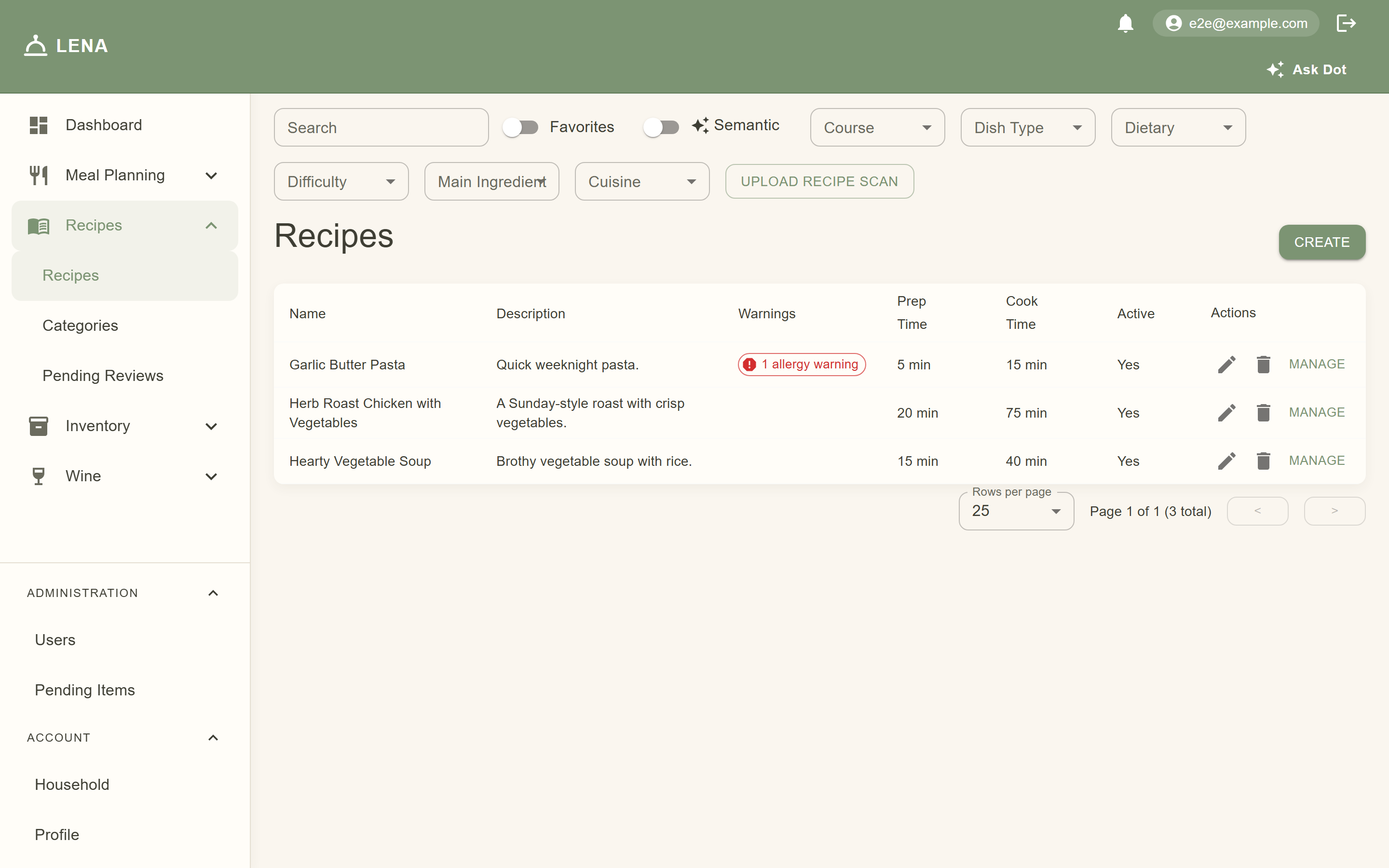
Open Recipes → Recipes to see the household's collection. You can:
- Search by name (the list narrows as you type)
- Semantic search (✨ Semantic switch, shown when the server has embeddings configured) — describe what you're in the mood for instead of matching names: "cozy comfort dinner", "something fresh with citrus", "quick weeknight pasta"
- Filter by category — one dropdown per group (Course, Dish Type, Dietary, Difficulty, Main Ingredient, Cuisine). Picks combine across groups, so "Italian" + "Easy" finds easy Italian recipes; picking two options in one group matches either
- Filter to favorites with the Favorite toggle
- Peek at a recipe — click its name or description to open a read-only preview: the ingredient list (grouped by section, optional lines marked) and the numbered steps with their durations, without leaving the table. Use the row's edit pencil or Manage link for the full recipe page with ratings, categories, and tweaks



Results are ranked for you. Keyword mode puts favorites first, then recipes your household has actually cooked (from meal plans and events), then ones you've opened before, then ones matching things you've searched for. Semantic mode ranks by how close each recipe's meaning is to your description — name, description, ingredients, and categories all count — with a small nudge for favorites and household staples. The more you use LENA, the closer the top of the list gets to "what you were probably going to pick anyway".
Semantic mode runs on a small local embedding model (Ollama's
nomic-embed-textby default). If your server doesn't have it configured, the switch simply doesn't appear and everything else works the same. One honest limitation: embeddings don't understand negation — "pasta with no cheese" may still surface cheesy recipes, so double-check the ingredients.
Categories are how you organize the collection. They come in groups, each with its own rules:
| Group | Pick | Examples |
|---|---|---|
| Course | one | Breakfast, Lunch, Dinner, Dessert, Snack, Side |
| Dish Type | many | Soup, Bread, Casserole, Single Pan, Cocktail |
| Dietary | many | Low Calorie (admins can add more — gluten-free, etc.) |
| Difficulty | one | Easy, Medium, Skilled |
| Main Ingredient | one | Chicken, Beef, Fish, Pork, Vegetarian |
| Cuisine | one | Italian, Mexican, French, American, Asian… |
Groups marked pick one are exclusive — a recipe can't be both Mexican and Italian, for example. Groups marked many allow several categories at once.
Assigning categories: open a recipe and scroll to Categories. Radio buttons appear under exclusive groups, checkboxes under the rest — just tap to apply; there's no separate save step. Any household member can categorize recipes.

Curating the taxonomy (admins): Recipes → Categories lists every group with its exclusivity and display order, and lets you add, rename, reorder, or delete groups and categories.

If a recipe's ingredients conflict with a household member's allergy or dietary records, the recipe page shows an alert naming the member and the allergen — a red banner for a confirmed allergy against a contains flag, amber for dietary restrictions and may contain. The line's allergen tags are listed just underneath.

Warnings are advisory — they name the conflict so your household can decide, they don't block the recipe.
On a recipe's page, tap the stars under Your rating. LENA shows the household's average rating and how many people rated — ratings feed the "Due for a revisit" and "Recommended for you" suggestions on your Dashboard, so it's worth the two seconds.
Open a recipe to edit it, or create a new one. A recipe has:

- Name, description, and servings
- Ingredients — each with a generic ingredient (search or create inline), an optional preferred brand, quantity, and unit of measure. Classic item-only lines still work; ingredient-keyed lines let recipes say "corn" without pinning a brand
-
Steps — numbered instructions, plus optional timing metadata per step:
- Duration (minutes)
- Step type (e.g. prep, cook)
- Passive — check this for "walk away" steps like simmering, rising, or marinating
- Depends on — which earlier step must finish first (defaults to the previous step; override it to describe steps that can run in parallel)
- Appliance — oven, stove, mixer, etc. LENA uses this to spot scheduling conflicts in event timelines
You only need timing metadata if you want the event timeline to schedule that recipe. Plain recipes work fine without it — LENA estimates a single-slot duration for unscheduled steps.
Recipes are shared, but tastes aren't. Any household member can tweak a recipe for the household — the original recipe stays untouched, and every view that household sees (the recipe page, meal plans, grocery lists, servings scaling, event snapshots, and Ask Dot's suggestions) uses the tweaked version.

On a recipe page, each ingredient line and step has a Tweak button:
- Swap — replace a line's ingredient or preferred brand (e.g. garlic → shallot)
- Adjust — change the quantity or unit
- Remove — drop the line or step entirely
- Add — new lines and steps are drafted in the tweaks panel itself
Tweaked rows carry small badges (Swapped, Adjusted, Added, Replaced) so it's always clear what isn't original, and the panel lists every pending change until you save or discard it. Household version / Original recipe at the top of the page flips between the tweaked and untouched recipe.


If the original recipe is edited after your household made tweaks, a banner flags the drift — Mark reviewed dismisses it once you've checked the changes still make sense. Tweaks whose original lines were deleted don't vanish silently; they show as "no longer applies" chips you can remove at your leisure.

Every tweak action is recorded in Tweak history at the bottom of the panel — who saved the tweak set (and how many lines and steps it contained), who cleared the tweaks, and who marked them reviewed, newest first:


Canonical recipe editing (the underlying ingredients and steps everyone shares) stays admin-only — tweaks are the member-level editing path.
Have a handwritten card, a cookbook page, or a photo of a recipe? On the web Recipes page, use Upload Recipe Scan:
- Choose the image file.
- LENA queues it for OCR processing.
- The import appears under Recipes → Pending Reviews while it works its way through processing (OCR → draft → review).
- Once processed, review the extracted recipe, fix anything the OCR got wrong, and save it to your collection.
Status chips tell you where each import stands: Processing (working), Ready (waiting for you), Reviewing, Failed, or Profanity (flagged by the content filter — edit and resubmit).
Tip: clear, straight-on photos with good light import best. One recipe per image.
Recipes submitted by members land on Pending Recipes (admin-only, under Administration) for review before joining the shared collection — same review-queue pattern as pending items.

Everyone in the household sees the same recipe collection — a favorite for one person is visible to all, and household tweaks apply to every member's view, plans, and lists. If a recipe is attached to a food event, the event keeps its own copy, so editing the shared recipe never surprises a planned dinner.