Repository navigation
Import export
English | Русский
Known issue in alpha 0.19.328: 27 producer prefab names differ in letter case from the native registry. This is not fixed in the issued package; review missing parts on import. The correction and successful 251/502-part catalogue checks belong only to the internal 0.19.329 candidate. Eight bounded native data checks are accepted for that candidate. Four direct producer-profile checks (.blueprint/.vbuild) have passed independent review. Acceptance of 2.17 covers codec/profile data only in the internal 0.19.329 candidate. Gameplay sections 3–13 and multiplayer remain open.
Updated 31 October 2026. Issued private alpha: 0.19.328. This is not a public beta or a Thunderstore package. Version and limits.
The internal 0.19.329 candidate has passed eight bounded native data checks. Four direct producer-profile checks (.blueprint/.vbuild) have passed independent review. Acceptance of 2.17 covers codec/profile data only in the internal 0.19.329 candidate. Strict player-state endpoints differ; the cause is not established. Inventory, source files and catalogue content hashes were preserved; the ordinary-save comparison covered metadata only. This run does not establish UI, world construction, new visual frames, networking or a cold-process test. The next requirement is 2.18; the 2.16 HOLD is unchanged. The .280 examples and 23 October captures describe their historical version; they do not validate 0.19.328 or the 0.19.329 candidate.
Each format is bounded by its pinned producer/reader.2.1–2.15 retain their stated acceptance limits. Planner 2.17 is accepted only for codec/profile data in internal 0.19.329; full gameplay remains separate. Two326planner consumer files and the four author-supplied PlanBuild originals do not prove complete gameplay behavior. Raw stays inert, missing records are kept by default and explicit omission is warned. A full BuildWorks companion/archive does not replace native application.
Import makes a working copy; export transfers a saved document. Use files you have permission to use, and save edits before exporting. Conversion does not grant redistribution rights to another author's library or extracted game assets.
- Open Import file from the hammer or editor catalogue.
- Browse to a file or enter its full path. Internal
.buildworks.json/ZIP and declared.blueprint/.vbuilddialects are supported. An extension alone does not prove that every dialect is supported. OBJ/FBX/glTF and terrain transfer are outside this module. - Read the review of parts, missing records, and contents options. Unknown data can be archived without restoring its behaviour.
- Keep source categories or choose an existing/new common category. Reviewing alone does not change the library.
- Select Confirm import. Wait through the stages; elapsed seconds are not an estimated completion time.
- Inspect the result card. If the single-file background operation continued after the window closed, find its result in the catalogue when it finishes.
Expected result: a separate managed import; the original stays unchanged. Importing does not build a house or grant resources.
- Select Choose group, then mark files. The current limit label specifies 1–32 files/blueprints and up to 64 MiB of source data in total.
- Review the group, then open Documents and categories.
- Deselect unwanted documents and set individual categories if needed. Src restores the source category; an empty field inherits the common/source category. Select Apply selection.
- Check the final composition and intended catalogue result, then confirm. Read skipped-file diagnostics: a selected path does not necessarily produce a document.
The group is committed as one archive. Closing before the write cancels the batch; an already published archive remains. This differs from single-file background import. Installed .280 has limited native evidence for routing the import result from three documents plus one skipped file, returning to review with Back, and preserving the editor draft/Undo/Redo. This does not accept every batch, a full restart workflow, ordinary mouse interaction, or visual presentation.
- Choose a saved card and open Export file.
- Set format, name, and folder. Choose BuildWorks JSON or ZIP + BuildWorks for the full document.
- For PlanBuild, read the loss review; its final button is Export with losses. Ordinary export uses Confirm export. Retain the full BuildWorks copy.
- Check the reported output path. Existing files are not automatically overwritten.
Enable Choose group in the export window, mark saved cards, review the selection, and confirm. Group export uses a full BuildWorks ZIP, not every foreign format. Check the output path and selected documents. A detailed result listing each document's name/category/ZIP entry was added in source322 and is included in installed .280. Export receipt correctness has CPU evidence; the limited native import run is not a native export acceptance test.
- Save your variant, then select Share in either catalogue.
- Use Copy path or Open folder.
- Send the indicated
.buildworks.jsonyourself. The recipient uses Import file and reviews the contents.
Expected result: a file containing the saved version. This does not publish it to the server and is not direct in-game player transfer; that workflow remains unfinished.
Common failure: the file was saved but the catalogue did not refresh. Use Refresh catalogue instead of importing again. If the portable file failed, retry Share without creating a new card. The share folder may not exist before the first save/share and is not an automatic import source.
Visual limitation324: the black capture is excluded and Exchange font warnings remain under investigation. Readable labels and a final null-font state cannot be inferred from inspect text alone. Exact first-card focus, hammer import, and Back during asynchronous inspection/preparation remain open.
At checkpoint324, the font review found a nonempty template and a likely Awake-before-assignment cause for 64 warnings; final Exchange font/mesh was not sampled then. Capture325 below now verifies the sampled fonts/materials and visible text in this one state. Other states, complete readability, and regression claims remain open.
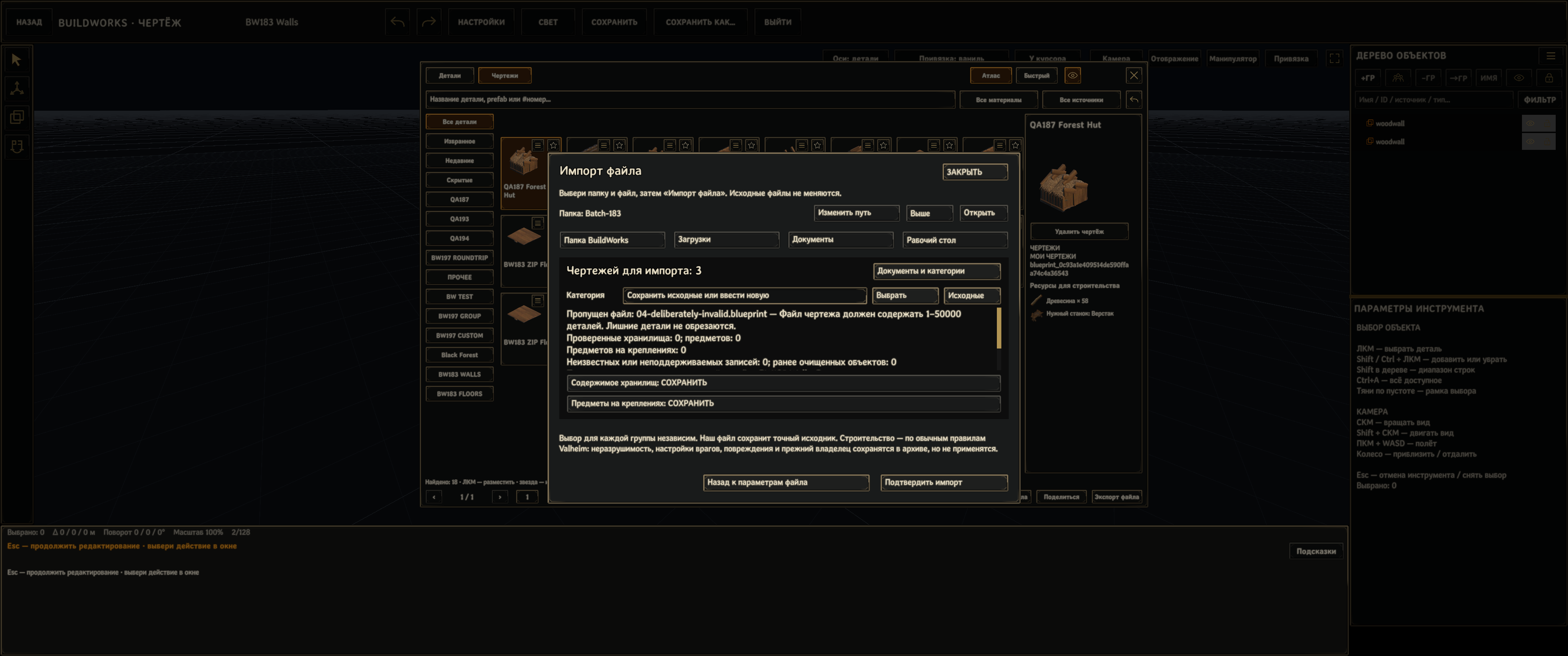
Real .280 import review, Russian UI: three documents and one deliberately invalid skipped file. Controlled native camera/Canvas composition, not an OS screenshot. Confirm import was not pressed for this capture; it does not prove a new archive or completed import.