Repository navigation
Releases
Meraline 1.14.0

Download Meraline-1.14.0.dmg, open it, and drag Meraline into your Applications folder. Meraline needs macOS 26 or later. Installed copies update themselves.
What's new
Decision mode grows in this release: decision models run on this Mac through Ollaya, the answers under the input open a panel with lists of your own, every preset asks at once, and Improve edits your text toward the answers it should get. Around it, presets ask with one click, the window stops closing by itself, and updates arrive within a quarter of an hour.
Decisions
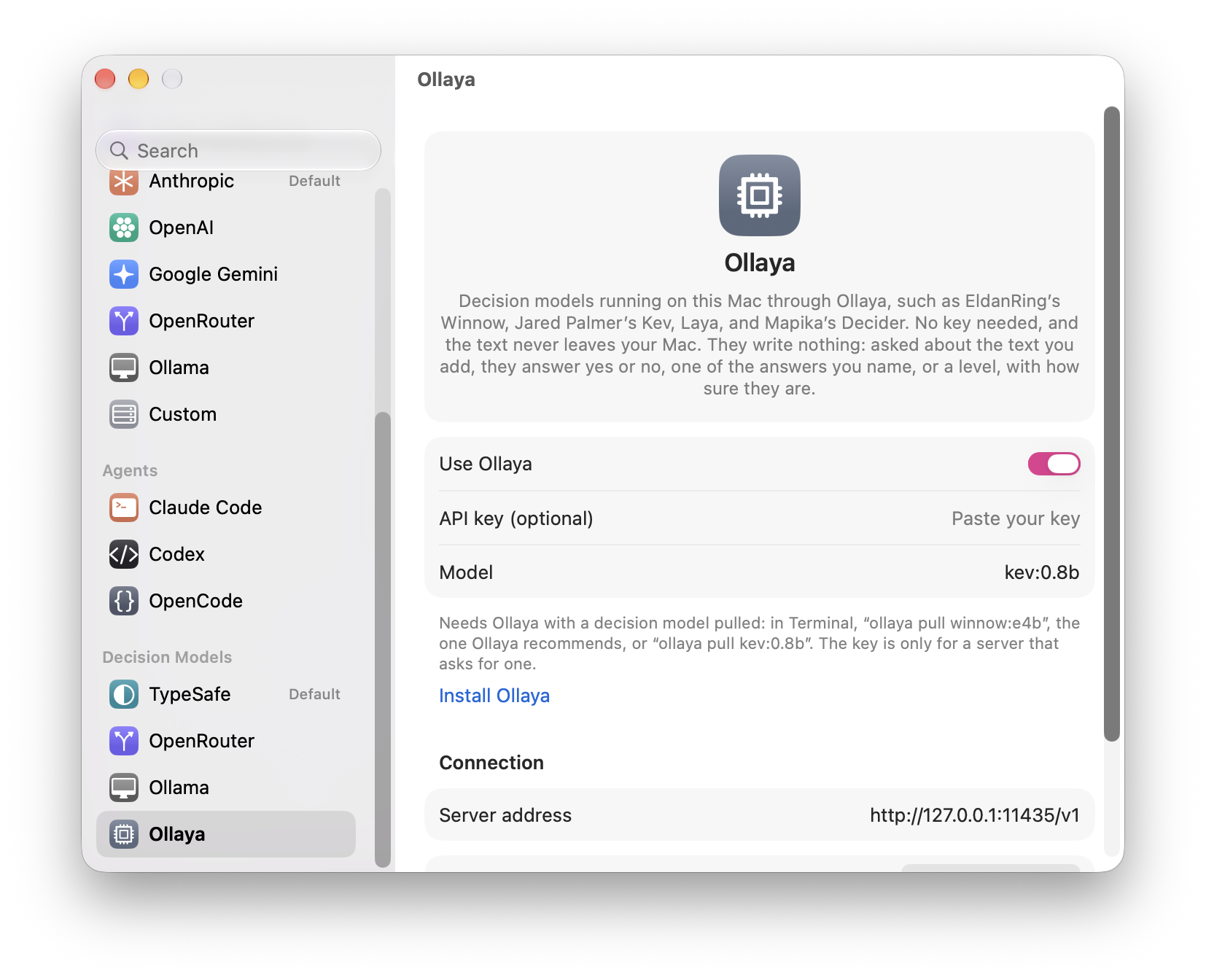
- Decision models through Ollaya. Settings › Decision Models has Ollaya beside Ollama: the Ollama of decision models, which pulls and serves EldanRing's Winnow, Jared Palmer's Kev, Laya, Mapika's Decider, and more on this Mac behind the same API as Jev. Turn it on, pull a model (
ollaya pull winnow:e4b, the one it recommends, orollaya pull kev:0.8b), and decisions, live decisions, the presets, and each word or line go to127.0.0.1:11435and nowhere else, free in Settings › Usage. A key is needed only for a server that asks for one.
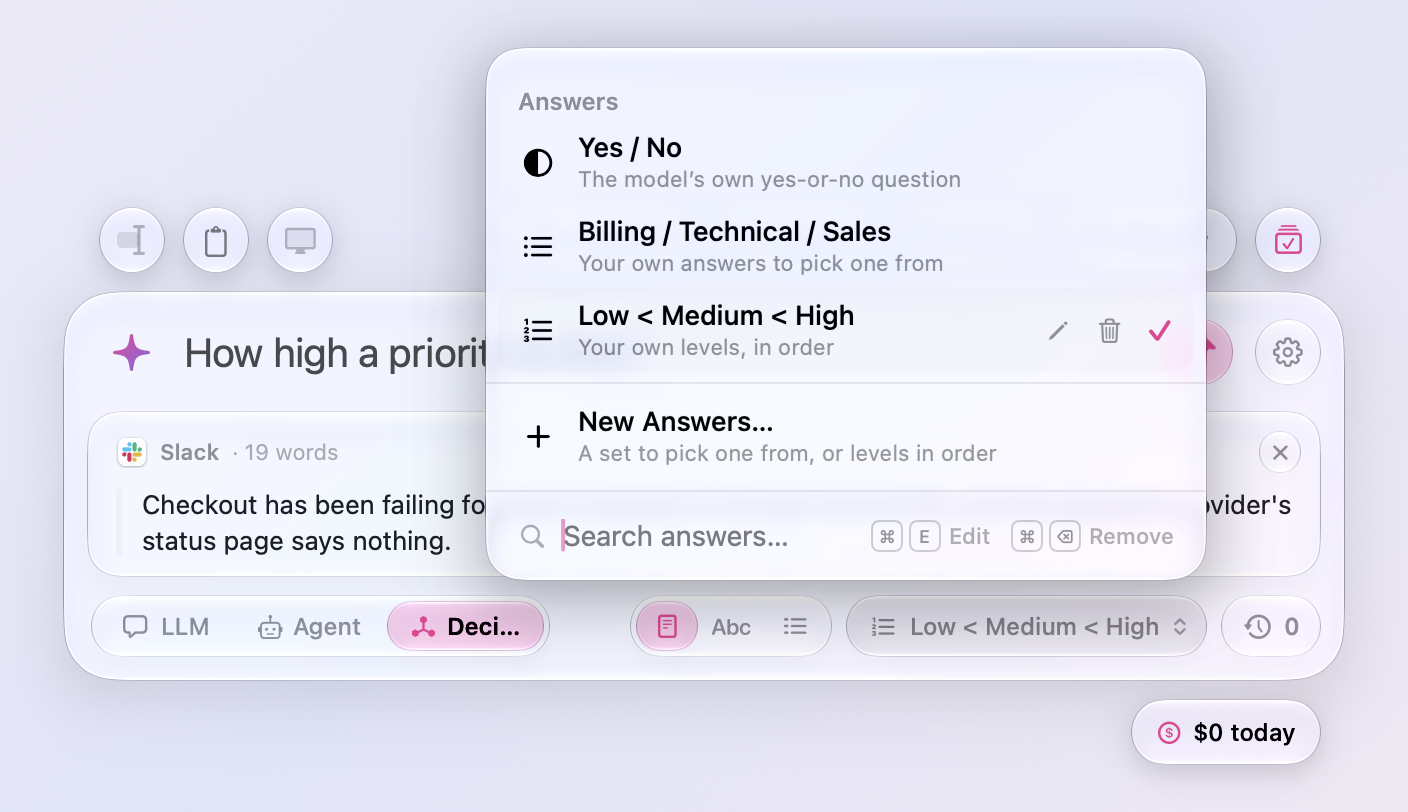
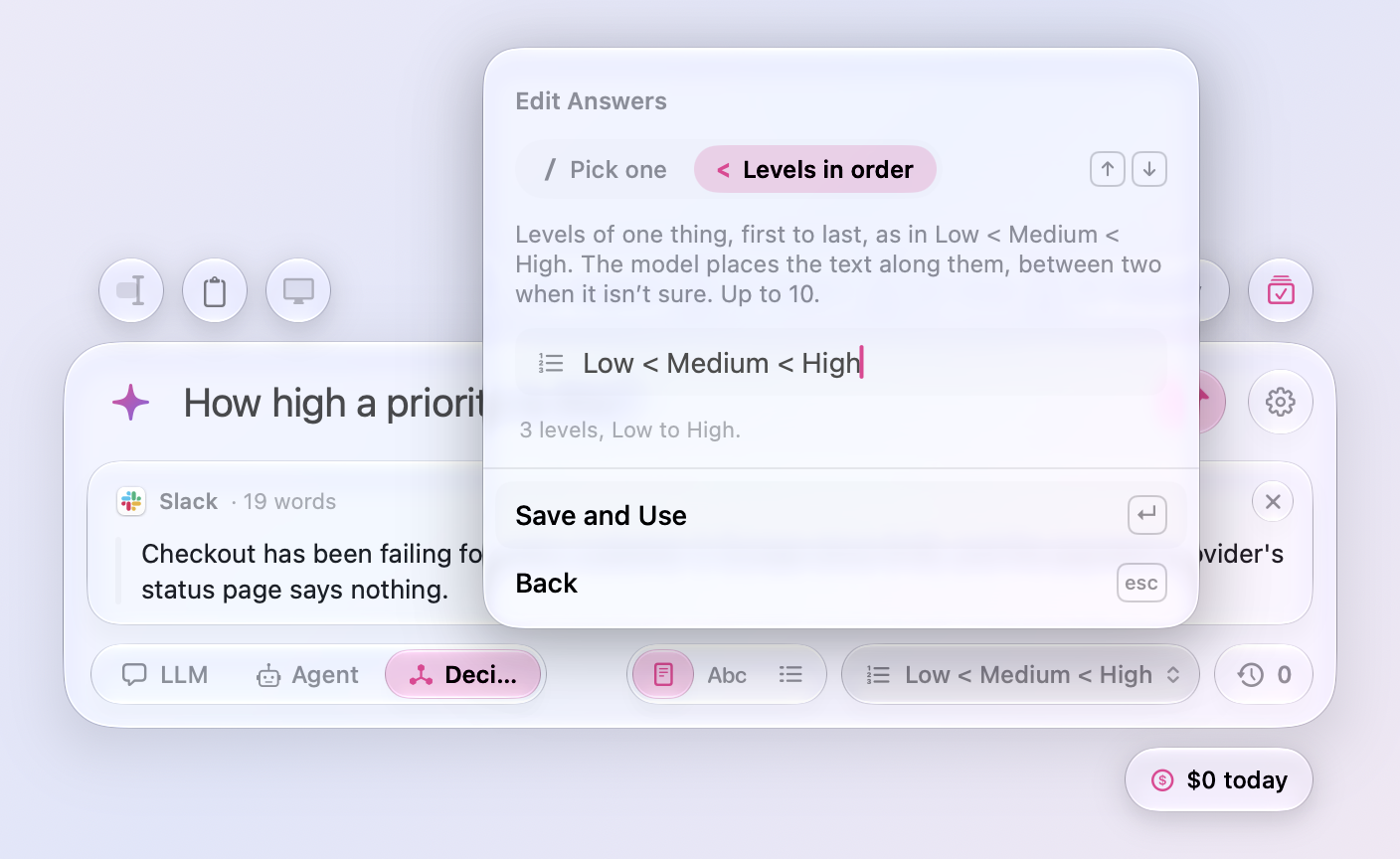
- The answers under the input are a click away. In Decision mode the capsule that shows what the next question picks from, Yes / No until you change it, opens a panel like the clock's, on the answers in use: switch between Yes / No and as many lists of your own as you like, Billing / Technical / Sales for one question and Low < Medium < High for another. New Answers… writes one in a form there, a set to pick one from with / between its answers or levels in order with <, with a toggle between the two and a word on what each means; ↑ and ↓ switch the toggle, Return takes the answers, and Esc goes back. On a list of yours, Edit (⌘E) opens it in the same form and Remove (⌘⌫) asks first, from the buttons at its end, a right-click, or the keyboard, and the search field shows both shortcuts. ⇧⌘A opens the panel from the keyboard, and Settings › Prompt › Decisions picks among the same lists. A question that names its own answers after its question mark still wins, and the panel says so.
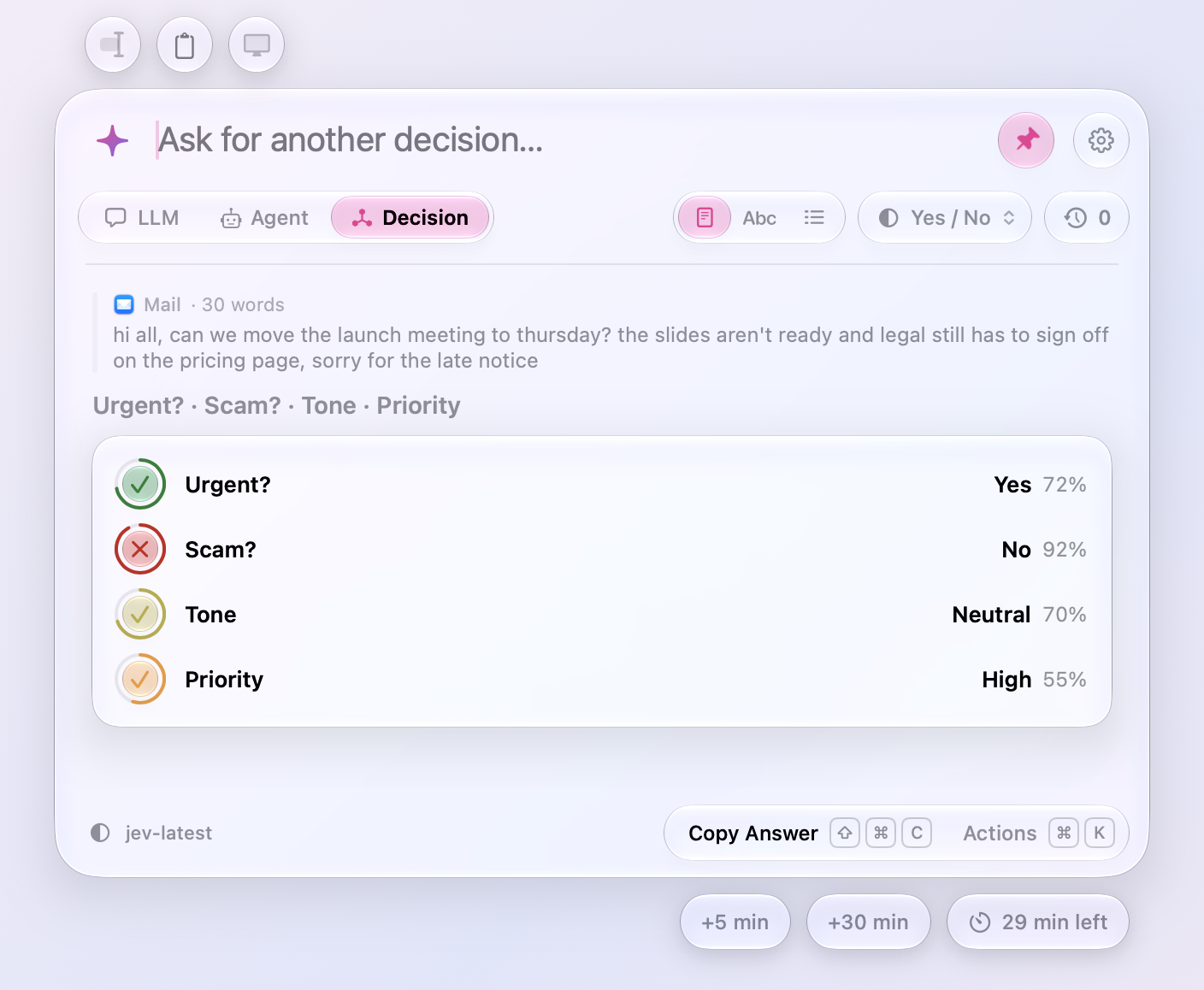
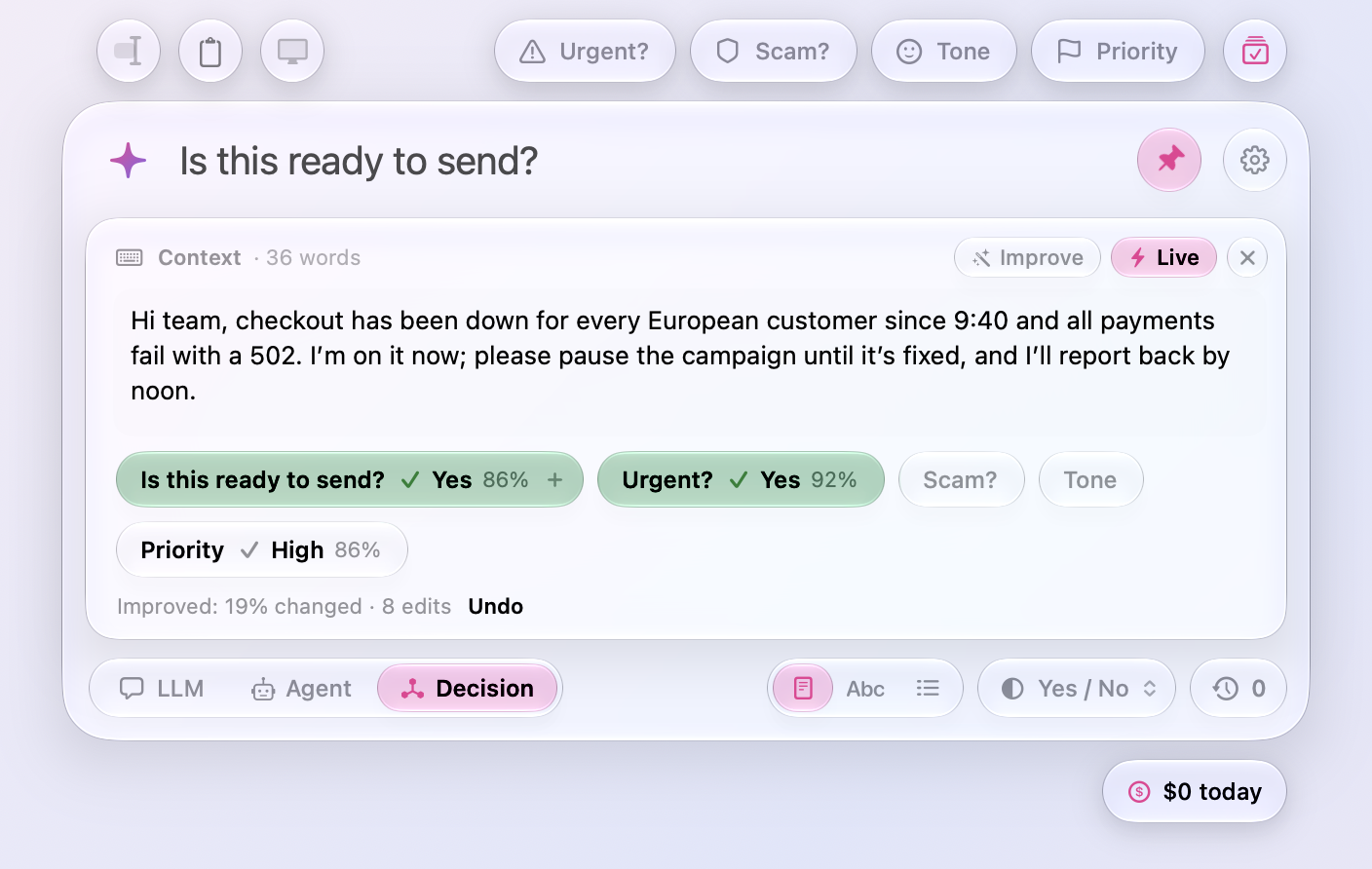
- Every decision preset at once. In Decision mode, a circle at the end of the presets, by the gear, asks all of them about your text in one click and one request: each preset's answer on one card, Urgent? Yes, Scam? No, Tone Neutral, Priority High, with how sure the model is. Your own question stays in the input for a follow-up, and Ask Again asks them all again.
- Improve on the Context card. In Decision mode with Live on, a wand beside the switch has the LLM you use change your text toward the answers the questions should get: Yes on each question, the highest level of a scale, or the answer a list of your own already gives. It starts with small edits that keep your words and length, and when those stop making the answers surer, a click more rewrites the parts in the way, then the whole text if that is what it takes, so it never says there is nothing to improve while an answer sits at 65%; a note under the capsules says what it did and how much changed, and Undo puts the text back. The instructions it works with are in Settings › Prompt › Decisions, and Settings › Usage counts the clicks.
Presets
- Presets ask with one click. With text selected, copied, or written on the Context card, a click on a preset above the window asks it right away, and the capsule shows an arrow as you hover. With no text yet, the click puts the preset in the input and opens the card for it as before; paste the text and click the preset again. Shift-click no longer sends: it puts the preset in the input to add to, and in Decision mode it turns on Live with that preset and puts the cursor in the Context card; Shift-click it again and it stops asking the preset, and when nothing else is asked and the card is empty, the card closes, Live goes off, and the cursor is back in the input, as if you never clicked.
The window
-
The window no longer closes by itself. It closed whenever it lost the keyboard, and sometimes something took the keyboard that you never asked for: an app coming forward on its own, a helper window of the system's, or the editor taking its window back a moment after ⌥ Space opened the panel over it, so the window vanished while you were reading an answer, or ⌥ Space seemed to do nothing. Now it closes only when you send the keyboard elsewhere, with a click, a key press, or a switch to another Space, and takes it back otherwise.
-
⌘N clears the Context card with no chat open. Esc with only text on the Context card closes the window and leaves the text for next time, on purpose, so there was no way to be rid of it short of selecting it and deleting. ⌘N now starts over with no chat open too: the input and the card empty, and the card's text waiting in Recent Chats as a stashed draft, with Live as it was, for 30 minutes; a line in the input alone is cleared, as Esc clears it. The row sits beside Stash Draft at the top of the clock's panel. Starting a new chat from a chat keeps the card's text the same way, with the chat.
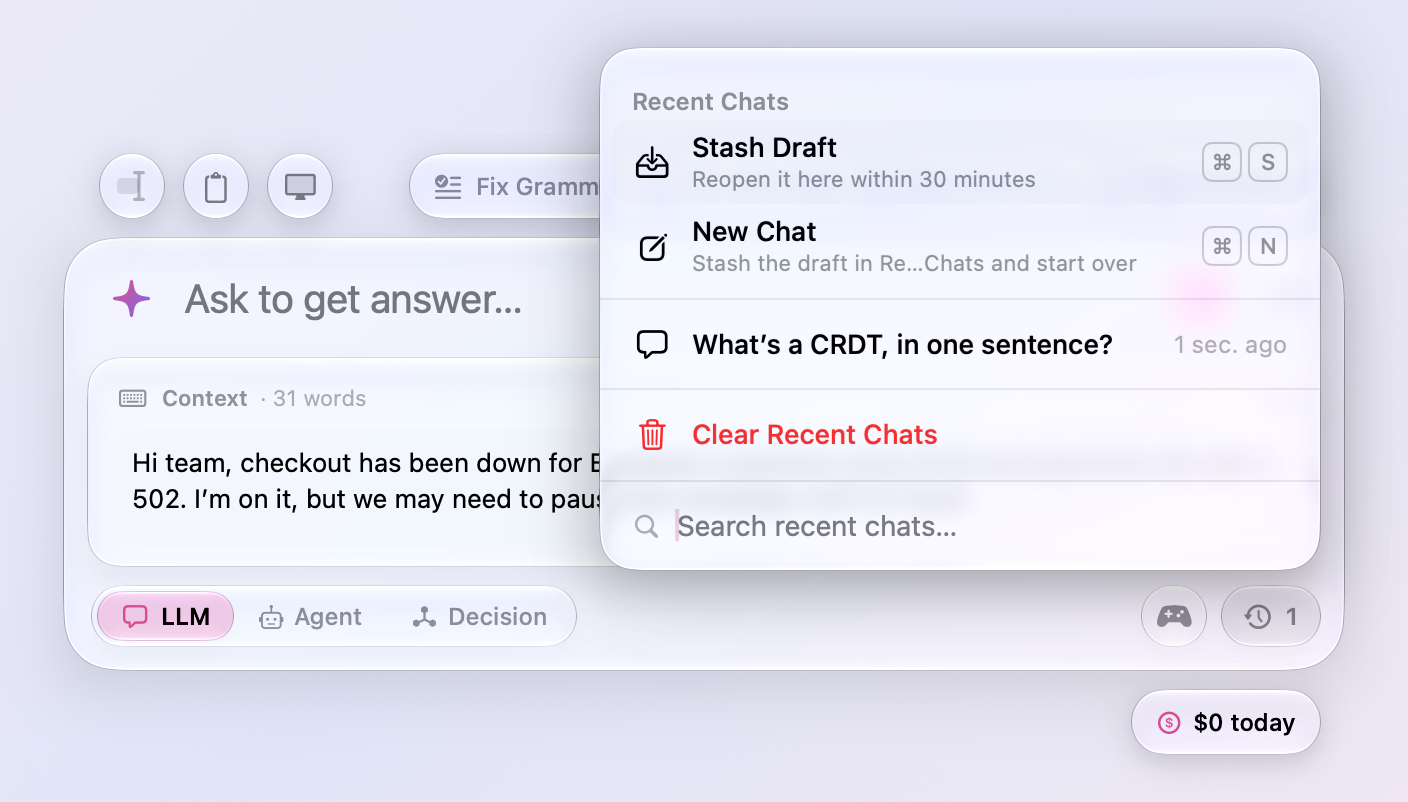
- Updates are found within a quarter of an hour. Meraline checks for updates every 15 minutes instead of once a day, and when you open the window after the Mac slept through a check, so the Update Available capsule is under the window by the time you press ⌥ Space. Before, Settings › Software Update could say “Last checked 15 hours ago” while a release waited.
All files, and how to verify them
| File | What it is | SHA-256 |
|---|---|---|
Meraline-1.14.0.dmg |
The installer | ee1c2213bd0df52cc283e2cf84fc03825ffb238fb76e46eefc66561da799223b |
Meraline-1.14.0.zip |
The archive Sparkle installs as an update | 43a7619392b176f765ce3f5d3d6f12dfa1786a102c7202b0d75cf4c5a2f3c865 |
Meraline-1.14.0-dSYMs.zip |
Debug symbols, for reading crash reports | 72d3db4c0acfd66abfe09d1a2ed183345fb807c396bbf0ca53084b745e14f1bd |
appcast.xml is the update feed that installed copies check once a day.
Every file was built by GitHub Actions from tag v1.14.0 and carries a signed provenance attestation:
gh attestation verify Meraline-1.14.0.dmg --repo Meldiron/meralineMeraline 1.13.0
Download Meraline-1.13.0.dmg, open it, and drag Meraline into your Applications folder. Meraline needs macOS 26 or later. Installed copies update themselves.
What's new
A pass through the app as a tester found a hang, a few bugs on keyboards where the digits take Shift, and places where the window got in the way of reading. This release fixes what it found.
Reading answers
- You can scroll up while an answer is still coming. The conversation follows a growing answer only while you are at its end. Scroll up to read from the start and it stays where you put it; before, every new word pulled you back down, and so did the follow-ups when they arrived. Scroll back to the end, or ask something, and it follows again.
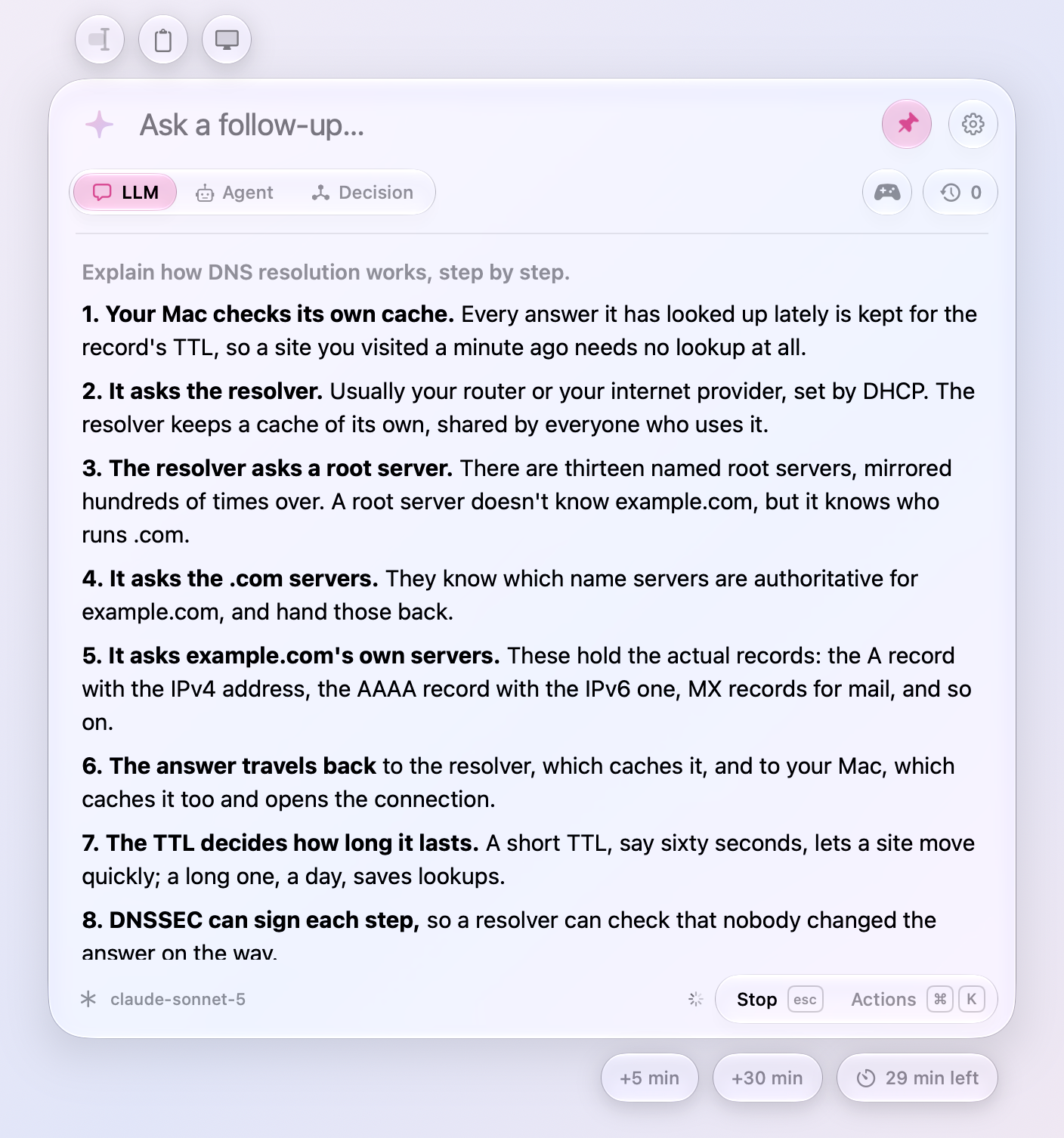
- Fast answers no longer fall behind the model. Words that arrive within a twentieth of a second go on screen together, instead of the whole answer being laid out again for each one. A long answer from a fast model used to finish on screen many seconds after it had arrived.
- Tables fit the window. A table's columns give way to the room the card has, the widest first, so a table of three or four columns wraps its cells instead of scrolling sideways with its last column cut off. A table too wide even for that still scrolls.
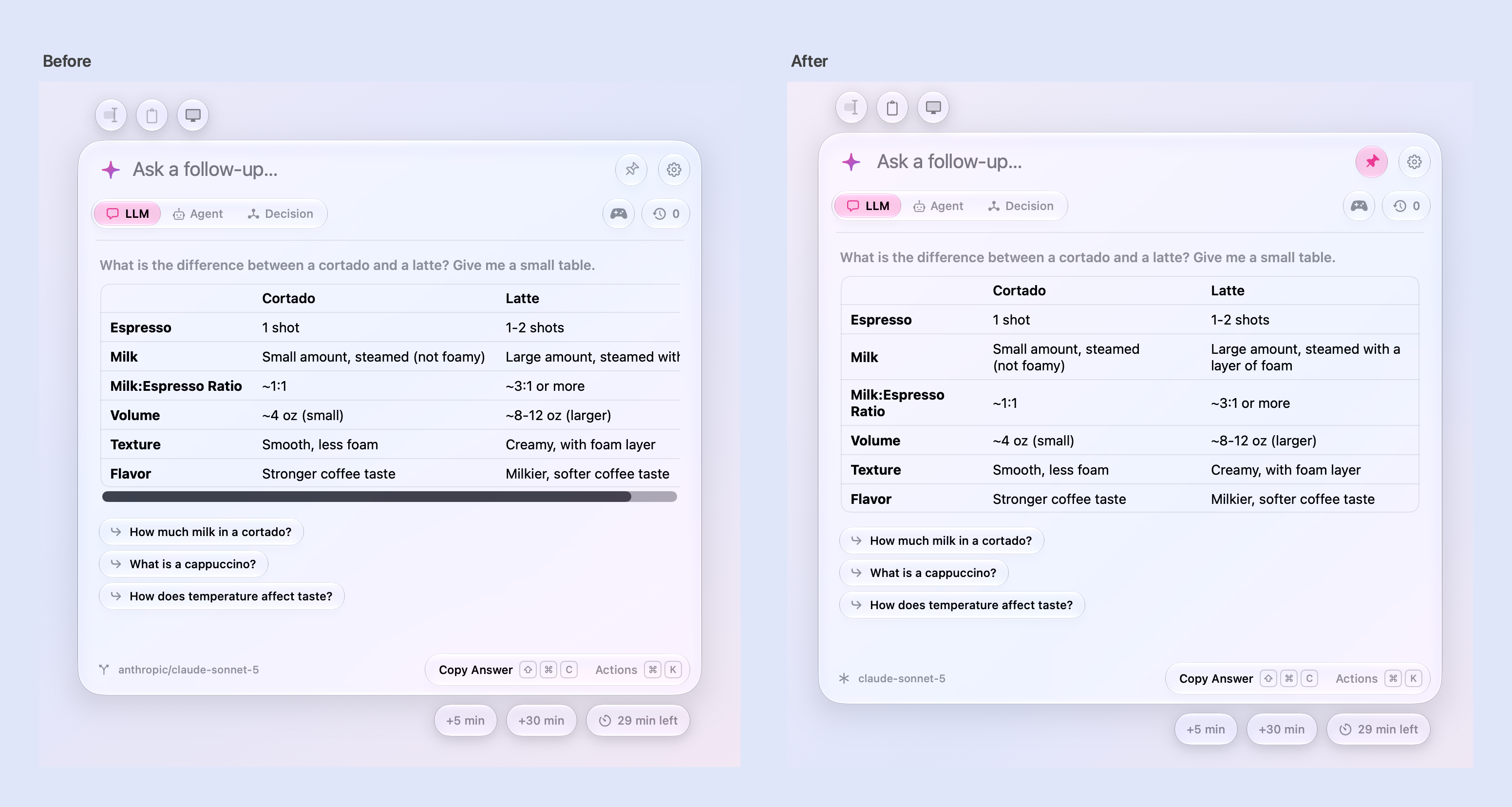
- With “Show scroll bars: Always” in System Settings, the conversation no longer flashes a scroll bar and re-wraps its text each time the card shrinks. Its scroll bar lies over the text, as Spotlight's does, and shows while scrolling.
Answers
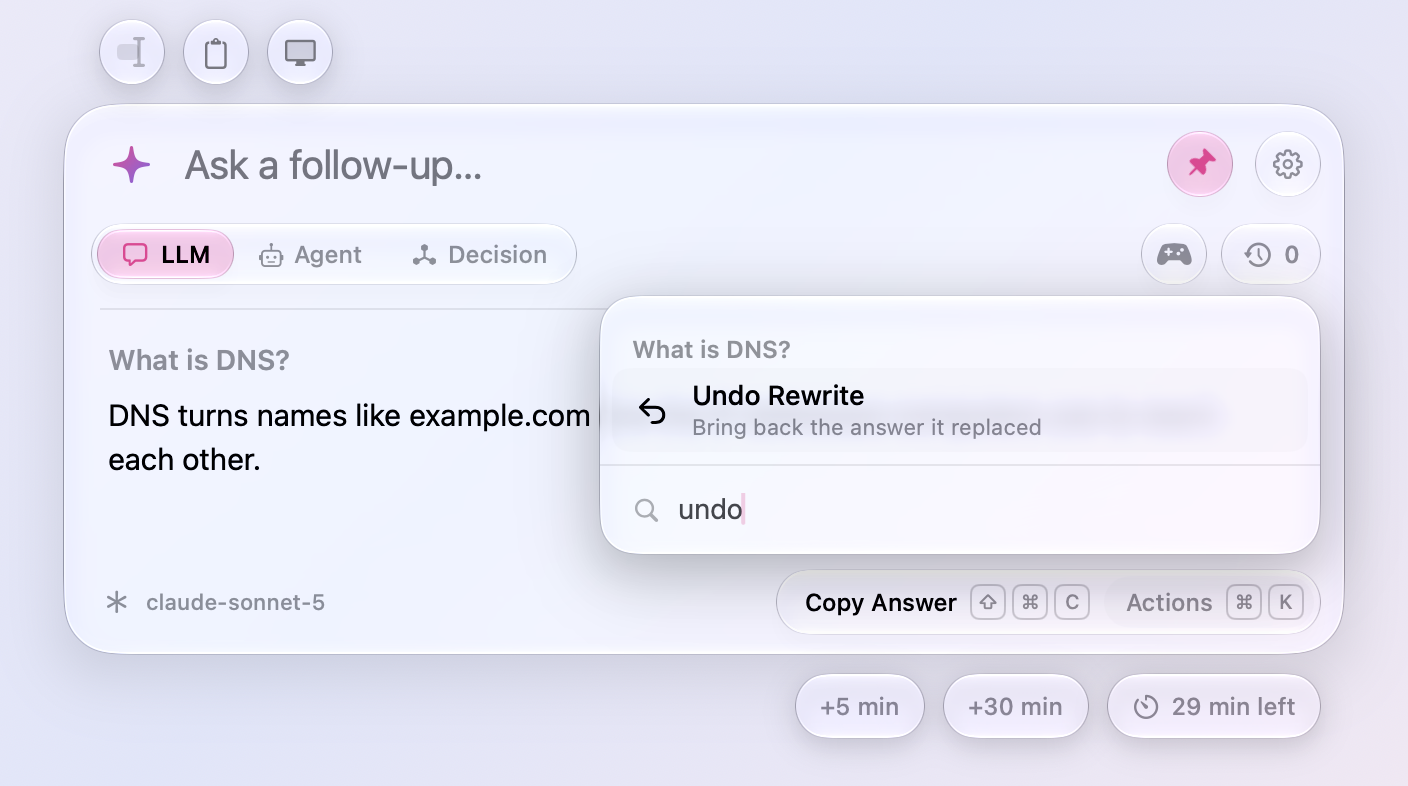
- Undo Rewrite. A rewrite, or a preset run on the answer, can be taken back from the chat's actions: the answer it replaced comes back under the same question. Each undo takes back the rewrite before it. Handy when ⌘1 ran Fix Grammar on an answer you only meant to zoom.
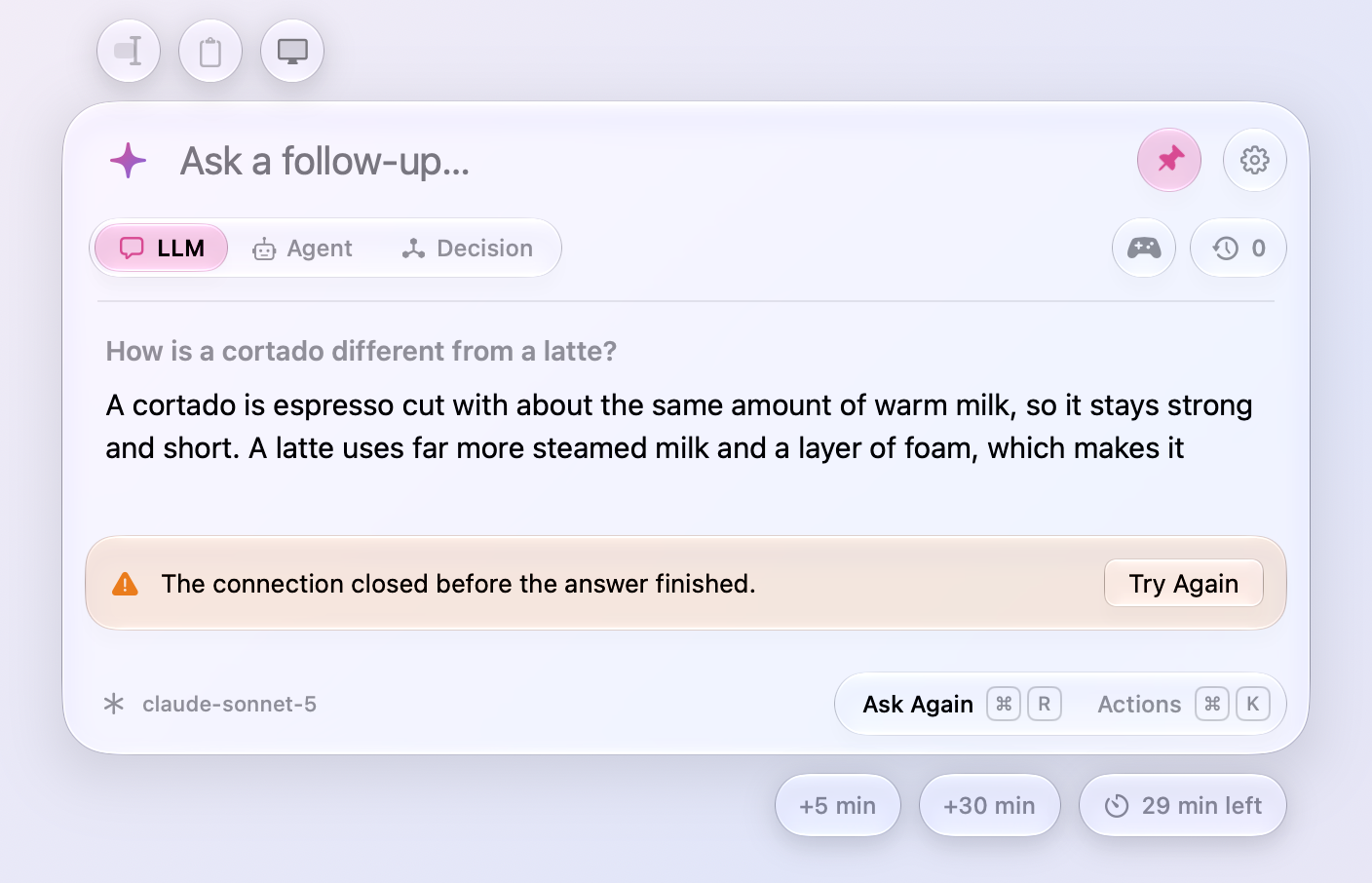
- Try Again after a failed answer. The error's banner has a Try Again button: it asks the question again when the answer was cut off, and sends it again when it came back to the input. After an answer fails partway, Ask Again is the footer's first action, with Copy Answer still in the actions.
- An answer whose connection closes partway now says so (“The connection closed before the answer finished.”) and keeps what arrived. Before, the cut-off text passed for the whole answer.
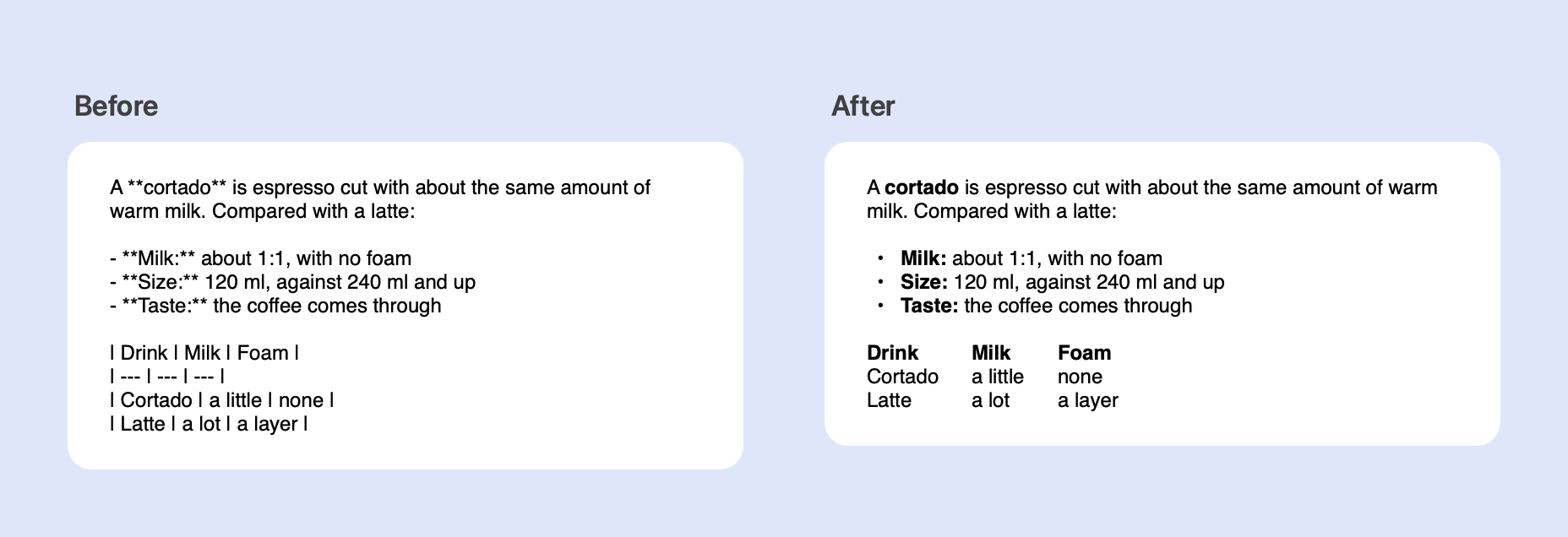
- Copy Answer and Insert Answer paste formatted text into apps that take it. The answer goes to the clipboard as its Markdown, as before, and beside it as HTML and rich text, so Mail, Notes, Pages, and web editors get bold, lists, code, and tables as such instead of the asterisks and dashes. Plain editors still get the Markdown.
- No follow-ups are suggested under an answer that is your own text changed, such as after Fix Grammar or Translate. They took the text for a subject: under a corrected note about a parcel, “Who is receiving the package?”.
Agents
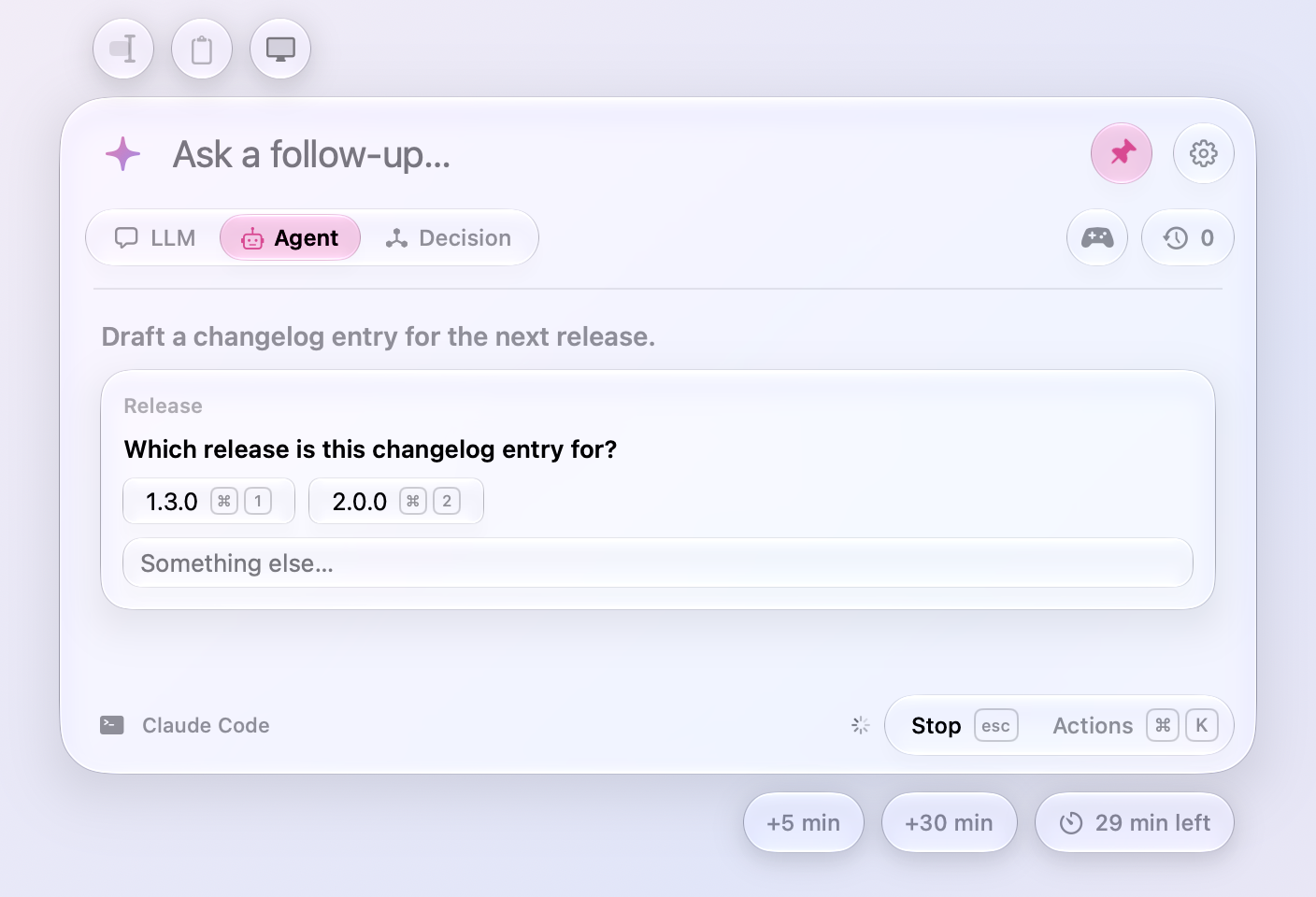
- ⌘1 to ⌘9 answer an agent's question. When Claude Code asks a question with choices, the keys pick them, as a click does, and the choices show their keycaps. Allow and Deny already took Return.
Games
- Word Football gives the model a second try. When the model's word breaks the chain or was played already, it is told what was wrong and asked once more before the foul is called; only the word that counted shows. Against Apple's on-device model, most matches used to end after one move.
- A round's result shows once when a game ends. It stood in the transcript and again in the Play Again tray right under it; the tray now leads with the game's name.
Recent chats
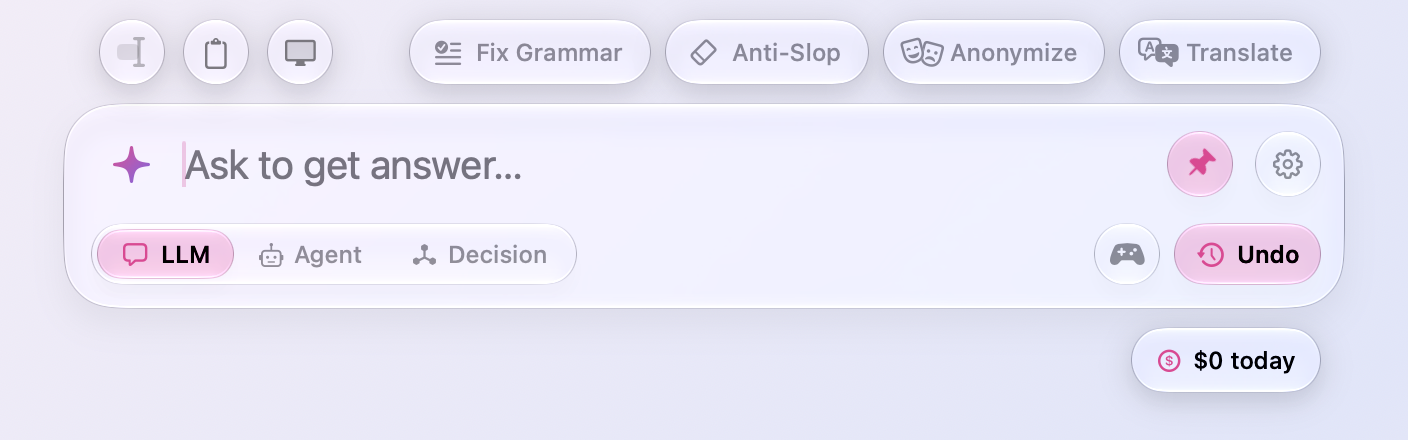
- A shake can be undone. Shaking the window still forgets Recent Chats without asking, but the clock's capsule under the input turns pink and says Undo for five seconds, and a click on it brings every chat back as it was. One drag shakes at most once, too; before, a wiggle that went on fired twice.
Keyboards where the digits take Shift
On a Czech, Slovak, or AZERTY keyboard the number row types letters, and the digits take Shift.
- ⌘1, ⌘2, and ⌘3 switch between LLM, Agent, and Decision there. They go by the key's place now; before, only ⇧⌘2 worked.
- ⌘0 puts answers back to actual size there. It goes by the key's place now, as ⌘1 to ⌘9 do.
- Zoom In shows the key that works on your keyboard. On a Czech or Slovak one the key that types + is the 1 key, which runs the first preset once an answer is ready, so Zoom In says ⌘= there.
Settings › Usage
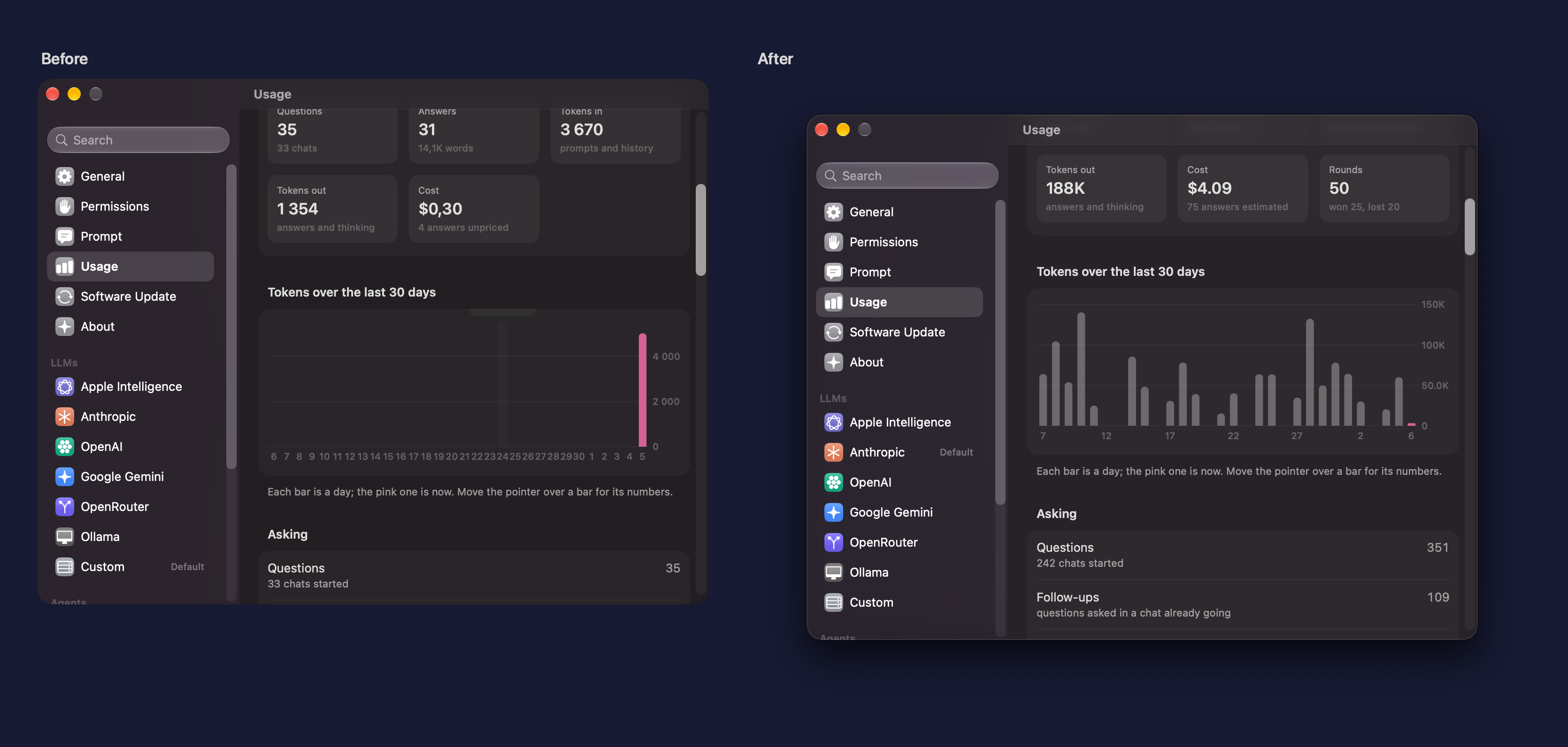
- The chart shows a bar's numbers when the pointer is over it. They sat above the chart, where only their bottom edge showed.
- The chart labels every few bars again. Every bar had a label, so a month's days ran together.
- The Hour chart no longer counts every five minutes twice, and the Day chart's bars are clock hours, so the bar for now sits over the hour it is. Both ran backwards from the current minute, which cut the counted five minutes in two.
Fixes
- Show What Changed no longer freezes Meraline under VoiceOver. With VoiceOver or any other accessibility tool reading the window, showing what an answer changed sent macOS 27 into a loop that never ended, and Meraline had to be force quit.
- The title of a panel of actions stays at the left when a search finds nothing, instead of jumping to the middle.
- A
meraline://URL's text comes without control characters, which a URL can carry and no keyboard types.
All files, and how to verify them
| File | What it is | SHA-256 |
|---|---|---|
Meraline-1.13.0.dmg |
The installer | c85d172970a811069768aa8dfd051cc5e2cf61b3149c7f8a4d920400a2de9e86 |
Meraline-1.13.0.zip |
The archive Sparkle installs as an update | 58ff792b7b62bb542fd7d80f50ea81a5a398eb4e575dac361615457b332e472b |
Meraline-1.13.0-dSYMs.zip |
Debug symbols, for reading crash reports | e3adb52c3d17135d48fcedca08f297cf7bbc321485346bf00e938b29927f1516 |
appcast.xml is the update feed that installed copies check once a day.
Every file was built by GitHub Actions from tag v1.13.0 and carries a signed provenance attestation:
gh attestation verify Meraline-1.13.0.dmg --repo Meldiron/meralineMeraline 1.12.0
Download Meraline-1.12.0.dmg, open it, and drag Meraline into your Applications folder. Meraline needs macOS 26 or later. Installed copies update themselves.
What's new
Presets
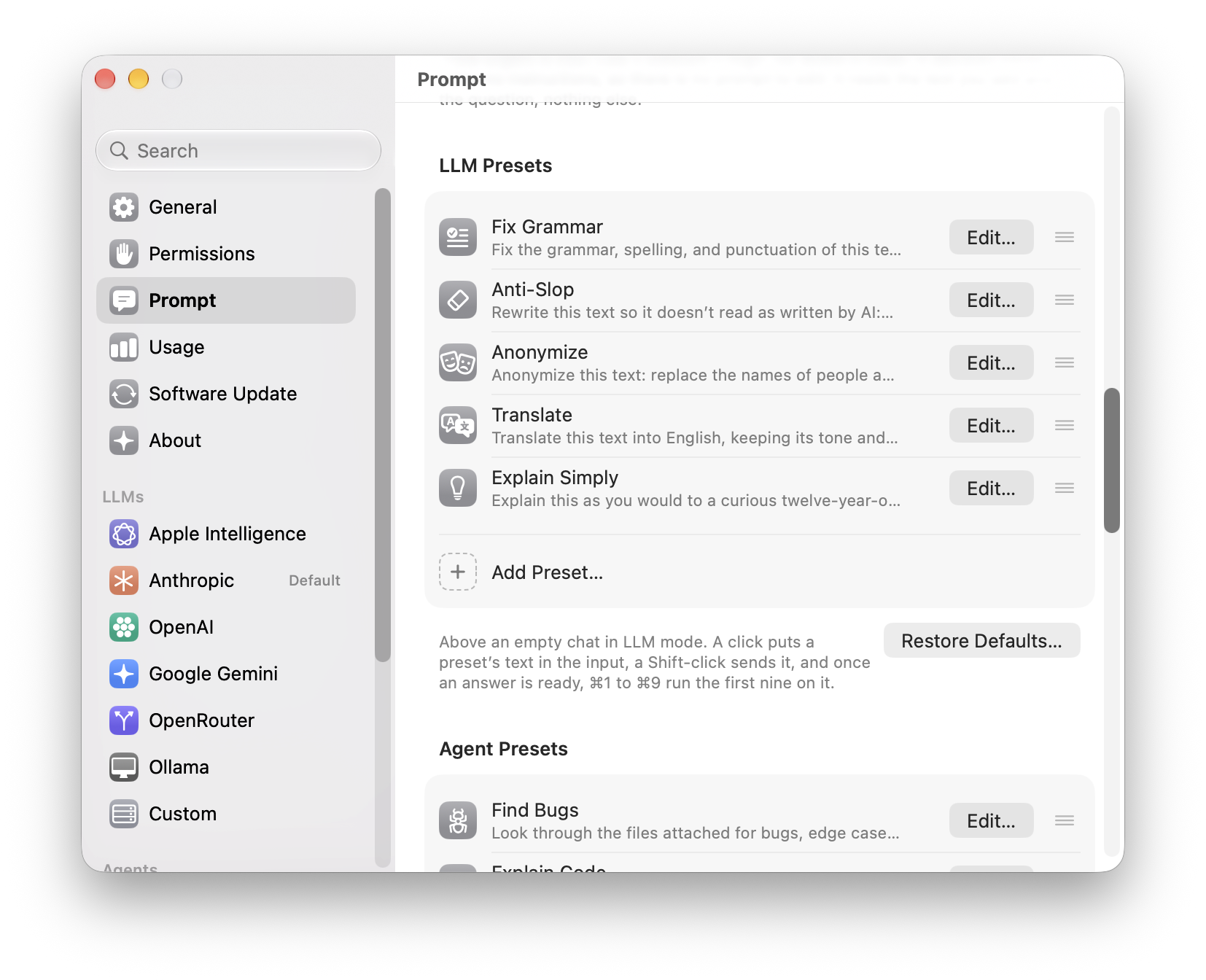
- Presets are a list you rearrange by dragging. Settings › Prompt shows each mode's presets as rows: the icon, the name, and the start of the text. Drag a row to change the order the capsules come in above an empty chat. Edit…, a double-click, or the row's menu opens the preset in a sheet with its icon, name, and text, and Save keeps the changes; Duplicate makes a copy to start from. Deleting a preset and Restore Defaults now ask first.
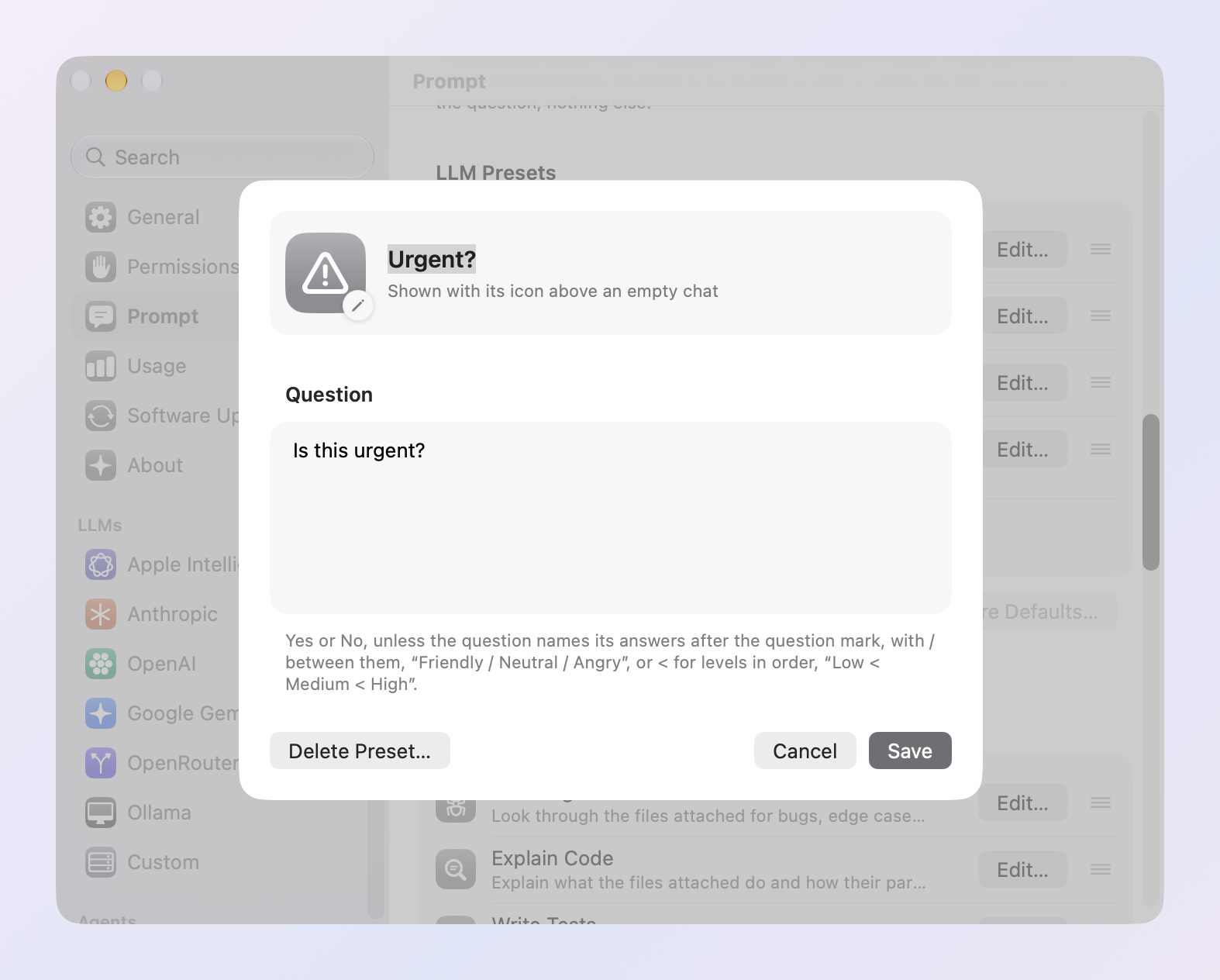
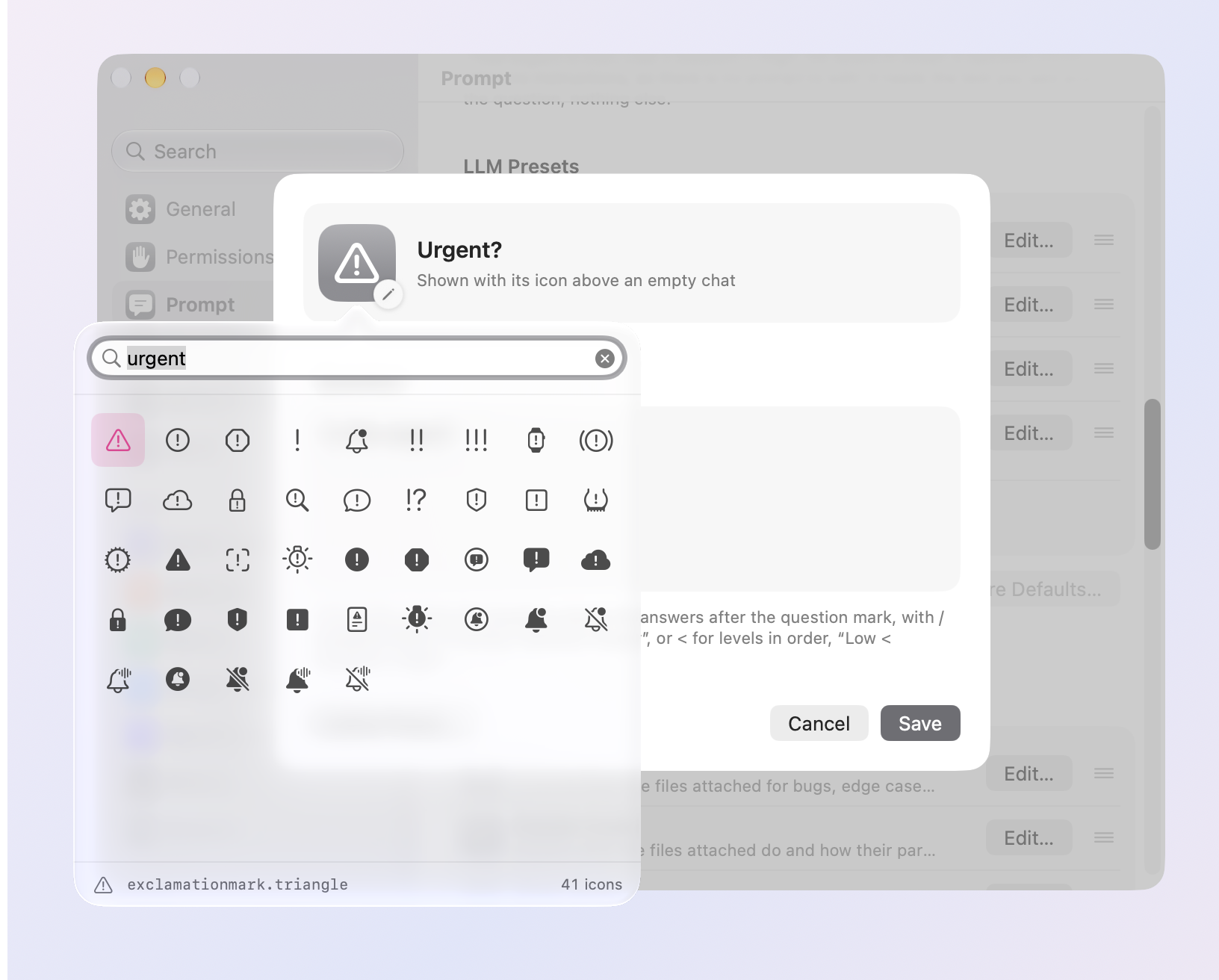
- An icon search that finds icons. Click the icon in a preset's sheet and type what you want. The search covers every SF Symbol on your Mac, by its name, Apple's keywords, and everyday words, so mail, urgent, idea, money, and bug find envelopes, warning signs, light bulbs, dollar signs, and ants, even half typed. With nothing typed it shows suggestions, then Apple's categories to browse. Return takes the first icon found.
Usage
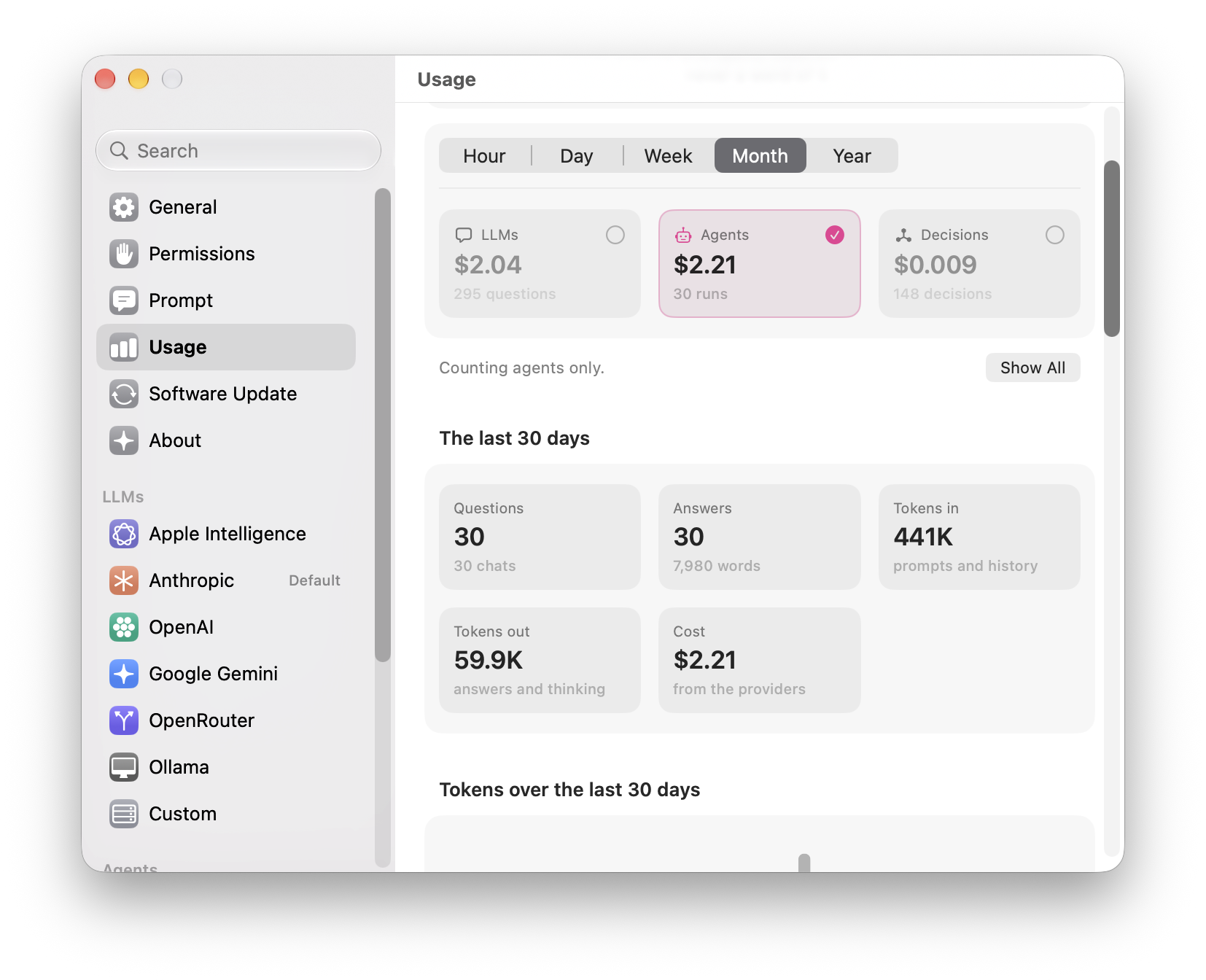
- See the LLMs, the agents, or the decisions alone. Settings › Usage has a tile for each kind of model under the span, with what it cost and how much you used it. Click one to leave it out of every number, chart, and row below, or back in; Option-click it, or pick Show Only from its menu, to see it alone, and Show All brings every kind back. Meraline remembers what you chose. Usage counted before this version is sorted into kinds by what it holds.
Fixes
- Esc no longer throws away a live decision. With Live on, pressing Esc (or ⌘N, or starting a game) used to clear the question and the Context card's text for good. Now the draft waits in Recent Chats: on its own, as Stash Draft keeps it, or with its chat. Reopen it and it's all back, in Decision mode with Live on, your kept questions, the presets you turned on, and their answers, with nothing asked twice. A chat that runs out of time now leaves the Context card's text in place too, not only the input's.
- A long text pasted into the Context card no longer makes the window tall and mostly empty. The card stops at a few lines and the text scrolls inside it.
All files, and how to verify them
| File | What it is | SHA-256 |
|---|---|---|
Meraline-1.12.0.dmg |
The installer | 782ccf487898adc159588b0a6693763ee10040cfdb624b39058d813ade0cbbcd |
Meraline-1.12.0.zip |
The archive Sparkle installs as an update | c03412a74035df10d0b3297b7b624e1fac24b0396b2824db8f7c5e74f1fafe0a |
Meraline-1.12.0-dSYMs.zip |
Debug symbols, for reading crash reports | 6f5814c37bda797df78aa56df2f43048957c7cf5c98d2e424f0e768e845f5a34 |
appcast.xml is the update feed that installed copies check once a day.
Every file was built by GitHub Actions from tag v1.12.0 and carries a signed provenance attestation:
gh attestation verify Meraline-1.12.0.dmg --repo Meldiron/meralineMeraline 1.11.0
Download Meraline-1.11.0.dmg, open it, and drag Meraline into your Applications folder. Meraline needs macOS 26 or later. Installed copies update themselves.
What's new
Decision
- Decisions as you type. The Context card has a Live switch in Decision mode. Turn it on, and the card asks the decision model about its text as you type, after each pause and at least once a second while you keep typing, without sending anything to the chat. Each answer shows on a glass capsule under the text: a check on green glass for Yes, a cross on red for No, plain glass for Not sure or an answer of your own, with how sure the model is. While a newer answer is on its way the last one stays as it is, and the Live switch spins. Return still asks for a decision in the chat.
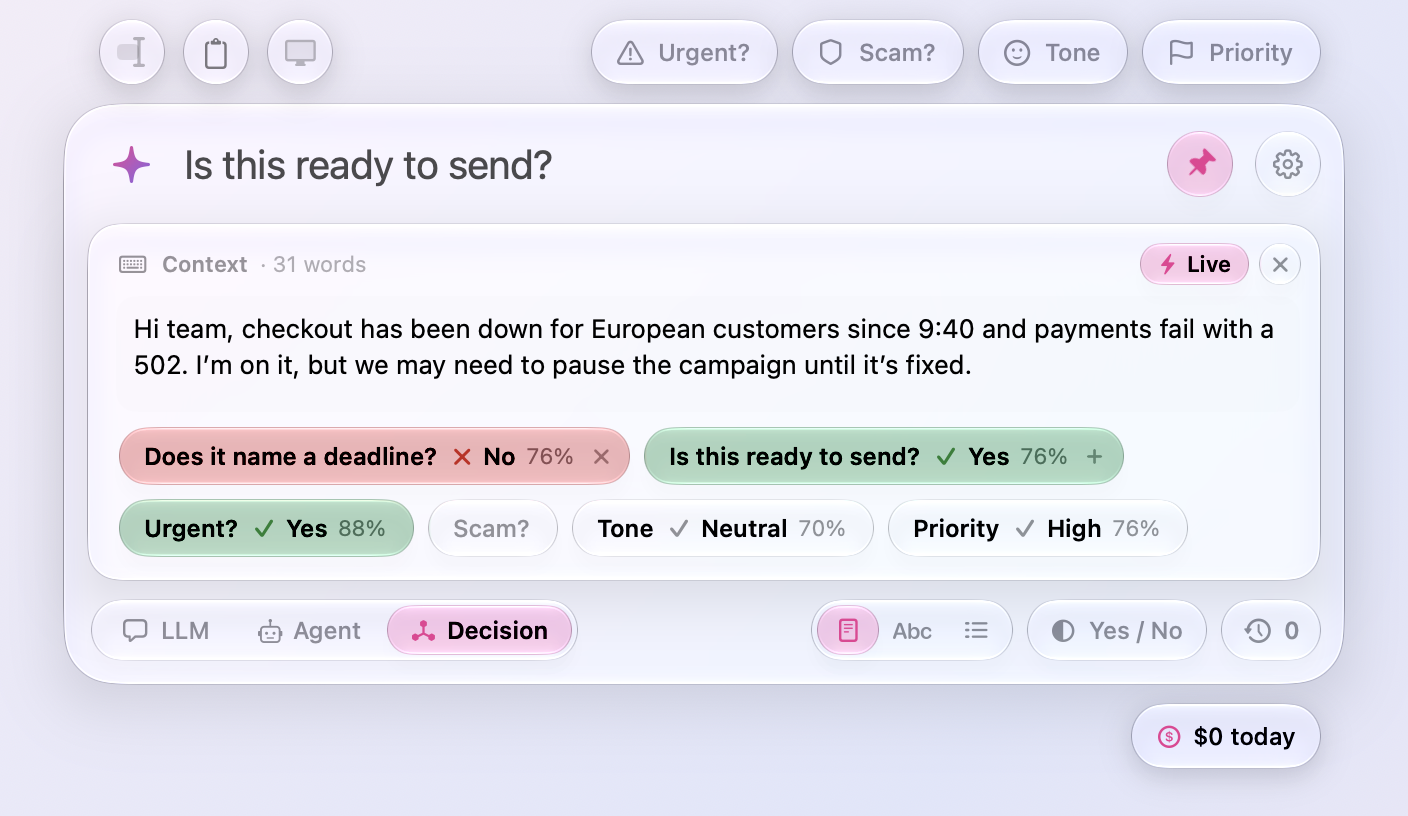
- Several judges at once. The question in the input is asked, and so is any preset you turn on: click Urgent?, Tone, or Priority on the card and a draft is decided three ways in one request. Click the plus on your question's capsule to keep it, in its place, and the input is free for the next one, so as many questions of your own as you like are asked beside the presets; a kept question turns off with a click and goes with its cross. Turning a preset on asks only that preset, and typing again asks everything that is on.
- Live belongs to the chat. The switch, the presets turned on, and the kept questions are the chat's: a new chat (Esc, ⌘N) starts with Live off and nothing on, since every pause asks the model, and turning the switch starts over too, your question in the input aside. Settings › Usage counts the live decisions among the rest.
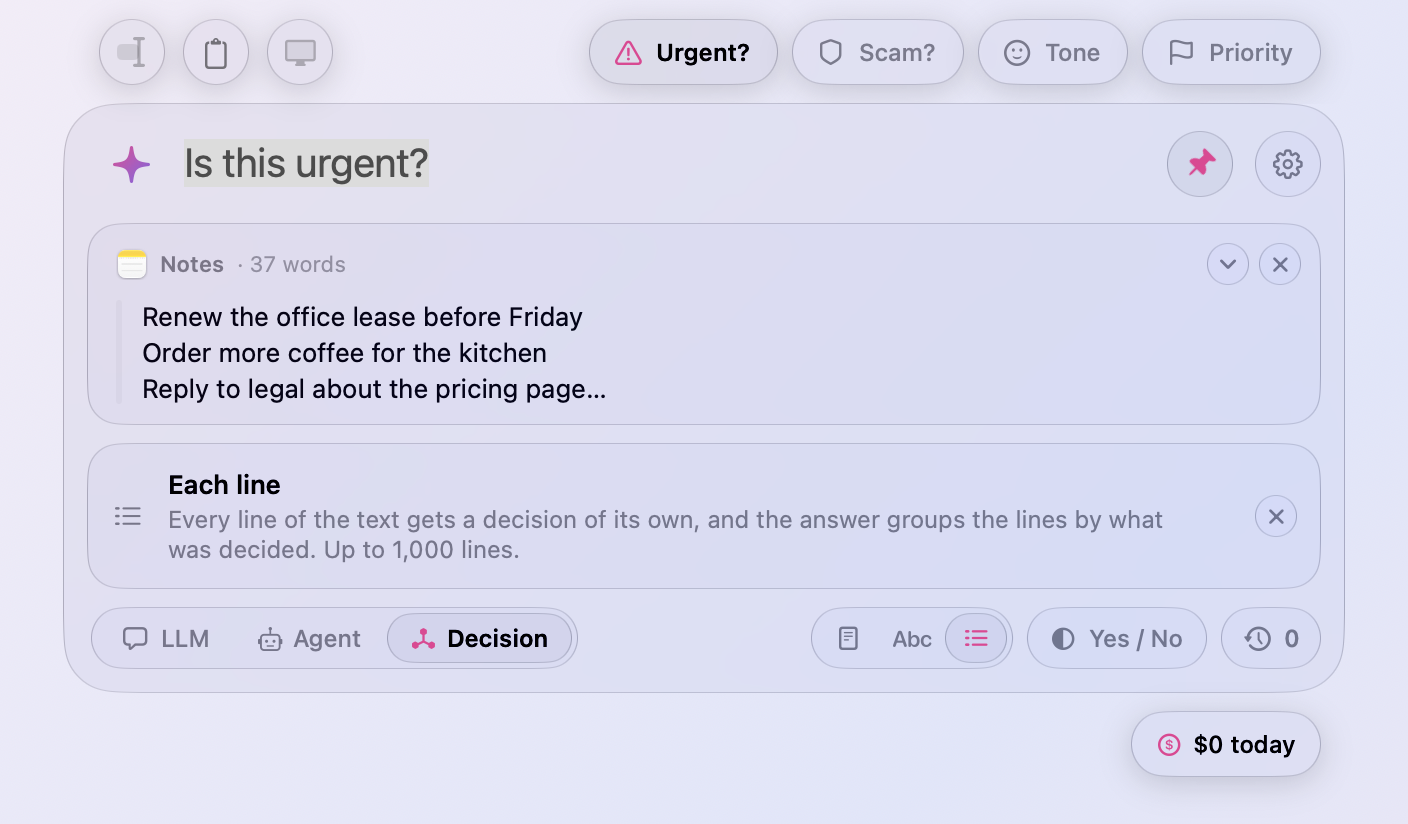
- The scope switch explains itself. Click Each Word, Each Line, or back to Whole Text under the input, and a note under the cards says what the choice decides about, up to the thousand words or lines a question takes. It goes with the question or the chat, and never shows on its own.
Ask
- A colon opens the Context card. End a question in a colon, “Fix the grammar:” or “Find the bugs in this:”, in LLM or Agent mode, and the Context card opens under the input for the text, as a preset does when there is nothing to work on yet. The cursor stays in the input; Tab moves to the card.
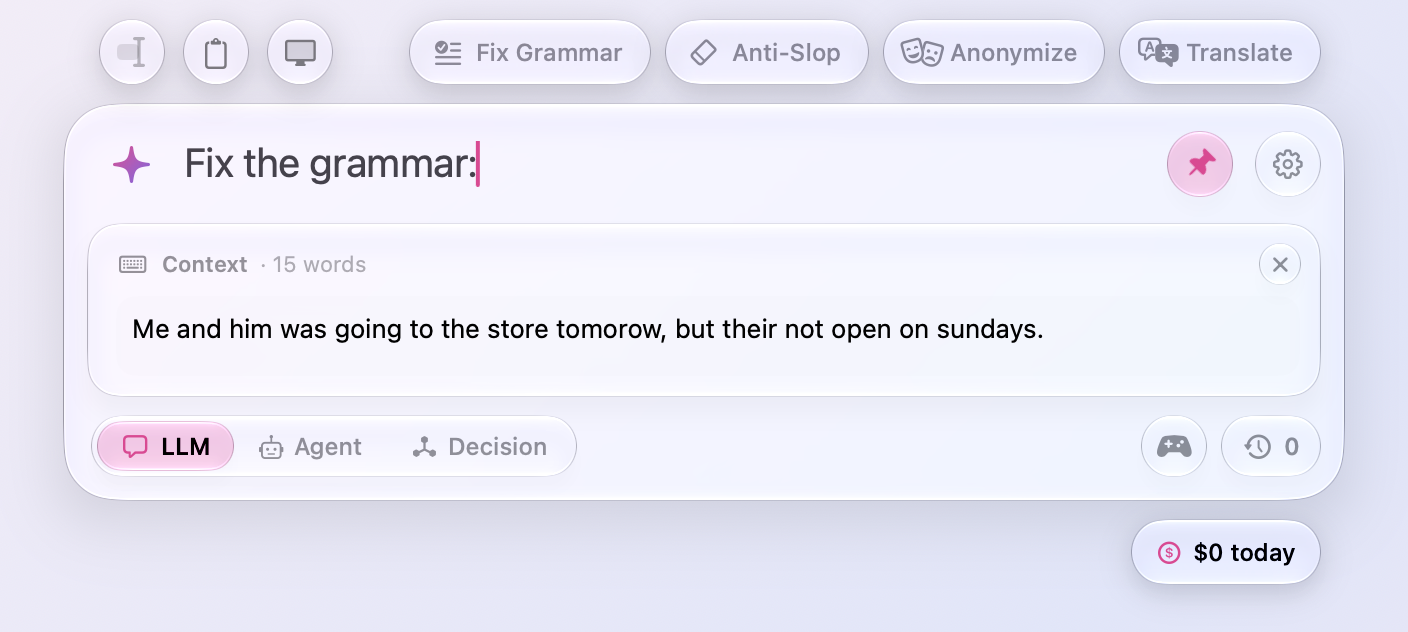
- Tab closes an empty Context card. Tab in the card with nothing written in it goes back to the input and takes the card away, so Tab opens and closes it. A card with text stays, as before.
- The window fades in and out. ⌥ Space fades the window in as the card rises into place, and fades it out as it closes, instead of showing and hiding it in a cut. Pressing the shortcut during the fade turns it around. With Reduce Motion only the fade remains.
- Fewer cuts in the chat. A chat's first question brings the conversation in smoothly, the thinking line fades into the answer's first words, and Show What Changed and Show Answer fade one into the other. An agent's ask, its tools, and the files it hands over fade in too.
Fixes
- The row that asks for a decision's context reads “write it here. It's optional.” as two sentences, not with a dash.
All files, and how to verify them
| File | What it is | SHA-256 |
|---|---|---|
Meraline-1.11.0.dmg |
The installer | a8b8127a8da953b97d488feec5cd16a7c1769d1da6280f8df42c6ff0f0e9e375 |
Meraline-1.11.0.zip |
The archive Sparkle installs as an update | 17159646afedb6f5322df100253b599b0145efa078f6dd0177258a3d2b974ebc |
Meraline-1.11.0-dSYMs.zip |
Debug symbols, for reading crash reports | f0b5ba51ec490306cd7385646022d778a7a907bc0a46005c50807650fdb1ce5a |
appcast.xml is the update feed that installed copies check once a day.
Every file was built by GitHub Actions from tag v1.11.0 and carries a signed provenance attestation:
gh attestation verify Meraline-1.11.0.dmg --repo Meldiron/meralineMeraline 1.10.0
Download Meraline-1.10.0.dmg, open it, and drag Meraline into your Applications folder. Meraline needs macOS 26 or later. Installed copies update themselves.
What's new
Ask
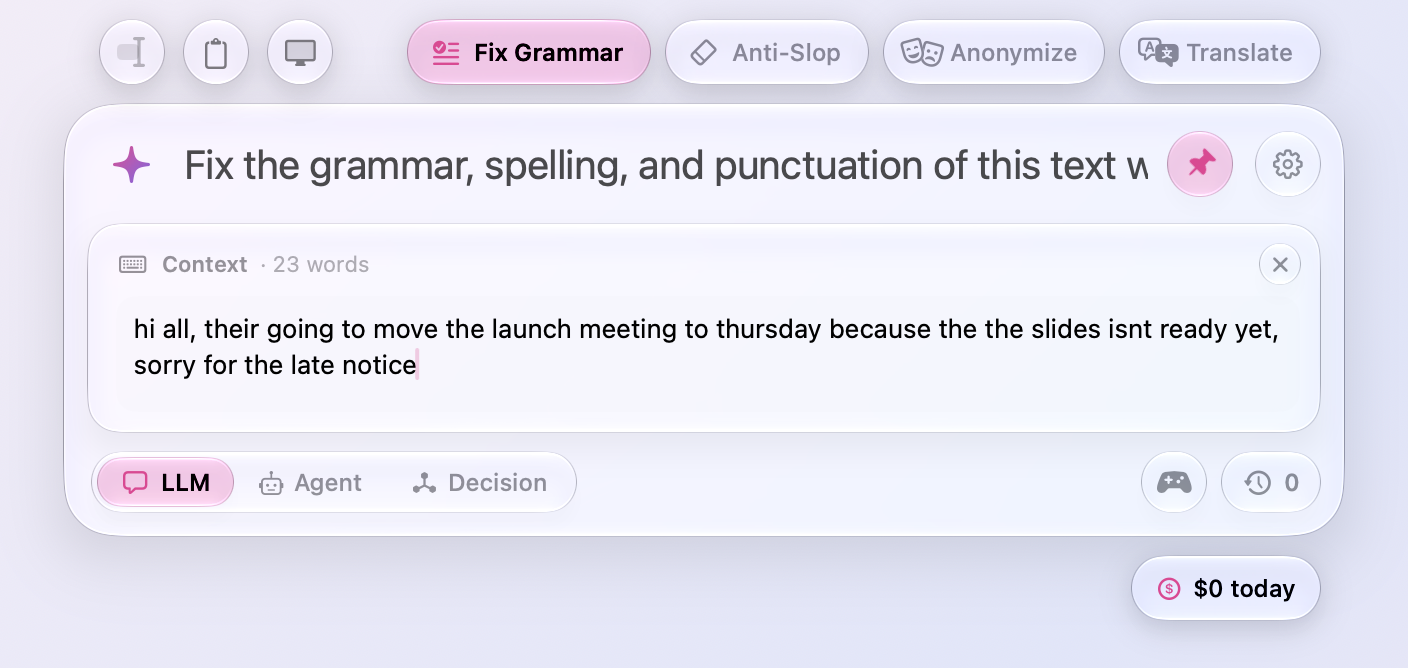
- The Context card takes the keyboard. Tab, Decision's Write It, and Add Text in the sparkle's panel open the card under the input with the cursor in it, so you can paste or type at once; the cursor used to stay in the input. Tab in the card goes back to the input.
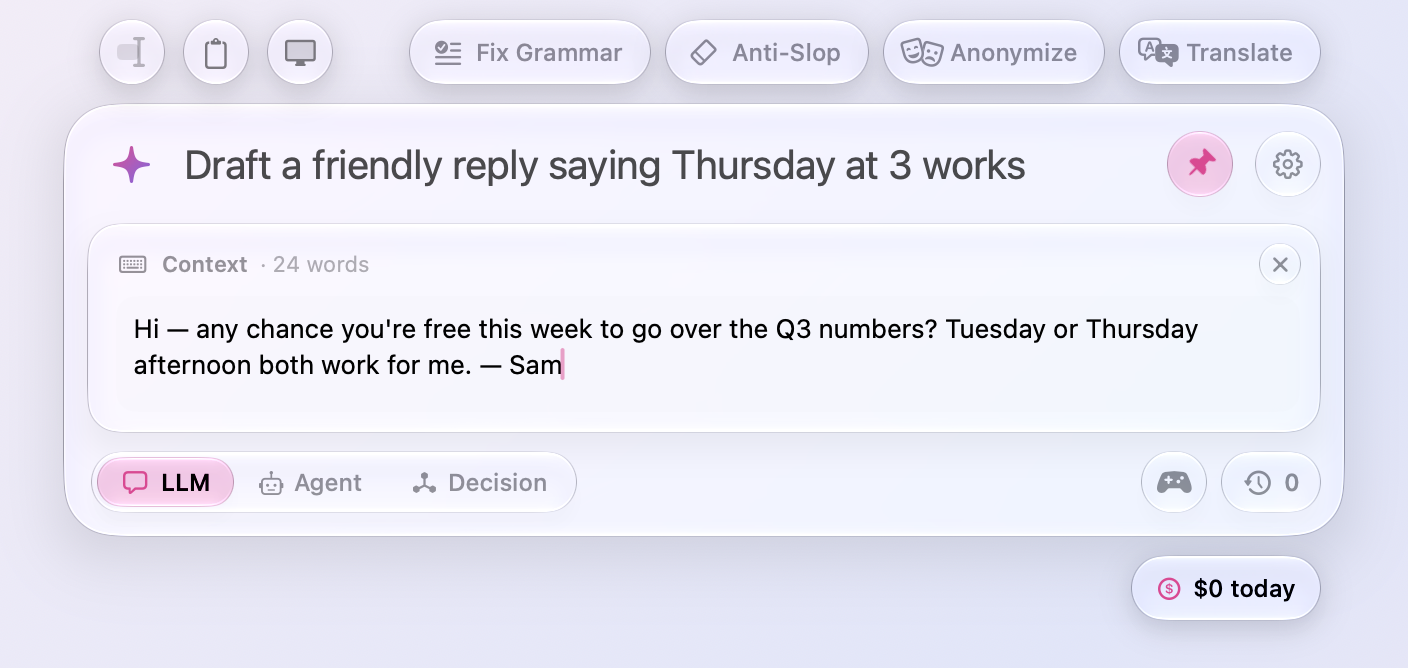
- What changed stands out. In Show What Changed, the text that stayed as it was is now gray, and the words that went and came sit on deeper red and green, so three edits in a long page are found at a glance instead of hunted for among white text. The strike through what went stays.
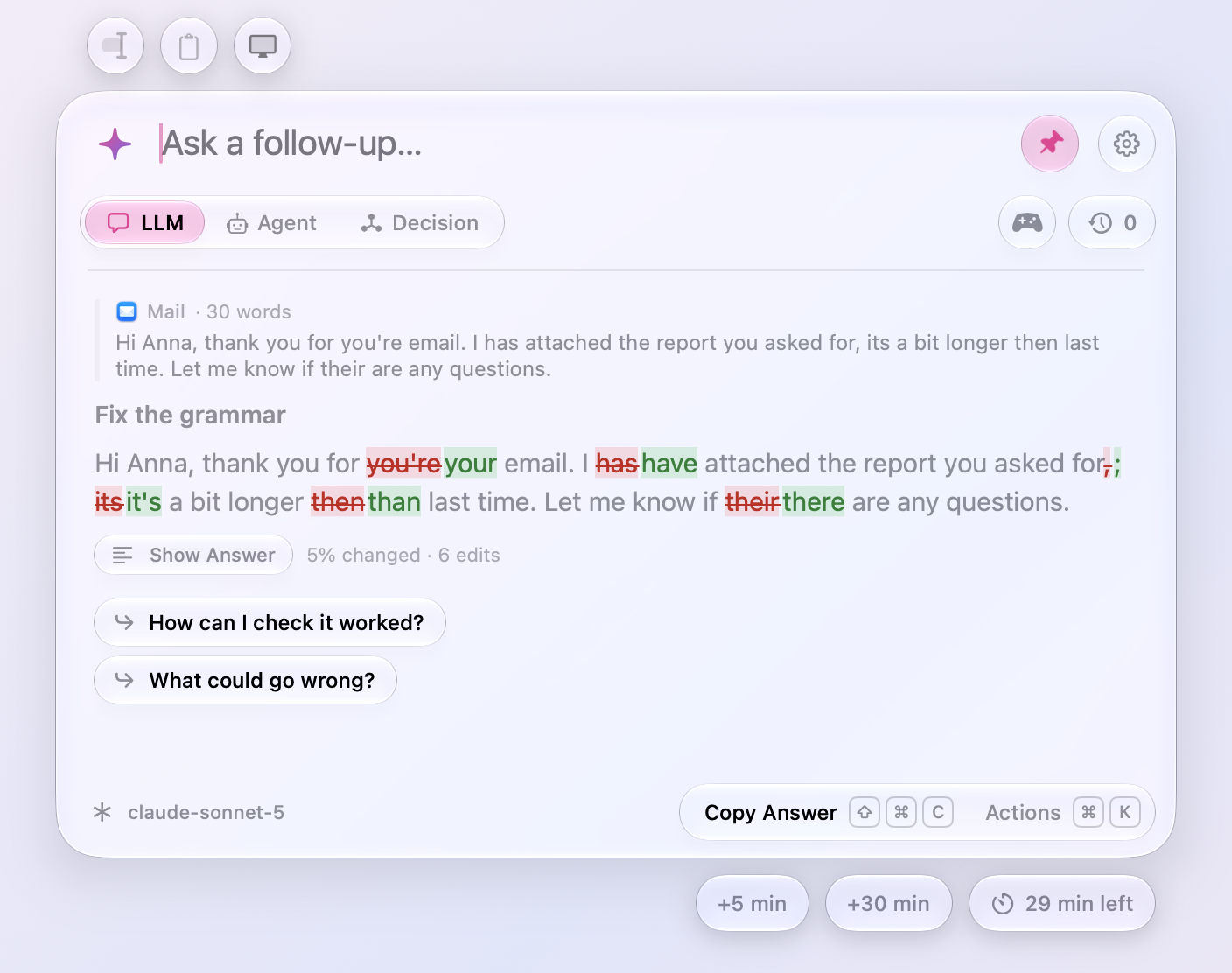
- Presets open the Context card. Click Fix Grammar, Anti-Slop, Find Bugs, or any other preset with nothing to work on yet, and the Context card opens under the input with the cursor in it, ready for the text. With text selected or copied, or a file or picture attached, the preset fills the input as before. The default presets now end as sentences rather than a colon, since the text comes on the card, not after them.
Decision
- The surest first. When Jev decides about each word or line, each answer lists its words or lines surest first, so the clearest calls lead and the near misses sit at the bottom. Copy Answer lists them the same way.
- Answers fold. Each answer's words or lines now sit folded under its header, the count beside it, so a long text's decisions read as a short summary first. Click a header to open its words or lines, and again to fold them back.
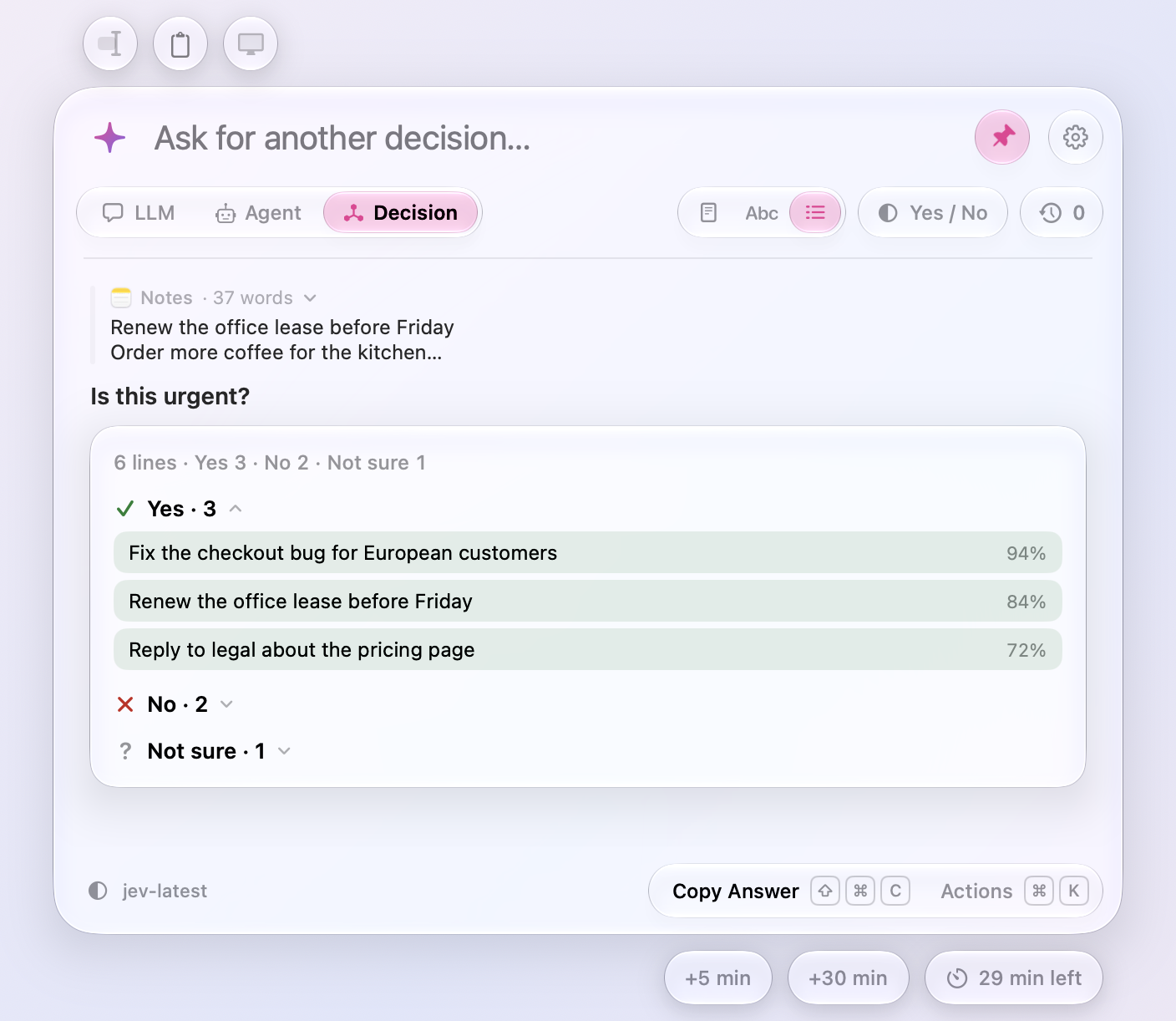
- Decision models through OpenRouter. Settings › Decision Models has OpenRouter beside TypeSafe, on the key you use for OpenRouter’s LLMs, pasted once for both. Pick TypeSafe’s Jev, Liquid’s D1, Upstage’s Solar Decide, Together’s Tev1, or Jared Palmer’s Kev, every decision model OpenRouter serves, and Settings › Usage counts what each answer cost as OpenRouter reports it.
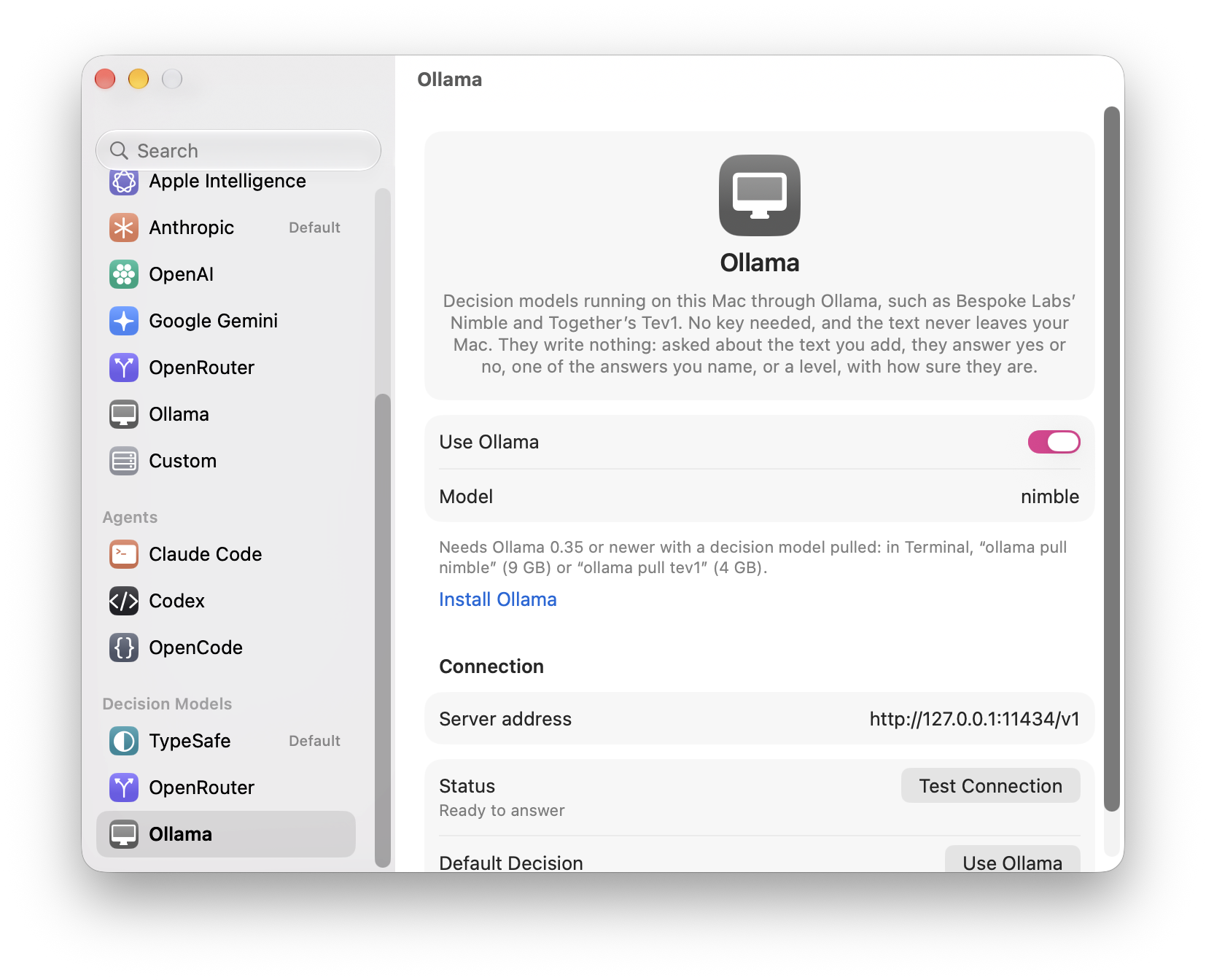
- Decisions on this Mac. Settings › Decision Models has Ollama too: turn it on, and Bespoke Labs’ Nimble or Together’s Tev1 decides on your Mac, with no key and nothing leaving it, as Ollama’s LLMs answer. It takes Ollama 0.35 or newer and a model pulled in Terminal, “ollama pull nimble” (9 GB) or “ollama pull tev1” (4 GB, or “tev1:0.8b” for a small one). A decision about each word or line goes eight at a time, since Ollama’s models read a request in prompts of 2,050 tokens, and Settings › Usage counts them as free.
Fixes
- Shadows fade out instead of ending in a line. The window keeps room for its shadows now: under the card, under the time-left and cost capsules below it, beside the presets, and around a panel of actions, where the shadow was cut off at the window's edge.
All files, and how to verify them
| File | What it is | SHA-256 |
|---|---|---|
Meraline-1.10.0.dmg |
The installer | 92b927797cb7f382daccb57c200d44b3f6f8fdf6a0b06ff8473b4ee756f9f5b2 |
Meraline-1.10.0.zip |
The archive Sparkle installs as an update | 64eecfdc1a2951fca3bec50cfce20e135b3e7876d0bf7b60db2223e6cf9fc316 |
Meraline-1.10.0-dSYMs.zip |
Debug symbols, for reading crash reports | 5e560675c4eb4bf27fd40b01bb1086d320ef023aa7db1fee109113945511294b |
appcast.xml is the update feed that installed copies check once a day.
Every file was built by GitHub Actions from tag v1.10.0 and carries a signed provenance attestation:
gh attestation verify Meraline-1.10.0.dmg --repo Meldiron/meralineMeraline 1.9.0
Download Meraline-1.9.0.dmg, open it, and drag Meraline into your Applications folder. Meraline needs macOS 26 or later. Installed copies update themselves.
What's new
Ask
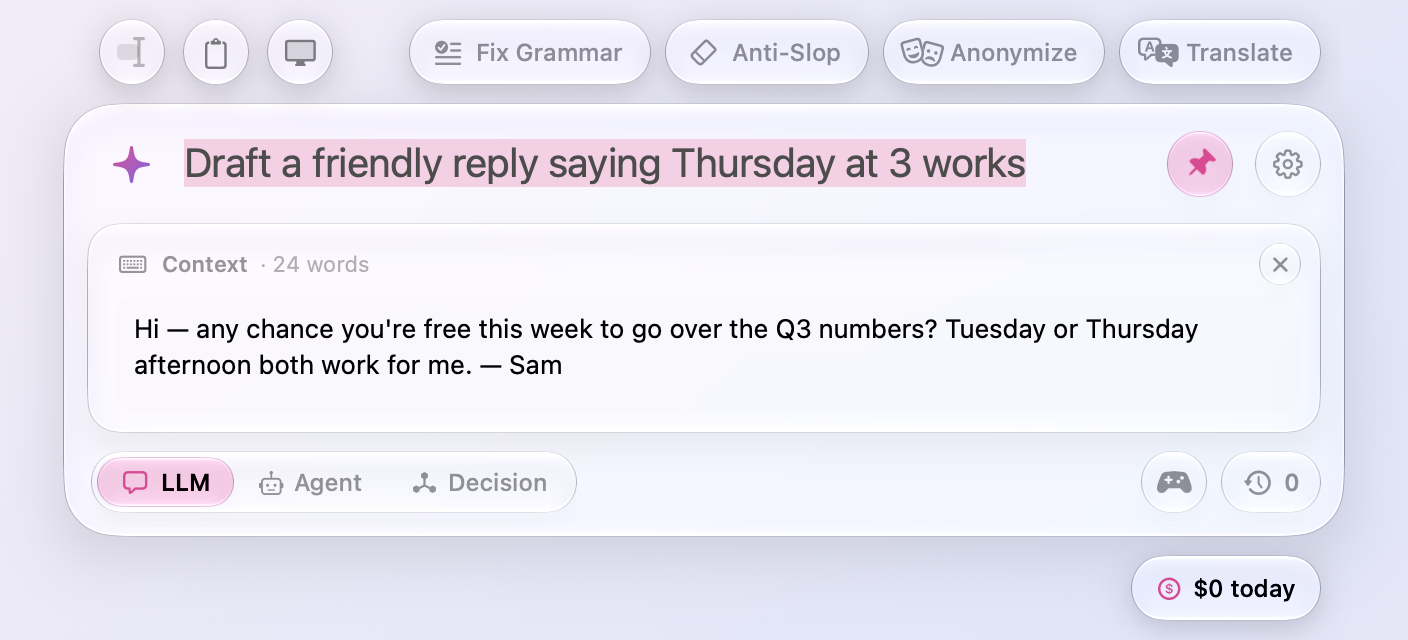
- Press Tab to add text to your question. Tab in the input opens a card for context written by hand, such as a quote, an email, or a snippet to work on, and it goes with your question in LLM and Agent modes the way selected or copied text does. ⌘Return sends from the card, and Return makes a new line there. Tab no longer sends, since Return already does. Add Text in the sparkle's panel opens the same card.
- Whole documents come along. Text you add from a selection, the clipboard, or the window used to stop at 20,000 characters. A long report or transcript now arrives in full, up to a million characters.
- Clearer placeholders. Each mode's empty input reads the same way: “Ask to get answer…” for LLMs, “Ask to do work…” for agents, and “Ask to make decision…” for Jev. Selected text and follow-ups still tailor it.
Decision
- Ask without context. A decision no longer needs text to decide about. Ask a question that stands on its own, such as “Is 17 prime?”, and Jev decides it as it is. The text you select, copy, or write still sharpens the call, and the row under the input suggests it, now as optional.
- A scale for levels in order. When a question names its answers in order (“How high a priority is this? Low < Medium < High”), Jev's answer shows on a scale: the levels from first to last, a marker where Jev placed the text, between two levels when it isn't sure, and each level's share beneath it.
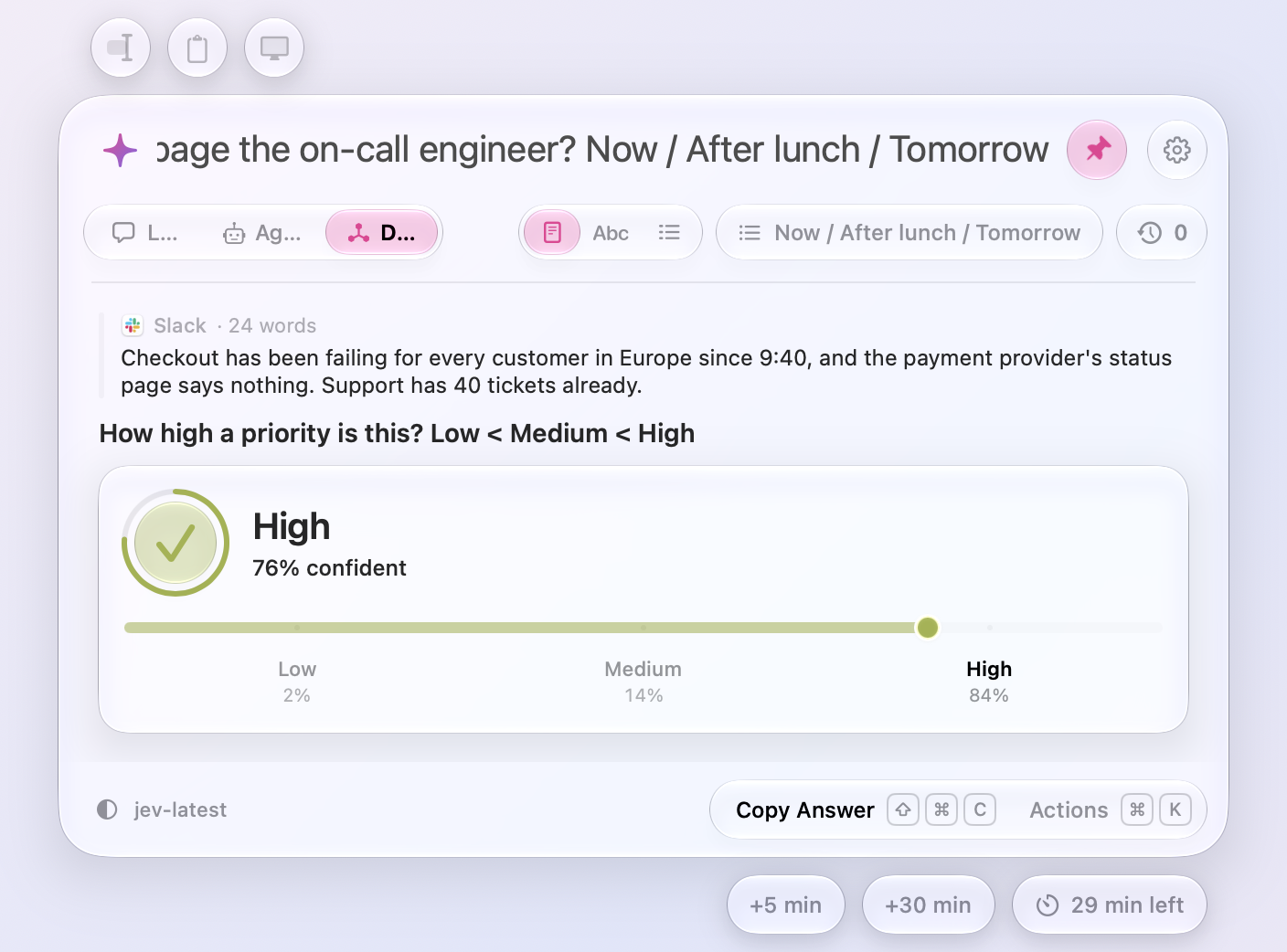
- Your own answers show how sure Jev is. For answers you named, a set with
/or levels with<, the disc, its ring, and the scale's meter turn green when Jev is very sure and amber when it's only moderately sure. Yes and No keep their green and red.
Speed
- The first open is as quick as the rest. Meraline builds and draws its window once, off screen, right after it launches, so the first ⌥ Space no longer waits for it.
- The window opens the moment you press the shortcut. Reading what you selected no longer holds it up. When an app has to be asked to copy, as browsers and editors do, that now happens after the window is up, and the selection is offered a moment later. Zed still reads first, since the ⌘C has to reach it.
Fixes
- New answers scroll into view again. After a few answers, the conversation stopped following along to the newest one.
- The cursor in the Context card sits on its first line. It blinked a line's gap above “Paste or type…”, and typing started there too. In LLM and Agent modes the hint now reads “Paste or type text to send with your question…” instead of asking for text to decide about.
All files, and how to verify them
| File | What it is | SHA-256 |
|---|---|---|
Meraline-1.9.0.dmg |
The installer | d8d1eea828545359260d273c18e1d6acab8d9fa13fa6321fb19e8e5c526582c1 |
Meraline-1.9.0.zip |
The archive Sparkle installs as an update | 8ae38abfdfb3b2999e3984d8df0a4973954c7939726f851dc06218dc029f1161 |
Meraline-1.9.0-dSYMs.zip |
Debug symbols, for reading crash reports | 8f02c57317104a471e5d13f64f9535c34e161cb5490b14e295b3f2bf395f781e |
appcast.xml is the update feed that installed copies check once a day.
Every file was built by GitHub Actions from tag v1.9.0 and carries a signed provenance attestation:
gh attestation verify Meraline-1.9.0.dmg --repo Meldiron/meralineMeraline 1.8.0
Download Meraline-1.8.0.dmg, open it, and drag Meraline into your Applications folder. Meraline needs macOS 26 or later. Installed copies update themselves.
What's new
Decision
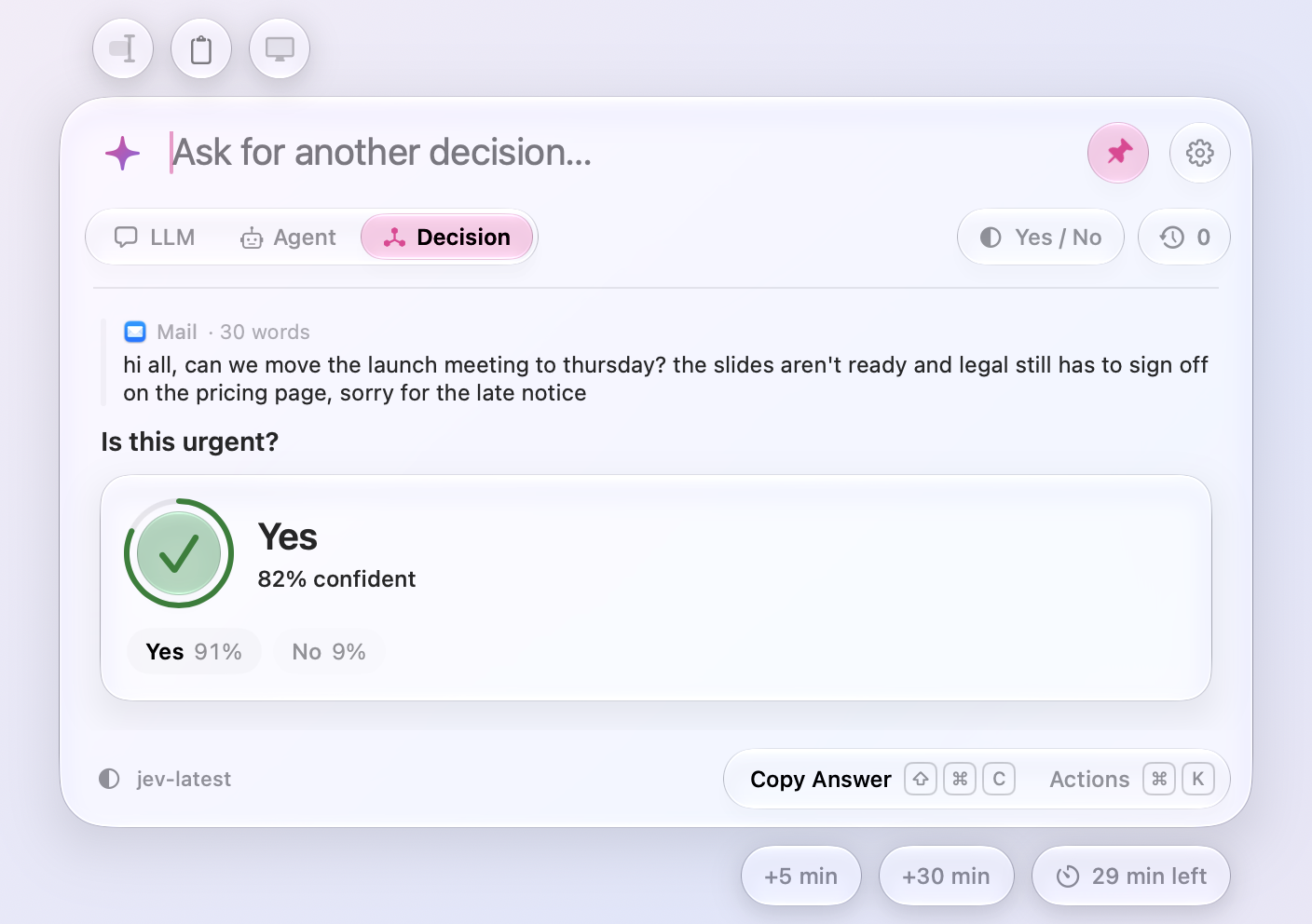
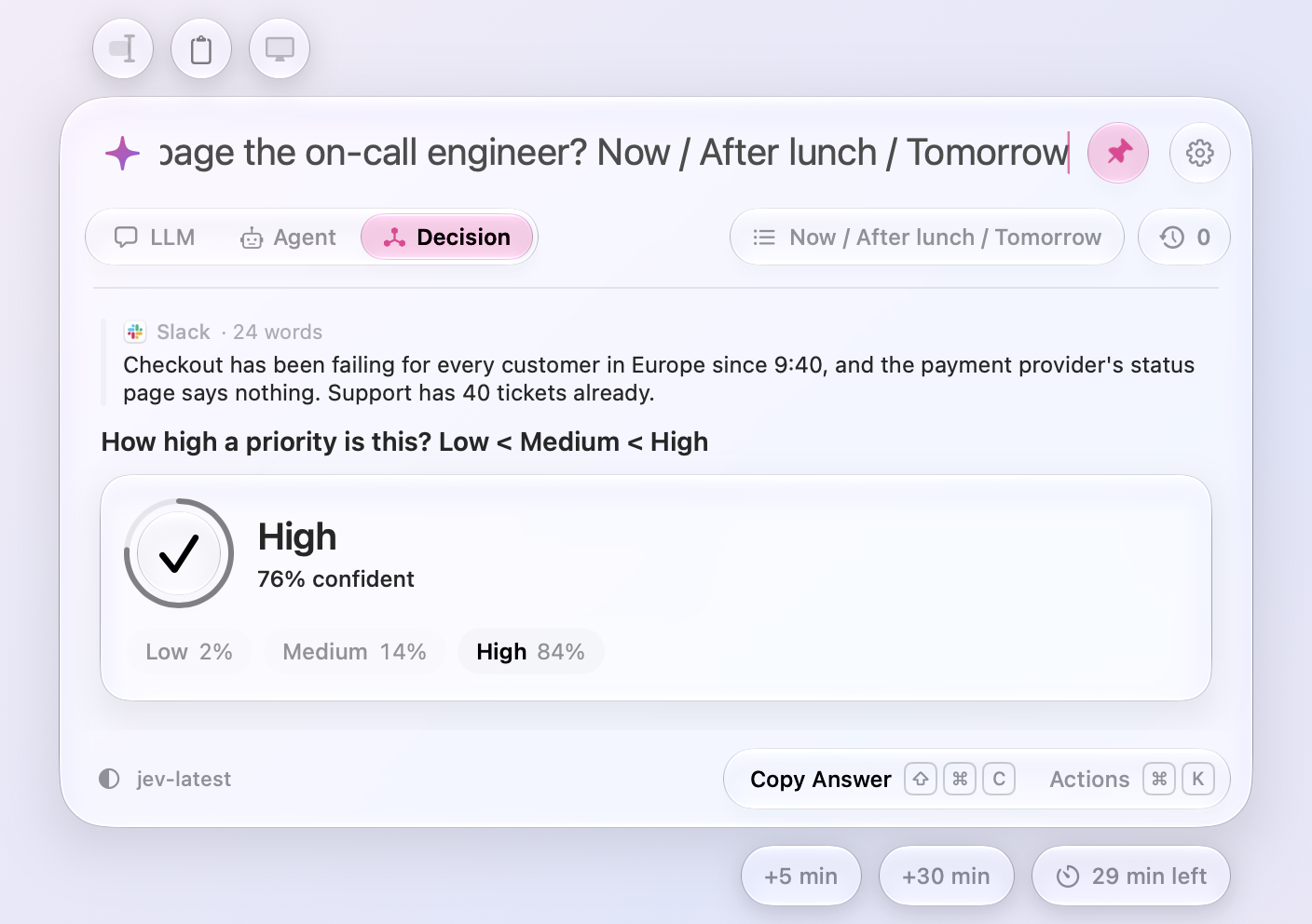
- Decision mode, with TypeSafe’s Jev. The toggle under the input has a third mode beside LLM and Agent (⌘3): Decision. Add the text you selected or copied with the buttons above the window, or write it in the window, ask a question, and Jev, TypeSafe’s decision model, answers in a fraction of a second, not in words but with a decision: a check on green glass for Yes or a cross on red for No, ringed by how sure it is, with “82% confident” beside it and every answer’s probability under it. Under the confidence you set in Settings › Prompt › Decisions, the answer says Not Sure and which way it leans. Yes and No are the answers unless the question names its own after its question mark, with / between them (“Which team should handle this? Billing / Technical / Sales”) or < for levels in order (“How urgent is this? Low < Medium < High”); the capsule under the input shows which answers the question picks from, and Settings sets the ones a question that names none picks from. A decision needs text, so nothing is sent without it, pictures and files wait for another mode, and the screenshot button steps aside. Follow-ups ask about the same text, Copy and Insert give the answer in words, and Settings › Usage counts decisions, with Jev at TypeSafe’s list price. Paste your TypeSafe API key in Settings › Decision Models to start.
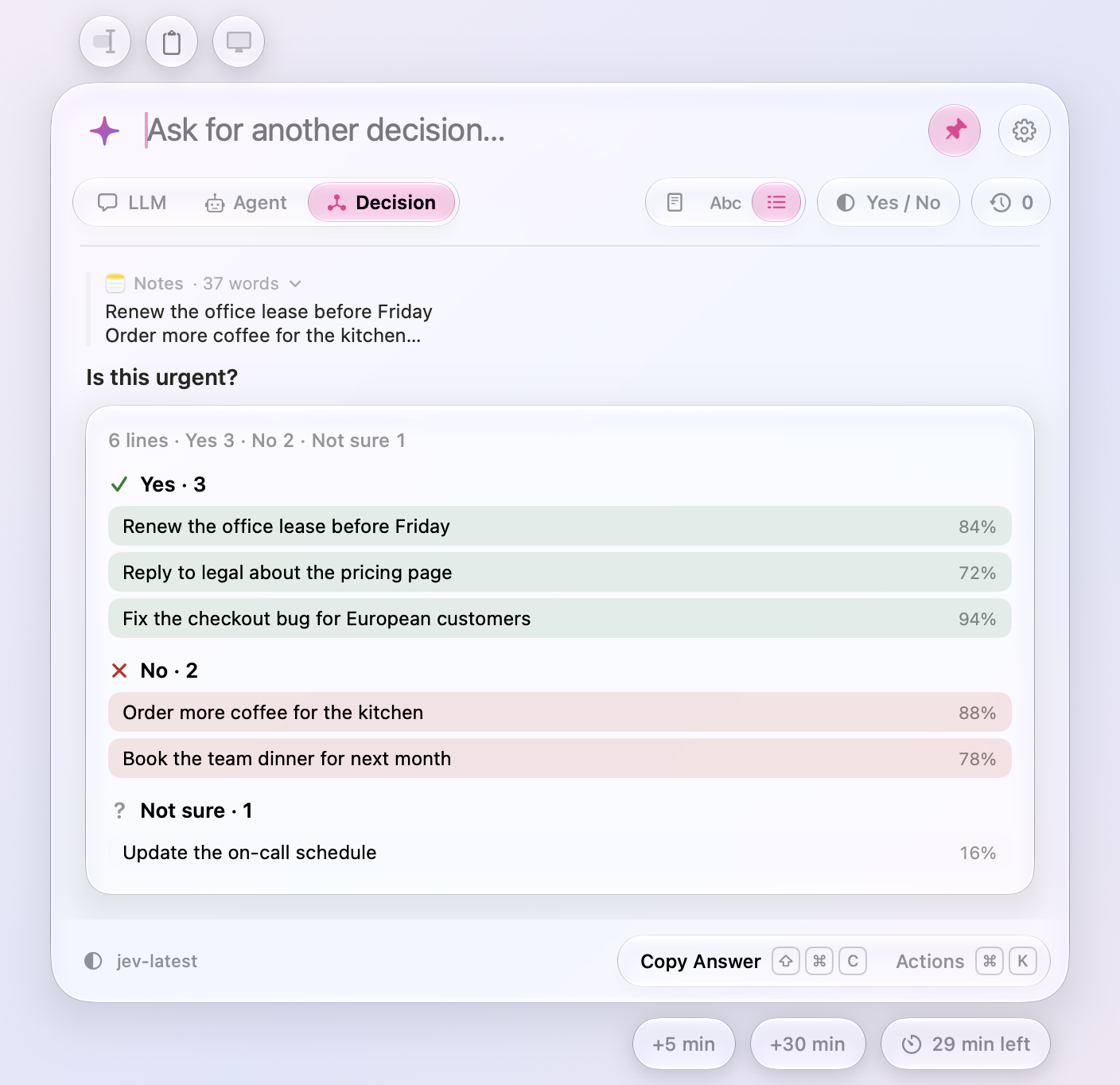
- Decide about each word, or each line. A switch at the games’ place in Decision mode decides about the whole text, each of its words, or each of its lines: Jev answers the question for every one, a hundred at a time, and the card fills in as they come, the words or lines grouped by answer, Yes on green and No on red, each with how sure Jev is. Up to 1,000 words or lines a question;
meraline://ask?mode=decision&scope=linespicks the scope too.
Ask
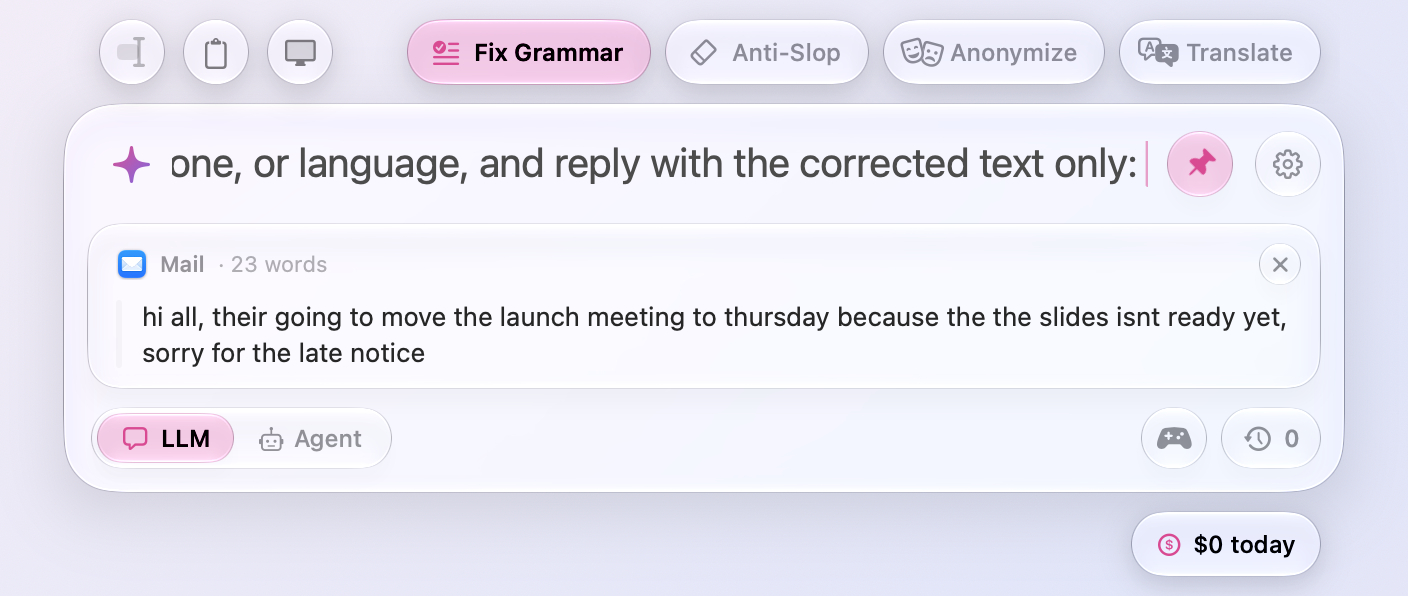
- Presets for your first question. Glass capsules above the window's top right, beside the gear, hold the prompts you'd otherwise type again and again: Fix Grammar, Anti-Slop (strips the filler, buzzwords, and em dashes that give AI writing away), Anonymize, and Translate, into the language set in Settings › Prompt. Click one to put its text in the input, ahead of anything you typed, and add the text to work on, or select it in another app first; Shift-click to send it at once; while Shift is down, the one under the pointer turns pink and points up. Click it again to take it out. They're for starting a chat, so they sink into the window once it starts and come back for the next one. Settings › Prompt › Presets edits them, adds your own with an icon of your choice, moves them along the row, and deletes them.
- Presets for each mode. LLM, Agent, and Decision each have presets of their own above an empty chat, and a change of mode sinks one row into the window as the next rises. Agents start with Find Bugs, Explain Code, Write Tests, and Research; decisions with Urgent?, Scam?, Tone, and Priority, two of which name their answers after the question. Settings › Prompt edits each mode’s list.
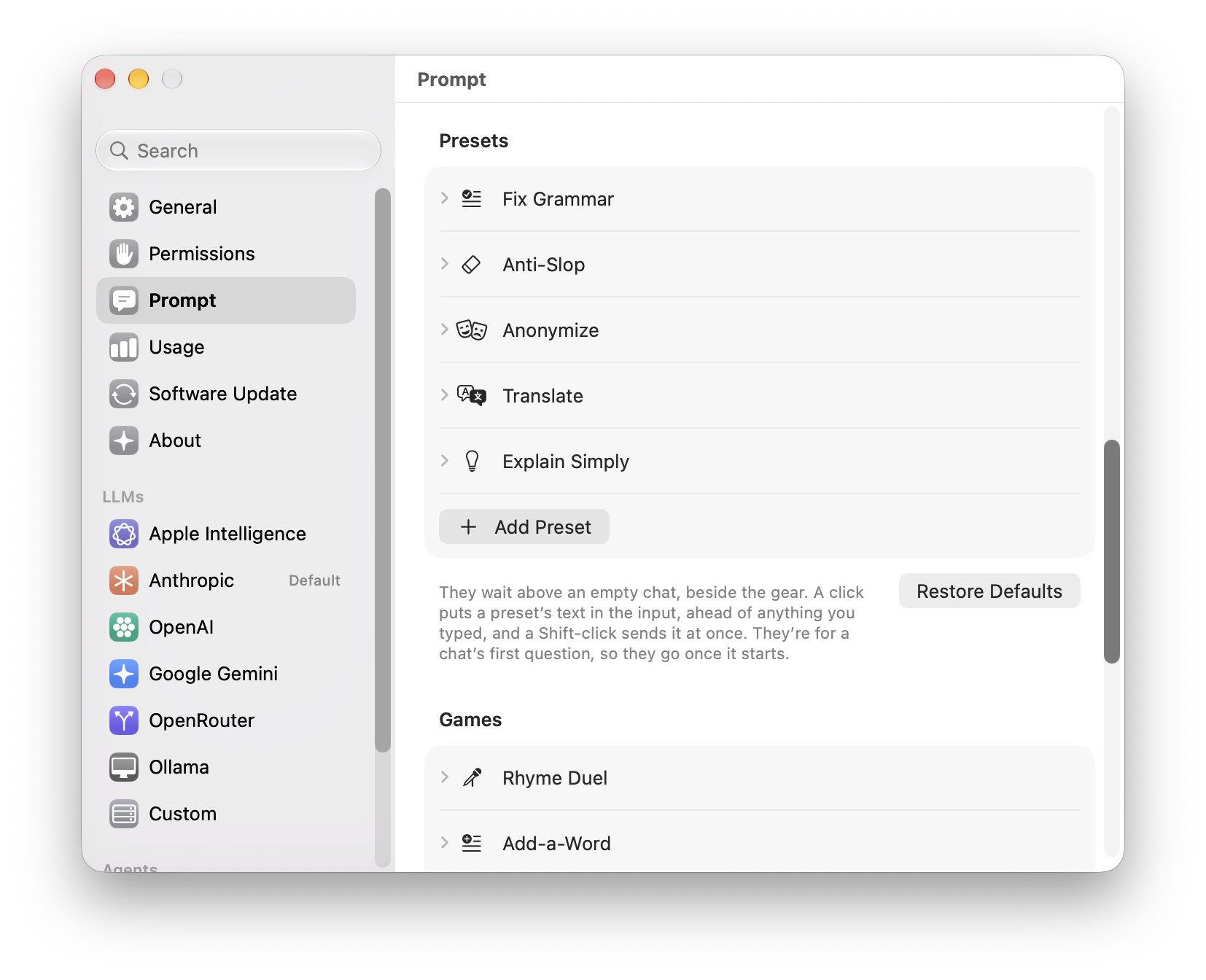
- ⌘1 to ⌘9 run your presets on an answer. Once an answer is ready, Actions (⌘K) lists the presets after Make Shorter and the other rewrites, and ⌘1 to ⌘9 run the first nine without opening it: Fix Grammar, Anti-Slop, Anonymize, or Translate the answer, or run one of your own on it. What comes back takes the answer's place, as a rewrite does, and if you stop it or it fails the old answer returns. They go by the keys' places, so they work on any keyboard layout; meanwhile ⌘1 and ⌘2 leave the LLM and Agent toggle, which they switch again once a new chat starts.
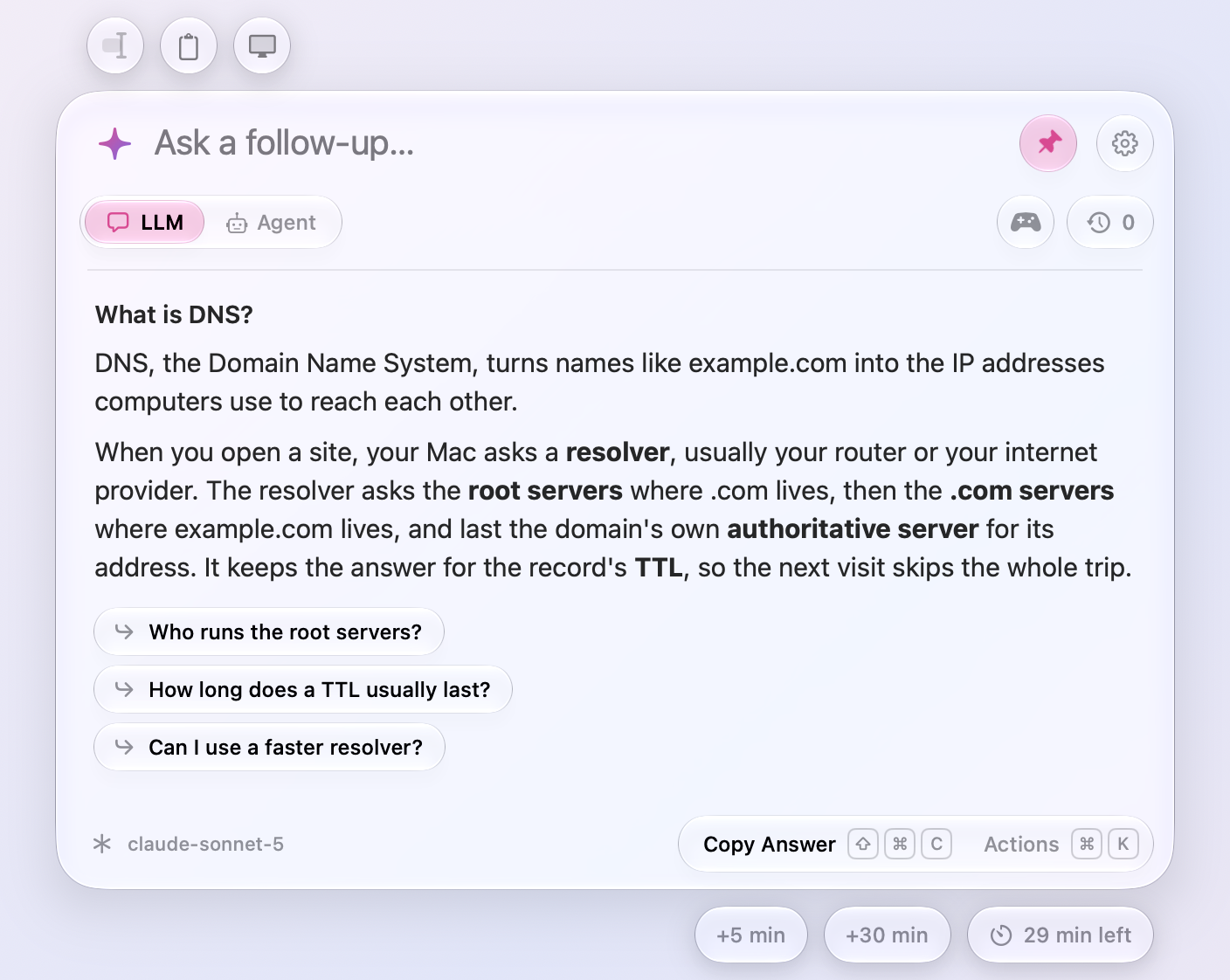
- Follow-up questions under an answer. Once an answer is done, two or three questions you might ask next wait under it, suggested on your Mac and never by your provider: by Apple Intelligence when it's on, and otherwise from the answer itself, its code, the terms it sets in bold, and the kind of question you asked (in English). Click one to put it in the input and change it before you ask, or Shift-click to ask it right away; while Shift is down, the one under the pointer turns pink and points up. While Apple Intelligence is still thinking of them, one chip says so, and it becomes the first of them. They go the moment you type or ask, live in memory only, and a chat reopened from Recent Chats gets new ones.
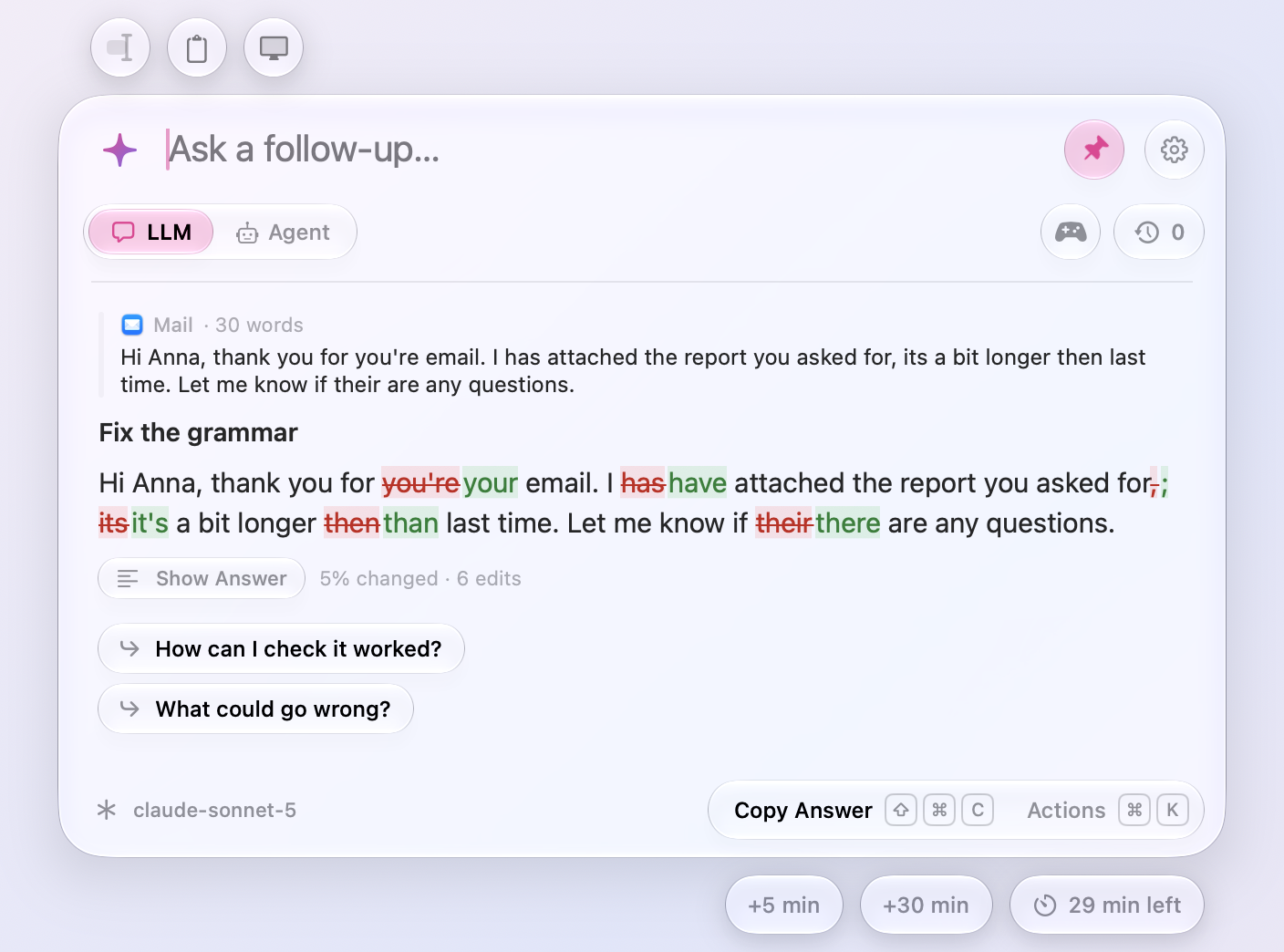
- See what an answer changed. Ask to fix the grammar of text you selected or copied, and Show What Changed under the answer, or ⌘D, puts your text in its place with each word that went struck through in red and each that came in green, so a fix is quick to check before you paste it. Show Answer brings the answer back. Beside the button, how much changed, in numbers: “5% changed · 6 edits”, where a typo counts only the letters that differ. It shows only when the answer is your text changed, not an explanation, a summary, or a translation of it, and the follow-ups and rewrites that rework the same text get it too.
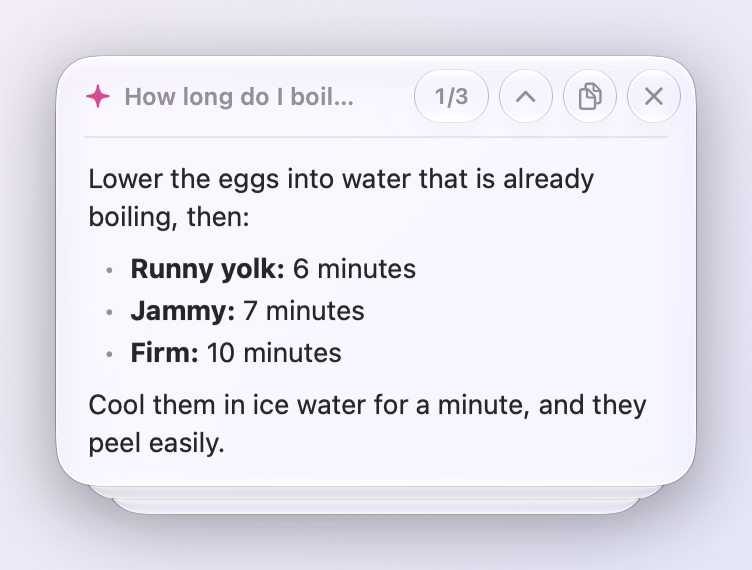
- Tear off several answers into one note. Tear off another answer while a note is open and it goes on top, with the edges of the ones behind it peeking out under the card. A count badge in the note's header, such as 1/3, brings the next one forward and Shift-click the one before, as ⌃⇥ and ⌃⇧⇥ do while the note has the keyboard, so you flip through them without opening the window. Esc, ⌘W, or the cross put away the answer in front, and Option-click on the cross the whole pile.
- Zoom answers to read them across the room. ⌘+ and ⌘− make answers larger or smaller, from 85% to 300%, and ⌘0 brings them back to their own size; pinching on the trackpad zooms too. Their text, code, and tables grow while the rest of the window stays as it is, and a capsule in the footer shows the zoom and goes back to 100% when clicked. A torn-off note opens at the window's zoom, then zooms on its own and widens with it.
- Paths in answers open with a click. A path to a file or folder on your Mac, such as
~/Downloads/report.pdf, becomes a link in the answer: click it to open it in its app, or ⌘-click to show it in Finder. In an agent's chat, paths inside the folder it works in count too, line numbers and all (src/app.swift:42), and so do the links it writes to its files. They open the way handed-over files do, so apps are only shown in Finder and scripts open as text, and they're found as the answer is drawn and kept nowhere.meraline://links in answers work too, but a question one fills in waits for you to press Return. - Drag text in. Drag a selection from any app onto the window, anywhere on it, the input included, and it waits above your question in a card of its own, with the app it came from, just like text you select and add with the button above the window. Drop more and each gets a card of its own, and a picture dragged from a web page still attaches as a picture. Files and pictures dropped right on the input now attach too, instead of landing in it as text.
- Services › Ask Meraline takes pictures. Select part of an image in Preview, or a photo in Photos, and choose Ask Meraline from the app's Services menu: the picture is attached to your next question, for any model, as text already was. The same picture comes only once, and a selection with both words and a picture still comes as words.
- Stash a draft for later. Press ⌘S with no chat open to put what you typed, and the selected text, clipboard, screenshots, and files you added, in Recent Chats, and start on something else. Reopen it from the clock and it's all back in the input. It waits there for 30 minutes, like any recent chat, and reopening another chat stashes what you had typed in an empty one, so it isn't lost. Anonymous mode keeps drafts out of Recent Chats too.
- What today has cost, under the window....
Meraline 1.7.0
Download Meraline-1.7.0.dmg, open it, and drag Meraline into your Applications folder. Meraline needs macOS 26 or later. Installed copies update themselves.
What's new
Usage
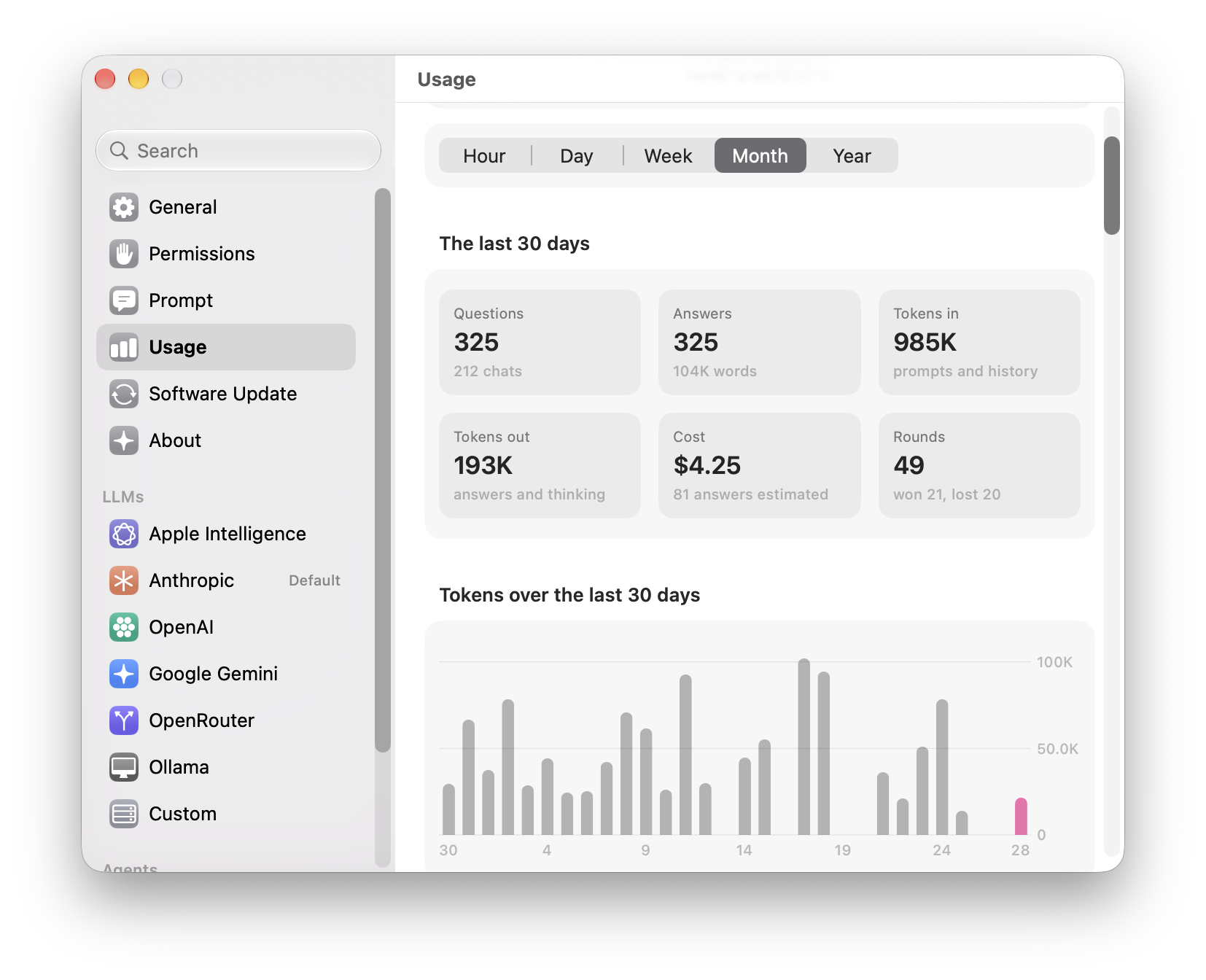
- Settings › Usage. A new pane counts how Meraline is used, by the hour, day, week, month, or year: questions and chats, answers and the words in them, tokens in and out with a chart along the span, and what they cost. Claude Code, OpenCode, and OpenRouter say what each answer cost; the rest is worked out from tokens at OpenRouter's public prices, and Apple Intelligence's answers are estimated from their length. Below, the models and what each cost, the agents' runs, tools, asks, and files handed over, what went with your questions, and habits: your busiest hour and weekday, days with Meraline and the longest streak, time spent waiting and reading, and answers copied, inserted, and torn off. The counts live in one file on your Mac, numbers only, never a word of what was asked or answered, and Clear Usage Data deletes it.
meraline://settings?pane=usageopens the pane.
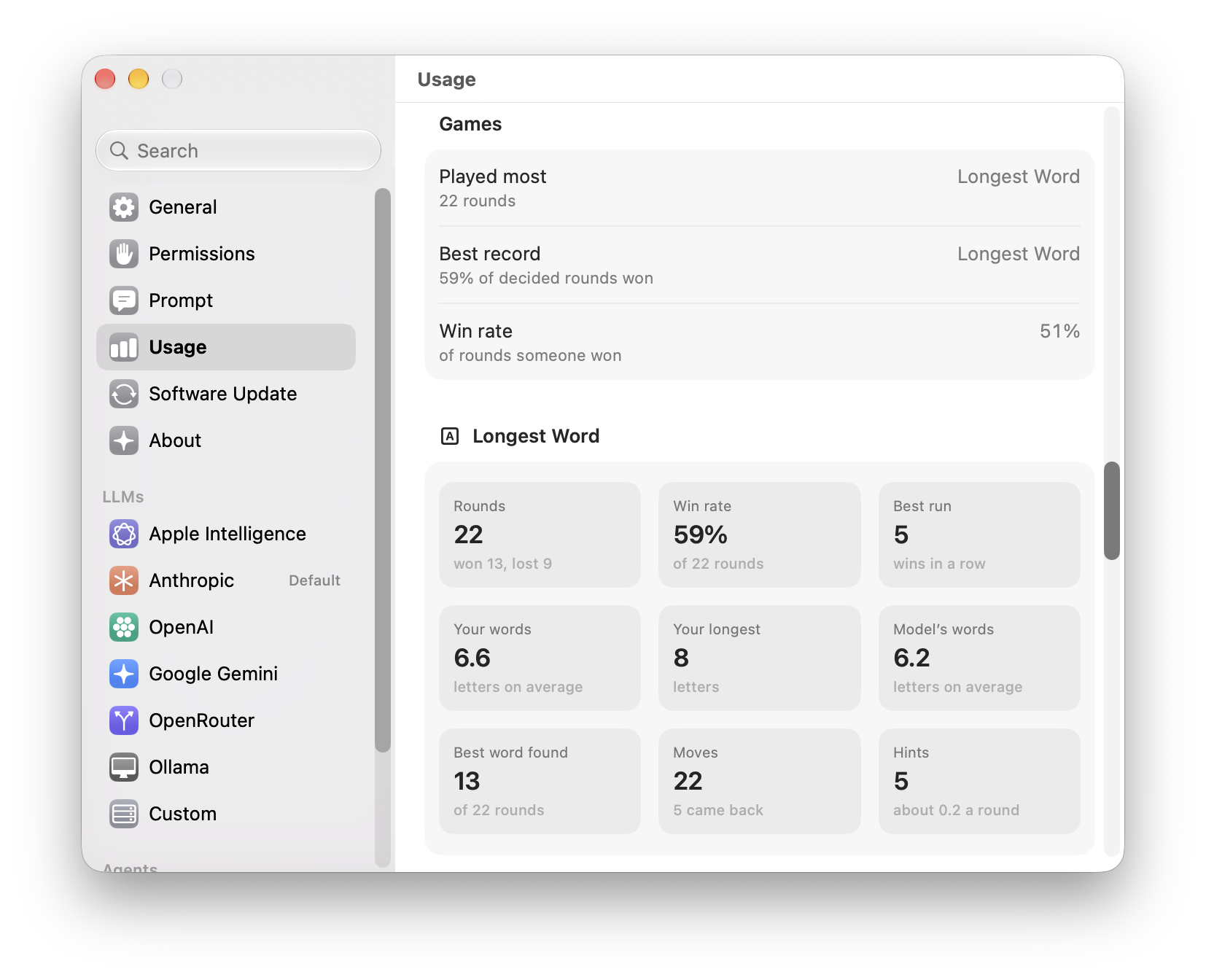
- Your games, in numbers. Each game you played gets a section of its own there, with its rounds, your win rate and best run of wins, and numbers of its own, such as Rhyme Duel's average score, the letters in your Longest Word words, or the typos you fixed in Fix the Typo.
Settings
- Answers in your language. Settings › Prompt starts with Language: English, Czech, Slovak, and 22 more. LLMs and agents answer in it unless you ask for another, as for a translation, and the games are played in it. It's added after your instructions, so ones you changed keep it too.
- Instructions for LLMs and for agents. Settings › Prompt now keeps one set of instructions for LLMs and another for Claude Code, Codex, and OpenCode, so quick answers can stay short while an agent says what it did. Agents start from instructions of their own that lead with what they did and what came of it. If you had changed the prompt, your version carries over to both.
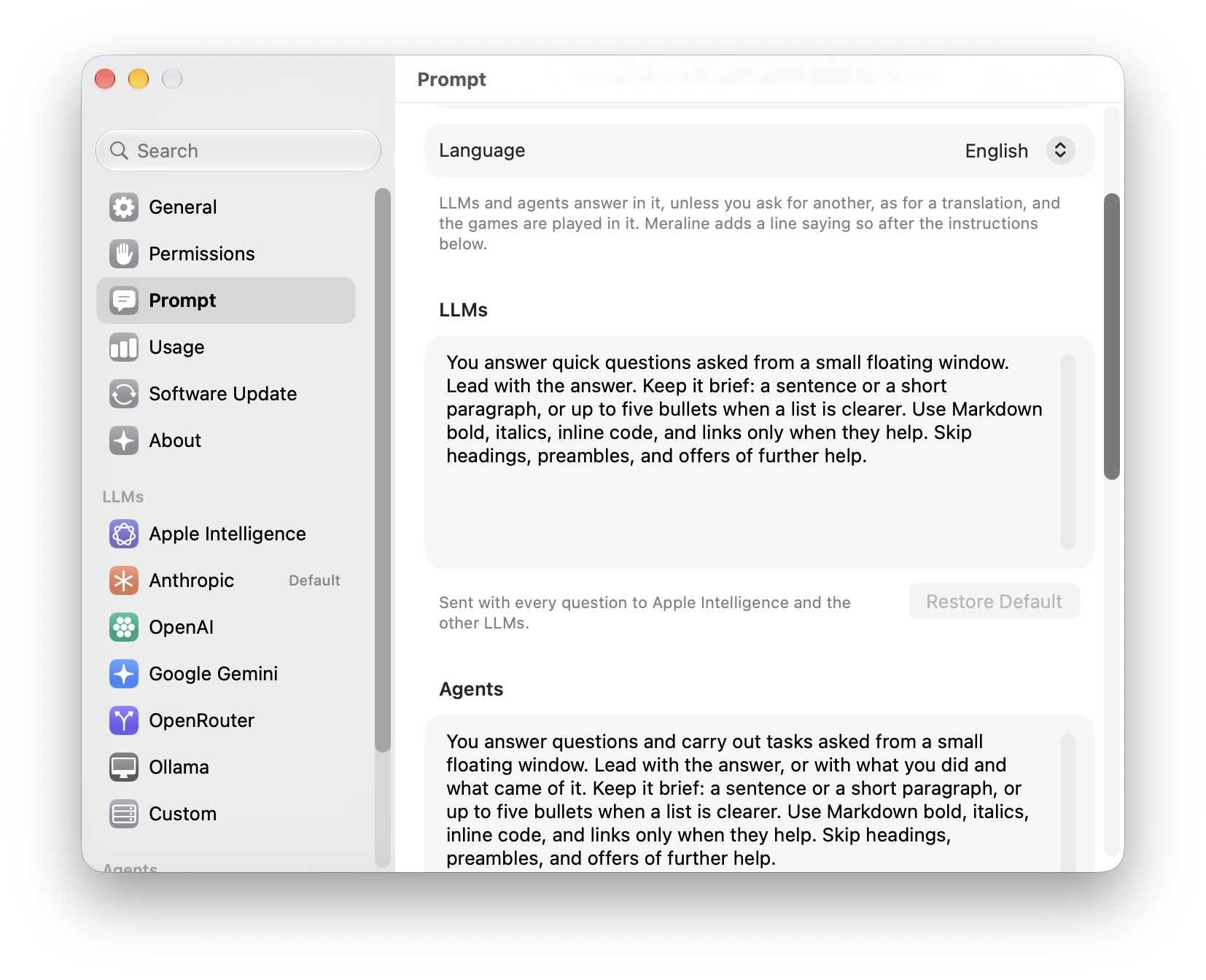
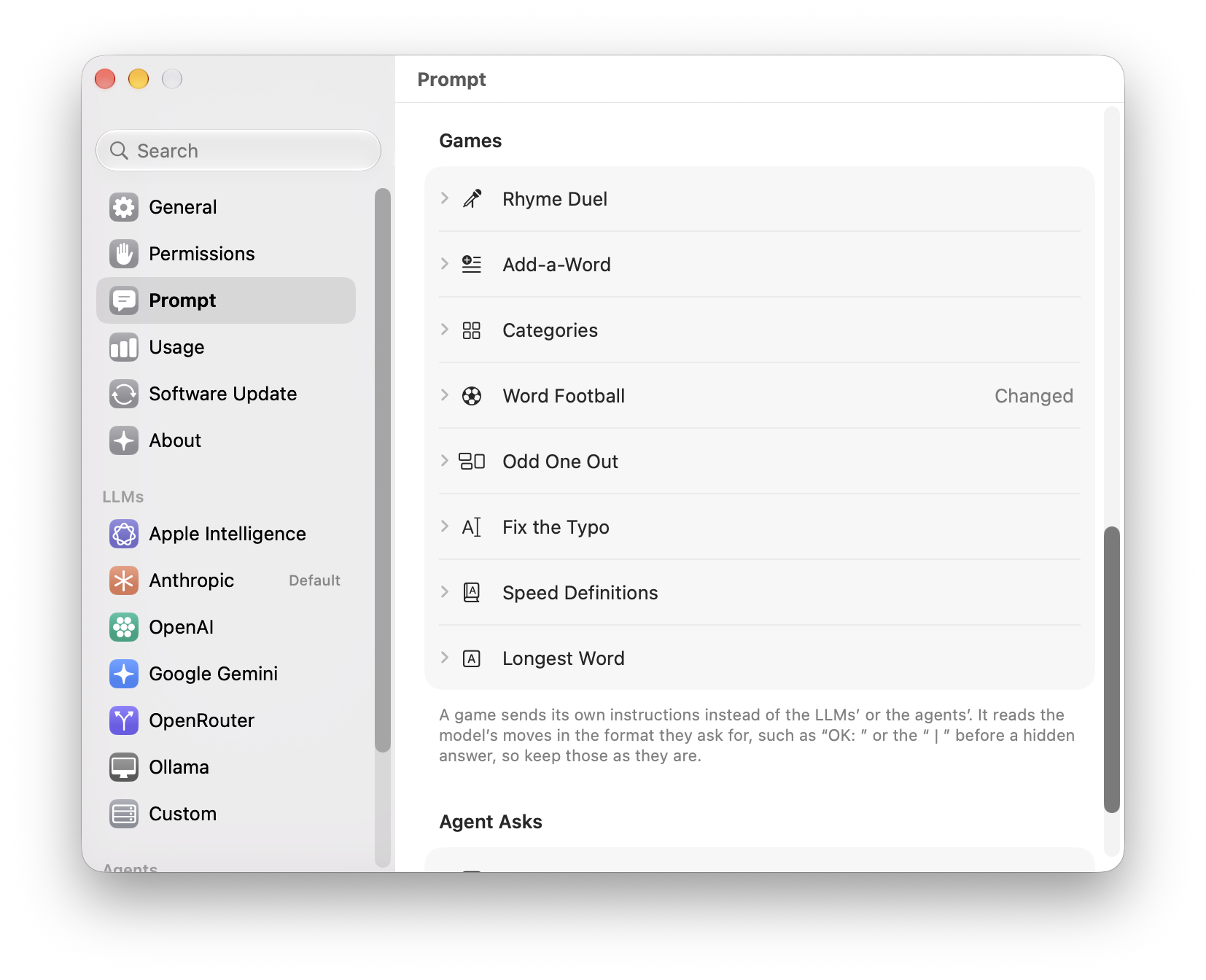
- Every prompt in one place. Below them are the rules of each of the eight games and the instructions Why? uses to explain an agent's ask. Each is folded under its name, says Changed once you edit it, and has Restore Default to go back. A game still reads the model's moves in the format its rules ask for, such as “OK: ” or the “ | ” before a hidden answer, so keep those as they are. Copy Diagnostics names the prompts you changed, never what they say.
Games
- Longest Word replaces Letter Auction. Your Mac draws nine letters, and you and the model each make the longest word you can. The model picks first and its word stays hidden until you play yours, so a round is quick and fair. The letters sit in glass bubbles, and the shuffle button beside them deals them out in a new order, hopping over and under each other, whenever you need a fresh look. Your Mac checks both words with macOS's dictionary, in your language, and afterwards shows a longer word when it knows one. Hint says how long a word hides in the letters and how it starts, and a word the dictionary doesn't know counts if you send it again. No prices to add up, no pool to keep track of. Links made for Letter Auction start Longest Word.
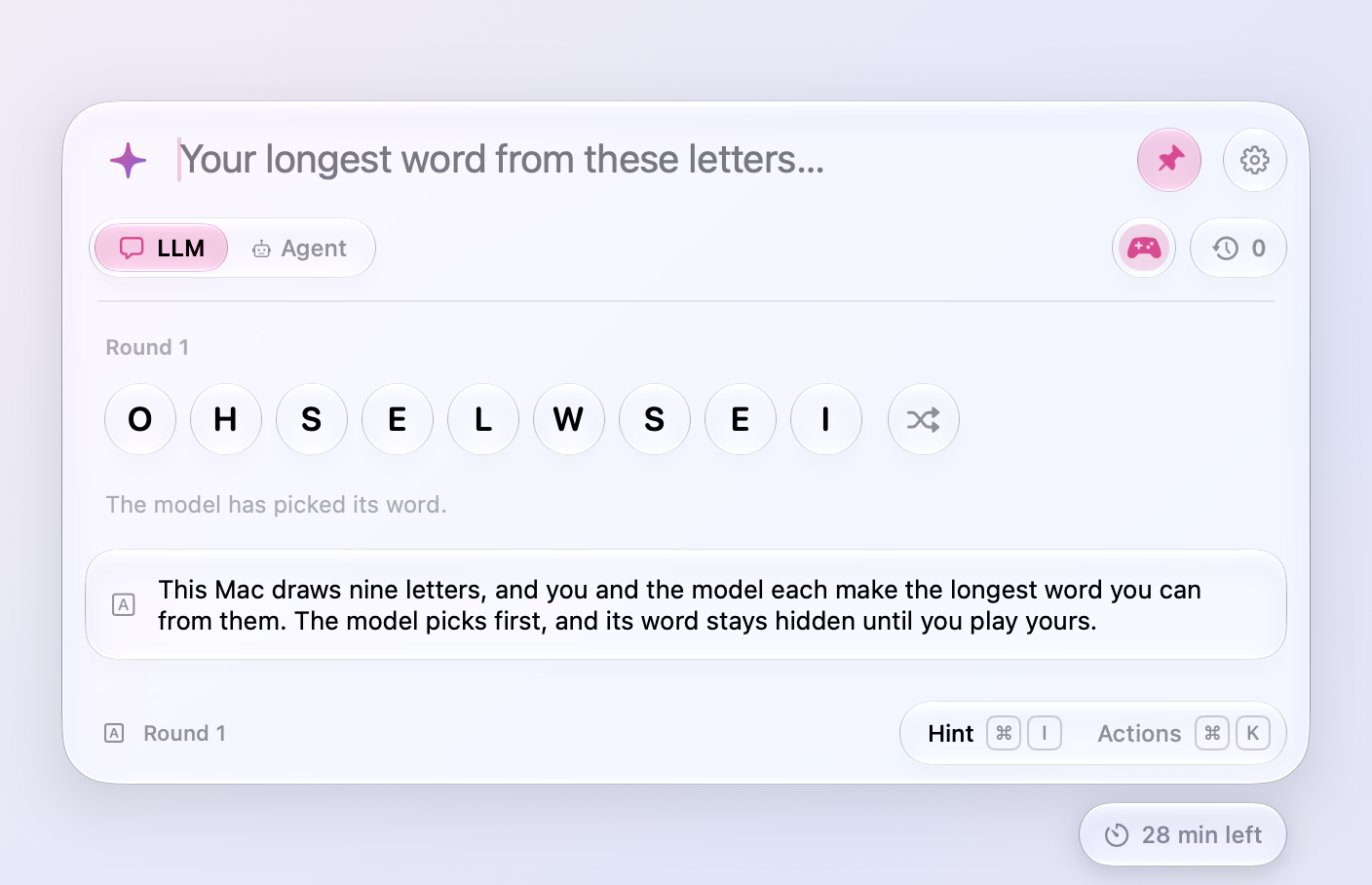
- Make the first move. Every game but Longest Word now waits for you to open it: write Rhyme Duel's first line, name a category, type the first word of an Add-a-Word sentence, kick off Word Football, or set the first Odd One Out puzzle. Or press Return, or the Random button in the game's card (Random Rhyme, Random Word, Random Category, Random Puzzle, or Random Sentence), to leave it to the model or the dice. Once a round is over, what you type opens the next one. In Rhyme Duel whoever opens sets each rhyme and the other answers it, so when you start, you pick the sounds and the model rhymes with you. In Categories the model always names the first thing, and a category it won't play comes back to you. In Odd One Out you take turns, so whoever starts sets rounds one, three, and five. A random kickoff in Word Football is never one of that chat's earlier matches while others are left.
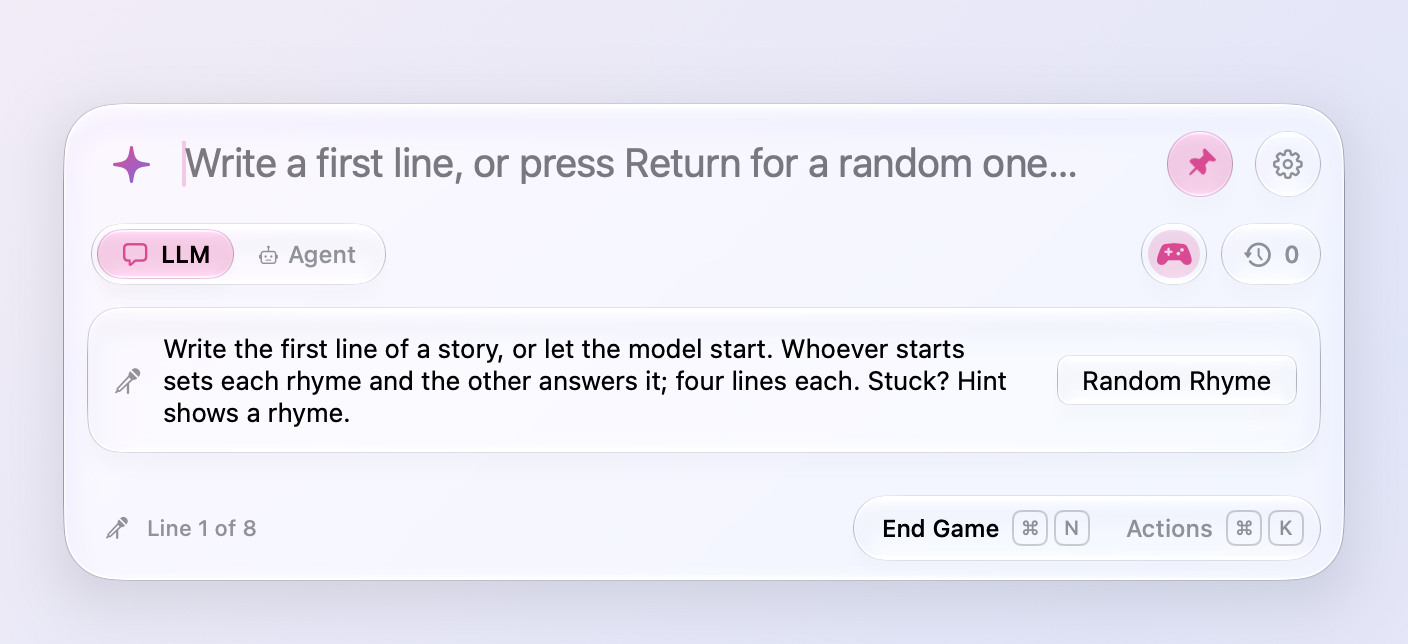
- Stump the model in Fix the Typo. Type a sentence with one misspelled word, and the model hunts for it; tap It found it or It missed. Before each of the five sentences you choose again: type one of your own, or press Return (or Random Sentence) for one of the model's to fix, so a game can mix both. The footer counts what you fixed and what the model found, and the game goes to whoever won more sentences.
- Give the words in Speed Definitions. Type a word, and the model defines it in ten words or fewer; tap It got it or It missed. Start that way and you give all five words, or press Return (or Random Word) to define the model's as before.
- Rhyme Duel rates how you played. Once the eighth line is in, the model scores your lines out of 10 and gives one quick idea for your next duel, quoting your own words, such as trading “for goodness’ sake” for a fresher detail. The score and the tip show under the poem, and Play Again says the score. Copy still takes just the poem.
- Games play out differently every time. Asked the same thing, a model answers the same way, so Meraline now rolls the dice itself. Each Rhyme Duel gets a story drawn on your Mac, such as a retired pirate in a laundromat who loses a bet, and each of the model's lines ends on one of three words of a sound no line has used yet. Hint knows the other words of that sound, so it always has a rhyme to offer. In Word Football, each word the model plays leans toward a kind drawn for it, an animal, a tool, a feeling, so no two matches run alike. Categories draws its category from more than a hundred, never one you've played in that chat until they run out. Each Odd One Out puzzle the model sets gets a theme, from gemstones to pirates, and a way to link the two that belong, such as what they're made of or a word hidden inside them. Speed Definitions deals the model three of more than 300 words to pick from, so serendipity no longer opens every game.
- Speed Definitions mixes easy, medium, and hard words. Most words are medium, one in five is easy, like umbrella, and one in five is hard, like ephemeral. Each word's heading says which.
- Rhyme Duel lines are shorter. The model used to answer a line with a sprawling one that buried its rhyme. Its rules now ask for the line of nursery rhymes and ballads: four beats, about eight syllables, one plain thing said in the order you would speak it, landing on the rhyme word. Sonnet's openings came down from eleven or twelve syllables to eight. Settings › Prompt shows the rules, if you want to tune them.
- Hint shows more rhymes. In a Rhyme Duel, Hint (⌘I) now lists up to six rhymes at once instead of one, and the model keeps ten behind each of its lines instead of six, so a second press has others to show.
- Add-a-Word remembers the story. Each new sentence goes to the model with the sentences before it written out in full, not only as the words you traded one at a time, so the model carries the story on, and scores each sentence for how much sense it makes there.
- Games in your language. With another language than English in Settings › Prompt, every game is played in it: the model's lines, words, categories, and reasons, with the drawn stories and topics still keeping games fresh. Rhymes don't mind accents (“rád” answers “hrad”), Word Football chains “kůň” to a word starting with N, and Longest Word spends č as c.
- Restart a game with ⌘R. Restart in a game's actions (⌘K) starts it over from the beginning while you're still playing; the game so far goes to Recent Chats. Once a round is over, ⌘R is still Play Again.
Ask
- Buttons with nothing to add fade further. The selection, clipboard, and screenshot buttons above the window go much fainter when there is nothing they could add, so a glance tells which of them a click would do something with.
- Quoted text opens in full. The text a question went with, quoted above it, now says how many words it is, and when its two lines cut it short, a click on its header shows all of it and folds it back. Handy after copying a few long messages to ask about together. The card under the input offers its chevron only when its three lines really leave something out.
Privacy
- Reopening a chat keeps its time. A chat you reopen from Recent Chats comes back with the time it had left, instead of another 30 minutes. A message or a click on the timer still gives it 30 minutes aga...
Meraline 1.6.0
Download Meraline-1.6.0.dmg, open it, and drag Meraline into your Applications folder. Meraline needs macOS 26 or later. Installed copies update themselves.
What's new
Ask
- Answers read like documents. Headings, lists, quotes, and tables show as they should, and code sits in a box with its language and a Copy button. Actions (⌘K) adds Copy Code Block for each block of code in the last answer.
- Tear off an answer. Tear Off Answer (⌘T) in Actions keeps an answer on screen in a small glass note beside the window, so a recipe or a list of steps stays in view while you work in another app. Drag it by its header or any empty space, resize it from its sides and bottom, and fold its question away with the chevron. It floats above other apps on every Space until its cross or Esc puts it away, and nothing of it is saved.
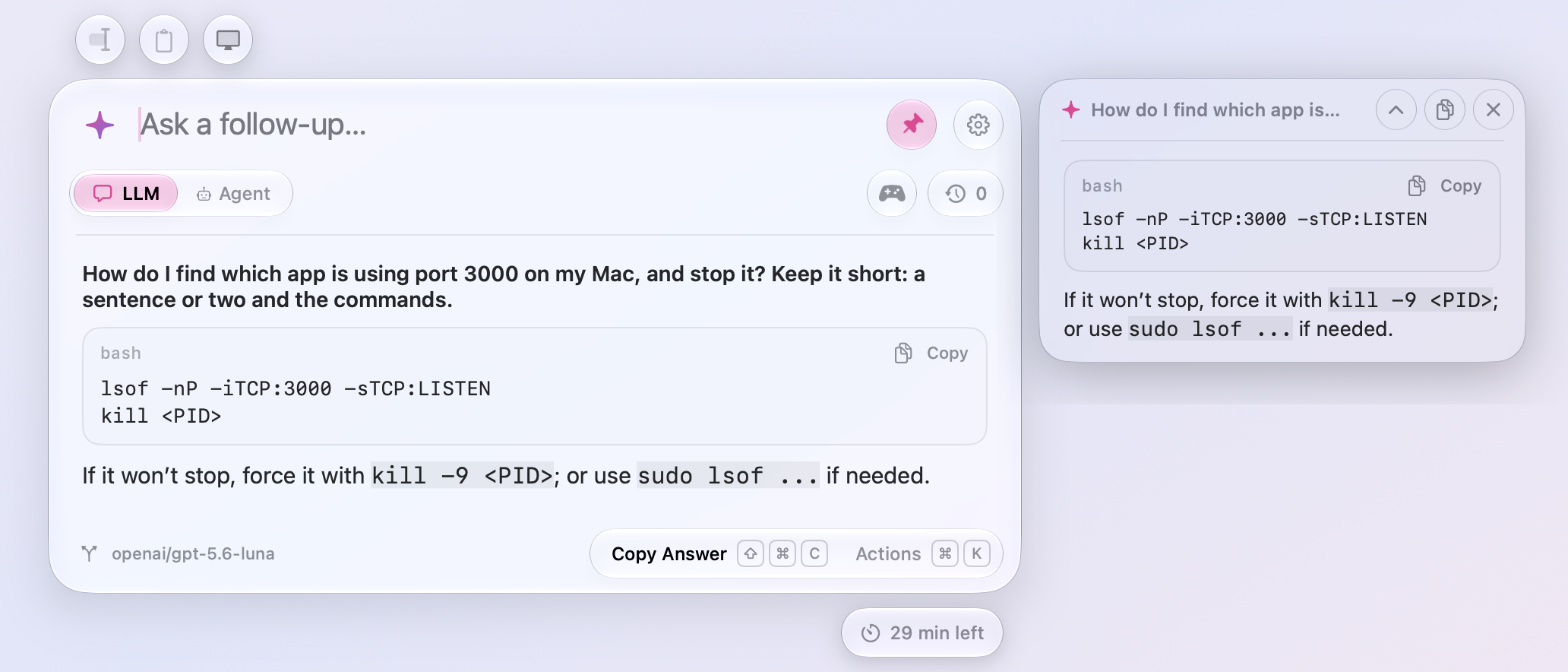
- Ask Again with another provider. Actions (⌘K) offers Ask Again with each of your other ready providers, and the one you pick answers your follow-ups too. Handy when one model turns a question down.
Agents
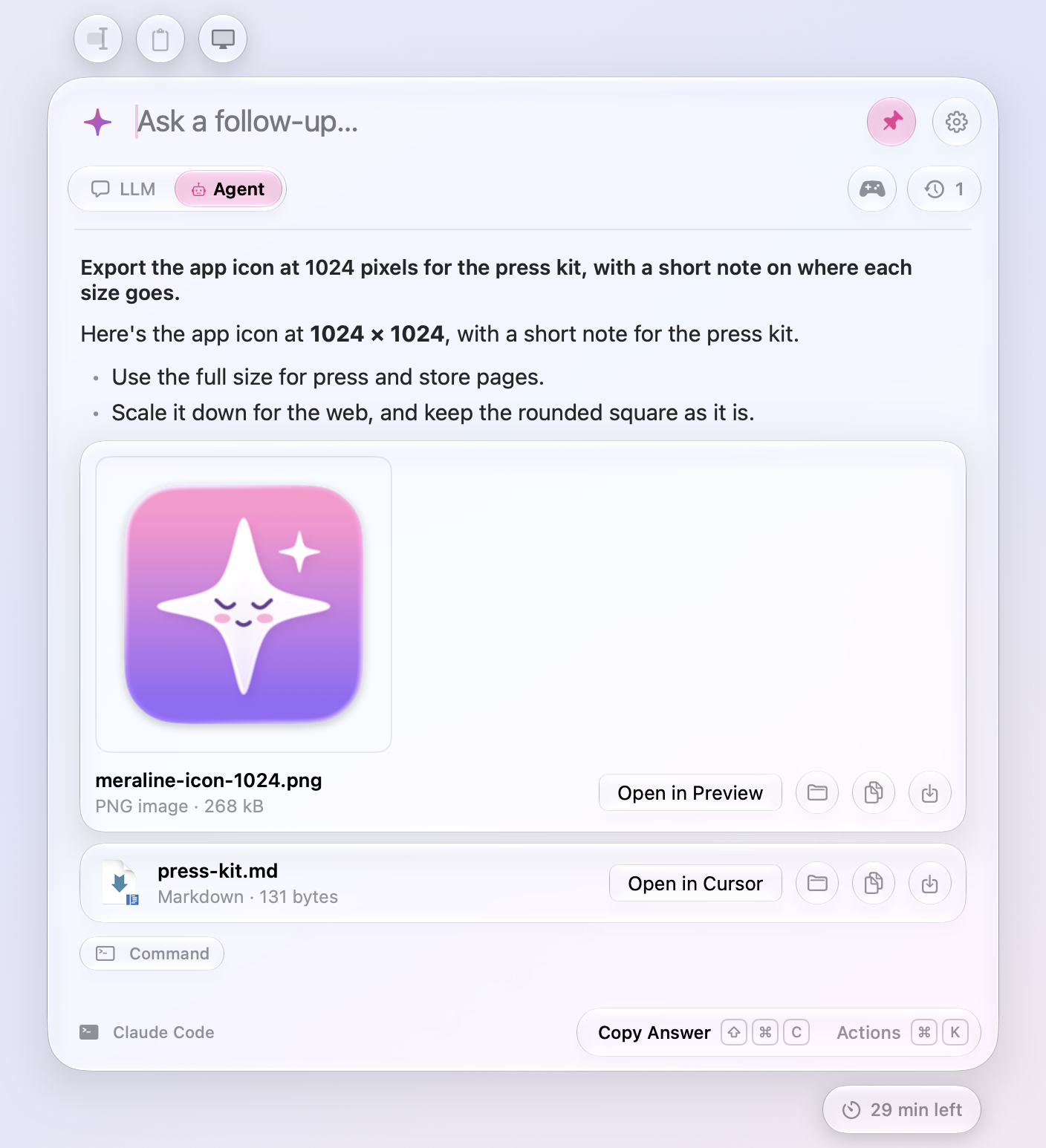
- Agents hand you files. When Claude Code, Codex, or OpenCode makes a file for you, a report, a chart, a spreadsheet, it hands it over with Meraline's own
present_filestool, and the file shows under the answer with its icon, kind, and size. A picture shows itself instead of its icon; click it to see it larger. Open it in its app, show it in Finder, copy it, save it to Downloads, or drag it anywhere. Actions (⌘K) offers the same, with ⌘O to open and ⌘S to save. Files stay in the chat's folder until you save or copy them, and Open never runs an app or a script.
- Agents answer sooner. Claude Code and Codex stay running for the chat, so a follow-up doesn't start them over, and they start as soon as the shortcut opens the window in Agent mode. Codex writes its answer word by word instead of all at once.
- A cleared folder doesn't stop the agent. macOS clears old files out of its temporary folder. If it cleared a chat's folder, Meraline makes a new one, the agent carries on, and a warning under your question says the earlier files are gone.
Privacy
- Every chat has 30 minutes. A capsule under the window's bottom right says how long the open chat has left, in minutes and then, in its last minute, seconds. Each message starts its 30 minutes over, and so does a click on the capsule. When the time runs out, the chat is deleted from memory with the files its agent worked on; whatever you'd typed stays in the input. Recent Chats no longer stops at your last five: a chat you close keeps counting down there, reopening it starts its time over, and an answer still arriving is never cut off. This replaces Settings › General › Start a new chat and the countdown on the pin.
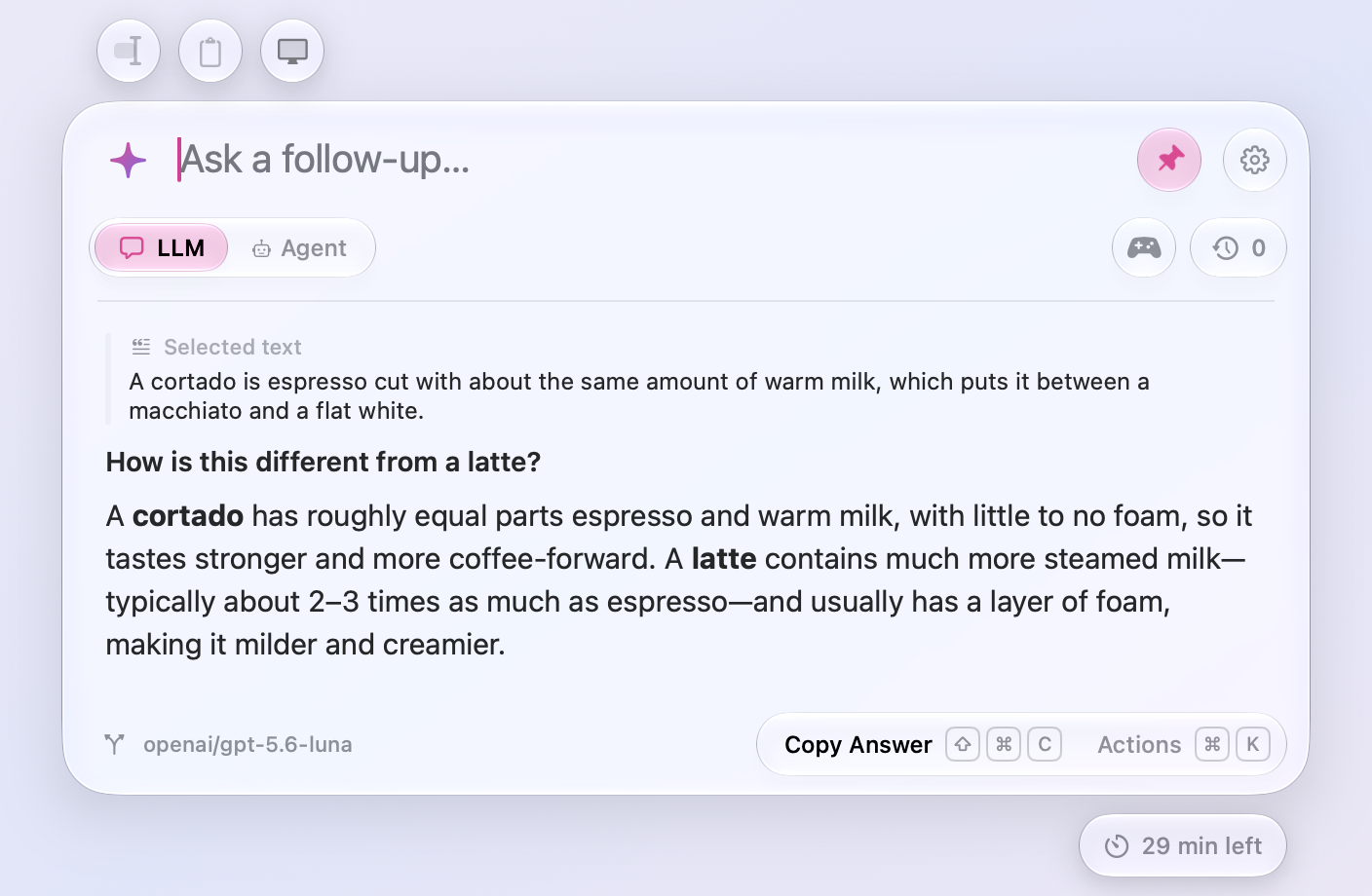
- Limits on what chats hold. A chat holds up to 512 MB, pictures mostly, and a question that doesn't fit stays in the input and says why. Meraline keeps up to 1,000 chats, and an agent's folder for a chat takes in up to 20,000 files and folders from what you attach.
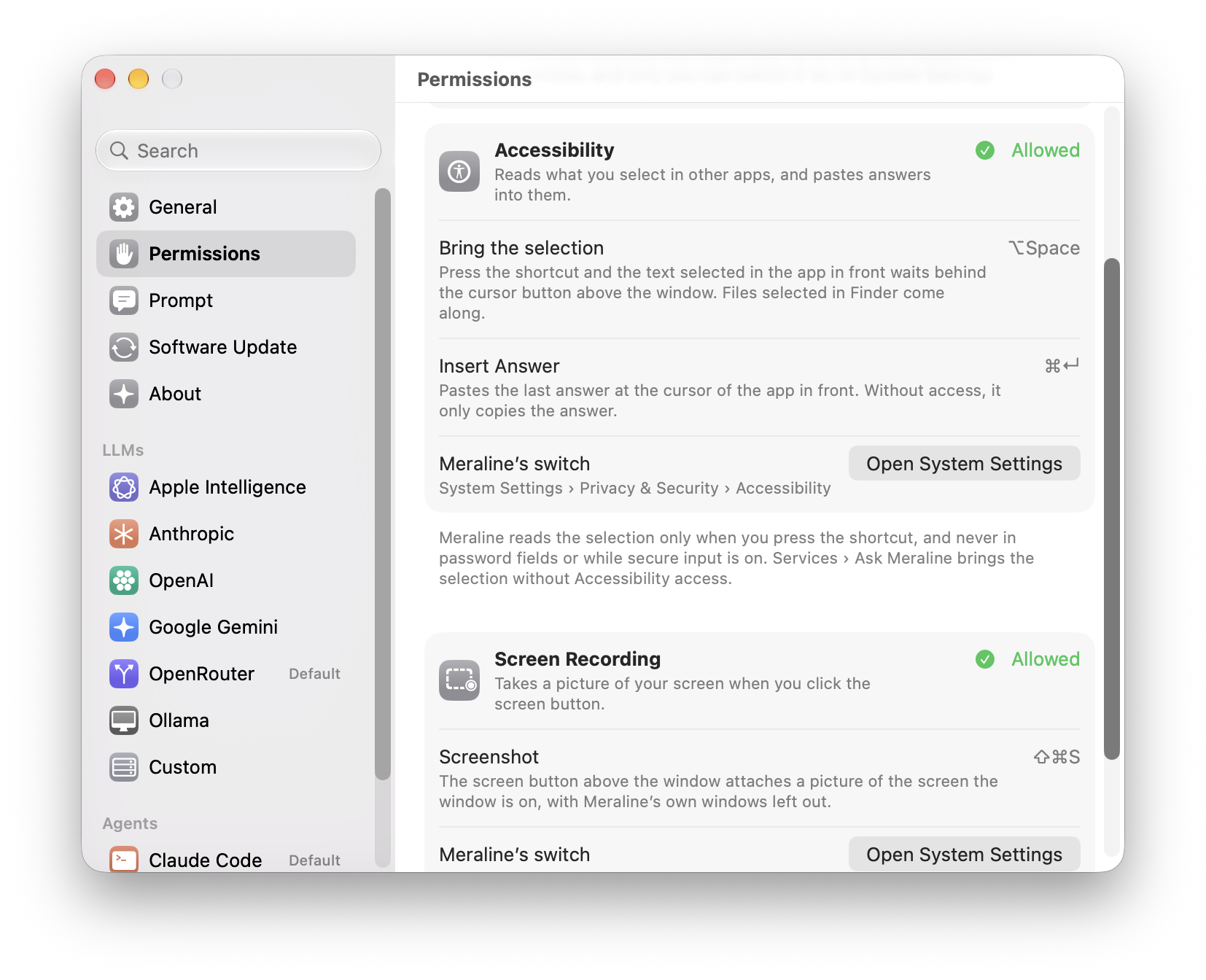
- Permissions in one place. Settings › Permissions lists what Meraline can ask macOS for, Accessibility and Screen Recording, with the features each one turns on and whether macOS allows it right now. Allow… asks macOS for it, and Open System Settings goes straight to the list with Meraline's switch. General no longer repeats the Accessibility row, and
meraline://settings?pane=permissionsopens the pane.
- No more "on this Mac" label. The badge beside the mode toggle and the note in the sparkle's panel are gone. Apple Intelligence and local Ollama models still answer without your question leaving the Mac.
Diagnostics
- More in Copy Diagnostics. The report says what the chats hold: how many there are and the memory they take, when the next one goes, the agents' folders on disk and their size, and how many agents are running, in counts and sizes only. It also says whether Meraline has Screen Recording access.
Fixes
- Dragging an empty part of the window moves it again on macOS 27, where the window had stopped moving.
All files, and how to verify them
| File | What it is | SHA-256 |
|---|---|---|
Meraline-1.6.0.dmg |
The installer | 99ff82aa9d0d74d92304c006e2b629ef8251da59883331bef7cffb77e3da8a67 |
Meraline-1.6.0.zip |
The archive Sparkle installs as an update | 450d84442253f7217cbb0d60f337cfef33e262ab3d111621222ebb0a8ec081da |
Meraline-1.6.0-dSYMs.zip |
Debug symbols, for reading crash reports | 56d701a8dec3e857ff5fde4138c2529160164ed7554377a556be8ba8c6326bde |
appcast.xml is the update feed that installed copies check once a day.
Every file was built by GitHub Actions from tag v1.6.0 and carries a signed provenance attestation:
gh attestation verify Meraline-1.6.0.dmg --repo Meldiron/meralineMeraline 1.5.0
Download Meraline-1.5.0.dmg, open it, and drag Meraline into your Applications folder. Meraline needs macOS 26 or later. Installed copies update themselves.
What's new
Ask
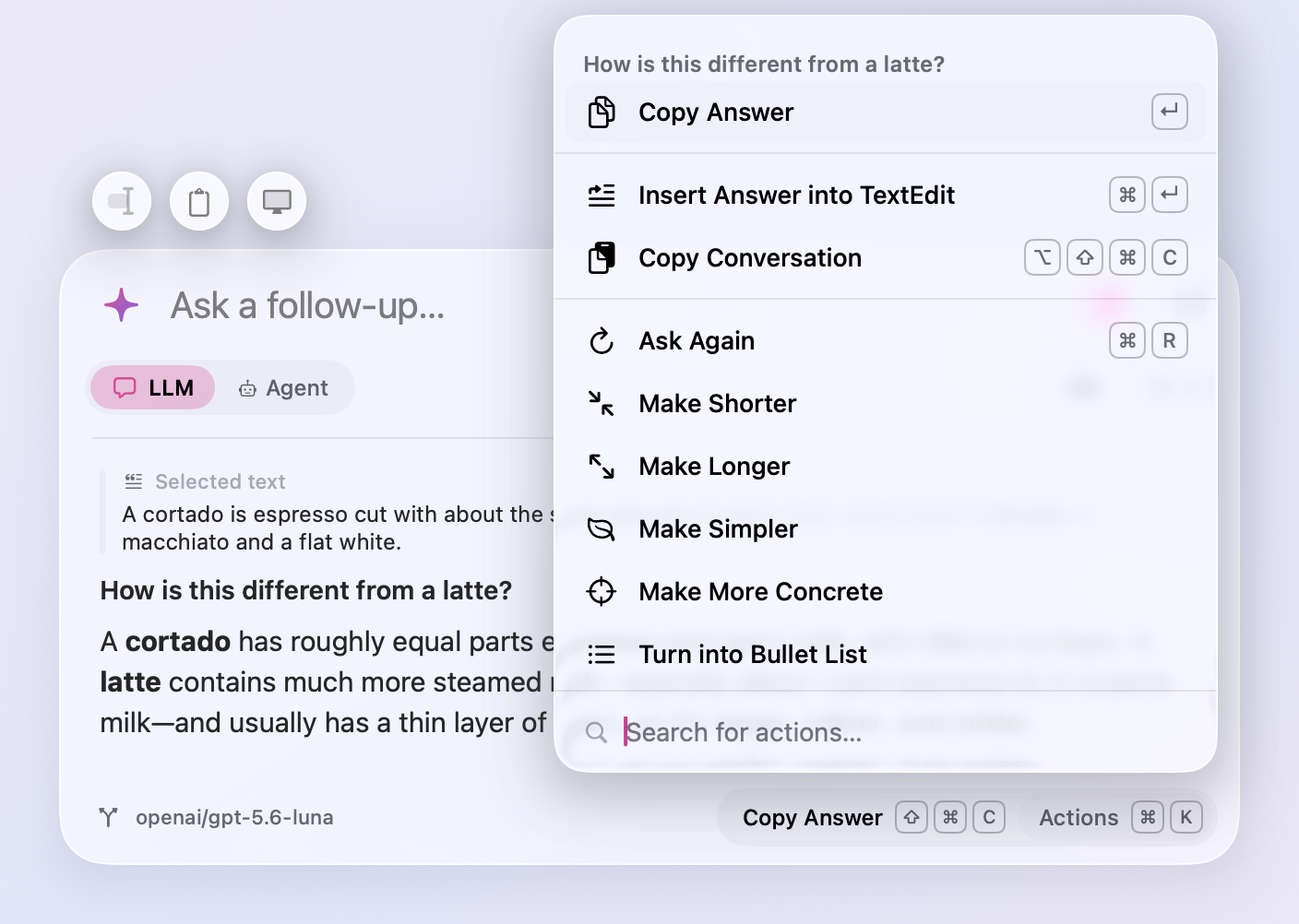
- Rewrite an answer. Actions (⌘K) under an answer now offer Make Shorter, Make Longer, Make Simpler, Make More Concrete, and Turn into Bullet List. The new answer replaces the old one under the same question, so rewrites stack (shorter, then a list) and a follow-up builds on what you see. If you stop the rewrite, or it fails, the old answer comes back.
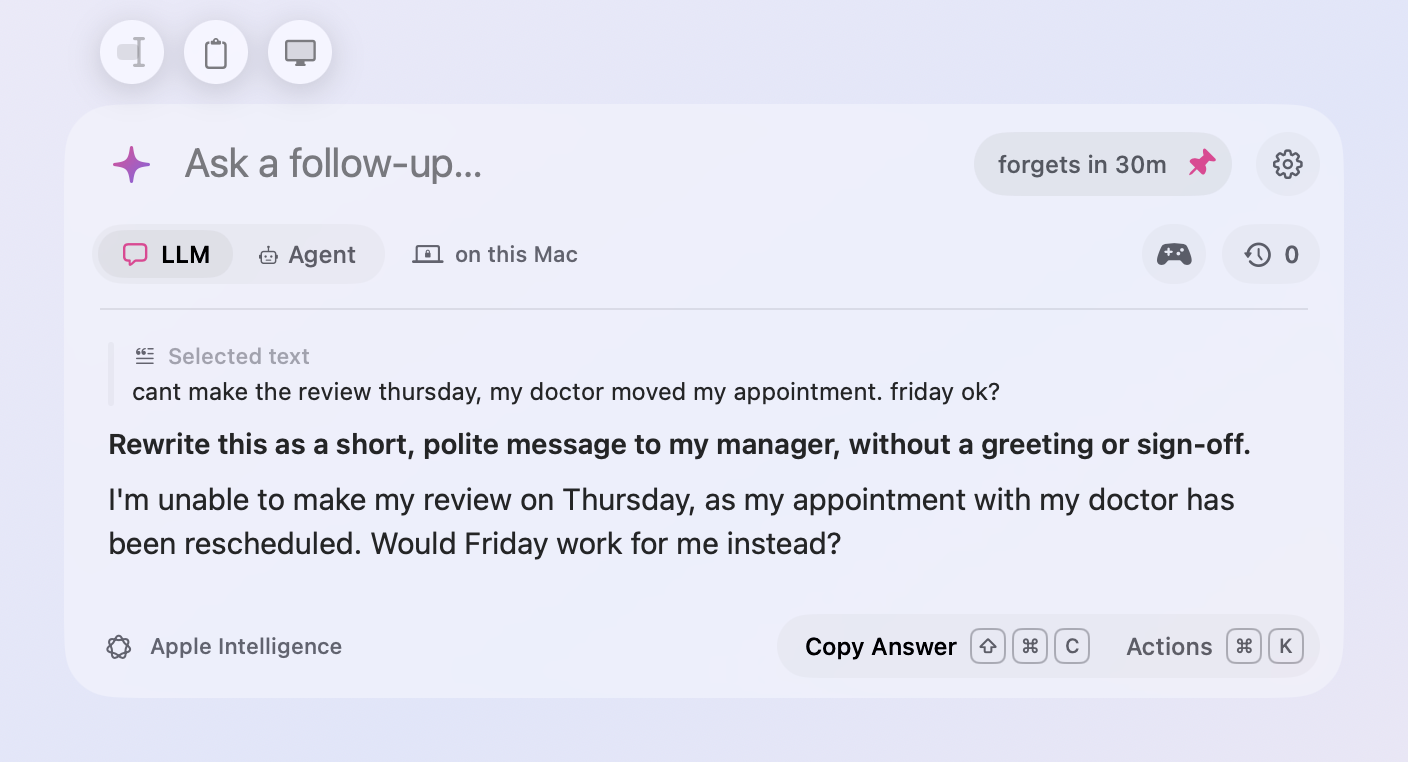
- Insert the answer where you were. Press ⌘↵ under an answer, or pick Insert Answer from Actions (⌘K), and the window closes and pastes the answer at the cursor of the app you opened it over. Select a paragraph, press ⌥ Space, ask for it friendlier, press ⌘↵, and the new text replaces the old. Your clipboard is put back afterwards. While you type a follow-up, ⌘↵ leaves it alone. Pasting needs the same Accessibility access as reading a selection; without it, the answer is copied for you to paste.
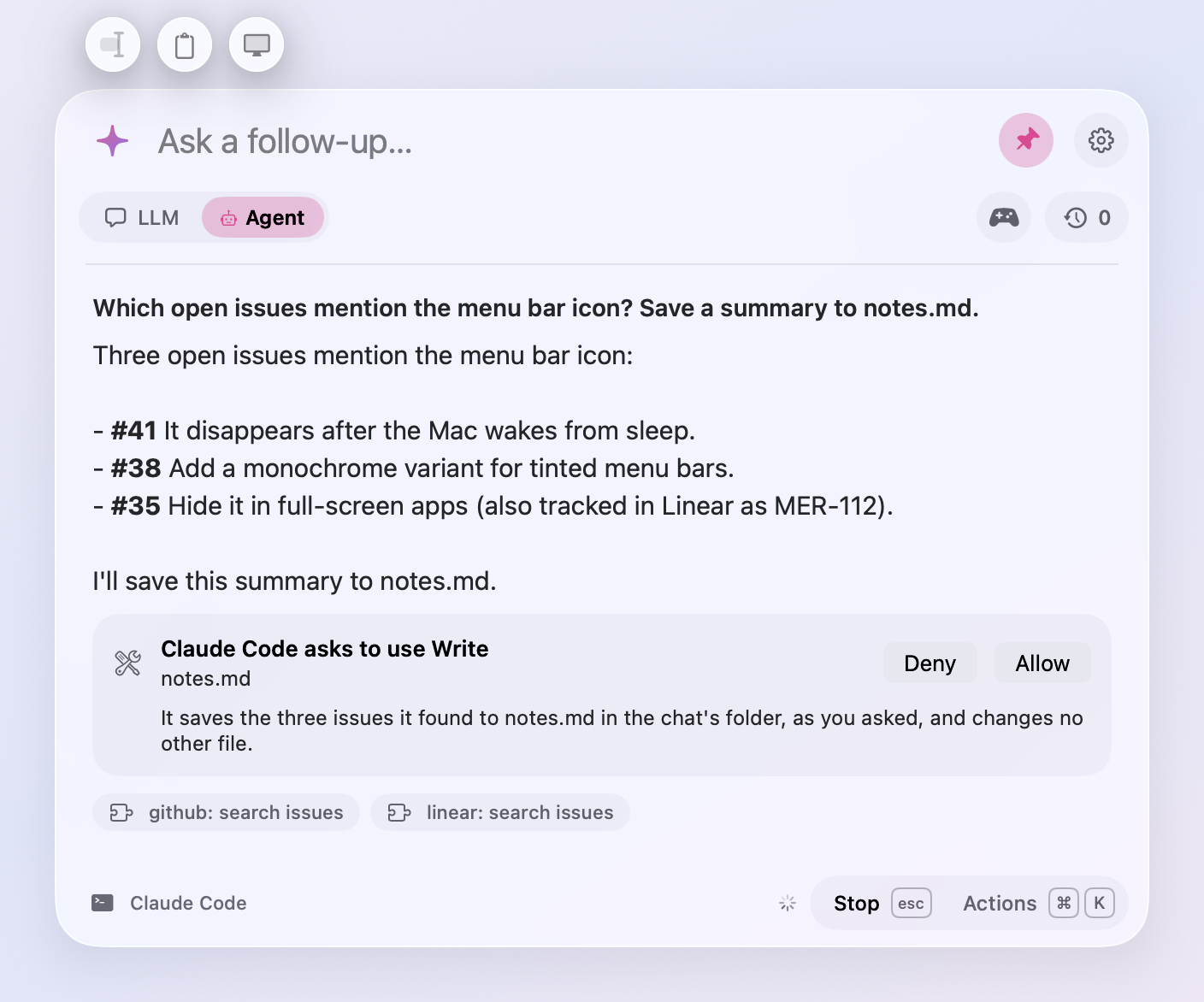
- Ask an agent why. When Claude Code asks to write a file, run a command, or use a skill, Why? beside Deny and Allow has it say in one line why it wants to, from your chat and what it is about to do. The reason comes from a quick run of Claude Code's small model with no tools, in a few seconds, and goes when you answer.
- More to automate.
meraline://asktakesclipboard=1andscreen=1, which add the clipboard and a screenshot as the buttons above the window do, so a Shortcut can ask "What's wrong here?" about your screen in one step. Withsend=1the question waits for the screenshot.agent=1oragent=0picks the mode for the question.meraline://play?game=oddOneOutstarts a game (meraline://playalone shows them all), andmeraline://mode?agent=1switches to Agent.
Privacy
- See when a chat moves on. A pinned window left on screen now counts down on its pin, "forgets in 28m", to the moment its chat moves to Recent Chats and the next question starts fresh. An anonymous chat is forgotten. Come back to the window and the clock stops. The clock now runs while a pinned window sits in the background as well as while the window is hidden, and it moves the chat on at that moment instead of the next time the window opens. Settings › General › Privacy sets how long, or Never.
- On this Mac. While Apple Intelligence answers, or Ollama with a model on this Mac, a quiet "on this Mac" sits beside the mode toggle, and the sparkle's panel says the same under those providers. Ollama's cloud models, a server on another machine, and Custom servers don't get it, since what you ask leaves the Mac.
- Hide from screen sharing. Turn it on in the sparkle's panel or Settings › General › Privacy, and Meraline asks macOS to leave the window out of screen sharing, recordings, and screenshots. A crossed-out eye beside the mode toggle shows it's on. It's off unless you turn it on. Apps that record the whole display, such as QuickTime and some video-call apps, can still show the window, so try it with yours before a call where it matters.
Updates and diagnostics
- Updates under the window. What's New moves from beside the pin to a capsule under the window's bottom left, lined up with the buttons above it. When a new version is out, an Update Available capsule sits beside it, or Restart to Update once the update has downloaded. Each has a cross that hides it until the next update.
- Screenshots in What's New. The release notes in the window now show the pictures the release shows on GitHub. Click one to open it full size.
- Copy Diagnostics after a crash. If Meraline quits unexpectedly, the next time you open the window a Copy Diagnostics capsule under it copies a report of what went wrong to paste into a bug report: the error and where in the code it happened, read from the crash report macOS keeps, with no questions, answers, or keys. It shows once for each crash, and its cross hides it. Nothing is sent anywhere.
Fixes
- Claude Code's asks no longer turn themselves down a few seconds after they appear ("tool permission stream closed"). The card now waits for as long as you take.
All files, and how to verify them
| File | What it is | SHA-256 |
|---|---|---|
Meraline-1.5.0.dmg |
The installer | 2f9dcd8d6b4de709b6a4eef8f639b3310182b26c193533c36067102b0b682acf |
Meraline-1.5.0.zip |
The archive Sparkle installs as an update | b2892115ace58b0f3ef0377075ccf26cb771d89d3ca6657fb4f930d6d57815a9 |
Meraline-1.5.0-dSYMs.zip |
Debug symbols, for reading crash reports | c21f82e2d56fef5f04f9842666e1d4166e2f96d74aa2806a5b211b6f00d5e207 |
appcast.xml is the update feed that installed copies check once a day.
Every file was built by GitHub Actions from tag v1.5.0 and carries a signed provenance attestation:
gh attestation verify Meraline-1.5.0.dmg --repo Meldiron/meraline