Events
How to create events, series, recurring dates, and event listings on ND Theme CMS v4.
Most events start in Django Admin, not by creating a CMS page by hand. Saving an event automatically creates (and keeps in sync) an Event Page.
Related: Site-Settings, Page-Meta, Page-Tags, Archiving, Navigation-and-Search.
- Go to Site-Settings at
/admin/ndthemes/setting/. - Open the Event Page setting (type: Page).
- Choose the CMS page that should parent new event pages (often your Events listing page).
When you create an event (or event series) without another parent, the system moves its CMS page under this Event Page setting.
- Open
/admin/ndthemes/event/. - Add an event and fill in:
- Name
- Start / End (date and time)
- Location
- Map link (optional)
- Series (optional — see Event Series below)
- Save.
The site:
- Creates a CMS page with the Event Page template
- Tags it with
Eventif that Page-Tags exists - Adds Date and Time and Location widgets into the page placeholders
- Seeds a short description in the content placeholder if it is empty
- Places the page under the series page (if set) or under the Site Settings Event Page parent
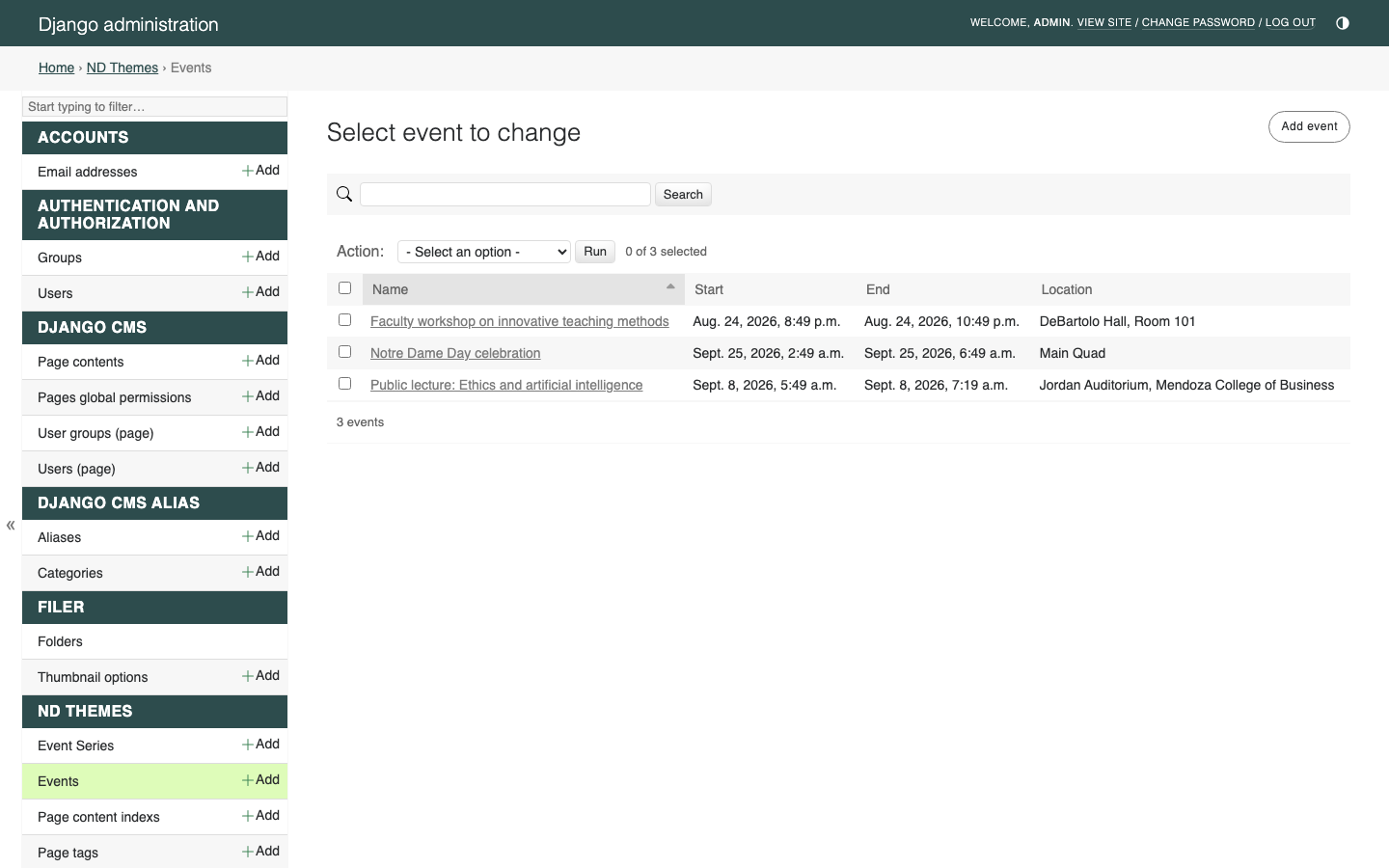
To delete events safely from the changelist, use the custom Delete selected events action (the default admin delete-selected action is disabled).
Open the public event URL (or find the page in the page tree). The template is Event Page.

| Placeholder | Role |
|---|---|
| date_time | Date and Time widget (synced with the Admin event) |
| location | Location widget (synced with the Admin event) |
| content | Event description and other body widgets |
Edit the description in content like any other page. Prefer NDT widgets where they fit; see Widgets.
| Change here | Updates |
|---|---|
Event in /admin/ndthemes/event/
|
Date and Time and Location on the Event Page |
| Date and Time on the Event Page | Event start / end in Admin |
| Location on the Event Page | Event location and map link in Admin |
Use either Admin or the page widgets — they stay aligned after you save.
Location fields on the widget: name, address, and Google Maps link. Admin stores location text and map link on the Event record.
Also set Page-Meta (preview image, summary, tags) so listings and cards look complete.
- Open
/admin/ndthemes/eventseries/. - Create a series with a Name and save.
The site:
- Creates an Event Series Page
- Tags it with
Eventwhen that tag exists - Adds an Event List widget to the Series Events placeholder with child events only turned on
- Places the series page under the Site Settings Event Page parent when it has no parent yet
Assign events to the series in the Event Admin (Series field). Those event pages move under the series page.
| Placeholder | Role |
|---|---|
| Page Lede | Intro under the title |
| Page Content | Optional content above the list |
| Series Events | Usually Event List (child events only) |
Deleting a series (via the custom bulk delete action) deletes its series page and linked events.
On /admin/ndthemes/event/:
- Select one or more existing events.
- Choose the admin action Create Recurring Events.
- Run the action.
Each selected event gets a new sibling event in the same recurring group (same name, location, and map link). You then set the new dates.
- If you selected one event, Admin opens the new event so you can enter its date.
- If you selected several, you get a confirmation and return to the event list to edit dates.
Recurring groups are also available at a public series URL pattern under /events/series/<slug>/ for linked occurrences.
Create (or use) a page with template Event Listing Page for your main upcoming-events view.

| Placeholder | Role |
|---|---|
| Page Lede | Short intro under the title |
| Page Content | Optional content above the list |
| Events List | Typically an Event List widget |
Point Site Settings Event Page at this listing page (or another intentional parent) so new events land in the right branch of the tree.
Use these on listing pages, series pages, or any content area:
Editor name: Event List
- Shows event pages that are still ongoing (
enddate on or after today) - Skips pages marked archived (
archive_now) - Optional tags filter (via Page Meta tags)
- Optional child events only (used on series pages)
- Optional date window, limit, and view-more link
Editor name: Events Insert
- Shows upcoming events (
startdate on or after today) - Skips archived pages
- Optional tags, date window, limit, and further-reading link
Both widgets read Event Pages (and their Date/Time + Location plugins), not a separate public calendar UI.
- Create events in Admin first; then enrich content and Page-Meta on the CMS page.
- Keep the
EventPage-Tags available if you want auto-tagging and archive/search categories. - Past or retired events: use Archiving, and optionally enable Auto-archive events in Site-Settings.
- Event Page placeholder slot names are lowercase (
date_time,location,content) — that is expected in Structure mode.