Repository navigation
Addons
mcIRC itself is chat. Everything else is an addon. A new setup installs and switches on MeshCore tools; everything else you choose. Open Tools > Addons:
-
Browse online catalog - addons reviewed and tested by the maintainers. Pick one, press Install.
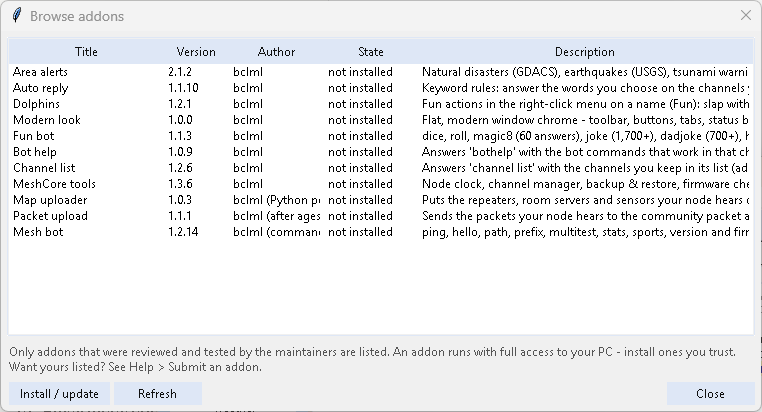
- Install from file / folder - an addon you downloaded or are developing.
- Update - installs newer versions of your addons from the catalog. Help > Check for updates does this too, together with mcIRC itself.
- Switch them on and off in the same window. Double-click an addon (or Settings...) to open its settings in their own window, including Use on these nodes when you connect more than one node (default: the main node; each node's tab also has Use this addon on node ...) - the channels an addon uses on a node are added to that node for you, and for every bot Send answers by private message instead of in the channel.
-
Settings per node (mcIRC 3.0; simpler since 2026.10.15): with more than one node connected, the settings window has a tab per node - main node holds the addon's settings, and an extra node's tab changes only what that node needs (the tab gets a *); everything else follows the main node. The addon then answers each node with that node's settings - e.g. a bot on one channel for one node and another channel for the other. Use the main node's settings for this node clears an extra node's own settings. What an addon does on its own - Area alerts' checks, rain warnings, announcements - uses the main node's settings. (Settings saved on the old separate main node tab became the main settings on the first start, after a copy of
gui_settings.jsonwas put inbackup/.) -
Channels are added to your node for you (mcIRC 2026.10.12-5): a bot only hears the channels its node is on, so when an addon uses a channel the node doesn't have - typed into its settings, a bot's answer channels, an alert addon's channels while it broadcasts - mcIRC adds it as
#namein a free slot: when you press OK / Apply, when you switch the addon on and right after connecting. Nothing on the node is ever overwritten or removed; all, Public and private names are left alone. A full node: Status says which channel couldn't be added - make room in MeshCore tools > Channels. -
Answers say who they are for (mcIRC 2026.10.15-4): every addon's answer in a channel starts with
@name:(@[Bob Smith]:for a name with spaces - MeshCore's mention form, so their app highlights it). Private answers are unchanged. A bot set to answer privately can only message someone in node memory (an advert heard from them); otherwise it answers in the channel instead - never in Public (any node's): there it doesn't answer, and Status says so. - Channels are a list (mcIRC 2026.10.15): every setting that takes channels shows them one by one, each with a x to remove it, and an Add menu - your node's channels, All channels (where a bot may answer everywhere) and Other channel... to type a name. When the list is empty it says what that means for that setting (off, every channel, the kind's own channel ...).
-
Every bot's settings window also has (mcIRC 2026.10.10-1): Wait 5 seconds before answering, then 9 seconds between parts - change the wait before an answer (repeaters are still repeating the question for a few seconds; 0 answers at once) and the gap between the parts of a long answer - and Command names...: your own words for any command, e.g.
pforpath. Both work, or tick not to 'path' itself and only yours do;bothelplists them (path/p). - No bots in Public (default): a bot's answer to a question asked in Public goes to that person privately, and a bot's own posts there are dropped. The toolbar switch Bots in Public: OFF/ON (red when on) and Options > Display change it.
- A channel an addon posts to that your node doesn't have is added to the node (as
#name, in the first free slot) instead of the message being lost. -
Calling a bot command: the command word first -
stats,!stats,/stats,.stats, or after addressing the bot:@[mcIRC] stats,@mcIRC: stats(alsobothelp). The bots answer private messages too (Also answer private messages in their settings - on by default). - Every switched-on addon has its own submenu in the Addons menu: its own entries (MeshCore tools > Node clock..., Map uploader > Recent uploads..., Packet upload > Status..., ...), then Settings... and Switch off.
- The bots and uploaders (Fun bot, Mesh bot, Channel list, Bot help, Map uploader, Packet upload) also have an ON/OFF switch on the toolbar, like Auto reply. Too many? Untick Show its ON/OFF switch on the toolbar in that addon's settings.
-
MeshCore tools - node clock, channels, backup & restore, firmware check / update, firmware builder (USB / Bluetooth / Wi-Fi companions, repeaters, room servers, sensors), path tools, packet monitor, radio health, coverage map. See MeshCore Tools.
-
Weather bot - now part of Area alerts (mcIRC 2026.10.15-4): its commands are on Area alerts' Weather commands tab (below). When you update, its settings - every node's - are added to Area alerts and it switches itself off (nothing is deleted). It is no longer in the catalog.
-
Fun bot -
dice,roll,magic8,joke,dadjoke,hacker,catfact,wc(World Cup), each on for the channels you choose. Jokes, dad jokes and cat facts come from free online collections - about 2,900, clean ones only (JokeAPI's safe mode plus a word filter) - and one isn't told again until about 400 others have been (remembered over restarts); offline, the built-in ones. 60 Magic 8-Ball answers, none twice within 30. Untick from free online collections in its settings to use only the built-in ones.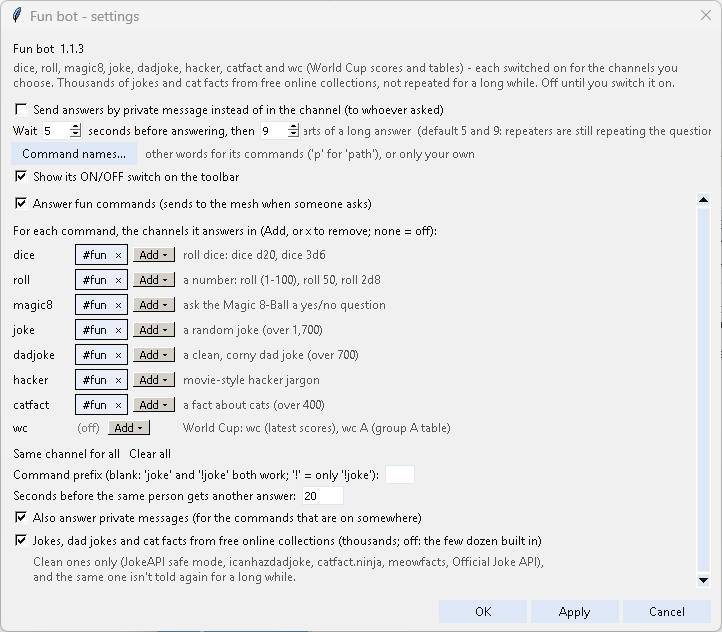
-
Bot help - answers
bothelpwith the bot commands that work in that channel; optional daily reminder. -
Channel list - answers
channel listwith the channels you keep in its list. People can add one withchannel list add #name(checked names, at most 30; you see who added what in Status and can switch it off in its settings - or only in some channels: ...but not in these channels). -
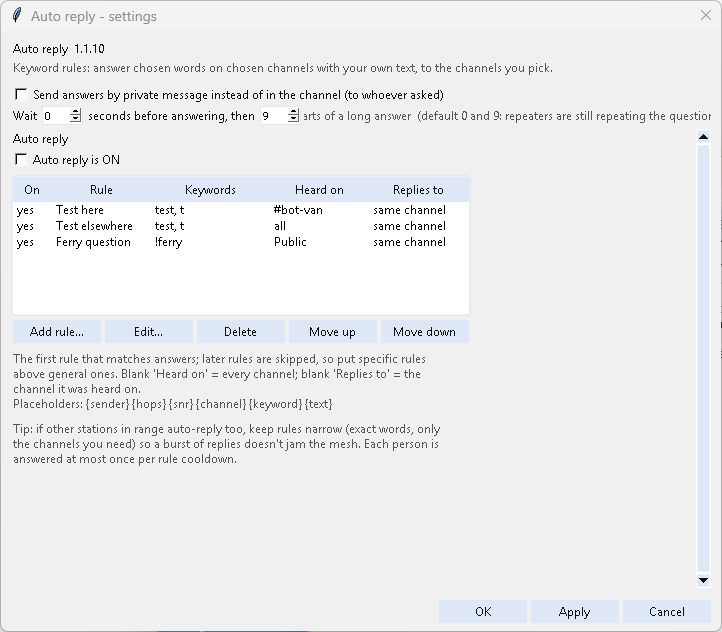
Auto reply - keyword rules: choose the words, the channels they are heard on, the reply text and the channels the reply goes to, with a per-person cooldown.
-
Dolphins - fun actions in the right-click menu on any name (Fun): slap with a large trout, a pod of dolphins, water balloon, anvil, penguins, a fresh battery and more - your own list;
/dolphins,/slap,/fun. Also a picture behind the channel list (on with the addon): a pod of dolphins, or your own picture - see Themes. It replaces the retired Slap addon. -
Modern look - flat, modern window chrome in the colours of your skin or theme.
-
Area alerts - alerts for the areas you choose anywhere in the world (pick a country, then a region, then an area): natural disasters (GDACS), earthquakes (USGS), tsunami warnings (NOAA), official weather warnings (Canada, the US and 38 European countries), public emergency alerts (Canada: Alert Ready; the US: FEMA IPAWS - evacuations, civil emergencies, shelter in place, Amber alerts, earthquake early warnings, from the authorities; tick Public emergency alerts; the weather services' own alerts come under Weather warnings, tests are left out), public transit service alerts (489 agencies in 28 countries - tick the ones to follow; by default only service stops and big delays) and road closures (21 road-information sites in Canada and the US). Most sources need no key; the ones that need a free key say step by step how to get it, with a button to the sign-up page. Alerts show in the Area alerts window; they go to the mesh only with Broadcast to the mesh ticked - each alert once (one event near several of your areas, such as an earthquake, goes out once, worded for the nearest area; an alert the agency rewords or republishes within 6 hours is shown as (again, not sent); Area alerts 2.1.3), at most one every 30 s and 10 messages an hour (a setting on the Route and more tab), never in Public. Each kind, transit agency or road source has its own channels (Add - up to 5). The first check after starting, switching on or adding areas only shows what is already in force. Needs
pip install requests gtfs-realtime-bindings. Daily weather (its own checkbox on the first tab): a 3-day forecast and a 5-day outlook for each area - each with its own checkbox and time (06:00 and 08:00 by default; 24-hour,6:30 PMand7amwork too) and its own channels (empty: the Weather warnings channels). Each goes out once a day within the hour after its time; mcIRC started later doesn't post a stale one.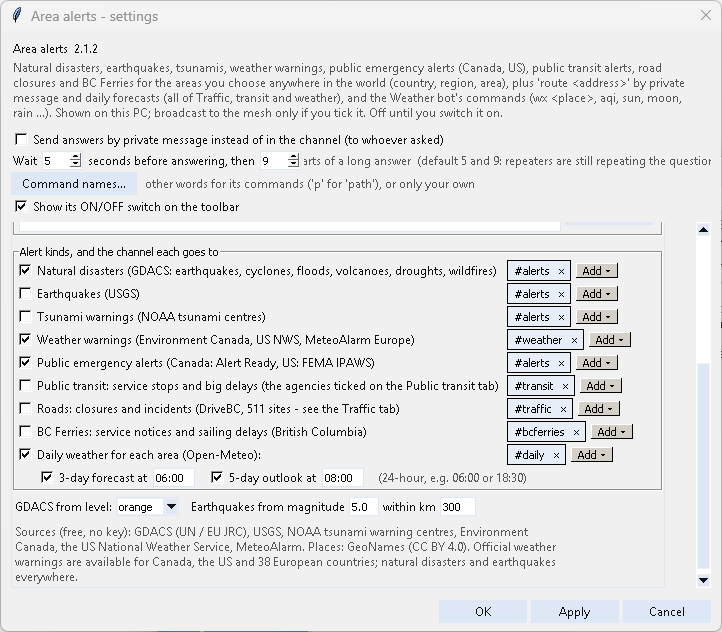 Since 2.0 it also does everything Traffic, transit and weather did: BC Ferries service notices and late sailings (a kind of its own), the map's DriveBC incidents and Earthquakes layers, a weekly reminder of which channels carry the alerts, mute / unmute in the Addons menu, Start every alert with (a group's region code, such as
 [on]) and theroutecommand below - all on the Route and more tab.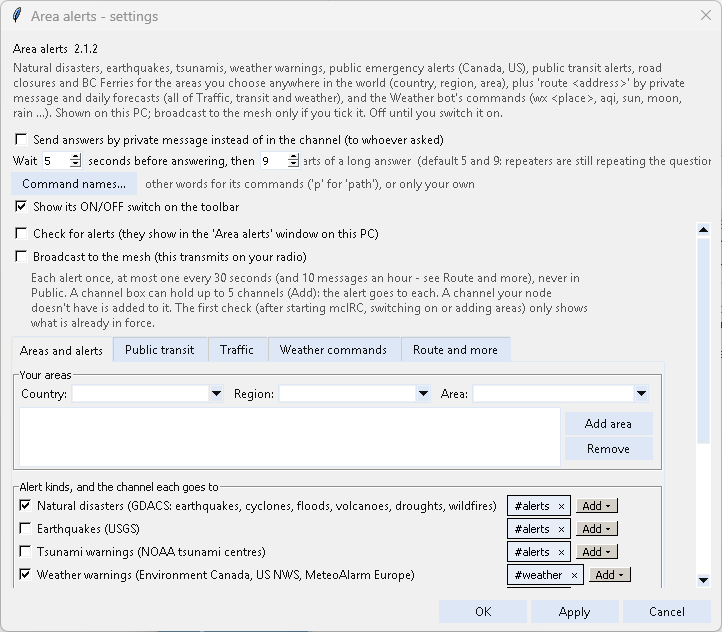 Weather commands (since 2.1 - they were the Weather bot):
 wx <place>(city, postal code, ZIP, node name or lat,lon),gwx,aqi,sun,moon,solar,sf,hfcond,satpass,airplanes,rain,aurora,channels,status,contact, in the channels you choose (default#weather), and an optional rain warning. Without a place (wx,sun,rain...) it answers for where the asker is: their node's advertised position, else the first repeater their message reached (the one nearest them; this needs mcIRC on USB or Wi-Fi, which hear packets), else its own location. Answers are named by town - or Near you when the town can't be looked up; never by a node's name, which often holds someone's callsign (Area alerts 2.1.2). Off until you tick Answer weather commands; it works whether or not the alert checks are on.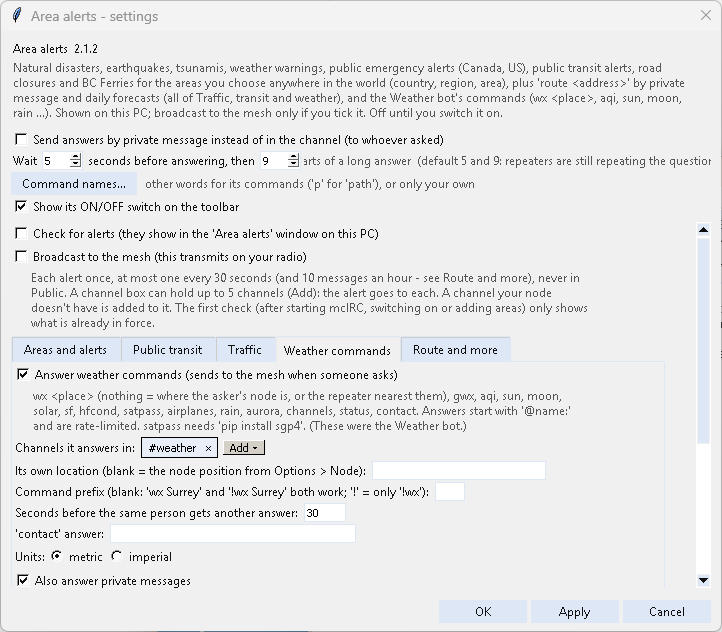
-
Mesh bot - the meshcore-bot commands the other bots don't have:
ping,hello,path(the repeaters your message came through - when they aren't known it says how many hops and why),prefix A1/prefix free,multitest(the paths your message took),stats/stat(last 24 h: the nodes your node heard, the busiest channels from the chat logs, and the packets heard since mcIRC started),sports,version/ver,firmware/fw(the newest MeshCore releases - read-only), and a greeter that welcomes each newcomer once with a random greeting from a list you can edit -{nick}and{channel}are filled in, and the defaults include mIRC Invision-style ones like»» Name has entered the room. Everyone act natural... ««(plain text - the mesh can't carry mIRC colours). Off by default; anyone already in mcIRC's node memory counts as known.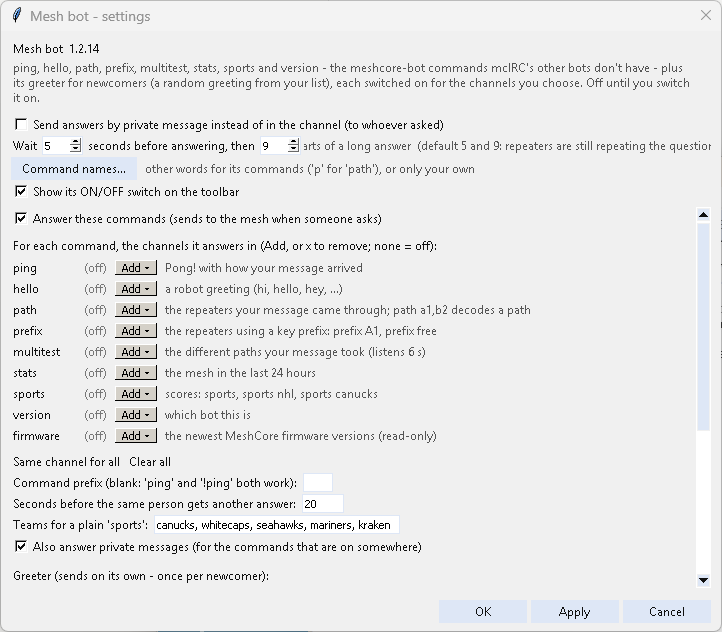
-
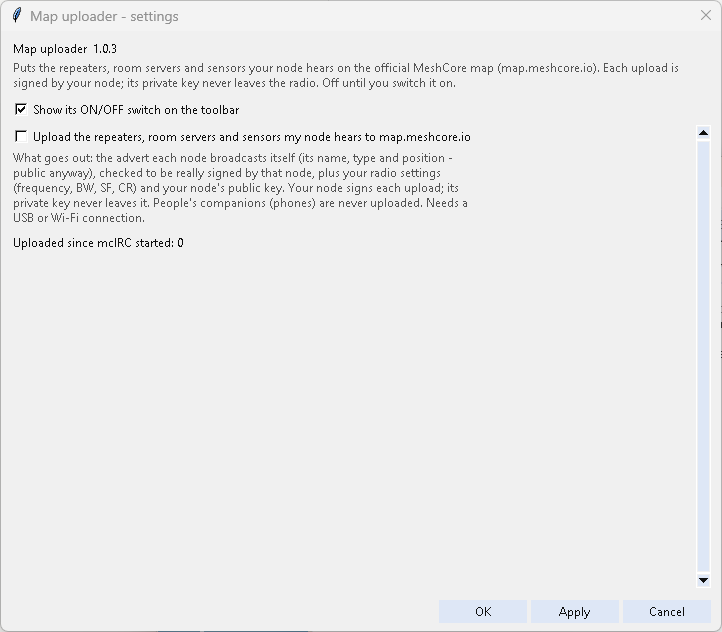
Map uploader - puts the repeaters, room servers and sensors your node hears on map.meshcore.io. Each upload is signed by your node itself; its private key never leaves the radio. People's companions are never uploaded. Signing needs USB or Wi-Fi (not Bluetooth). Map upload skipped: the node was busy is harmless: the node lost track of a signature for a moment (it is tried 3 times), only that advert is skipped and uploading carries on. Map uploader paused means the node really can't sign: update its firmware with MeshCore tools > Firmware.
-
Packet upload - sends the packets your node hears to community packet analyzers (28 to choose from - pick the ones that cover your area; none is ticked when installed, nothing is sent until you choose) so they can map coverage and routes. Set your 3-letter area code (the IATA code of the airport nearest you, e.g. LHR, JFK, SYD) and tick the servers; you log in with a token your node signs. Needs
pip install paho-mqtt. Your node then appears as an observer under its own name (on live.meshcore.ca: Filters > Observers) - online while mcIRC runs. The area code decides where your node is listed: analyzers group nearby codes into their own regions.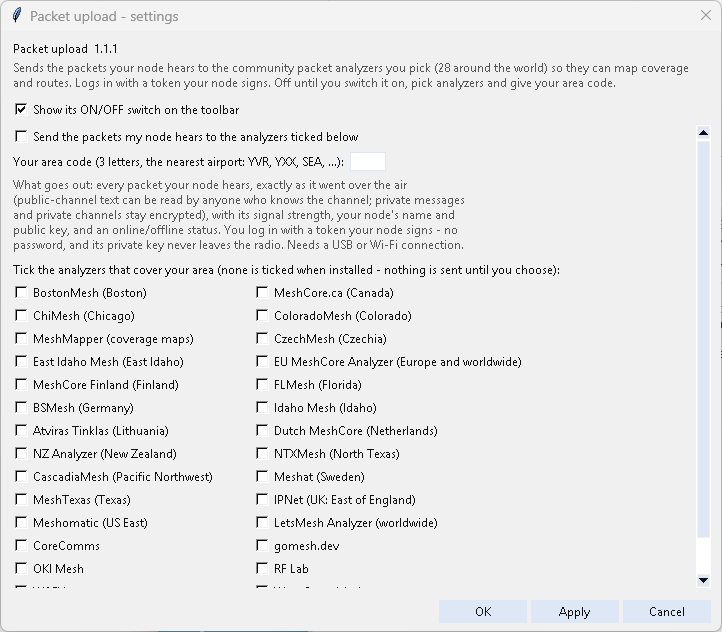
-
Nodes dashboard - for people with many nodes (companions, repeaters, room servers): the ones you pick in one window (Addons menu > Nodes dashboard..., or
/dashboard). A table shows each node as online (heard within an hour), quiet (within a day) or silent, when it was last heard, which of your nodes hear it, how many of its adverts, relayed packets and messages were heard, its signal and the hops of its adverts - click a heading to sort. Pick one node for graphs of its signal, packets per hour and advert hops (last 24 h or 7 days); none or several for a comparison. Add nodes... lists every node mcIRC remembers, with a search box and a type filter; Remove asks first and deletes that node's graph history. It only listens - no logins or status requests, nothing is sent - so it shows what your radio hears of a node, not a repeater's own battery or counters. Relayed counts a packet only when its last hop matches exactly one repeater you know (short 1-byte hops are often shared). The history stays on your PC (logs/nodes_dashboard.json, 7 days by default). -
Channel spotter - logs every
#channelname people mention in messages, in its own Channels spotted window: who mentioned it first, in which channel, when, and how often./spottedlists them, most mentioned first (/spotted new: only ones your node doesn't have). It only listens; off until you switch it on. -
HF conditions - for amateur radio operators: someone types
hfand gets the HF band conditions right now - solar flux, sunspots, A and K index, X-rays, noise, and Good / Fair / Poor for 80-40m, 30-20m, 17-15m and 12-10m by day and night (plus any VHF band that is open). The trigger words are yours to change (comma separated, one or more words each; defaulthf, condx, bands, propagation;!hf,@[bot] hfandhf pleasework too). It answers only in the channels you add (Add / x) and in private messages (can be switched off) - never in Public, not even with All channels. One answer per person a minute (a setting). Data from hamqsl.com (N0NBH), free with no key, read at most every 30 minutes. Area alerts' weather commands also answerhfcond: leave that word out of the trigger words if both are on. Off until you switch it on. -
Traffic, transit and weather - now part of Area alerts (mcIRC 2026.10.15). When you update, its settings - areas, alert types, channels, the BC Transit systems it followed, TransLink and TomTom keys, the route command - are added to Area alerts' own, and it switches itself off (nothing is deleted). It is no longer in the catalog. The console bot (
Run_Agent.bat) is unchanged.-
route <address>- directions by private message (Area alerts > Settings > Route and more, off until you tick it). Someone sends the bot a private messageroute 1234 Main St, Town(alsodirections/gps, orroute <from> to <to>); it answers privately: the route (distance and time), Via: the roads in order with each city the route enters (road numbers as people say them, e.g. Hwy 1), what is on the way (DriveBC closures, incidents and roadwork - British Columbia only; names DriveBC's feed sends with broken letters, like stal¿¿¿¿w¿¿as¿¿m Bridge, are mended - in channel alerts too), each with where it is: DriveBC's cross streets (Roadwork Hwy 11 Hazelwood Ave to Valley Rd), else the nearest freeway exit (exit 66 (232 St), from OpenStreetMap), else the town - all of it listed over as many messages as it takes, and where it started - the position the asker's node last advertised, and how long ago (moved since? send an advert and ask again). The quickest route is taken; about as quick (within 3 minutes): the one with fewer incidents and roadwork; a road closed on the way is avoided while another route is open. Travel times are without live congestion, unless you add a free TomTom key (Route and more tab: Open the sign-up page, register at my.tomtom.com with no credit card, copy the app's API key, not the App ID; 2,500 routes a day). With a key, each route's time includes the slow traffic on it now (~102 min (+5 min traffic now)), a jam can make another route the quickest (avoids slow traffic), and the jams on the way are named (Slow Hwy 1 from exit 58 (200 St) 8 km +6 min), outside BC too. The start and destination then also go to TomTom; the key is never logged and shows only as (set) in bug reports. Without a key nothing changes. Private only: asked in a channel, the bot never repeats the address - it only says to ask by private message; addresses are never logged; one route per person every 2 minutes. Free services, no key: OpenStreetMap (addresses) and OSRM (routes).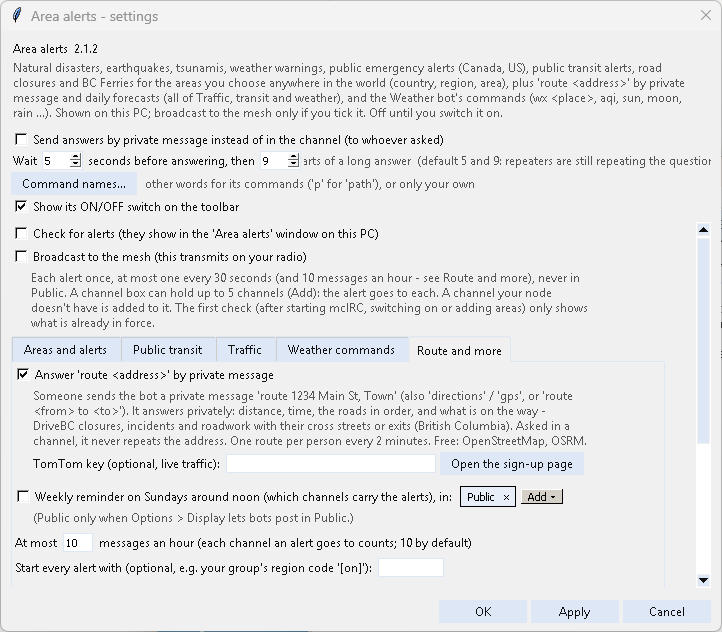
-
Bots are off until you switch them on, wait a few seconds before answering (so the answer doesn't collide with repeaters still repeating the question) and never transmit on their own otherwise.
Right-click a name in the chat > Fun sends one line about that person to the window in front, for example
slaps @[Bob] around a bit with a large trout 🐟 or sends a pod of dolphins to rescue @[Bob] from a boring conversation 🐬.
Out of the box: the trout slap, a pod of dolphins, dolphins that swim circles / rescue / do backflips / splash / carry them off to a
tropical island, a clue-by-four, a water balloon, an anvil, wild penguins, fixing their antenna and a fresh battery.
Change the list by double-clicking Dolphins in Tools > Addons: Add, Edit, Remove, Up / Down, or
Defaults to start over. In a message, {nick} is where the person's name goes; a counter checks it fits one mesh message.
From the input line: /fun lists them, /fun <number or name> <nick> sends one, /slap <nick> and /dolphins [nick] still work.
One per 10 seconds - the mesh is a small shared channel. Nothing is ever sent unless you click or type it.
The Slap addon is retired: its trout is one of the fun actions. If you still have it, it keeps working and mcIRC tells you once that you can remove it.
An addon runs Python code with full access to your PC - install only addons you trust. The catalog lists only reviewed ones.
The catalog can list addons kept in their authors' own GitHub repos, and addons that build on other projects follow them. mcIRC installs exactly the version the maintainers reviewed. When the author publishes something newer, Browse online catalog shows "... upstream (waiting for review)" and nobody gets it until it has been reviewed - then Check for updates brings it to everyone. Map uploader, Packet upload and Mesh bot follow recrof/map.meshcore.io-uploader, agessaman/meshcore-packet-capture and agessaman/meshcore-bot this way.
Want to make one? See Writing an Addon.