Repository navigation
Updating
Help > Check for updates downloads the newest version from GitHub and installs it - and your addons: newer addons are updated together with mcIRC, or on their own when only they are newer (they run the new version at once, no restart). mcIRC also checks quietly once a day and says so in the Status window, for the app and for addons - and a big red UPDATE square flashes at the start of the toolbar (mcIRC 2026.10.23-3). Click it to install; it stays after a restart until the update is installed.

- Your settings, installed addons, logs and node memory are never touched.
- Files that get replaced are backed up to
backup/first. - If you edited
emergency_agent.py, your copy is kept and the new one is saved beside it asemergency_agent.py.new. - Installed addons are refreshed when the new version ships a newer package.
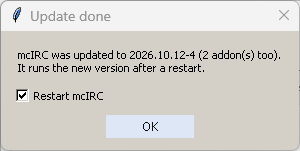
A box says what was updated, with Restart mcIRC:
- ticked after an mcIRC update: the new version runs after a restart;
- unticked after addon-only updates: they already run the new version.
Press OK: with the box ticked, mcIRC closes and opens again by itself. The new copy waits until the old one has fully closed, then connects again if you were connected. Untick it (or close the box with X) to restart later; Restart now in the update window does the same.