Repository navigation
Slash Commands
Type / in the input line and the matching commands pop up above the input line, filtered as you type. Up/Down move through the list, Tab completes, Esc closes.
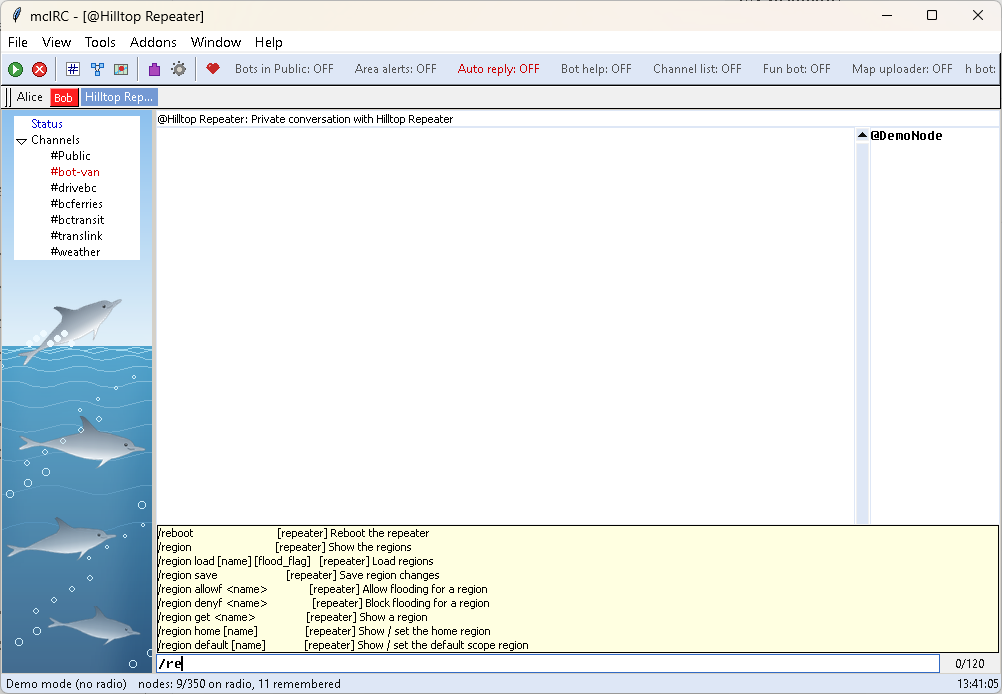
Where a command goes
- In a repeater or room-server window: the Repeater commands below are sent to that device.
- Anywhere else: the Your node commands run on your own node through meshcli.
-
/meshcli <anything>always runs any meshcli command on your node.
| Command | Arguments | What it does |
|---|---|---|
/help |
Show this command list in the Status window | |
/list |
Channel list | |
/map |
Open the map | |
/nodes |
Open the node list | |
/addons |
Open the addon manager | |
/options |
Open Options | |
/connect |
Connect to your node | |
/disconnect |
Disconnect from your node | |
/freq |
<MHz> |
Change YOUR node's radio frequency (it reboots) (asks first) |
/clear |
Clear this window | |
/join |
<#channel> [key] |
Join a channel - added to your node if it isn't there yet (a hashtag channel; with a 32-character key: a private one) |
/part |
[#channel] |
Leave a channel - removed from your node, its window closed |
/query |
<name> |
Open a private window with a node |
/msg |
<name> <text> |
Send a direct message |
/close |
Close this window | |
/login |
<admin password> |
Log in to the repeater / room server in this private window |
/logout |
Forget the login for this repeater | |
/node |
<meshcli command> |
Run a meshcli command on YOUR node (when a repeater window is open) |
/rpt |
<text> |
Send raw text to the repeater in this private window |
/meshcli |
<command...> |
Run any meshcli command on your node |
/bug |
Report a bug (sends a troubleshooting log to GitHub) | |
/donate |
Support mcIRC with an optional donation (PayPal) | |
/quit |
Exit mcIRC |
| Command | Arguments | What it does |
|---|---|---|
/reboot |
Reboot the repeater (asks first) | |
/poweroff |
Power the repeater off (asks first) | |
/shutdown |
Power the repeater off (asks first) | |
/clkreboot |
Reset the clock and reboot (asks first) | |
/clock |
Show the repeater's time (UTC) | |
/clock sync |
Set the repeater's clock from yours | |
/time |
<epoch_seconds> |
Set the repeater's time |
/advert |
Send a flood advert | |
/advert.zerohop |
Send a zero-hop advert | |
/start ota |
Start an over-the-air firmware update (asks first) | |
/erase |
FACTORY RESET - erases the repeater (asks first) | |
/neighbors |
List nearby repeaters | |
/neighbor.remove |
<pubkey_prefix> |
Remove a neighbor |
/discover.neighbors |
Discover zero-hop neighbors | |
/clear stats |
Clear the statistics | |
/stats-core |
Battery, uptime, queue length | |
/stats-radio |
Noise floor, RSSI/SNR, airtime | |
/stats-packets |
Packet counters | |
/log start |
Start capturing the rx log | |
/log stop |
Stop capturing the rx log | |
/log erase |
Erase the captured log | |
/log |
Print the captured log | |
/ver |
Firmware version | |
/board |
Hardware name | |
/get |
<param> |
Read a setting (type /get to see them) |
/set |
<param> <value> |
Change a setting (type /set to see them) |
/tempradio |
<freq>,<bw>,<sf>,<cr>,<minutes> |
Temporary radio parameters |
/password |
<new admin password> |
Change the admin password (asks first) |
/powersaving |
[on|off] |
Show / set power saving (repeater) |
/setperm |
<pubkey> <0-3> |
Set a companion's permission (0 guest .. 3 admin) |
/sensor list |
[start] |
List the sensors on the node |
/region |
Show the regions | |
/region load |
[name] [flood_flag] |
Load regions |
/region save |
Save region changes | |
/region allowf |
<name> |
Allow flooding for a region |
/region denyf |
<name> |
Block flooding for a region |
/region get |
<name> |
Show a region |
/region home |
[name] |
Show / set the home region |
/region default |
[name] |
Show / set the default scope region |
/region put |
<name> [parent] |
Add or update a region |
/region remove |
<name> |
Remove a region |
| Command | Arguments | What it does |
|---|---|---|
/advert |
Send an advert from your node | |
/floodadv |
Send a flood advert from your node | |
/reboot |
Reboot YOUR node (asks first) | |
/clock |
[sync] |
Show / sync your node's clock |
/time |
<epoch> |
Set your node's clock |
/ver |
Your node's firmware version | |
/infos |
Your node's settings | |
/get |
<param> |
Read a setting of your node |
/set |
<param> <value> |
Change a setting of your node |
/contacts |
List your node's contacts | |
/contact_info |
<name> |
Details of a contact |
/share_contact |
<name> |
Share a contact with others |
/export_contact |
<name> |
A contact's URI |
/import_contact |
<URI> |
Import a contact |
/remove_contact |
<name> |
Remove a contact from your node (asks first) |
/path |
<name> |
Show the path to a contact |
/disc_path |
<name> |
Discover a new path |
/reset_path |
<name> |
Reset the path to flood |
/change_path |
<name> <path> |
Change the path to a contact |
/advert_path |
<key> |
Path from an advert |
/req_status |
<name> |
Request status from a repeater |
/req_telemetry |
<name> |
Request telemetry |
/req_neighbours |
<name> |
Request a repeater's neighbours |
/req_acl |
<name> |
Request a repeater's access list |
/req_owner |
<name> |
Request a repeater's owner info |
/req_regions |
<name> |
Request a repeater's regions |
/req_clock |
<name> |
Request a repeater's clock |
/req_mma |
<name> |
Min/max/avg from a sensor |
/trace |
<path> |
Run a trace (comma separated path) |
/node_discover |
<filter> |
Discover nearby nodes (all, or types) |
/get_channels |
List your node's channels | |
/get_channel |
<n|name> |
Info for a channel |
/set_channel |
<n> <name> [key] |
Set a channel |
/add_channel |
<name> [key] |
Add a channel |
/remove_channel |
<n|name> |
Remove a channel (asks first) |
/scope |
<scope> |
Set the scope for flood messages |
/pending_contacts |
Show pending contacts | |
/add_pending |
<pending> |
Add a pending contact |
/flush_pending |
Flush pending contacts | |
/chan |
<n> <text> |
Send text to channel number n |
/cmd |
<name> <command> |
Send a command to a repeater (no ack) |