Defining keywords for the animation
This is typically done by creating a Java enum that implements the Keyword interface. The Keyword interface defines the following methods:
public interface Keyword {

	/**
	 * The actual keyword text.
	 */
	public String getKeyword();

	/**
	 * A list of strings that describe each expected value
	 */
	public String[] getAutocompletionDescriptions();

	/**
	 * Returns an array with the indices of the rendering
	 * state properties (i.e. the indices in the
	 * nonchannelproperties and channelproperties
	 * arrays defined in RenderingState).
	 */
	public int[] getRenderingStateProperties();

	/**
	 * Returns the length of the keyword.
	 */
	public int length();

	/**
	 * Returns a map that assigns pre-defined strings to values.
	 */
	public Map<String, double[]> getReplacementMap();
}
This may seem overly complicated at first glance, but most of these functions may return null, but allow to greatly improve functionality. We’ll go through it step by step.
The most basic version for the example above would look like this:
public enum ExtKeyword implements Keyword {

	BRIGHTNESS("brightness", ExtRenderingState.BRIGHTNESS);

	private final String keyword;
	private final int[] rsProperties;

	private ExtKeyword(String text, int... rsProperties) {
		this.keyword = text;
		this.rsProperties = rsProperties;
	}

	@Override
	public int[] getRenderingStateProperties() {
		return rsProperties;
	}

	@Override
	public String[] getAutocompletionDescriptions() {
		return null;
	}

	@Override
	public String getKeyword() {
		return keyword;
	}

	@Override
	public int length() {
		return keyword.length();
	}

	@Override
	public Map<String, double[]> getReplacementMap() {
		return null;
	}
}
So the important and required methods are
-
getKeyword(): Returns the keyword as a text -
length(): Returns the length of the keyword -
getRenderingStateProperties(): Returns the indices of the properties in theRenderingStateclass which are modified by this keyword In the example above, only one property is modified. This is the simplest case, but it is also possible to change multiple properties at once. We’ll come back to that later.
When typing in the Animation Editor, the sentence is automatically completed step by step:
From frame 0 to frame 180 change brightness to
To further auto-complete (and add a descriptive placeholder for the value that should be entered), the getAutocompletionDescriptions() must return a meaningful value:
public enum ExtKeyword implements Keyword {

	BRIGHTNESS("brightness",
			new String[] {"<0..1>"},
			ExtRenderingState.BRIGHTNESS);

	...
	private final String[] autocompletionDesc;

	private ExtKeyword(String text,
				String[] autocompletionDesc,
				int... rsProperties) {

		this.keyword = text;
		this.rsProperties = rsProperties;
		this.autocompletionDesc = autocompletionDesc;
	}


	@Override
	public String[] getAutocompletionDescriptions() {
		return autocompletionDesc;
	}

	...
}
When typing in the Animation Editor now, the sentence is automatically completed and a description is added for the value of brightness (in our case “<0..1>”):
From frame 0 to frame 180 change brightness to <0..1>
Sometimes, a rendering property allows only discrete values, or they are just more convenient. In the example here, we can introduce 3 pre-defined values for brightness: dark (with a value of 0.3), normal (with a value of 0.5) and bright (with a value of 1). To do so, getReplacementMap() must return a meaningful value:
public enum ExtKeyword implements Keyword {

	BRIGHTNESS("brightness",
			new String[] {"<brightness>"},
			makeReplacementMap(),
			ExtRenderingState.BRIGHTNESS);

	private final Map<String, double[]> replacementMap;

	private ExtKeyword(String text,
			String[] autocompletionDesc,
			int... rsProperties) {
		this(text, autocompletionDesc, null, rsProperties);
	}

	private ExtKeyword(String text,
			String[] autocompletionDesc,
			Map<String, double[]> replacementMap,
			int... rsProperties) {
		this.keyword = text;
		this.rsProperties = rsProperties;
		this.autocompletionDesc = autocompletionDesc;
		this.replacementMap = replacementMap;
	}

	@Override
	public Map<String, double[]> getReplacementMap() {
		return replacementMap;
	}

	private static Map<String, double[]> makeReplacementMap() {
		HashMap<String, double[]> map =
				new HashMap<String, double[]>();
		map.put("dark",   new double[] {0.3});
		map.put("normal", new double[] {0.5});
		map.put("bright", new double[] {1.0});
		return map;
	}
}
This is what auto-completion provides now:
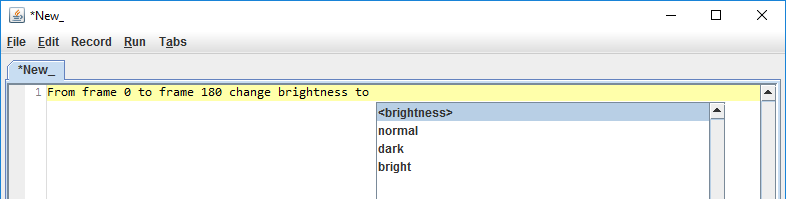
Assume we have another rendering property, an object color. Starting from the beginning, we would add these lines to the class that extends RenderingState (I’m omitting other code adjustments in this class which are straightforward):
public static final int COLOR_RED   = 1;
public static final int COLOR_GREEN = 2;
public static final int COLOR_BLUE  = 3;
Of course we also need to adjust the class implementing the IRenderer3D interface, which I will also skip here.
We want now to introduce a keyword color which changes the red, green and blue component simultaneously. To do so, we need to specify multiple RenderingState properties in the keyword constructor
...
COLOR("color", null, null,
		ExtRenderingState.COLOR_RED,
		ExtRenderingState.COLOR_GREEN,
		ExtRenderingState.COLOR_BLUE),
...
which allows us to write in the animation text
From frame 0 to frame 180 change color to (255, 0, 0).
Of course it also makes sense here to add value descriptions and pre-defined colors:
COLOR("color",
	new String[] {"<r>", "<g>", "<b>"},
	makeColorReplacementMap(),
	ExtRenderingState.COLOR_RED,
	ExtRenderingState.COLOR_GREEN,
	ExtRenderingState.COLOR_BLUE);

private static Map<String, double[]> makeColorReplacementMap() {
	HashMap<String, double[]> map =
				new HashMap<String, double[]>();
	map.put("red",     new double[] {255.0, 0.0, 0.0});
	map.put("green",   new double[] {0.0, 255.0, 0.0});
	map.put("blue",    new double[] {0.0, 0.0, 255.0});
	map.put("yellow",  new double[] {255.0, 255.0, 0.0});
	map.put("cyan",    new double[] {0.0, 255.0, 255.0});
	map.put("magenta", new double[] {255.0, 0.0, 255.0});
	return map;
}