Dynamic zoom using a macro
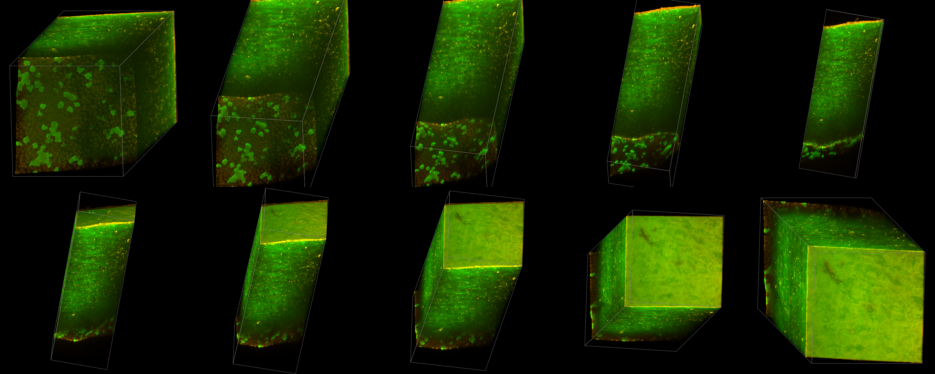
Unfortunately, the stack of the cornea is too big, so that only parts of it are visible once it turned by 90 degrees. We could zoom out more, but then lots of space is wasted at the animation beginning. What we want to add here is a dynamic zoom: We start with a zoom of 0.6, as we are approaching 90 degrees, we zoom further out to 0.3, as we rotate further towards 180 degrees, we zoom in again to 0.6, etc.
We can express the zoom factor as a function of time (measured in frames). A formula that works well is
zoom = 0.6 - 0.3 * | sin(2πt / 180) |
where the unit of t is frames.
You can easily verify the formula by setting at an angle of 0° (t = 0, zoom = 0.6), 90° (t = 45, zoom = 0.3, 180° (t = 90, zoom = 0.6), 270° (t = 135, zoom = 0.3) and 360° (t = 180, zoom = 0.6).
To implement this, replace the last line with
From frame 0 to frame 90 zoom by a factor of zoom
Instead of a value for zoom, we just enter an arbitrary word (here: zoom). The Animation Editor recognizes that there is a name instead of a number and expects an ImageJ macro with the same name, taking the time (i.e. frame) as a single parameter. Once you press the “Enter” key at the end of the line the corresponding macro function body is inserted:
script
function zoom(t) {
	return 0;
}
The “script” keyword indicates that the following lines contain a macro. After entering the formula above, the entire script reads now:
At frame 0:
- rotate by 10 degrees vertically
- rotate by 10 degrees horizontally

From frame 0 to frame 90:
- zoom by a factor of zoom
- rotate by 180 degrees vertically


script
function zoom(t) {
	return 0.6 - 0.3 * abs (sin (2 * PI * t / 180));
}