Repository navigation
Build
Alt-Shift-B builds the project of the file in front. The modified files of the project are saved first, and what the compiler says comes in the window Build at the bottom of the screen. The lines it names are marked in the gutter till the next build, a cross for an error and an exclamation mark for a warning, and Alt-Shift-J and Alt-Shift-K go to the next and the previous one.
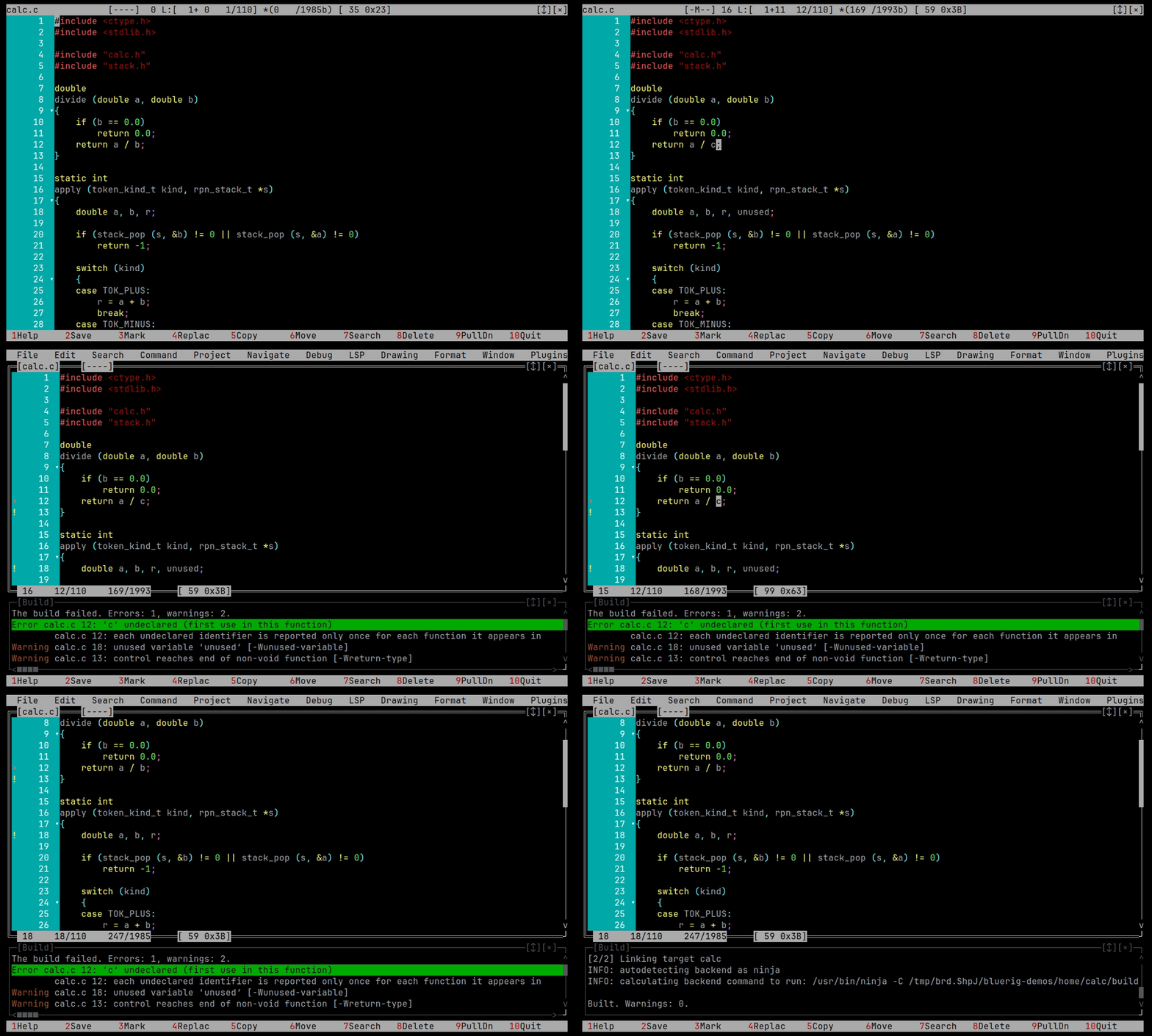
The build is found by itself:
| Found | Runs |
|---|---|
| a meson build directory whose source is the project, in it or next to it |
meson compile -C that directory |
| a cmake build directory, likewise |
cmake --build that directory |
a Makefile in the project |
make there |
Command > Build command gives a project a command of its own, which then goes before what was found. With nothing found, bluerig asks for one the first time. Window > Build output shows the output again.
The marks are drawn as the skin has them: build-error-char and
build-warning-char in [widget-editor], their colours builderror and
buildwarning in [editor].
The debugger builds the project the same way before it starts a program, and finds the programs with debug information that the build made.