Repository navigation
Home
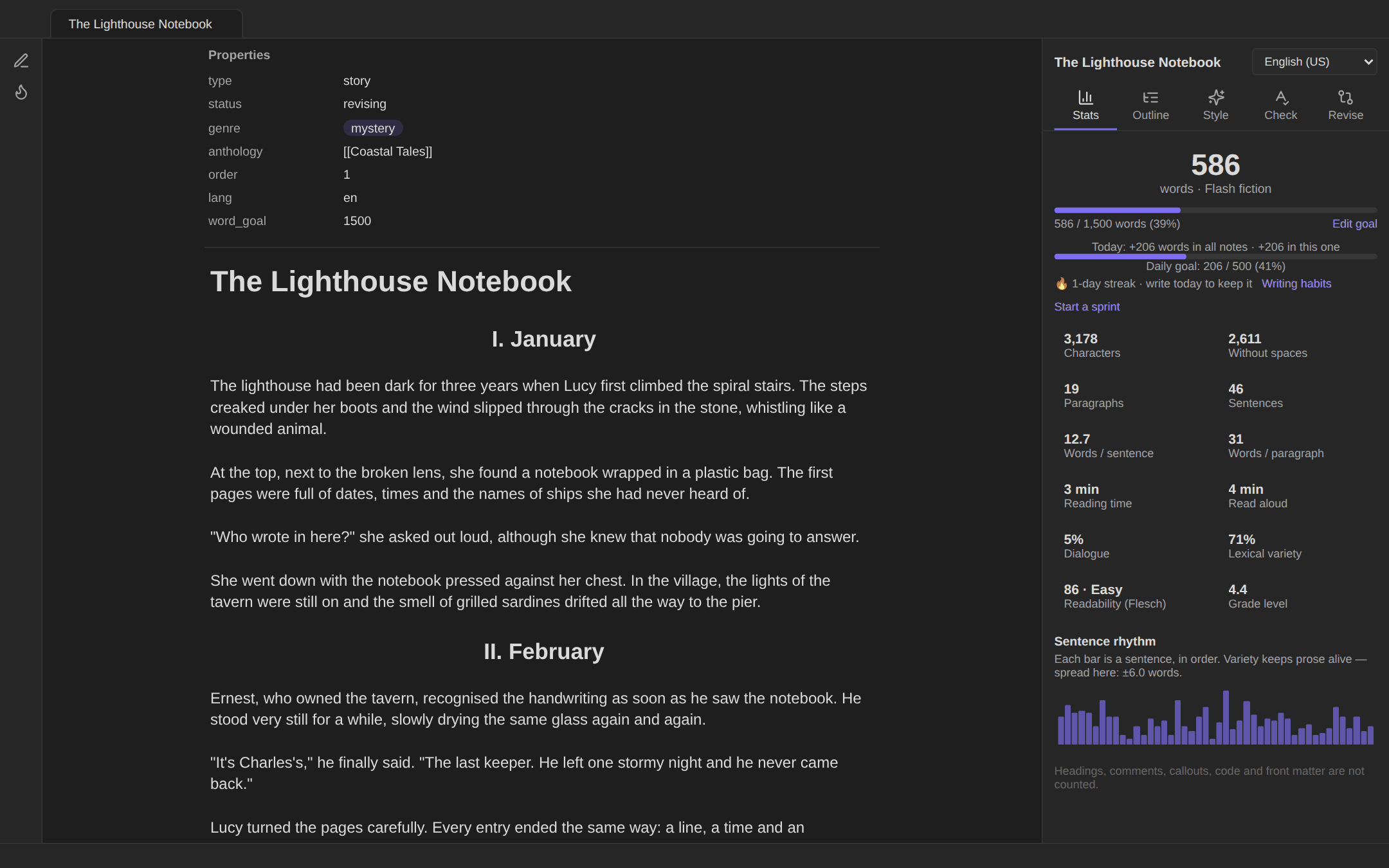
Authors Toolbox turns Obsidian into a workspace for writing fiction, poetry and screenplays. It adds a writing panel with statistics and style insights, an English and Spanish spelling and grammar check, screenplay and poetry modes, submission-ready manuscript export, a writing-habits dashboard and a revision mode with drafts and tracked changes.
It runs on macOS, Windows, Linux, iPhone and iPad (Obsidian 1.7.2 or later). Everything except the grammar check works offline, on your device.
| Feature | In short | |
|---|---|---|
| 📊 | Writing panel | Word count, length category, readability, sentence rhythm, a reorderable outline and style insights (repetitions, adverbs, crutch words, names), updated as you type. |
| ✅ | Spelling and grammar | On-demand LanguageTool check in English or Spanish with underlines, suggestions and a personal dictionary. |
| ✍️ | Formatting tools | Align single paragraphs, insert images with captions, and type Spanish dialogue dashes (raya) without breaking Markdown. |
| 🎬 | Screenplays | Fountain screenplays formatted as you type, with smart Enter, suggestions, a scene board, cast list, coaching notes and .fountain export. |
| 🪶 | Poetry | Verse layout, Spanish métrica (sinalefa, ley del acento final), rhyme scheme and form recognition. |
| 📄 | Manuscript export | Word, PDF, EPUB and plain text in standard manuscript or anonymous contest format, with a live page preview and whole-project export. |
| 📮 | Copy for Substack | A story or poem ready to paste into a Substack post: title and subtitle apart, formatting and verse lines kept. |
| 🔥 | Writing habits | Words per day, goals, streaks, sprints, and where your words go by genre, form and project. |
| 📬 | Submissions and contests | Contest notes, checks for length, anonymity, language and layout, export for a contest, a record of what was sent where, deadlines in the status bar and a calendar file. |
| 🔁 | Revision mode | Drafts of a note, comparisons word by word and chapter by chapter, restoring text, revision goals, marks in the editor and Word files with tracked changes. |
- Getting started: install the plugin and set up your first story.
- Note properties: the few front-matter properties that switch features on.
- Commands and Settings: every command and option.
- How it works: the architecture and the algorithms behind the numbers (readability formulas, syllable counting, the comparison engine, the PDF writer).
- Privacy and your data: what is stored where, and the one feature that uses the network.
- FAQ and troubleshooting.
- Development: building, testing and releasing the plugin.
The screenshots in this wiki are rendered from the plugin's own code with the sample notes from the repository, in a dark theme. Your theme, fonts and window size will make them look slightly different.