Repository navigation
Submissions
From "this story is ready" to "it is sent, and I know what happens next", without leaving Obsidian: choose where to send it, check it meets the rules, export it, record what you sent, and see answers and deadlines in one place. Everything stays on your device; the plugin never reads a website.
A contest (or magazine, or call for submissions) is a normal note with type: contest. The body is yours for rules, links and notes; the properties tell the plugin what it needs. All are optional.
| Property | Example | Used for |
|---|---|---|
deadline, opens
|
2026-12-01 |
Upcoming list, status bar, notices, calendar file |
recurs |
yearly |
Dates roll forward a year once passed, so "opens in 23 days" appears ahead of time |
word_min, word_max
|
5000 |
Length check |
languages |
[es, en] |
Language check |
anonymous |
true |
Anonymity check |
fee, prize, url, country, theme
|
Shown on the page; the fee is prefilled when you log a submission | |
simultaneous |
false |
Warns when a story is out at two venues and this one bans it |
font, spacing, page_size
|
Times New Roman, double, A4
|
Layout check, applied in one tap |
-
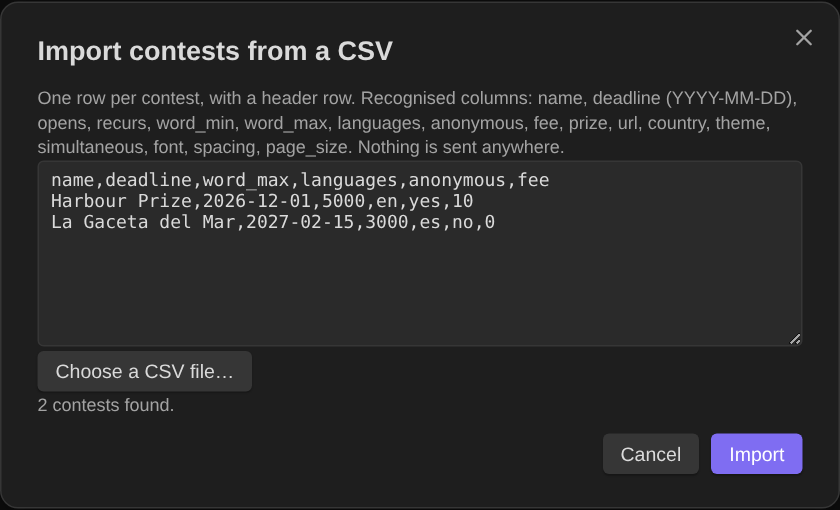
New contest note… asks for a name, deadline and length and writes a note listing every property to fill in. New notes go in the Contests folder setting (default
Contests); notes are found anywhere in the vault. - Import contests from a CSV… fills notes from a spreadsheet you keep (header row; English or Spanish column names; commas or semicolons). It never overwrites a note and skips rows without a name.
Open the export window for a story: Check for a contest compares it with a contest note and lists what passes, what needs a look and what fails.
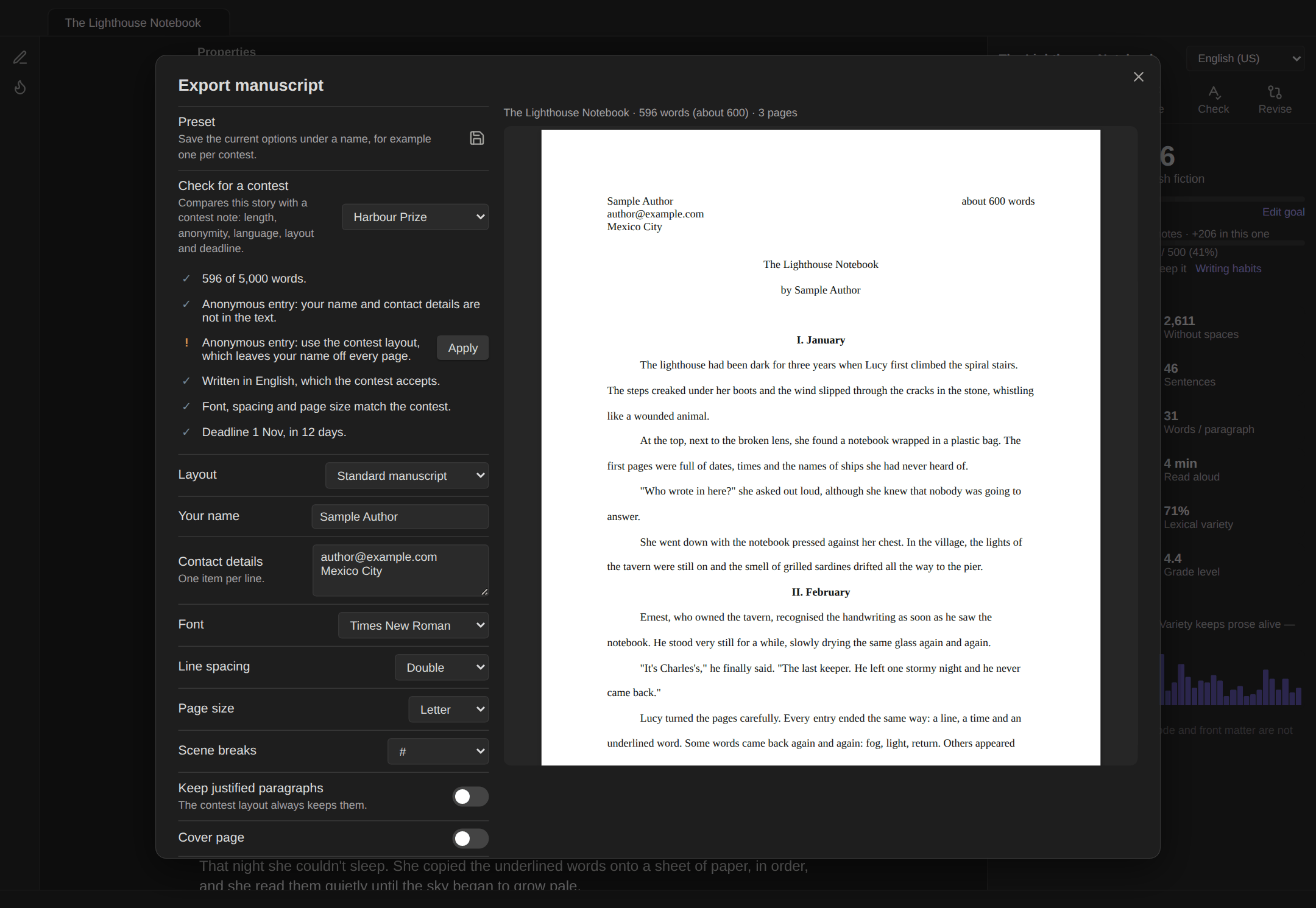
- Length: 4,812 of 5,000 words, using the same count as the export.
-
Anonymity (when
anonymous: true): your name and every contact line from the settings are searched for in the title and text, ignoring case and accents, whole words only. A name found only in the note's properties is a warning (they are not exported, but travel with the note). The contest layout is suggested if you are on the standard one. - Language, layout (font, spacing, paper; Apply changes the options) and deadline (passed, this week, or comfortably away).
Export for this contest does it all in one action: applies the contest's layout, exports the files (named Story - Contest), keeps the exact version as a draft (Sent to Contest, 19 Oct) and offers to log the submission with the draft and files attached. If a check fails you are asked before exporting.
Add a submission for this note… (also in the page, and for finished stories with none) records venue, status, the day it was sent, the answer, fee and a note. Status goes planned → sent → accepted, declined, withdrawn or no reply. Records are small JSON files in .authors-toolbox/submissions/ (a setting), one per story, like drafts: hidden from search and the graph, synced with the vault, kept if you uninstall. They follow a renamed story and a renamed contest note.
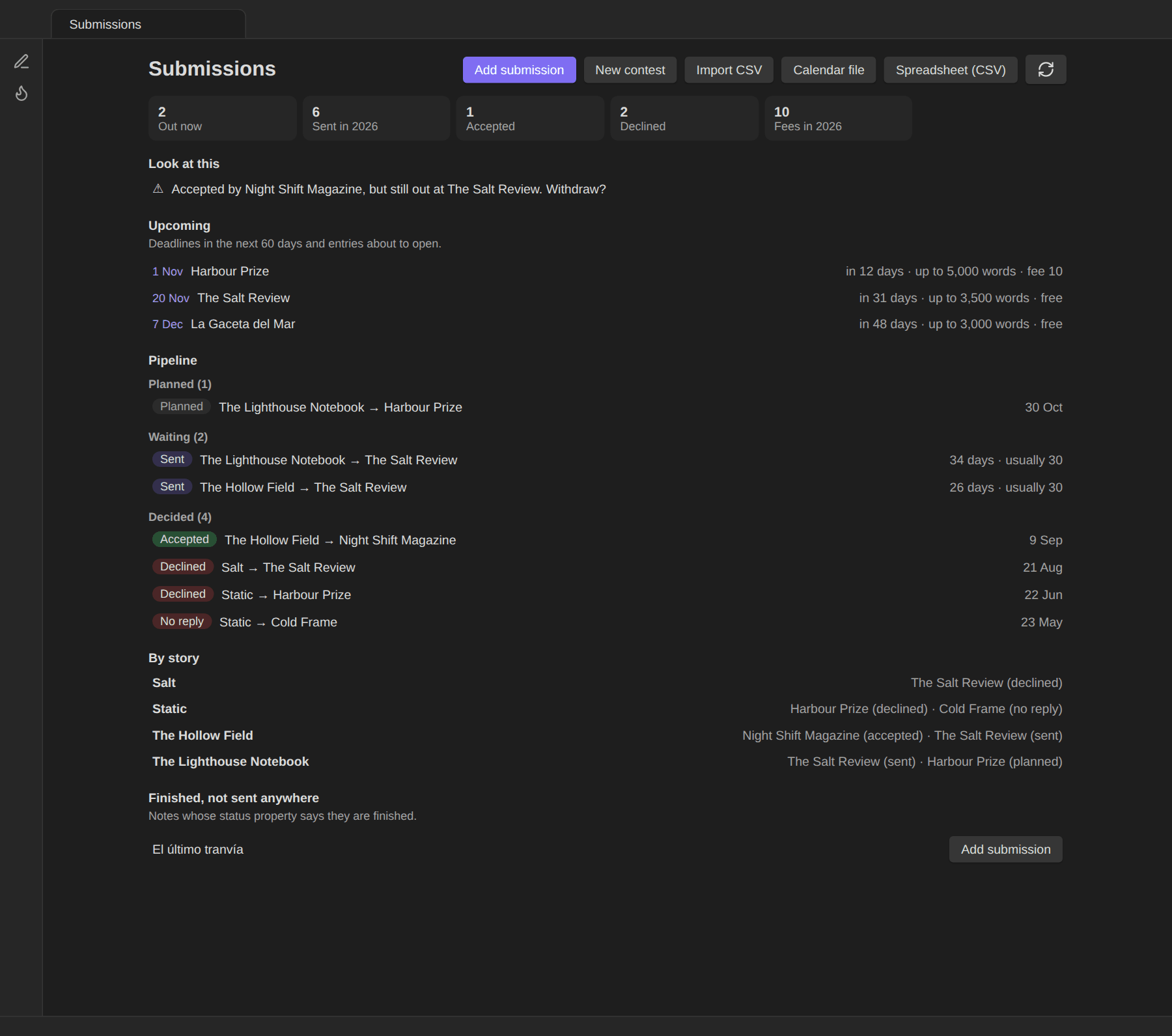
Open it from the paper-plane ribbon icon or Open submissions.
- Totals: out now, sent, accepted and declined, fees.
- Look at this: accepted here but still out elsewhere (withdraw?), or out at a venue that bans simultaneous submissions while out elsewhere.
- Upcoming: deadlines in the next 60 days and entries about to open.
- Pipeline: planned, waiting (days waiting, and how long that venue usually takes once you have history) and decided.
-
By story, and finished stories not sent anywhere (notes whose
statusproperty is final, finished, done, ready…). -
Calendar file writes the deadlines as an
.icsfile in the contests folder, so a phone calendar can show them; Spreadsheet (CSV) writes your submissions.

The status bar shows Next: Harbour Prize, in 12 days (tap it to open the page). When Obsidian opens, a notice lists deadlines within the window of the Announce deadlines setting (default 14 days), once a day. Obsidian has no background notifications, so reminders appear when the app is open.
In the Revise tab, a story's latest submission is shown with Compare with the version sent.
Open submissions, New contest note…, Import contests from a CSV…, Add a submission for this note…, Export for a contest…, Export contest deadlines as a calendar file.