Repository navigation
Settings
All options are in Settings → Authors Toolbox. On Obsidian 1.13 and later they are also searchable from the settings search box.
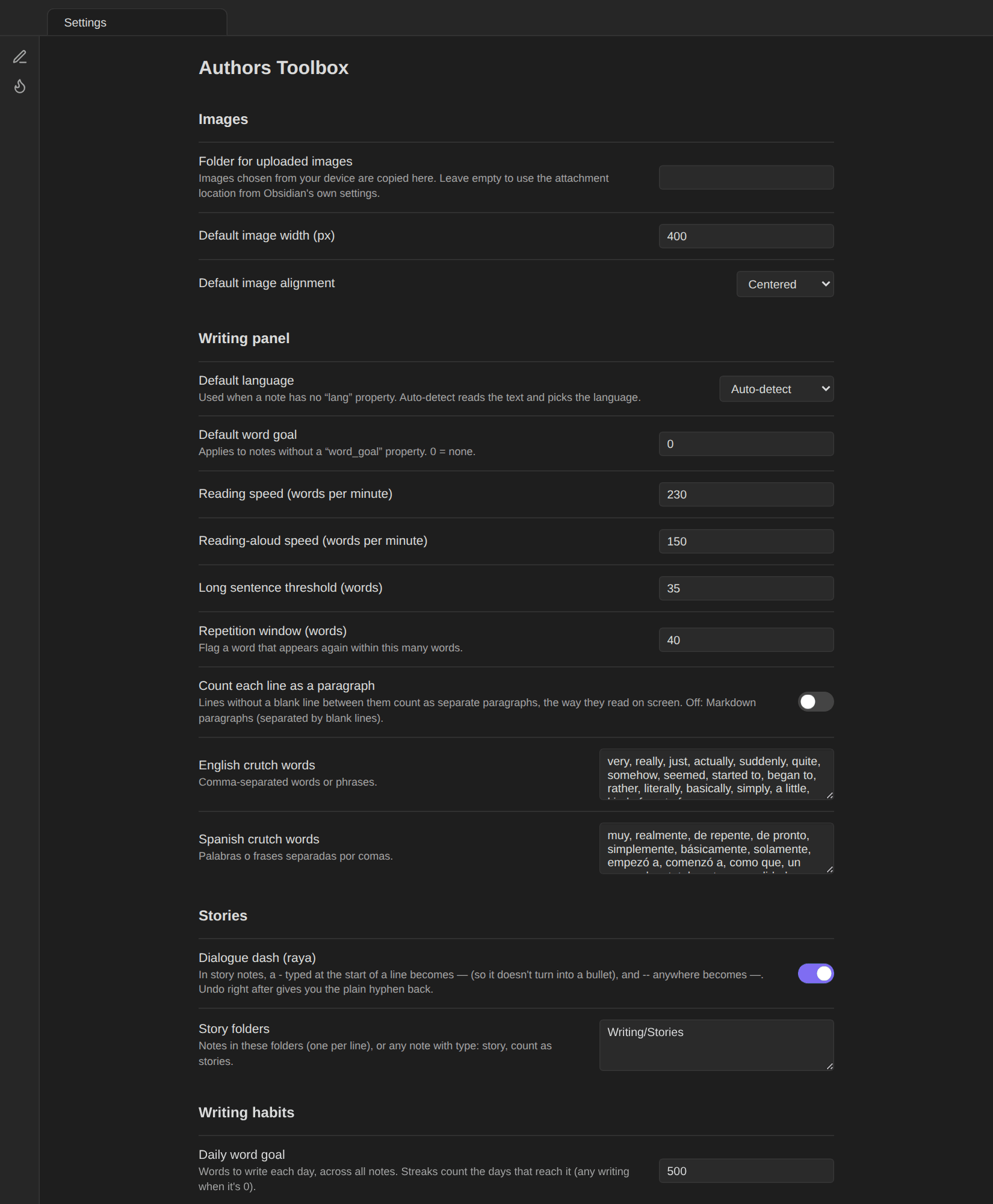
| Setting | Default | What it does |
|---|---|---|
| Folder for uploaded images | — | Images chosen from your device are copied here. Leave empty to use the attachment location from Obsidian's own settings. |
| Default image width (px) | 400 | |
| Default image alignment | Centered | Options: Inline, Centered, Left, Right. |
| Setting | Default | What it does |
|---|---|---|
| Default language | Auto-detect | Used when a note has no “lang” property. Auto-detect reads the text and picks the language. |
| Default word goal | 0 (none) | Applies to notes without a “word_goal” property. 0 = none. |
| Reading speed (words per minute) | 230 | |
| Reading-aloud speed (words per minute) | 150 | |
| Long sentence threshold (words) | 35 | |
| Repetition window (words) | 40 | Flag a word that appears again within this many words. |
| Count each line as a paragraph | Off | Lines without a blank line between them count as separate paragraphs, the way they read on screen. Off: Markdown paragraphs (separated by blank lines). |
| English crutch words | very, really, just, actually, suddenly… | Comma-separated words or phrases. |
| Spanish crutch words | muy, realmente, de repente, de pronto… | Comma-separated words or phrases (Spanish notes). |
| Setting | Default | What it does |
|---|---|---|
| Dialogue dash (raya) | On | In story notes, a - typed at the start of a line becomes — (so it doesn't turn into a bullet), and -- anywhere becomes —. Undo right after gives you the plain hyphen back. |
| Story folders | — | Notes in these folders (one per line), or any note with type: story, count as stories. |
| Setting | Default | What it does |
|---|---|---|
| Daily word goal | 0 (none) | Words to write each day, across all notes. Streaks count the days that reach it (any writing when it's 0). |
| Weekly word goal | 0 (none) | Words from Monday to Sunday. Streaks keep following the daily goal. |
| Monthly word goal | 0 (none) | Words each calendar month. |
| Goals per genre | — | One line per genre, “horror: 5000”: words per month. |
| Count revision days toward the streak | Off | A day that reaches the daily goal in revised words keeps the streak going. |
| Writing folders | — | Folders with your works, one per line, for the genre, form and project breakdowns. Empty: the story folders and the scripts folder. |
| Ideas folder | Where Add an idea for this work keeps its notes, one per work. Empty: Ideas. |
|
| Default sprint length (minutes) | 25 | |
| Default sprint word target | 500 | Leave at zero for no target. |
| Setting | Default | What it does |
|---|---|---|
| Keep a daily draft automatically | On | The first time you open a note in your writing folders each day, its text is kept as a draft if it changed since the last one, so you can always see what you changed today or go back. |
| Keep automatic drafts for (days) | 30 | Named drafts are kept until you delete them. |
| Drafts folder | .authors-toolbox/drafts |
Where drafts are stored in your vault, one file per note. Folders starting with a dot are hidden from Obsidian (search, graph, Dataview) but sync with the vault. |
-
Contests folder: where new contest notes go (default
Contests). Existing contest notes are found anywhere. - Announce deadlines (days ahead): a notice when Obsidian opens, once a day; 0 turns it off.
- Next deadline in the status bar.
-
Submissions folder: where records are stored (default
.authors-toolbox/submissions).
- Number every fifth line: 5, 10, 15… in the margin of poem notes and in Word, PDF and EPUB exports.
-
Underline lines out of meter: a wavy underline on lines more than one syllable from the note's
meterproperty (on by default).
| Setting | Default | What it does |
|---|---|---|
| Default layout | Standard manuscript | Standard manuscript shows your name, contact details and word count. The contest layout is anonymous: only the title and your pseudonym. Options: Standard manuscript, Contest (anonymous). |
| Font | Times New Roman | Options: Times New Roman, Courier, Arial. |
| Line spacing | Double | Options: Double, 1.5 lines. |
| Page size | Letter | Options: Letter, A4. |
| Contact details | — | Printed under your name on the first page of a standard manuscript, one item per line (city, email, phone…). |
| Pseudonym | — | Used by the contest layout. A note's “pseudonym” property overrides it. |
| Start chapters on a new page | Off | Each top-level heading begins a new page. In a project export every story or chapter note always starts a new page. |
| Keep justified paragraphs | Off | Paragraphs marked as justified stay justified in the standard layout too. The contest layout always keeps them. |
| Scene-break symbol | # |
Options: #, * * *, —, Blank line. |
| Cover page | Off | Title on a page of its own; the text starts on page 2. |
| Table of contents | Off | A contents page after the title page in PDF and Word. The title then has its own page. |
| Setting | Default | What it does |
|---|---|---|
| Scripts folder | Scripts |
Folder where new scripts and story adaptations are created. |
| Author name | — | Written on the title page of new scripts and on exported manuscripts. |
| Smart line breaks in scripts | On | After a character name or parenthetical, the return key starts the next dialogue line; after dialogue or action it starts a new element (blank line). Shift+Enter always inserts a plain line break. Reload the plugin after changing. |
| Setting | Default | What it does |
|---|---|---|
| Allow sending text to the grammar service | Off | Checks run only when you ask: from the panel, a command, or the editor's context menu. The text in the chosen scope is sent to the server below (LanguageTool). Obsidian's built-in spellcheck keeps working alongside it; on macOS and iOS it follows your keyboard languages. |
| Server | https://api.languagetool.org |
Default: https://api.languagetool.org (free). You can point this to your own LanguageTool server. |
| Premium username (email) | — | Optional. A premium account gives higher limits and more checks. |
| Premium API key | — | |
| Picky mode | Off | Extra style and punctuation suggestions. |
| Personal dictionary | — | One word per line (character names, places, invented words). These are never flagged as misspelled. |
| Turned-off rules | WHITESPACE_RULE |
Rule IDs from the grammar service, comma-separated. |
At the bottom of the settings: the device (for example "iOS, phone") and whether the file picker, the clipboard and the XML reader are available. Features that need one explain themselves when it is missing. Copy these lines into a bug report.
Some choices are saved from where you make them rather than in this tab:
- the panel's current tab, the dashboard's range (30 / 90 / 365 days) and the revision page's Changes only / Whole text;
- export presets (from the export window);
- the daily word history and the sprint log;
- your note's language, word goal and genre (as note properties, see Note properties).
All of it is stored in the plugin's data.json, except drafts (see Revision mode).