Repository navigation
SCADA and HMI
Note
Design stage. This page describes planned mechanics from the design document. Not implemented yet — see Roadmap (milestone M6; analog desks start earlier, with relays A1 and analog computers A2 in M3).
This page covers the operator side of plant I&C: control desks, panel instruments, CC: Tweaked monitors used as operator displays, the pcui Lua library, alarm management, redundancy, and the main and remote control rooms.
- The control desk is an engineered structure too. You do not get a "reactor screen". You decide which parameters to show, where, with which instrument and which alarm. A badly designed desk is a legitimate cause of an accident.
- High-performance HMI (ISA-101). Grey background, muted static graphics, colour only for deviations and alarms. Analog indicators show a value relative to its normal range, not just a number.
- Alarms per ISA-18.2. Every alarm requires an operator action. Priorities, acknowledgement, suppression and shelving are game mechanics. An alarm flood is part of every serious accident scenario.
- Fault tolerance. A crashed Lua program, loss of instrument power, smoke or radiation in the control room are normal events. You prepare for them with redundancy and a remote shutdown panel.
| Era | Typical tier | Means | Opens up | Limits |
|---|---|---|---|---|
| E2. Analog panel | T1 |
signal_cable, analog_gauge, chart_recorder, indicator_lamp, key_switch, annunciator_panel (hardware logic), control_desk, scram_button
|
Remote control without a computer; chart recorders (1 point/s on paper) | One parameter = one block |
| E3. Computerized I&C | T2+ |
io_module, CC: Tweaked, pcui, monitors, watchdog_relay, redundancy |
Controllers, start-up sequencers, trends, mimics, software alarms | Program bugs, computer failure, call budget |
Eras map onto the automation ladder: E2 = A1 + A2 (relays and analog computers), E3 = A3 + A4 (PLC with SIS, and CC computers). A5 (SCADA / plant level) has no era of its own. On the coal and metallurgy branch an E2 panel appears before the first reactor. A correct T2 station has both computerized I&C and an analog backup minimum, as real power units do.
All desk elements are 1×1 blocks mounted on a control_desk (sloped desk section, up to 4 elements on the front face; adjacent sections join into a continuous desk) or on any solid face (vertical panel). Elements are bound to signals with the wiring_tool item: click the element, then the sensor, actuator or io_module channel. Virtual wire length is limited to 64 m Manhattan distance (scada.max_virtual_wire_m); a physical signal_cable run can be any length.
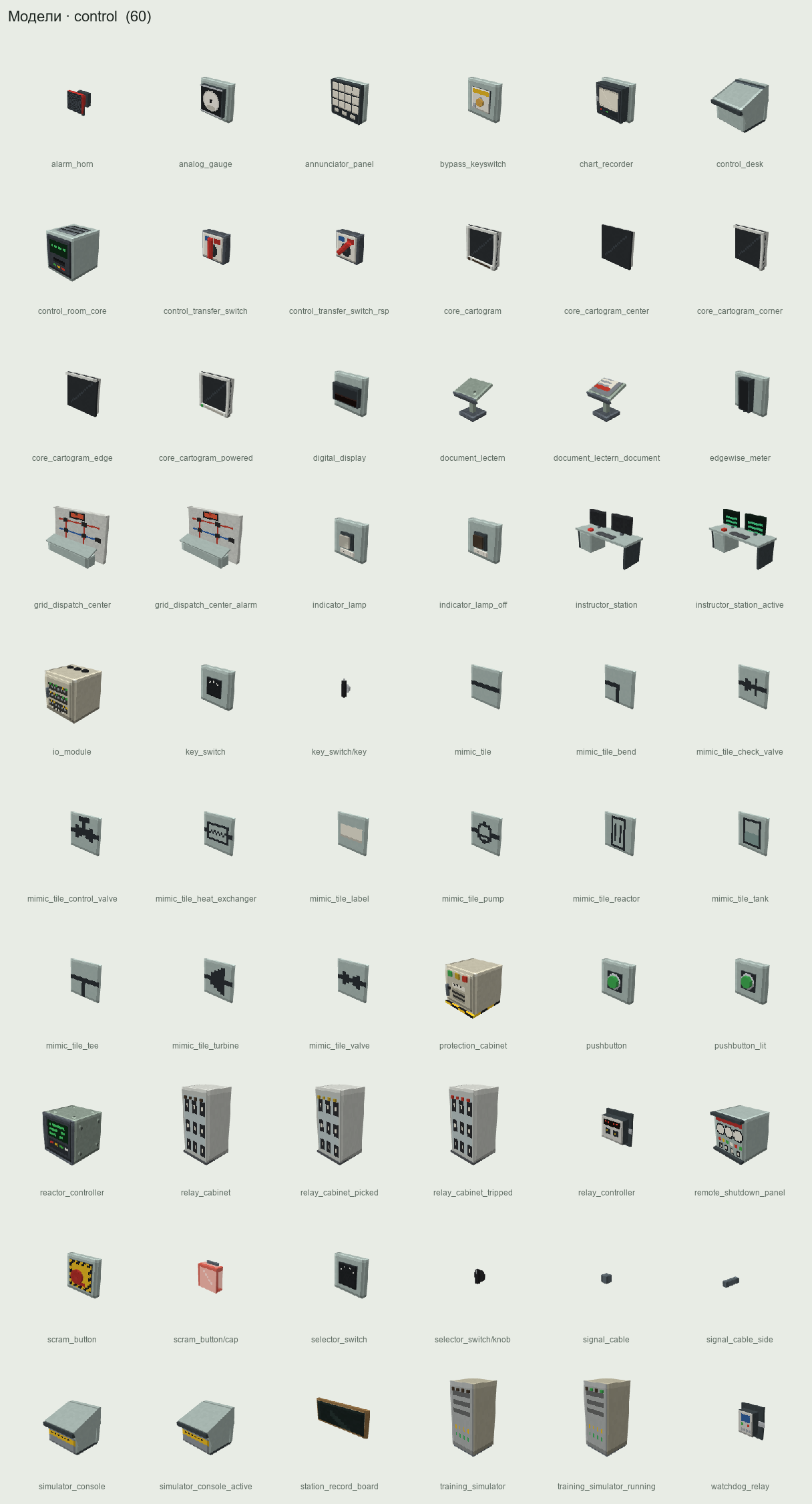
| Block | Element | Binding | Client sync | Panel slot |
|---|---|---|---|---|
analog_gauge |
Round 270° gauge | Tag or "from computer" | 10 Hz, interpolated needle | GAUGE |
edgewise_meter |
Vertical edgewise meter | Tag | 10 Hz | GAUGE |
chart_recorder |
Chart recorder, 1–3 pens | 1–3 tags | 1 Hz, batches of 10 | — |
digital_display |
6-digit display | Tag or computer | 2 Hz | DIGITAL_DISPLAY |
indicator_lamp |
Indicator lamp (lens colour) | Discrete tag / actuator state / computer | On event | LAMP |
annunciator_panel |
4×3 annunciator, ISA-18.2 logic | Up to 12 alarms | On event | pc_annunciator |
mimic_tile |
Mimic tile (pipe, pump, valve, tank, ...) | Actuator state | On event | — |
key_switch |
Control switch with select-before-operate | Actuator | On event | KEY_SWITCH |
selector_switch |
2–4 position selector | Mode or computer input | On event | SELECTOR |
pushbutton |
Illuminated pushbutton | Actuator command or computer input | On event | PUSHBUTTON |
scram_button |
Covered scram button |
protection_cabinet only |
On event |
SCRAM_BUTTON (read-only) |
bypass_keyswitch |
Scram channel bypass lock |
protection_cabinet + reason + channel |
On event | — |
alarm_horn |
Alarm horn/bell | Annunciator / alarm engine | On event | — |
control_room_core |
Control room "core" | Room | 1 Hz habitability | — |
remote_shutdown_panel |
Remote shutdown panel section | — | As elements | pc_panel |
control_transfer_switch |
Control transfer switch for a system | System | On event | — |
core_cartogram |
Core map, top view | reactor_controller |
1 Hz, delta frames | CARTOGRAM |
Analog gauge. Major divisions use round 1-2-5 steps. ISA-101 zones on the scale: light-blue normal band, thin alarm marks in priority colour, dark-grey needle. The needle is a second-order system (natural frequency 1.5 Hz, damping 0.6, about 1 s settling). On BAD quality it drops to mechanical zero (open loop) or pins right (short), like a real 4–20 mA instrument.
Chart recorder. Paper speed 60, 600 or 6000 mm/h. The server buffers 3600 points per pen (one real hour). You can tear off the paper as a chart_paper item and study it in a GUI. This is the only way to keep history without a computer.
Control switch (select-before-operate). Right-click arms the switch (lamp flashes, 5 s timer). Shift + right-click then turns it right (OPEN/ON) and plain right-click turns it left (CLOSE/OFF). It times out after 5 s. It refuses with a "stop click" if the actuator is in LOCAL or you hold no operator key. SBO is enabled by default for primary_pump and valve_gate on primary circuit and main steam isolation lines.
Covered scram button. The first right-click lifts the cover; a second within 10 s presses it. Circuit: scram_button → cable → protection_cabinet, reason MANUAL, with no dependence on CC, io_module or computer power. Any player who can physically reach it may press it; the press is logged with the player's UUID.
Bypass keyswitch. Configured for one (reason, channel) pair. Inserting the station's bypass_key (role SHIFT_SUPERVISOR) and turning it enables the bypass. While active, a white status window shows "BYPASS reason/channel", pc_bypass is sent, the station team is notified, and the key cannot be removed.
Annunciator. 12 engraved windows (up to 2×10 characters) following ISA-18.1 Sequence A:
| Alarm state | Window | Sound |
|---|---|---|
NORMAL |
Off | — |
UNACK |
Fast flash (2 Hz) in priority colour | Priority horn until silenced |
ACKED |
Steady | — |
RTNUN |
Slow flash (0.5 Hz) | Short "return" chime once |
SHELVED / SUPPRESSED / OOS
|
Off (with small indicator for shelved / out of service) | — |
Physical buttons: ACK, SILENCE, LAMP TEST. First-out: the first window in a group to go UNACK within 2 s flashes at 4 Hz, so you can tell what tripped first in a cascade.
Mimic tiles. 12 shapes (straight pipe, bend, tee, pump, gate valve, control valve, check valve, tank, heat exchanger, turbine, reactor, label) that join automatically. A running pump is a filled dark-grey symbol, a stopped one an outline. Colour appears only on deviation: orange frame for command/position disagreement, magenta for failure.
Relay controller. relay_controller is the simplest A1 block: an on/off controller with hysteresis ("on at ≤ a, off at ≥ b"), for example to hold tank level with a makeup pump. PI control without a computer is available at A2 (analog_summer + analog_integrator) and in PLCs (PC_PID); see Automation-Platform.
Core cartogram. Wall panels up to 4×4 blocks showing the core from above, one cell per fuel_channel or rod channel. The panel does its own R2 core-map read once per second through a dedicated hardware channel, so it costs no computer tokens. It shows the same in-core monitoring values, with model error, as getCoreMap.
| Mode | quantity |
Default scale |
|---|---|---|
| Power | power |
0–1.5 of core average; red above kq_alarm
|
| Fuel temperature | tFuel |
300–1500 °C |
| Cladding temperature | tClad |
300–1200 °C; orange ≥ 800 °C, red ≥ 1204 °C |
| Outlet temperature | tOutlet |
per channel setpoints |
| Flow | flow |
0–1.2 of nominal; red < 0.7 |
| Void fraction | void |
0–1 |
| Burnup | burnup |
0–assembly maximum |
| Enrichment | enrichment |
0–5 %, categorical by batch |
| Cladding state | cladState |
intact / defect / leaking / failed |
| Rod position | rodPos |
0–1 withdrawn |
Lua can switch mode and scale via pc_panel (setMode, getMode, setScale, setAlarm) but cannot read values through the panel.
Advanced Monitors assemble up to 8×6 blocks. getSize() is always the source of truth; approximate sizes at text scale 0.5:
| Monitor, blocks | Characters | Sub-pixels (2×3 per char) |
|---|---|---|
| 1×1 | 15×10 | 30×30 |
| 3×2 | 57×24 | 114×72 |
| 4×3 | 79×38 | 158×114 |
| 8×6 | 164×81 | 328×243 |
pcui draws trends and bar graphs with characters 128–159 (2×3 sub-pixels), redraws only dirty rows, and caps refresh at 4 Hz for monitors up to 4×3 and 2 Hz for larger ones.
pcui.palette.apply(mon) redefines the terminal palette:
| CC slot | Role | RGB |
|---|---|---|
colors.lightGray |
Background | #C4C4C4 |
colors.gray |
Static graphics (pipes, outlines) | #8C8C8C |
colors.black |
Text | #1E1E1E |
colors.white |
Highlight, dialog background | #F4F4F4 |
colors.blue |
Live process values | #2B4C7E |
colors.lightBlue |
Normal range band | #9DB4CC |
colors.cyan |
Operator setpoints | #007C80 |
colors.red |
Priority 1 | #E00000 |
colors.orange |
Priority 2 | #FF8C00 |
colors.yellow |
Priority 3 (priority 4 is log-only, no colour) | #F2D200 |
colors.magenta |
Bad / stale data | #B000B0 |
colors.purple |
Manual mode (LOCAL / MAINTENANCE) |
#5A3E8C |
colors.green |
Reserve; not used for "running" | #5E7F5E |
Priority colours are also distinguished by marker shape (▲ / ◆ / ●) and priority number, for colour-blind players.
pcui ships as ROM Lua through the mod's datapack (data/computercraft/lua/rom/modules/main/pcui/...), so require("pcui") works on every computer and a server can override it with its own datapack. Modules: units, palette, draw, widgets/ (value, bar, trend, gauge, mimic, alarms, button, faceplate, status), page, net (the pcnet protocol), hist (file historian), registers (Modbus maps).
| Function | Purpose |
|---|---|
pcui.dev(label) |
Find a device by plant tag |
pcui.app{monitor, fps, title, station} |
HMI application on a monitor |
app:page(id, {level, parent, title, hotkey}) |
Page; level is the ISA-101 level 1–4 |
pcui.Value{...} |
Number with units, quality and deviation colour |
pcui.Bar{..., normal={a,b}, setpoint=} |
Moving analog indicator with normal band |
pcui.Trend{..., pens, span, period} |
Trend, 1–4 pens, span up to 3600 s |
pcui.Gauge{...} |
Character-drawn dial |
pcui.Mimic{x, y, src} |
Mimic from a text description |
pcui.AlarmList{..., ann, filter} |
Alarm list, touch to acknowledge |
pcui.Button{..., confirm=bool} |
Button; confirm gives an SBO dialog |
pcui.Faceplate{dev} |
Device faceplate (L3) |
app:run() |
Event loop (timer, monitor_touch, pc_*) |
pcui.units.MPa, .degC, .pct, .tph, .pcm, .uSvh
|
Unit conversion |
The app batches reads: one readMany per device per frame. A page with 40 tags on 4 devices at 2 Hz costs about 52 tokens/s, 13 % of a computer's budget.
Mimics are described as text, with letters for equipment and -|+ for piping:
-- rcs.mimic
#size 60 18
#bind P1 dev=1RCP-01      kind=pump
#bind R  dev=reactor      kind=reactor
#bind SG dev=SG-1         kind=hx
#value 40 8 tag=rcs.pressurizer.pressure fmt=%6.2f unit=MPa
     +----------[R]----------+
     |                     [SG]====> steam
     +----<P1>---------------+
An overview screen in about 20 lines:
local pcui = require("pcui")
local app = pcui.app({ monitor = peripheral.find("monitor"), title = "UNIT 1", fps = 2 })
local ov = app:page("overview", { level = 1, title = "OVERVIEW", hotkey = "1" })
local R = pcui.dev("reactor")
local PZ = pcui.dev("PZR")
ov:add(pcui.Bar{ x = 2, y = 3, w = 3, h = 12, dev = R, tag = "core.power.neutron",
                 lo = 0, hi = 1.2, normal = { 0.0, 1.02 } })
ov:add(pcui.Value{ x = 6, y = 3, dev = R, tag = "core.power.neutron", unit = "pct", fmt = "%5.1f" })
ov:add(pcui.Value{ x = 6, y = 5, dev = R, tag = "core.period", unit = "s", fmt = "%6.0f" })
ov:add(pcui.Bar{ x = 20, y = 3, w = 3, h = 12, dev = PZ, tag = "rcs.pressurizer.pressure",
                 lo = 14.0e6, hi = 17.0e6, normal = { 15.3e6, 15.7e6 }, setpoint = 15.5e6 })
ov:add(pcui.Trend{ x = 30, y = 3, w = 48, h = 12, span = 600, period = 1,
                   pens = { { dev = R, tag = "core.power.neutron", lo = 0, hi = 1.2 },
                            { dev = PZ, tag = "rcs.pressurizer.level", lo = 0, hi = 1 } } })
ov:add(pcui.AlarmList{ x = 2, y = 17, w = 76, h = 6, ann = peripheral.find("pc_annunciator") })
app:run()| Level | Purpose | Content |
|---|---|---|
| L1 — Plant overview | Situational awareness | 10–20 KPIs as bars with normal range, power/pressure/level trends, alarm summary by system |
| L2 — System | System control | System mimic (primary circuit, SG, turbine, ECCS, ...), main values, faceplate buttons; understood in ≤ 15 s |
| L3 — Detail | Device control | Faceplate: mode, state, setpoint, commands, trends, interlocks |
| L4 — Diagnostics | Maintenance | Sensor health, drift, electronics dose, vibration, command log, registers |
Navigation via keys 1–9 or a touch tab bar; an OVERVIEW button is always top right. Any priority 1–2 alarm must be reachable in ≤ 2 touches from L1.
An alarm notifies the operator of a deviation that requires action within limited time. Everything else is an event (log) or a status (lamp). AlarmEngine (sim.alarm) stores only alarms with priority 1–3 and an operator-action text; priority 4 is log-only.
States: NORMAL, UNACK, ACKED, RTNUN (returned, unacknowledged), SHELVED, SUPPRESSED, OOS (out of service). Condition onset → UNACK; acknowledge → ACKED; clearing → RTNUN or NORMAL; latching alarms stay until reset. A priority-1 alarm still active 30 physical minutes after acknowledgement re-alarms (scada.realarm_p1_s = 1800). An alarm that fires ≥ 3 times in 60 s is flagged as chattering; with scada.auto_chatter_delay its on-delay doubles (up to 60 s).
| Time to respond \ consequence | Minor (economics, wear) | Significant (unit trip, equipment damage) | Severe |
|---|---|---|---|
| > 30 min | 4 (log) | 3 | 3 |
| 10–30 min | 3 | 3 | 2 |
| 3–10 min | 3 | 2 | 1 |
| < 3 min | 2 | 1 | 1 |
Target distribution: about 80 % priority 3, 15 % priority 2, 5 % priority 1.
Built-in alarms created when blocks are assembled (limits and priority editable; priority-1 alarms cannot be deleted):
| Alarm | Priority | Default limit | Operator action |
|---|---|---|---|
Scram (prot.tripped) |
1 | — | Post-trip procedure |
| Period below warning | 1 | 2 × scram setpoint | Stop withdrawal, insert rods |
| Primary subcooling margin low | 1 | 10 K | Raise pressure / lower temperature |
| Pressurizer level low | 2 | 0.20 | Increase makeup |
| SG level low | 2 | 0.35 (narrow) | Increase feed |
| Main coolant pump vibration zone C / D | 2 / 1 | ISO 10816 B/C, C/D | Reduce load / stop pump |
| Pump cavitation | 2 | pc_pump_cavitation |
Raise suction pressure / reduce flow |
| H₂ in containment | 1 | 0.04 | Check recombiners, isolation |
| Room dose rate ALERT / HIGH | 2 / 1 | radiation limits | Restrict access / evacuate |
| Criticality (CAAS) | 1 | — | Evacuate immediately |
BAD sensor on a scram channel |
2 | — | Check channel, consider bypass |
| I&C failure (watchdog) | 2 | — | Go to manual control |
-
State-based suppression. The built-in group
POST_TRIPactivates 2 s after a scram for 30 physics minutes and hides consequential alarms (low power, low steam flow, low cold-leg temperature). You can define your own groups from Lua (setSuppression). -
Shelving. Temporary manual hiding:
SHIFT_SUPERVISORonly, priorities 2–4 only, max 8 h, and the shelved count is always visible on L1. -
Out of service. Set by putting the sensor into
MAINTENANCE.
| Metric | Definition | Target (EEMUA 191 / ISA-18.2) |
|---|---|---|
| Average rate | P1–P3 alarms per operator per 10 min | ≤ 1 very likely acceptable, ≤ 2 manageable |
| Flood | > 10 alarms in 10 min | < 1 % of time; pc_alarm_flood, FLOOD banner on all screens |
| Standing | Active > 24 h | < 5 |
| Chattering | ≥ 3 activations in 60 s | 0 |
During a LOCA a well-rationalized station raises 10–20 alarms; a default-configured one raises 80–150 in the first minute. An optional shift score (scada.shift_score = true) scores each 8 physics hours: −1 per minute of unacknowledged P1, −0.2 per minute of P2, −5 per minute of flood, −10 per unexplained scram, +10 for a shift without limit violations.
If a Lua program crashes (exception, "too long without yielding", computer destroyed, server restart without startup.lua, access card removed), actuators keep their last commanded state (fail-last). Without a watchdog a dead controller goes unnoticed until the process leaves its limits.
watchdog_relay (pc_watchdog): default timeout 2.0 s (range 0.5–60 s), owner is the first computer to call arm(), up to 8 (device, action) pairs, redstone output 15 when tripped. Actions: HOLD, SET_POSITION x, OPEN, CLOSE, STOP, START, HEATERS_OFF, REQUEST_TRIP, RAISE_ALARM (P2 "I&C FAILURE"). They execute in the simulation, without CC, even if every computer is destroyed. Call kick() after a successful controller iteration, not from a separate parallel coroutine; pcui.app does this correctly.
The standby computer B tracks master A's heartbeat (pcnet HB at 2 Hz) and state:
| B state | Condition | Next | Action |
|---|---|---|---|
STANDBY |
HB from A within 1.5 s | STANDBY |
Track A's setpoints and integrators |
STANDBY |
No HB for 1.5 s | SUSPECT |
— |
SUSPECT |
Watchdog tripped | TAKEOVER |
takeover() |
SUSPECT |
HB returns | STANDBY |
— |
TAKEOVER |
Ticket DONE
|
MASTER |
Init integrators from last HB; arm(); kick()
|
Takeover happens only after the relay trips, because two active controllers on one valve are worse than none. The relay is the only arbiter of ownership; devices reject commands from non-owners (E_ACCESS: NOT_MASTER). Switchover time ≈ 2.05 s with a 2 s timeout.
-- standby.lua (fragment): controller = module with init(state), step(), export()
local pcui = require("pcui")
local net = require("pcui.net")
local controller = require("sg_level_ctrl")
local wd = pcui.dev("WD-1")
local lastHb, peerState, state = os.clock(), nil, "STANDBY"
net.on("HB", function(msg) lastHb = os.clock(); peerState = msg.payload; if state ~= "MASTER" then state = "STANDBY" end end)
while true do
  net.poll(0.25)
  if state == "STANDBY" and os.clock() - lastHb > 1.5 then state = "SUSPECT" end
  if state == "SUSPECT" and wd.getState().tripped then
    wd.takeover()
    controller.init(peerState)       -- bumpless: integrators from last heartbeat
    wd.reset(); wd.arm(); state = "MASTER"
  end
  if state == "MASTER" then controller.step(); wd.kick(); net.send("HB", controller.export()) end
end| Level (Purdue / ISA-95) | What | Blocks | Network |
|---|---|---|---|
| 0 — Field | Sensors, actuators |
instrument_*, pumps, valves, rod drives |
signal_cable |
| 1 — I/O and protection | I/O, scram, watchdogs |
io_module, protection_cabinet, watchdog_relay
|
wired modem |
| 2 — Control | Controllers, sequencers | CC computers in the I&C room | wired modem "CTRL" |
| 3 — HMI | Operator screens | Computers + monitors in control rooms | wired modem "HMI" or rednet |
| 4 — History | Loggers, reports | Computer with disk drives | rednet |
Recommended practice: keep levels 2 and 3 on separate networks. The screen computer has no access card and cannot write to actuators; controllers take setpoints from the HMI via pcnet with range checks.
Closed-loop dead time for a typical SG level loop is about 0.4–0.6 s plus 1 s sensor lag (scan 0.05 s, snapshot ≤ 0.05 s, program period 0.5 s, positioner 0.2 s + travel). scada.io_scan_period_ticks (1–10) lets a server make I/O slower for realism; real I/O scans take 100–500 ms.
pcnet protocol (on top of rednet, protocol "pcnet"): fields v, type (HB, STATE, SETPOINT, ACK, ALARM), src, seq, t, payload. Old seq values are dropped. Data older than 2 s is stale and drawn in magenta. SETPOINT needs an ACK within 1 s and is retried up to 3 times. There is deliberately no anti-spoofing; protection is physical (who is on the network) plus access cards.
A control_room_core block flood-fills an enclosed room (≤ 4096 air blocks, scada.mcr_max_volume) and registers all desk elements inside. Once per second it computes habitability:
| Parameter | DEGRADED | UNINHABITABLE |
|---|---|---|
| Dose rate (average of 9 points) | > 1.93·10⁻⁸ Sv/s (≈ 69 µSv/h) | > 2.78·10⁻⁶ Sv/s (10 mSv/h) |
| Air temperature | > 323 K | > 333 K |
| Smoke (fire blocks in or on the boundary) | ≥ 1 | ≥ 4 |
Instrument power (io_module links) |
Some channels lost | All lost |
The DEGRADED dose threshold comes from the control-room habitability criterion of 10 CFR 50 Appendix A, GDC 19 (≤ 50 mSv over the accident): 50 mSv / 30 days = 69 µSv/h. An uninhabitable room still works, but players inside take dose and heat damage, and signal_cable in fire burns out.
remote_shutdown_panel must be in another room ≥ 16 m from the control_room_core. It shows READY only when the mandatory minimum is bound:
| Function | Required elements |
|---|---|
| Reactor shutdown |
scram_button (second circuit) |
| Subcriticality monitoring |
core.flux.source, core.flux.intermediate
|
| Heat removal | Auxiliary feedwater (pump + valve), atmospheric steam dump |
| Primary monitoring |
rcs.pressure.wide, rcs.pressurizer.level, rcs.loop<n>.temp.hot/cold, rcs.subcooling.margin
|
| Primary pressure | Pressurizer heaters on/off, pressurizer PORV |
| Inventory and boron | Makeup pump, boron injection |
| SG monitoring |
sg<n>.level.wide, sg<n>.pressure
|
One control_transfer_switch per system ("primary", "SG-1", "rods", ...) on the remote panel, operated with a SHIFT_SUPERVISOR key. In RSP all main-control-room elements bound to that system are disconnected, and Lua commands from the MCR network get E_ACCESS: TRANSFERRED_TO_RSP. Transfer back requires the MCR not to be UNINHABITABLE. The reason is hot shorts: every 10 s of burning, a signal_cable in fire has a 10 % chance (scada.hot_short_probability) of sending a random command to its actuator, until the system is transferred.
-
CC-Tweaked-API —
pc_annunciator,pc_panel,pc_watchdog, error codes - Automation-Platform — automation levels A0–A5, PLC, SIS, historian
- Accidents — alarm floods during LOCA, control room fires
- Radiation-Safety — dose rates used for habitability
- Acoustics — alarm sounds
- Multiplayer — station keys, roles and journaling