Repository navigation
Account DNS
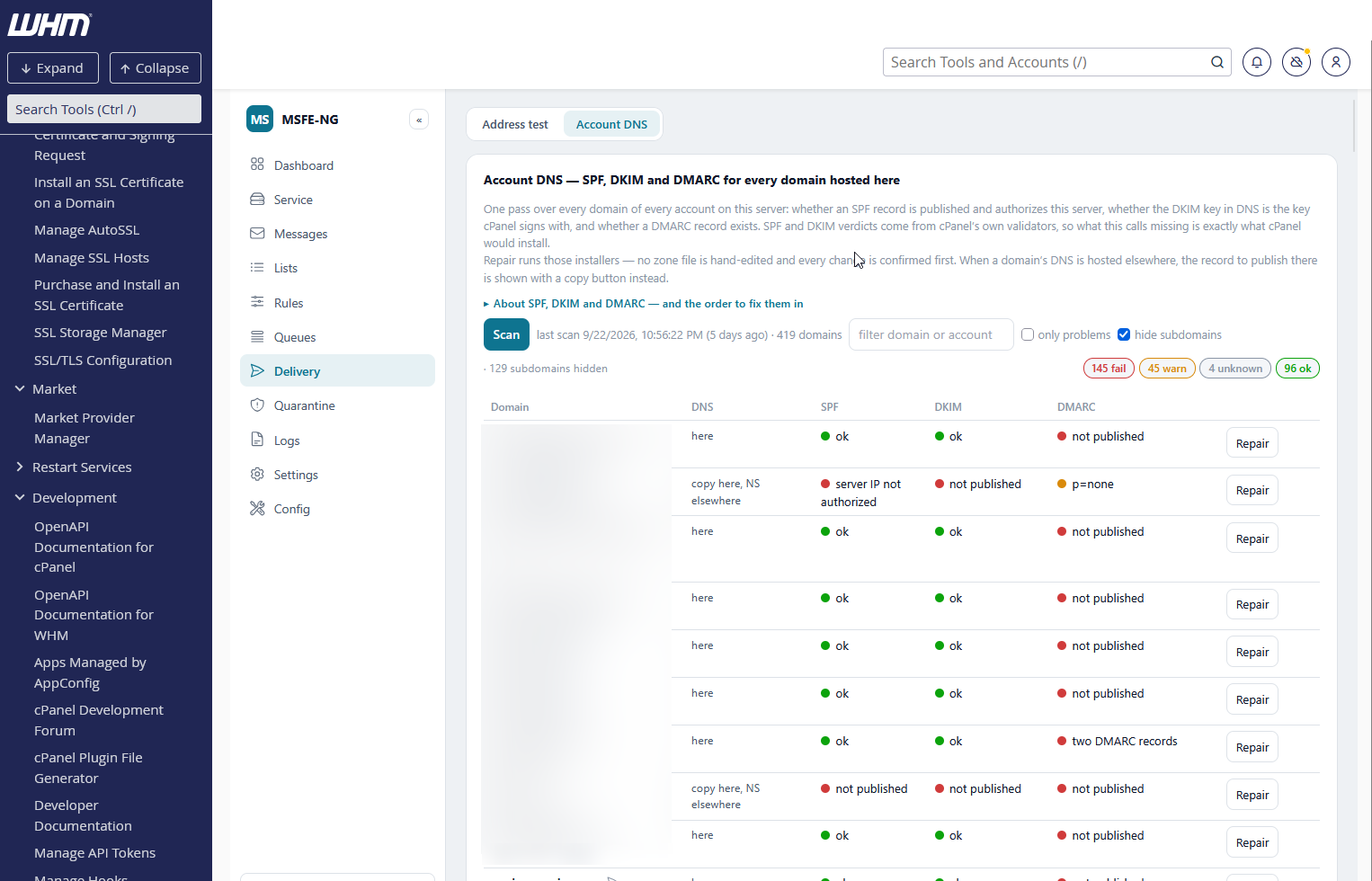
The Delivery tab has two views. Address test answers "why does mail from this address fail?" for one address (Delivery test). Account DNS answers the server-wide question: which of my accounts have broken mail authentication right now?
Press Scan and every domain of every account on this server is checked for the three records that decide whether its mail is accepted: SPF, DKIM and DMARC. Rows arrive as the scan progresses (the validators resolve every domain, so a big server takes a while) and the result is kept, so reopening the view shows the last scan at once with its age.
The rows are sorted fail → warning → unknown → ok, then by name, so what needs attention is at the top. Click a row to see the evidence, the record to publish and the repair.
| Column | Where the verdict comes from |
|---|---|
| SPF | cPanel's validate_current_spfs: is a record published, and does it authorize the IP this server sends the domain's mail from. MSFE-NG adds the record's own quality — syntax, the 10-DNS-lookup limit, the all qualifier (+all fails, ?all or no all warns), ptr
|
| DKIM | cPanel's validate_current_dkims: is the default selector published, and is it the key this server signs with. MSFE-NG adds key strength (RSA under 1024 bits fails, 1024 warns), the testing flag t=y, a revoked key |
| DMARC | MSFE-NG's own lookup: a record at _dmarc.<domain>, its syntax and policy. p=reject or p=quarantine passes, p=none passes with a warning (monitor only), nothing published is a failure. A subdomain that inherits its organizational domain's policy is not applicable, with the inherited policy shown |
Using cPanel's own validators for SPF and DKIM is deliberate: what this view calls missing is exactly what cPanel's own Repair would install, and there is never a disagreement between the two tools.
Each check shows a coloured dot and a short phrase; the row takes the worst of the three.
| Dot | Meaning |
|---|---|
| fail (red) | nothing published, or what is published is wrong: the record does not authorize this server, the DKIM key in DNS is not this server's key, no DMARC record. Mail is being rejected or filtered because of it |
| warning (amber) | published and working, but weaker than it should be: p=none, a 1024-bit DKIM key, a soft or missing all, a testing key, an SPF close to the lookup limit |
| unknown (grey) | the check could not be made — a validator failed, a DNS lookup timed out, or cPanel returned a state this version does not know (the raw word is shown in the open row). Never treated as a finding, and never repaired |
| ok (green) | as it should be |
Open a row to see, per check: the paragraph explaining the verdict, the extra findings as a list, what is published now (the records as DNS returns them), the record to publish with a copy button, and — where a repair is possible — an Apply button. Re-check this domain runs the three checks again for that row alone, which is what to press after a fix once the old record's TTL has passed.
Repair on a row (or Apply on one check) uses cPanel's own installers.
Nothing writes a zone file by hand, and nothing runs without a confirmation
that states the change and shows the record. The same installers are behind
Apply this fix… on an SPF, DKIM or DMARC row of the Address
test, which offers it only when this view reports the record
as repairable. The Address test's TLS-RPT, MTA-STS and DMARC report-authorization
rows use a plainer path: one TXT record into the local zone that holds the
name (dumpzone + removezonerecord for what is there, then addzonerecord),
also available as msfe-ng acctdns txt <name> <value>. The MTA-STS policy
site (mta-sts.<domain>) is set up through create_subdomain for the account
hosting the domain, the policy file in its document root, and
start_autossl_check_for_one_user for the certificate — msfe-ng acctdns mta-sts <domain>.
| Check | What runs |
|---|---|
| SPF |
install_spf_records for the domain, with the record shown in the dialog |
| DKIM |
ensure_dkim_keys_exist — which generates the key pair when there is none — then enable_dkim, which publishes the public key and turns on signing |
| DMARC |
addzonerecord on the local zone: _dmarc.<domain> TXT, TTL 14400, with the record built in the dialog; an existing record is removed first (dumpzone, removezonerecord) |
The Repair dialog has one section per repairable check, each with a checkbox (ticked) and the record to install. The SPF record can be edited before applying. The DKIM record is read-only: cPanel generates the key and publishes it. The DMARC section is a small form rather than a text box:
| Field | What it decides |
|---|---|
Policy p=
|
none (monitor only — nothing blocked, reports flow), quarantine (failing mail goes to spam), reject (failing mail is refused). Each choice shows when it is the right one |
Subdomains sp=
|
the policy for subdomains without their own record; reject is safe when no subdomain sends mail |
Apply to pct=
|
the share of failing mail the policy applies to; below 100 only while ramping up |
Reports to rua=
|
aggregate report addresses (comma-separated); defaults to postmaster@<domain>. Point it at the DMARC report mailbox to see the reports in the DMARC reports view |
Failure reports ruf=
|
per-message forensic reports; optional, few receivers send them |
| DKIM / SPF alignment | relaxed (default) or strict |
The record is built as you change the fields; tags the form has no field for
(fo=, rf=, ri=) are carried along unchanged; edit the record by hand
instead switches to a free text box. When the domain publishes two or more
DMARC records (receivers then ignore the policy entirely), the dialog lists
them and you choose the one to keep — the form starts from it and the others
are removed — or start from a fresh record. When the domain already publishes a DMARC record
(a p=none row, or two records), the form starts from what is published and
the repair replaces it: the old _dmarc lines are removed from the zone
(dumpzone + removezonerecord) before the new one is added, so the zone
never ends up with two records.
Each section, and each check in the row's details, has a Good practice
panel: the rules that matter when deciding (one SPF record, under 10 lookups,
~all then -all; 2048-bit DKIM keys and yearly rotation; DMARC from p=none
with reports to quarantine and reject, sp= for unused subdomains,
external report authorization). The card header has a short About SPF, DKIM
and DMARC panel with the order to fix them in.
A green SPF or DMARC cell can still be changed: the row's Edit button (or Change the … record… in the details) opens the same dialog with the current record, unticked until you choose it — for a policy upgrade, a new include, a report address. DKIM is never edited by hand: cPanel owns the key.
Apply selected runs the chosen changes one after another and shows each installer's transcript — the command and cPanel's own reply — then re-checks the domain and replaces the row, in the table and in the saved scan (a reload shows the same). The resolver this host uses still remembers the old answer, so the re-check does two more things: when the resolver is the private one on this host, its cache for the domain is flushed first; and if cPanel's validator still reports the old state, the domain's authoritative name server is asked directly. A record found there turns the cell green as applied — propagating, with the note that resolvers show it within the record's TTL; a later scan confirms it. When the zone is only a copy here (name servers elsewhere), the authoritative answer does not change and the row says so.
The DNS column says where the zone that holds the name actually lives, and the repair follows from it. Hover it for the name servers.
- here — this server holds the zone and the domain's name servers point at it. Repair installs the record and it is live.
- copy here, NS elsewhere — this server has a zone file for the domain, but the domain's name servers are somewhere else (a hidden primary, a DNS provider, or a stale copy left behind by a migration). cPanel will happily update the local copy, and nothing changes in public DNS unless those name servers replicate from here. The row says so, the Repair dialog repeats it, and the record to publish is always shown so it can be pasted at the real DNS host. This is the case that explains most "I fixed it and nothing happened" reports.
-
elsewhere — no local zone at all. Nothing can be installed; the row
offers copy records instead, which puts the records to publish on the
clipboard in zone-file form (
name. 14400 IN TXT "…"). DKIM is the one exception: the key pair can still be generated here, and its public record then appears as something to copy.
cPanel creates a DKIM key for every domain it knows, subdomains included, and
its validators list them all — so a server with a few dozen accounts reports
hundreds of "missing SPF" subdomains that never send a message. They are
hidden by default (the count is shown next to the checkbox), and each one
carries a sub chip when shown. Untick hide subdomains when a
subdomain really is a sending identity — a newsletter host, a ticketing system,
a shop.
The other chips on a row: addon and parked for the domain's kind in cPanel,
and mail elsewhere when this server does not deliver the domain's mail
locally (its MX points somewhere else, or it is a backup MX) — a missing SPF
record on such a domain is usually someone else's business, but a wrong one is
still worth knowing about.
- filter — a live substring match on the domain or the account name.
- only problems — hides the rows that are entirely ok.
- hide subdomains — see above; on by default.
The chips on the right count fail / warning / unknown / ok over the rows currently visible, so they follow the filters.
- Every verdict is a read: cPanel's validators and DNS lookups. The scan changes nothing.
- Every change is one of cPanel's documented API calls, passed as arguments and
never through a shell. No zone file, no
/var/cpanelfile and no key is edited by MSFE-NG itself. - Every apply is confirmed first and shows what will be installed; the transcript afterwards is the installer's own words.
- Records you type are validated before they are sent: an SPF record must begin
with
v=spf1and parse, a DMARC record withv=DMARC1, no quotes, length capped. - A state this version does not recognise is unknown and is never repaired.
- Resolvers may keep the old answer until the record's TTL expires. A fix can therefore still read missing right after it was installed; the report says so when that happens. The installer's reply is the proof the record was written — re-check the row later.
msfe-ng acctdns scan [--user <u>] [--domain <d>] [--all] [--json]
msfe-ng acctdns fix <domain> <spf|dkim|dmarc> [--record <r>] [--json]
msfe-ng acctdns txt <name> <value> [--json]
scan prints one line per domain, followed by a summary:
[FAIL] example.com      spf: not published   dkim: ok   dmarc: missing
[WARN] example.net      spf: ok              dkim: 1024-bit key   dmarc: p=none
--user limits the scan to one account, --domain to one domain, --all
includes subdomains (hidden otherwise, as in the UI), --json prints the whole
scan. Exit 0 when nothing failed, 1 when any domain has a failing
check, 2 on a usage error, 3 when the panel is not cPanel.
fix applies one repair to one domain and prints the installer's transcript and
the re-checked row; --record supplies the record to install instead of the
proposed one (SPF and DMARC only). Exit 0 on success, 1 when the
installer refused, 2 on a usage error.
txt publishes one TXT record at <name> (a bare value or a zone-file line)
into the zone this server holds for it, replacing any TXT record already at
that name, and prints the transcript. The value is checked against the name:
v=TLSRPTv1 under _smtp._tls, v=STSv1 under _mta-sts, v=DMARC1 under
_report._dmarc; _dmarc and _domainkey names are refused (use fix).
Exit 0 on success, 1 when refused or no local zone holds the name
(the record to publish elsewhere is printed), 2 on a usage error.
mta-sts <domain> makes mta-sts.<domain> serve an MTA-STS policy: the
subdomain is created through cPanel for the account that hosts the domain
when it is not there yet (that adds the A record and the web site), the
policy goes to .well-known/mta-sts.txt in its document root (replacing one
already there; a guarding .htaccess is written only when none exists), and
AutoSSL is asked for the certificate. The policy is built from the domain's
MX hosts with --mode (testing by default, enforce, none) and a week of
max_age, or read from --policy <file>. The _mta-sts TXT record is
txt's job. Exit 0 on success, 1 when the domain is not hosted by an
account here or cPanel refused, 2 on a usage error.
cPanel only, for now. On DirectAdmin or a bare host the view says so and nothing runs; the row model is panel-agnostic, so a DirectAdmin backend can be added behind it later.
The DMARC lookups use this host's resolver. Installing the private resolver (Service → Private DNS resolver) is not required here, but it makes the lookups faster and more reliable.