Repository navigation
Delivery test
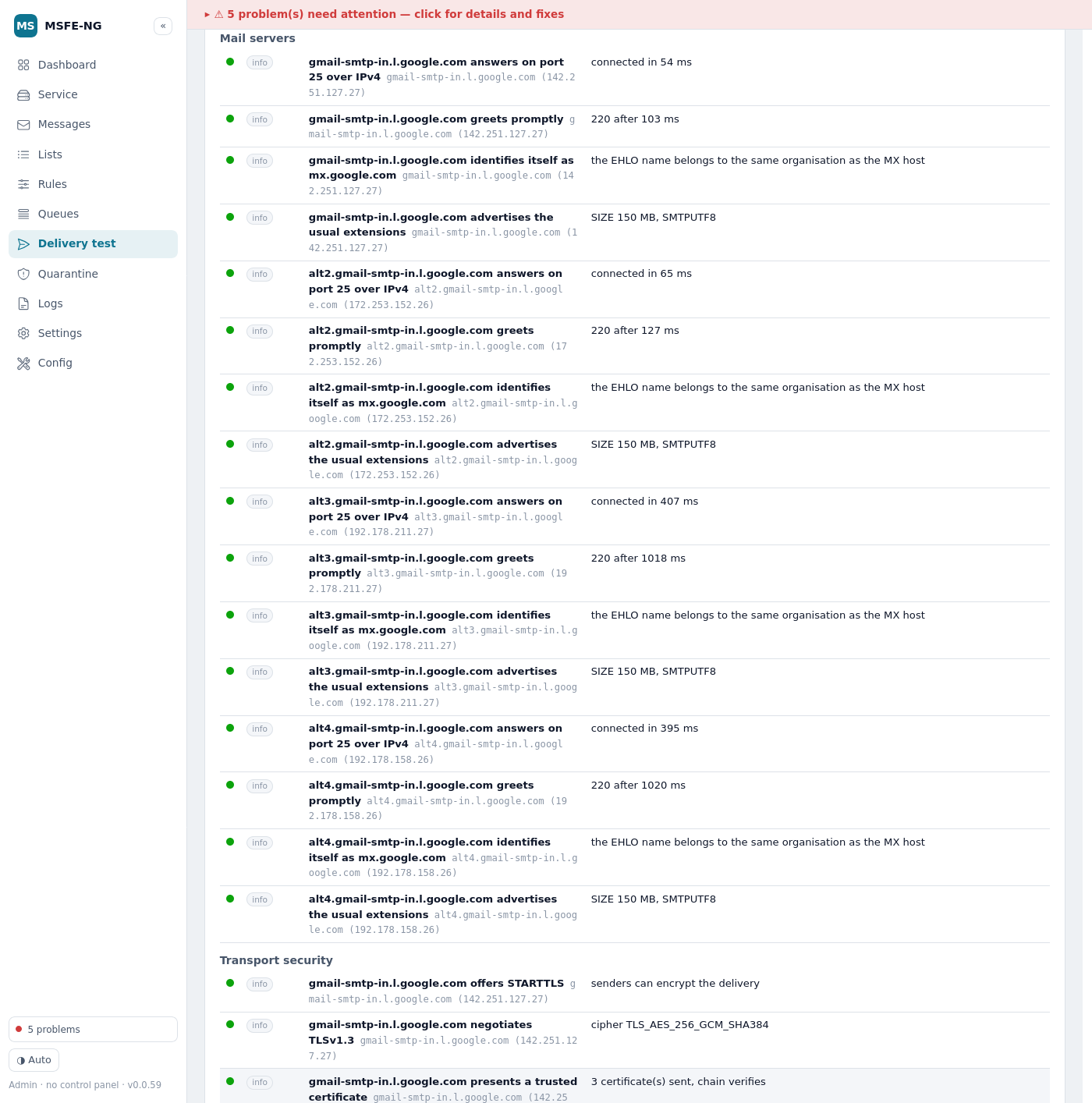
A deliverability diagnostic for one email address: what receivers see when that address sends mail, and what a sender sees when trying to deliver to it. Type the address, press Run test, and the report fills in as the checks finish (a run takes a few seconds; up to a minute when a mail server delays its greeting).
The rail calls the tab Delivery; the pills at the top of it switch between this Address test and Account DNS, which checks SPF, DKIM and DMARC for every domain hosted on this server in one scan. A finished test also offers Investigate address, which opens OSINT with the address filled in (nothing is looked up until you press Run there).
Every check ends in one of five verdicts:
| Verdict | Meaning |
|---|---|
| fail | something is broken or will get mail rejected |
| warning | works, but weaker than it should be, or worth a look |
| unknown | the check could not be made — a lookup failed, a tool is missing, a list refused the resolver. Never treated as a finding |
| pass | as it should be (info rows explain what was seen) |
| n/a | does not apply here (no IPv6 on this host, no DANE published, …) |
Rows are sorted fail → warning → unknown → pass; n/a rows are collapsed. Each row opens to the evidence (the DNS records, the SMTP transcript, the certificate) and a fix: the DNS record to publish (with a copy button), where to click in WHM/cPanel, or the command to run.
When the fix is the domain's SPF, DKIM or DMARC record and the domain is
hosted on this cPanel server with its zone here, the row also offers Apply
this fix…. It opens a confirmation that states what will run, shows the
record cPanel itself proposes (SPF editable, DKIM read-only, DMARC as the
policy form) and where the zone lives, and nothing happens until you press
Apply. The change runs through the same installers as Account
DNS's Repair (install_spf_records, enable_dkim,
addzonerecord) and shows their transcript; the row then notes the fix was
applied and offers to run the test again. Resolvers can keep the old answer
until the record's TTL passes, so a re-run right away may still show the old
state.
Three more records get the same button, published as plain TXT records with
cPanel's addzonerecord into whichever zone on this server holds the name:
TLS-RPT (_smtp._tls.<domain>), MTA-STS (_mta-sts.<domain>) and the
DMARC external-report authorization (<domain>._report._dmarc.<receiver>,
which belongs in the receiving domain's zone, so it is offered when that
domain is hosted here even if the tested one is not). The confirmation shows
the TXT value to publish, editable, and any TXT record already at that name
is replaced.
MTA-STS needs more than the record: senders that see it fetch the policy from
https://mta-sts.<domain>/.well-known/mta-sts.txt and ignore the record while
that fails. When the tested domain is hosted by a cPanel account here, the
MTA-STS record dialog offers to set up the policy site first (on by
default) and the policy rows — mta-sts.<domain> does not resolve, the
policy cannot be fetched, answers something other than 200 — get their own
Apply this fix…. That creates mta-sts.<domain> as a subdomain of the
account through cPanel's create_subdomain (which adds its A record to the
zone and the web site; document root mta-sts.<domain> under the account's
home, outside public_html so nothing of the main site reaches it — or
public_html/mta-sts.<domain> when the server's Tweak Setting Restrict
document roots to public_html is on) unless
the account already has it, writes the policy to .well-known/mta-sts.txt
there with a small .htaccess that keeps the main site's rewrites out and
the file text/plain, and asks AutoSSL for the certificate. The dialog shows
the policy, editable: mode: testing to start, one mx: line per MX host
the domain publishes (the domain itself when it has none), a week of
max_age. AutoSSL issues the certificate in the background and resolvers may
hold a negative answer for the new name for a while, so a re-run right away
can still fail on the fetch; the transcript is the proof of what was done.
Also available as msfe-ng acctdns mta-sts <domain>.
A proposal that still contains a <placeholder> is never offered. Rows about
a name whose zone is not on this server, or about anything else (MX, TLSA, …),
keep the copy button only.
Nothing is guessed. An address alone cannot prove that the mailbox exists, that its mail authenticates, or that it lands in the inbox — the report says so in its last row. An MX host is never assumed to be a sender: a blocklist entry for an inbound address is a low warning with that note, not a failure.
Sending — mail from this address
-
DNS — the domain exists, has ≥2 resolving name servers and a sane SOA,
no CNAME at the apex, DNSSEC (validated with
delv/unbound-host, or the resolver's AD flag; a broken chain is a critical failure because validating resolvers answer SERVFAIL), and whether every authoritative server agrees on the SOA serial, MX and SPF (a serial-only difference is a low warning — large providers generate serials per server). -
SPF — exactly one record, syntax, the 10-lookup and void-lookup limits,
missing includes and loops, the
allqualifier,ptr, macros, record length, address scope; with a sending IP under Advanced, the record is evaluated for that IP and a fix record proposed. -
DKIM — the selector you give,
default, and ~60 common selectors are tried; key type and size (RSA ≥2048 passes, 1024 warns, <1024 fails), testing flag, SHA-1-only keys, revoked keys. When nothing is found the verdict is unknown with the hint to takes=from a sent message'sDKIM-Signature. -
DMARC — record at the domain or inherited from the organizational
domain, syntax, policy (
rejectpasses,quarantinepasses with a note,nonewarns),pct,sp, report addresses and the external-report authorization record at the receiving domain, alignment notes. - Reputation — the domain against Spamhaus DBL, SURBL and URIBL; the sending IP (when given) against Spamhaus ZEN, SpamCop, Barracuda, UCEPROTECT 1–3, PSBL, Mailspike, s5h and the DNSWL allowlist. Each listing carries its meaning and the removal page; a PBL listing gets smarthost advice. Lists that refuse the resolver or time out are folded into one summary row as unknown.
- BIMI — record present, and whether DMARC is strong enough for it.
Receiving — mail to this address
- DNS — MX records (null MX is respected; no MX falls back to A/AAAA with a warning), priorities, TTLs, each MX resolves and is not a CNAME, public addresses only, reverse DNS confirms forward (FCrDNS), generic PTR names, IPv6 presence.
- Mail servers — one courtesy call per MX and address family: connect, greeting (a delayed greeting is a low warning, not a failure), EHLO name (the MX name, its reverse name, or the same organisation), extensions (SIZE, 8BITMIME, PIPELINING; AUTH offered on port 25 before TLS is a warning), STARTTLS.
-
Transport security — the TLS handshake through the system
openssl(protocol, cipher), certificate chain trust, missing intermediates, names covering the MX, expiry; MTA-STS (record, policy fetched over HTTPS pinned to the resolved address with no redirects, mode, MX coverage,max_age, and whether each MX certificate satisfies the policy); TLS-RPT; DANE (TLSA records, their DNSSEC state, and anopensslmatch against the live certificate). - Reputation — the MX addresses against the same IP lists, as low warnings.
- sending IP — the address the domain sends from (this server's IP, a smarthost). Enables SPF evaluation and the sending-side blocklist rows.
- DKIM selector — when discovery does not find the key.
- log days and include server audit — for addresses hosted on this server (see below).
-
fresh run — ignore a report cached in the last 10 minutes
(
delivery_cache_secs).
For an address whose domain belongs to a cPanel account on this server,
include server audit (ticked automatically when the domain is hosted here)
adds a This server section. It is read-only — files under /etc and
/var/cpanel, exim -bt, uapi/whmapi1 queries, ss, systemctl — and
looks only at that account; other people's addresses in evidence are masked
(j***@example.com).
-
Account — the owning account and whether it is suspended; Exim's
routing list for the domain (local / remote / backup MX) against where
the public MX points (a local domain whose MX is elsewhere means mail sent
from this server never reaches the real mailboxes); the mailbox
(
Email list_pops_with_disk: suspended incoming or login, quota); the default address (reject / blackhole / catch-all forward). -
Routing —
exim -btfor the address (undeliverable, local, remote), forwarders to external addresses (with the SRS advice), loops and pipes, filters that discard, autoresponder, BoxTrapper, whether MailScanner is in the path and whether cPanel's SpamAssassin scans a second time, greylisting. -
Outbound identity — the IP mail leaves from (
/etc/mailipsor the main IP), the HELO name resolved both ways against it, SPF evaluated for that IP, cPanel's DKIM key compared with what DNS publishes (a different key in DNS is worse than none), smarthost /queue_only, whether port 25 outbound is open, and the outbound IP on the sender blocklists. -
Services and network — exim, dovecot, cphulkd, mailscanner state;
listening ports; csf
TCP_IN/TCP_OUT/SMTP_BLOCK; Exim version andrequire_secure_auth; the submission-port certificate formail.<domain>. - Limits and filtering — the hourly limit against the last hour of authenticated sends, the defer/fail cutoff, the acceptance ACL options (sender verification off is a warning), cPanel Spam Filters and auto-delete.
- Logs and queues — the Exim main log for the last log days (default 2, up to 7; the live file's tail plus two rotated ones, 32 MB each at most): messages to and from the address with deliveries, bounces (the remote response is classified — Gmail, Microsoft, Yahoo, iCloud, Proofpoint, Mimecast, blocklists, cPanel limits — with the fix and the delisting page), deferrals; SMTP-time rejections of mail to or from the address; failed logins as the address; the panic log; Dovecot logins (addresses, failures); MailScanner's verdicts on mail from the address; messages for or from it in the queues (frozen ones with their log).
- Abuse and reputation — csf entries for the supplied IP and the recent login addresses, cPHulk, outbound bursts from the account this hour, logins from many different addresses.
A probe of the server's own MX address is marked as such: Exim treats its own host as trusted (it advertises AUTH to itself, for instance), so what remote senders see is best checked from another host.
Analyse a saved message or a bounce takes an .eml file (Gmail: ⋮ →
Download message; Outlook: drag the message to the desktop; Thunderbird: Save
as) of at most 2.9 MB. The address to test, the DKIM selector and the sending
IP are taken from the file unless entered above; the file is kept, readable
by root only, just for the run.
A received message adds a Message group on the sending side: the
receiving hop's Authentication-Results (SPF, DKIM, DMARC, ARC as the
receiver saw them — a failure here is what the recipient's filter acted on),
the DKIM-Signature (domain alignment with From, headers covered, l=,
SHA-1), Return-Path/From alignment, the Received chain with per-hop delays
and the first public hop (which then gets the blocklist rows), required
headers (Message-ID, Date, From, a Date more than a day off), raw 8-bit
headers, line length (998), bulk-mail one-click unsubscribe (Gmail/Yahoo
2024), links (raw IPs, shorteners, text/target mismatch, domains on the
domain blocklists), attachments (executables, scripts and double extensions
fail; macro-enabled Office and very large ones warn), and the body shape
(scripts/forms, image-only, HTML without a text part), plus display-name and
Reply-To oddities.
A bounce is taken apart into a Bounce group: the delivery-status part with, per recipient, the action, the enhanced status code and its meaning, the remote MTA and its exact words — classified into who said it (Gmail, Microsoft, Yahoo, iCloud, Proofpoint, Mimecast, a blocklist, cPanel's own limits), what it means and what to do, with the delisting page. The original message's headers, when returned, get the header checks above. Non-standard bounces (plain text) are searched for SMTP replies.
From the shell: msfe-ng delivery eml <file.eml> [--bounce] [--address a] [--json | --html].
Diagnostic inbox — receive a test message hands out a one-time address
dt-<token>@<this server's hostname>. Send a message to it from the account
you are diagnosing — Gmail, Outlook, a web form, a printer — and the tab
polls until it arrives (the address accepts mail for 30 minutes). The
message is analysed on the next poll and deleted; the rows show how it came
in: the SMTP client and its SPF result for the sender domain, whether
the DKIM key the signature names is published (the cryptography itself
is not verified), TLS on the way in (from Exim's log line; a local
submission is marked as such), the spam verdict MailScanner or cPanel's
SpamAssassin added, an authenticated local submitter, and the message's own
shape (the Message checks above).
It needs two Exim fragments: a router that accepts dt-<token> at the
hostname while /var/spool/msfe-ng/diag/active/dt-<token> exists, and an
appendfile transport into /var/spool/msfe-ng/diag/box/dt-<token> (owned
by Exim's delivery user, 10 MB quota). They live in /etc/msfe-ng/ and are
pulled in by two .include_if_exists lines under @PREROUTERS@ and
@TRANSPORTSTART@ in /etc/exim.conf.local — cPanel's supported
customisation file — followed by buildeximconf and an Exim restart.
Install from the card (Install the inbox, with a dry run) or with
msfe-ng delivery inbox install; uninstall removes the lines and files
and rebuilds. Deleting the fragment files alone also switches it off. From
the shell, msfe-ng delivery inbox new prints an address and poll <token>
analyses what arrived.
Send a test message — follow it to the remote server sends one real
message (subject MSFE-NG delivery test <tag>, a short note with the tag)
from an address hosted here to an external mailbox through this server's
Exim, after a confirmation. A background job (delivery-testmail) follows
the Exim id through the main log for up to 150 s and reports: accepted
by the remote (its response and the TLS used), refused (the response
classified — Gmail, Microsoft, Yahoo, blocklists, cPanel limits — with the
fix), still deferred (the reason; the Queues tab shows the message), or
not delivered yet. Whether the message went through MailScanner is noted.
Then look where it landed on the receiving side (inbox or spam, and its
authentication results — the Analyse a saved message upload reads them).
From the shell: `msfe-ng delivery testmail --from --to
[--follow ] [--json]`.Monitors — re-test on a schedule keeps a list of addresses (with their
test options: sending IP, selector, server audit) re-tested every 1–24 hours
(default 6) by the 5-minute msfe-ng monitor cron, at most
delivery_max_monitors (20). Each run's full report is stored in MySQL
(delivery_monitors, delivery_runs — migration 0003, applied by
msfe-ng db-migrate on upgrade) and compared with the previous one: a check
that got worse (pass → warning or fail, warning → fail) or recovered is sent
to Telegram, one message per monitor per alert cooldown
(alert_cooldown_mins); a lookup that merely failed (unknown) never
alerts. History opens the runs with fail/warn/unknown/pass counts, each
one openable in the tab or as the standalone HTML page, and downloads a CSV;
run now forces a run; pause/resume and remove do what they say.
Runs are kept 200 per monitor and 90 days.
From the shell: msfe-ng delivery monitor list | add <address> [--interval-mins n] [--audit] [--ip ..] [--selector ..] | remove <id|address> | run [--dry-run] [--id n].
The same checks can be offered in the cPanel user panel, limited to the
account's own domains: the audit forced to that account, evidence masked, no
test mail, monitors filtered by owner, a lower run rate. The API is designed
for it (user_scope in the inputs, owner on monitors) and it will arrive in
a later release.
Probes are read-only and polite: one SMTP connection per MX and family
(EHLO/QUIT only, never MAIL FROM to a third party), one TLS handshake, the
MTA-STS policy fetched once. Targets that resolve to private, loopback,
link-local or this server's own addresses are not probed (they show as
unknown with the reason); the MTA-STS fetch is https-only, size-capped and
follows no redirects. Runs are rate-limited (delivery_runs_per_min, default
6), one per address at a time, and their reports are kept 24 h under
/var/cache/msfe-ng/delivery readable by root only.
The test uses system tools and says so when one is missing: openssl
(TLS and DANE), curl (MTA-STS), delv from bind-utils or unbound-host
(DNSSEC). Spamhaus, URIBL and DNSWL refuse shared resolvers — install the
private resolver (Service → Private DNS resolver) so their rows answer.
JSON and HTML download the report; Open shows the standalone HTML page. Recent tests lists the last runs. The same run from the shell:
msfe-ng delivery test user@example.com [--ip 203.0.113.5] [--selector s1] [--audit] [--days 7] [--json | --html] [--force]
Checks stream as [VERDICT] id title lines, followed by a per-scope summary
and the problems to fix, most important first. Exit 0 = no failure, 1 = at
least one failed check, 2 = usage, 3 = the address was refused.
Config keys: delivery_runs_per_min (6), delivery_cache_secs (600),
delivery_log_days (2), delivery_max_monitors (20), delivery_helo (the
EHLO name used by the probes; empty = this host's name).