Repository navigation
Service
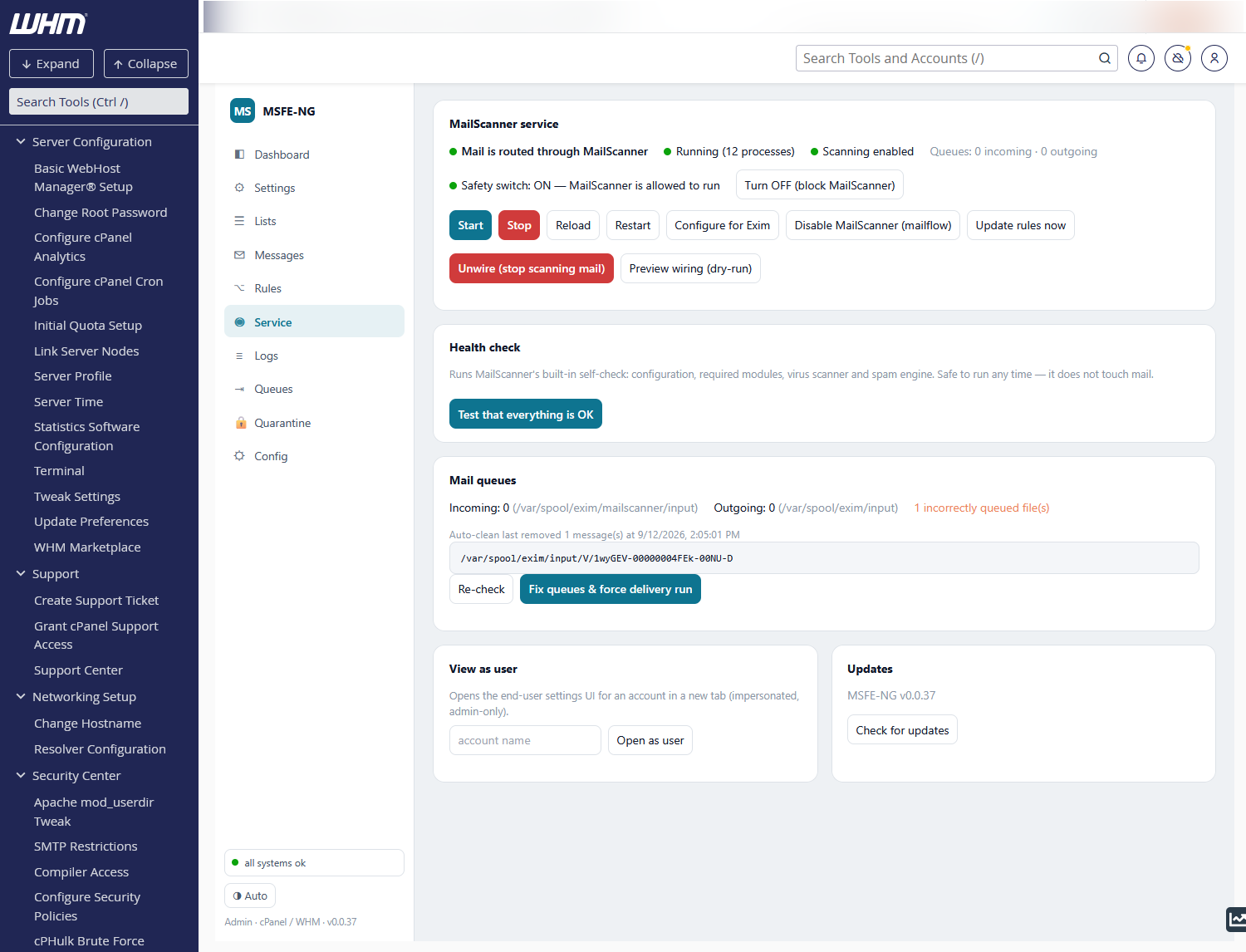
The status line answers three questions: is mail routed through MailScanner (Exim wiring), is the service running (with process count) and is scanning enabled (the mailflow toggle). Queue counts are shown on the right.
- Safety switch — MailScanner's own run/no-run latch. OFF means the service refuses to start; turn it ON before starting. Changing it does not alter mail flow.
- Start / Stop / Reload / Restart — the service itself. Stop warns you: while MailScanner is stopped, wired mail waits in the scanning queue and is not delivered.
-
Configure for Exim — sets up
MailScanner.conffor this server (queue directories, run-as user, sendmail paths; original backed up) and creates the incoming spool directory. Safe to re-run. -
Enable / Disable MailScanner (mailflow) — the instant kill switch: with
scanning disabled, mail bypasses MailScanner entirely (Exim delivers directly).
It is the named-queue ACL fragment renamed to
.disabled(its include isinclude_if_exists) plus one Exim rebuild, so it exists only for the named-queue wiring; on ConfigServer's two-config layout/etc/exim.confitself spools into the scanning queue, there is no switch, and the button is not shown./etc/exiscandisableis not the kill switch: cPanel reads it for one thing only — turning off its own exiscan, the ClamAV pass in Exim's SMTP ACL — so MSFE-NG leaves that file as it finds it (see the doctor check cPanel virus scan in Exim (exiscan)). -
Disable cPanel SpamAssassin (double scan) (cPanel only) — cPanel's own
Apache SpamAssassin runs in Exim before MailScanner sees the message, for
every account with Spam Filters on (or all of them under WHM's Forced
Global ON): two scores, two thresholds, cPanel's own
+spamfolders. That Exim ACL has no off switch, so the button turns Spam Filters off for each such account through cPanel's own API (uapi SpamAssassin disable_spam_assassin), clears Forced Global ON if set, and remembers the accounts in/etc/msfe-ng/cpanel-sa-accounts; Restore turns them back on. An account can still re-enable Spam Filters in cPanel — the status line and the doctor check cPanel SpamAssassin double scan show it (remove the Spam Filters feature in WHM → Feature Manager to prevent that). Two WHM switches sit above the per-account flags and are honoured: the Apache SpamAssassin service off in Service Manager (/etc/spamddisable— Exim skips spamd for everyone) and Enable Apache SpamAssassin spam filter off in Tweak Settings (skipspamassassin=1— the feature is gone, cPanel's API refuses to touch it). With either off the status line and the doctor report off server-wide, stale.spamassassinenableflags left in account homes are ignored, and the button does nothing. CLI:msfe-ng exim <enable|disable>-cpanel-spamassassin. - Update rules now — runs a sync immediately (also every 10 min by cron).
- Wire Exim → MailScanner / Unwire — adds (or removes) the Exim named queue that holds incoming mail for scanning. Preview wiring (dry-run) prints the exact changes without applying them.
The Activity console below shows each command and its output, then follows the MailScanner journal for ~20 s so startup progress and errors are visible.
One row for every daemon the mail system depends on, as systemd sees it. The first six are required; the rest are optional and checked only when they are installed.
| Service | Unit(s) looked for | Role |
|---|---|---|
| MSFE-NG | msfe-ng |
this panel's daemon |
| MailScanner |
mailscanner / MailScanner
|
scans the mail Exim queues for it |
| Exim | exim |
receives and delivers all mail |
| ClamAV |
clamd / clamd@scan
|
the virus scanner |
| Database |
mysqld / mariadb / mysql
|
message log, quarantine index, DMARC reports |
| Cron |
crond / cron
|
msfe-ng's scheduled jobs |
| Dovecot, csf, lfd, Unbound | same names | mailboxes, firewall, login-failure daemon, local resolver (optional) |
Each row shows one of these states:
| State | Meaning |
|---|---|
| running · at boot | fine |
| running · NOT at boot | it runs now but stays stopped after a reboot. Enable at boot fixes it |
| not running | it should be running. Start, or Enable & start when it is not enabled either |
| not installed | a required service has no unit |
| held by the safety switch | MailScanner is stopped on purpose (see MailScanner service) |
| not in use | an optional service that is not installed or not enabled |
Running services also have Restart, except msfe-ng itself: restarting it
from the page would cut the page off. Use systemctl restart msfe-ng. Every
action asks first and shows the systemctl output.
Other services that are stopped or failed on the server are listed under the table as down, without a warning. They are not needed by mail and are often stopped on purpose (cPHulk, for example). systemd calls this state degraded; the page does not raise it. The header shows systemd's state only when it is something else, such as starting or maintenance.
A MailScanner set up by hand is often left not enabled at boot. It runs
until the next reboot, and then mail waits unscanned in the queue. The
doctor reports this as services start at boot, with a
one-click systemctl enable. Wiring Exim to MailScanner from this tab now
enables the unit too.
From the command line: msfe-ng service units (exit 1 when something needs
attention) and msfe-ng service unit <name> <enable|start|restart|enable-now>.
Test that everything is OK runs MailScanner's built-in self-check
(--lint: configuration, Perl modules, virus scanner, spam engine). It does
not touch mail and can take up to a minute. A red verdict shows the full output.
Incoming (waiting for scan) and outgoing (delivery) counts with the age of the
oldest message, plus a scan for incorrectly queued files — spool files that
sit where Exim will never look. Fix queues & force delivery run moves them
aside into msfe-ng-badqueue (never deletes) and kicks a queue run. The
last automatic clean is noted here too. Per-message work happens on the
Queues tab, which shows both queues in full.
Opens the end-user panel impersonating an account (root only) — handy to see exactly what a customer sees.
Check for updates compares MSFE-NG with its latest GitHub release and the MailScanner engine with the latest MailScanner v5 release. When something is newer, an Upgrade … now button appears:
- Upgrade MSFE-NG now — downloads the release, verifies its checksum and runs the installer (the same as the install one-liner). The daemon restarts in the middle; the console keeps polling and the page reloads once the new version answers. Settings, policy and wiring are kept.
-
Upgrade MailScanner now — only for the RPM engine (
/usr/sbin/MailScanner): installs the newer RPM, checks its perl dependencies, re-applies Configure for Exim and restarts MailScanner. Mail queues meanwhile. A ConfigServer engine (/usr/mailscanner) is not upgraded in place — see Migration.
The last line of the card links to the project on GitHub, where you can star it.
You do not have to come here to learn about a release: the sidebar shows ⬆ MSFE-NG vX available (or MailScanner … available) under the version line whenever something newer exists, and clicking it opens this tab. The page checks once after loading and then every six hours; the daemon asks GitHub at most once an hour for those, while Check for updates always asks afresh.
Private DNS resolver appears as a card until unbound answers on loopback
and resolv.conf points there — see Troubleshooting, DNS
blocklists, for what the install does.
Migrate from ConfigServer MailScanner appears as its own card while the
legacy /usr/mailscanner tree exists — see Migration for what it
does, step by step.
Decommission ConfigServer MSFE appears instead while something of
/usr/msfe (or its cron entries, root's crontab lines, WHM registration) is
left and the ConfigServer engine is gone: it removes the old front-end and
only it, after packing all of it into <backup_dir>/legacy-msfe-<time>.tar.gz;
the engine keeps scanning and nothing is restarted, so it runs at once rather
than as a job — see Migration, Decommissioning ConfigServer
MSFE. CLI: msfe-ng legacy decommission [--run].
All the cards above it run as background jobs: transient systemd units that survive the
daemon's own restart, logging to /var/log/msfe-ng/jobs/<job>.log. The job
console under the card follows the log; reopening the tab while a job runs
picks it up again. CLI: msfe-ng upgrade [--check], msfe-ng engine install.