Repository navigation
Config
Every configuration file of the scanning chain, edited in place with validation, history and a tester — plus the maintenance tools. Everything here is also available from the CLI.
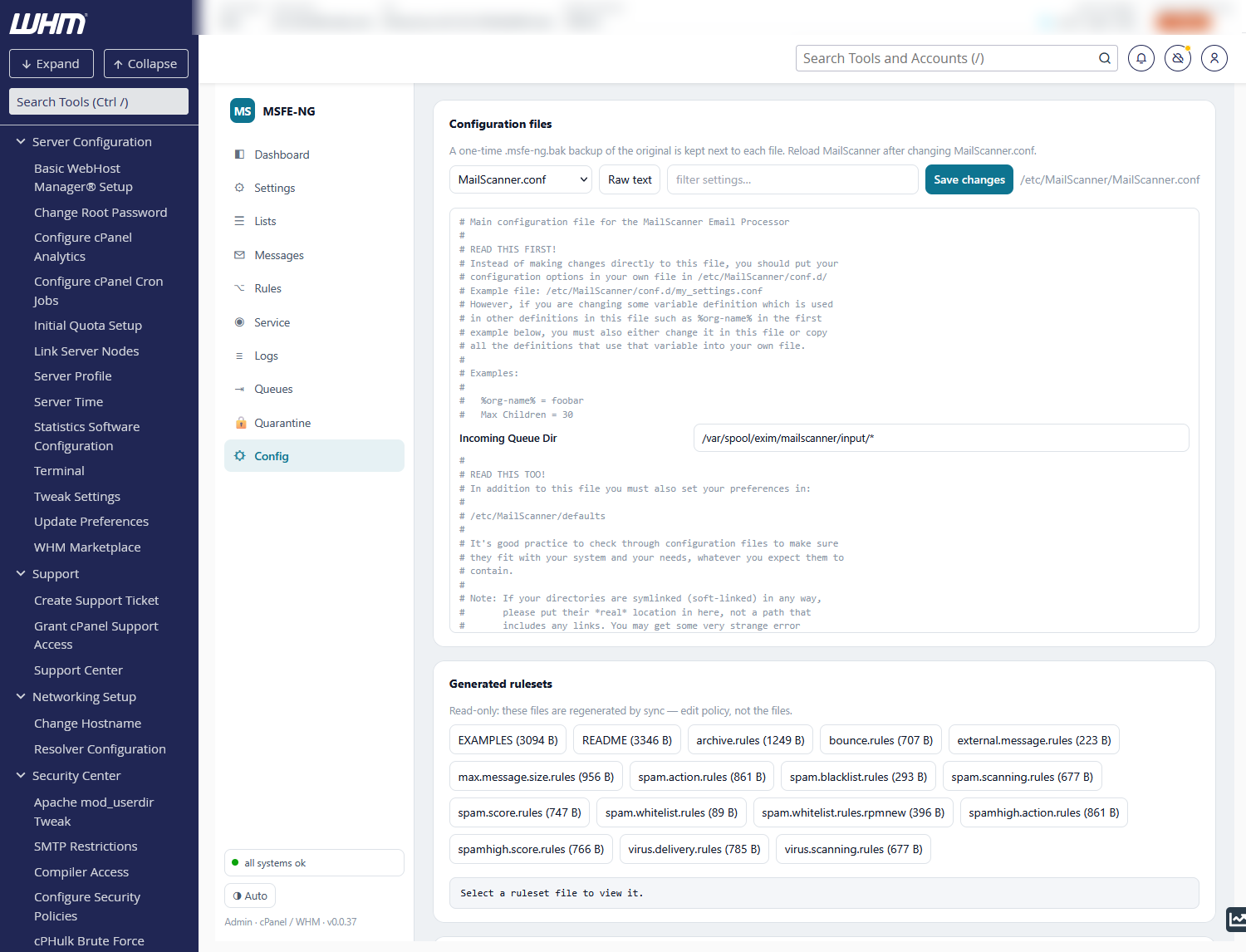
The left column lists every file under MailScanner's configuration directory
(/etc/MailScanner, or /usr/mailscanner/etc on a ConfigServer layout) plus
MSFE-NG's own config.toml, grouped by directory: the main files, conf.d/
fragments, mcp/, rules/, custom/ and the reports/<language>/
notification templates. Each file carries a badge for the editor it gets and a
lock when it is read-only. find a file… filters the tree by name;
search in files… (Enter) looks for a text, case-insensitively, inside every
file: the results replace the tree, grouped by file with the line number and
the line, and clicking one opens that file at that line (the raw editor,
scrolled and selected). Escape or clearing the box brings the tree back.
CLI: msfe-ng conf grep <text> prints id:line: text for the same search.
| Badge | Files | Editor |
|---|---|---|
| settings |
MailScanner.conf, conf.d/*.conf, config.toml
|
form: one field per setting, comments shown in between |
| ruleset |
rules/*.rules that sync does not generate |
table: direction, pattern, value; drag rows (⋮⋮) or ↑ ↓ to reorder |
| file rules |
filename.rules.conf, filetype.rules.conf, archives.*
|
table: action, pattern, log text, user text; drag rows (⋮⋮) or ↑ ↓ to reorder |
| RBL list | spam.lists.conf |
table: name, DNS zone |
| scanners | virus.scanners.conf |
table: name, wrapper, install dir |
| hosts | phishing.*.custom |
one hostname per row (paste many at once) |
| text |
spamassassin.conf, mcp/*, country.domains.conf, reports/*
|
raw text |
| 🔒 | the ten rulesets sync generates, phishing.*.conf (ms-update-phishing), custom/*.pm, defaults, *.rpmnew
|
view only — the lock's tooltip says who owns the file |
Order matters. Rulesets and file rules are read top to bottom and the
first match wins, so a rule placed below a broader one may never fire. Drag a
row by its ⋮⋮ handle (or use ↑ ↓) to move it; its comment moves with it and
the file's header stays on top. In file rules, ⚠ marks a rule that an earlier
one hides — the earlier rule matches every example name of it first and has a
different action (same-action duplicates are not flagged); hover the ⚠ for an
example name, click it to jump to the rule that wins. The tester and
msfe-ng conf test report the same as a warning.
Form ⇄ Raw text switches any editor to the plain file. + New creates a
conf.d/<name>.conf fragment (read after MailScanner.conf, so it overrides
it) or a new rules/<name>.rules ruleset. The filter box finds a file by name.
With the engine installed, every setting is typed from MailScanner's own
ConfigDefs.pl: yes/no settings are selects, numbers are number fields, and
settings that may take a ruleset get a ruleset… picker listing
rules/*.rules. ≠ default marks a value that differs from the engine
default (click it to reset), unknown a directive the engine does not know
(a typo — MailScanner ignores it silently), overridden in … a setting a
conf.d fragment sets again. Only settings that differ from the engine
default shows what this host actually changed.
Every save goes through the same pipeline, for every file kind:
- the file's own parser checks the syntax (a table cannot hold a line MailScanner would misread);
- the change is validated on a staged copy of the whole configuration
directory:
MailScanner --lintfor MailScanner.conf, rulesets, file rules, spam lists and scanner definitions,spamassassin --lint -pforspamassassin.conf— the live file is untouched until the lint passes (conf.dfragments, which the engine always reads from the live directory, are linted right after apply and put back if that fails); - the previous version is copied into the file's History
(
backup_dir/conf/…, the newest 50 kept); - the file is written atomically, mode and owner preserved;
- MailScanner is restarted for files it reads only at start
(
MailScanner.conf,spamassassin.conf,spam.lists.conf,virus.scanners.conf,conf.d,mcp) or reloaded for the ones it re-reads per batch (rulesets, file rules, phishing lists); the badge next to the file name says which.
The report under the editor shows the lint findings, the transcript and the
restart outcome. save without lint skips step 2 (the syntax check still
runs); apply without restart/reload skips step 5 — the tab then shows a
Restart pending banner naming the files the running engine has not read,
and the doctor warns about it. A file that changed on disk while you were
editing is refused and reloaded (stale), never overwritten.
History lists every kept version with a line diff against the current file;
Restore this version goes through the same pipeline, so the file you replace
is kept too. The one-time .msfe-ng.bak older releases wrote appears as
original.
Test configuration runs MailScanner --lint, spamassassin --lint and
MSFE-NG's own cross-file checks and turns them into one list of findings,
each naming the file and setting it is about — click one to open it there:
- from MailScanner --lint: rulesets it cannot open, values that cannot be
rulesets, syntax errors with line numbers, the virus scanners it found versus
the ones
Virus Scannersnames, the phishing list sizes, whether SpamAssassin loaded cleanly, whether the EICAR test batch was caught; - from spamassassin --lint with MailScanner's
spamassassin.conf: lines it cannot parse, unknown options; - from MSFE-NG: every file, directory and command a setting names exists;
every ruleset parses and its values fit the setting's type (a ruleset
without a
defaultline is a warning, except where no value means off —Archive Mail, where "no match" is the only way to say "archive nothing else", is reported as OK by design); the scanners and spam lists named are defined (defunct blocklists flagged); filename patterns compile;conf.dfragments and phishing lists parse; directives the engine does not know (typos); files the scanning user cannot read; and the doctor checks that judge the same chain.
Test with my changes on the editor runs the same test on a staged copy that includes what you typed but did not save — nothing goes live. The lint runs a real test batch through the scanners, so a test takes 5–20 s.
Under Maintenance & tools: pick a sample (clean, the GTUBE spam string, the
EICAR test file as an attachment) or upload a .eml, and Run simulation
asks each stage directly — SpamAssassin with MailScanner's spamassassin.conf
as the scanning user (offline skips DNS, Razor and Pyzor), the virus scanner
through clamdscan, the filename/filetype rules over the attachments (and,
for a zip, the Archives: filename rules over each member's stored path, with
an encrypted member refused unless Allow Password-Protected Archives is on;
members are not unpacked, so the archive filetype rules and nested archives
stay with the engine) — then predicts MailScanner's actions for that sender and recipient from your
rulesets (spam checks, scores, spam/high/non-spam actions, virus handling).
It is a simulation: nothing is delivered. Send real test mail submits the
three test messages through the MTA instead; their real verdicts appear on the
Messages tab once scanned.
Export snapshot downloads one tar.gz holding MailScanner's configuration
directory (everything except the generated phishing lists) and /etc/msfe-ng
(config and policy), with a manifest; a copy stays in backup_dir/snapshots.
It contains config.toml with the database password — keep it private.
Import snapshot takes an uploaded file (up to about 2.9 MB through the
panel; larger ones: msfe-ng snapshot import on the server) or a snapshot kept
on this server, and shows every file with its status (same, changed, new,
read-only) and a diff on click. Changed and new files are preselected;
config.toml is not, because it is host-specific. The selection is imported as
one set — validated on a staged copy, one history copy per file, one restart or
reload — and refused as a whole if the lint fails. Policy files regenerate the
rulesets. Old msfe-ng backup tarballs import too.
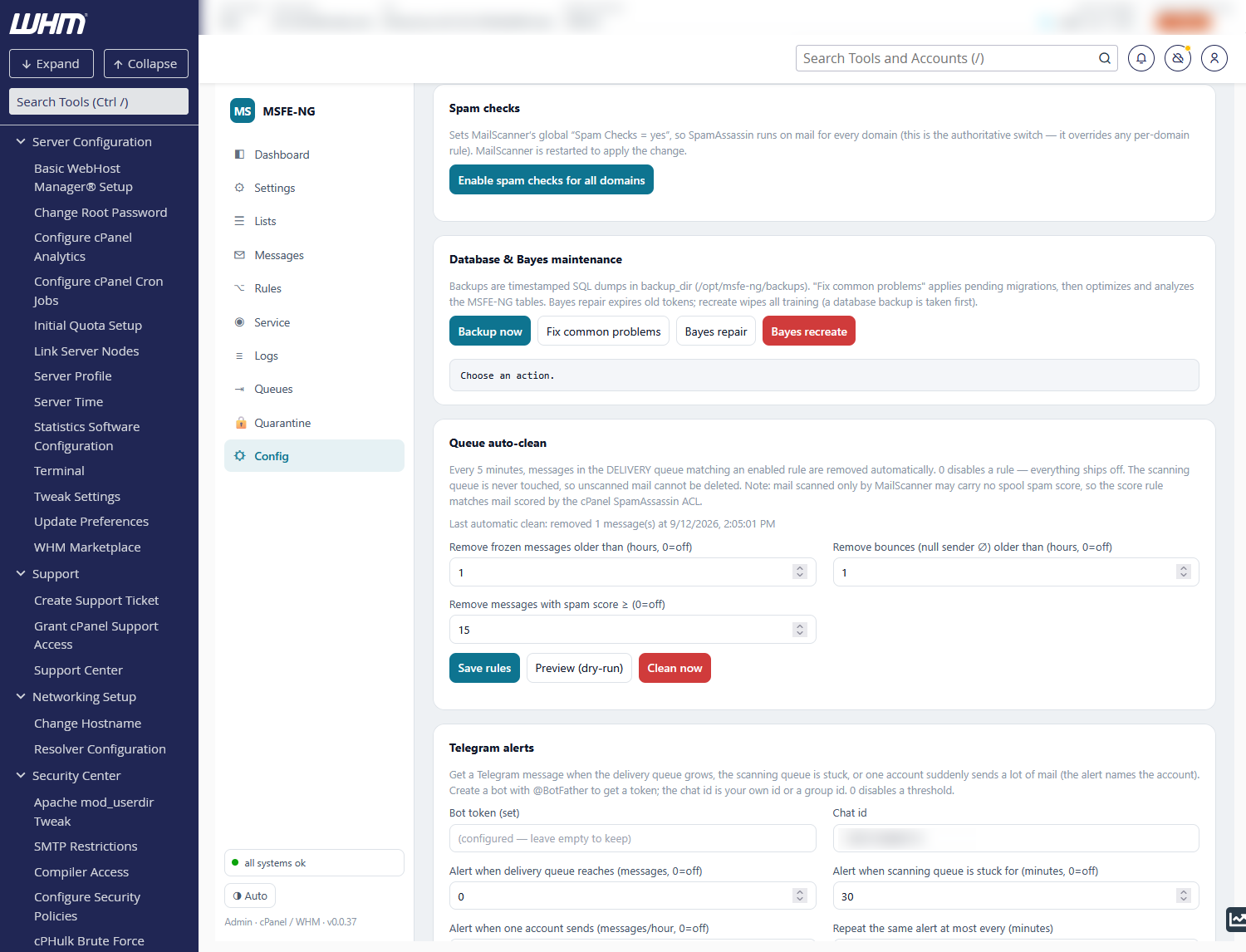
Enable spam checks for all domains sets MailScanner's global
Spam Checks = yes (the authoritative switch that overrides any per-domain
rule) and restarts MailScanner.
The RPM engine ships with #!/usr/bin/perl shebangs: system perl, where
every module MailScanner needs has to be installed (cpanm for what EL does
not package) and where a second SpamAssassin ends up beside cPanel's — with
its own sa-update and its own rule directory. cPanel's perl
(/usr/local/cpanel/3rdparty/bin/perl) already carries Mail::SpamAssassin
with the rules cPanel keeps updated, DBI, DBD::mysql, MIME::Parser and the
rest, which is how the ConfigServer engine always ran.
engine_perl = "cpanel" (this card, or the key in config.toml,
MSFE_NG_ENGINE_PERL=cpanel at install) points the engine's five perl
scripts (MailScanner, ms-create-locks, ms-peek, ms-sa-cache,
ms-upgrade-conf) at the real path of cPanel's perl (for example
/usr/local/cpanel/3rdparty/perl/542/bin/perl, never the symlink, so a cPanel
update cannot silently switch the engine to a perl nobody checked) and
restarts MailScanner. The card shows what each script runs under now.
What keeps it true: Configure for Exim, the engine upgrade (an RPM update
resets the shebangs) and msfe-ng engine install re-assert the choice; the
five-minute monitor cron repairs scripts whose perl has disappeared (cPanel
moving from perl/542 to a newer one removes the old directory and
MailScanner would not start) and sends a Telegram alert when it did; the
doctor check MailScanner engine perl fails on a vanished perl, warns on a
stale shebang, and --fix rewrites them. cPanel's perl is used only when it
loads Mail::SpamAssassin, DBI and MIME::Parser — nothing is ever installed
into it; when it lacks something the engine stays on system perl and the
doctor says why. The ConfigServer engine is not touched. CLI:
msfe-ng engine perl [--apply] [--json].
-
Backup now — timestamped SQL dump into
backup_dir(default/opt/msfe-ng/backups). - Fix common problems — applies pending migrations, then OPTIMIZE/ANALYZE on the MSFE-NG tables.
- Bayes repair — expires old tokens and syncs the SpamAssassin Bayes DB.
- Bayes recreate — takes a database backup, then wipes Bayes so it retrains from scratch (all ham/spam training is lost).
Every 5 minutes the monitor cron removes messages from the delivery queue that match an enabled rule:
| Rule | Removes |
|---|---|
| Remove frozen messages older than N hours | frozen (undeliverable, unbounceable) mail |
| Remove bounces older than N hours | null-sender (∅) mail |
| Remove messages with spam score ≥ N | mail the cPanel SpamAssassin ACL scored at or above N |
0 disables a rule; everything ships off. The scanning queue is never
touched, so unscanned mail cannot be deleted. Preview (dry-run) lists what
would go right now; Clean now runs the rules immediately; Save rules
stores them for the cron. The last automatic run is summarised above the
fields.
Every minute (msfe-ng autoban run, from /etc/cron.d/msfe-ng) the sources
of newly logged spam are banned temporarily in ConfigServer Firewall (csf -td) when a rule fires. Everything ships off.
Thresholds — one row for high-scoring spam, one for spam: enabled,
messages (count 1 = ban on the first message), within a window and
ban for a duration, both as a number plus seconds / minutes / hours /
days. Defaults: high spam 1 in 10 minutes → 1 day; spam 3 in 1 hour → 2 hours.
Save thresholds stores them as autoban_* keys in config.toml.
Match rules — block and/or ban by content. Each rule has a field
(Subject, From address, To/Cc, Body text, or any header by name), a
match (contains, a literal matched case-insensitively, or regex, a
Perl regex exactly as SpamAssassin reads it — /…/i is added when you give
no delimiters), the pattern, Block delivery, Ban the source for
a duration, and a comment. Rules become SpamAssassin rules named
MSFE_MATCH_<id> in /etc/mail/spamassassin/msfe-ng-match.cf (written on
every sync): a blocking rule scores 100, so the message follows the
domain's high-spam action — quarantined by default, deleted if the policy
says so — and is never delivered; a ban-only rule scores 0.01, which tags
the message in the log without changing its verdict. The pattern is
validated with the engine's own perl when you save (a bad regex is refused
with perl's message) and the site config is linted afterwards; Test
against recent mail shows which of the last 200 subjects or senders would
match. Whitelisted mail skips SpamAssassin, so match rules never touch it.
Also reject at SMTP time (not for body rules) additionally refuses
matching mail in Exim's DATA ACL with a 550, before MailScanner — the
source is then banned from the reject log (reason smtp); the table's
SMTP column marks those rules and counts the last day's refusals. How
it is wired, what is never refused and what to verify on the host:
Rules → Reject at SMTP time.
Never banned, whatever the rules: your own, loopback and private
addresses; anything in csf.allow or csf.ignore; an address csf already
denies (permanently or temporarily); an address that also delivered clean
mail inside the window — a shared provider IP (Gmail, Microsoft, a relay)
with one false positive stays reachable; and an address this engine banned
within the window. At most 100 bans per run; the rest re-trigger on their
next message. Every ban is a row in the autoban table (Recent
auto-bans, with unban) and, with Telegram configured and the box
ticked, a Telegram line. Dry run now shows what the current settings
would ban right now, without banning.
CLI: msfe-ng autoban status, msfe-ng autoban run [--dry-run], msfe-ng autoban rules, msfe-ng autoban rejects, msfe-ng autoban smtp-off. The
doctor warns when rules are enabled without csf, when the SpamAssassin
file behind the rules is stale (--fix syncs), and when the Exim fragment
behind the SMTP-time rejects is stale or not included by the built
exim.conf.
Create a bot with @BotFather and paste its token (never shown again once saved —
the field just says configured; leave it empty to keep it) and the chat id (your own
id or a group). Then set thresholds (0 = off):
- delivery queue reaches N messages
- scanning queue stuck for N minutes — mail waiting for MailScanner that never gets scanned (the classic "scanner wedged" incident)
- one account sends N messages/hour — outbound bursts, the usual sign of a compromised mailbox; the alert names the account
- repeat the same alert at most every N minutes
Send test message confirms the bot and chat id work. The doctor warns if Telegram is only half configured.
The same card holds the AbuseIPDB API key (abuseipdb_key, from the API
tab of your AbuseIPDB account), used only when you report an address by hand
from the client-IP view. Like the bot token it
is never shown again once saved: the label says configured; leave the field
empty to keep it.
The OSINT view is off until OSINT lookups is switched on in the
OSINT providers card (it writes osint_enabled); the OSINT view itself
offers a Switch OSINT on button and a link to this card. The same card holds the
optional Have I Been Pwned API key (osint_hibp_key) and the lookup mode
(osint_hibp_mode): direct sends the full address to HIBP, range sends only a
6-character hash prefix and needs the Pro/High RPM plan. The key is a secret: it is
never shown again once saved (the label says configured), an empty field keeps it,
and Clear key removes it. Only letters, digits, - and _ are accepted. The card
also takes a Search key (Brave Search API) (osint_search_key; the full address is
sent in quotes to Brave Search, results are candidates only) and a Validation key (Hunter) (osint_validation_key;
the full address is sent to Hunter, which checks the mailbox itself and uses the account's paid quota; the result is a vendor assertion, and Hunter is unticked by default on the OSINT view), each with its own
Clear button and the same rules. The
keys are stored in config.toml, which is readable by root and by the mail group (the
MailScanner logging plugin needs it). Like the AbuseIPDB and Telegram secrets they are also
visible in the Config tab's raw view, history and snapshot exports. The config.toml file holds the limits: osint_runs_per_min, osint_max_concurrent,
osint_deadline_secs, osint_max_external_queries, osint_cache_secs and
osint_retention_hours. Scheduled checks add osint_max_monitors (10),
osint_history_days (90) and osint_monitor_budget (300 provider units a month,
0 = unlimited); the defaults are listed on the OSINT page, and the alerts use the
Telegram settings and alert_cooldown_mins.