Repository navigation
Settings
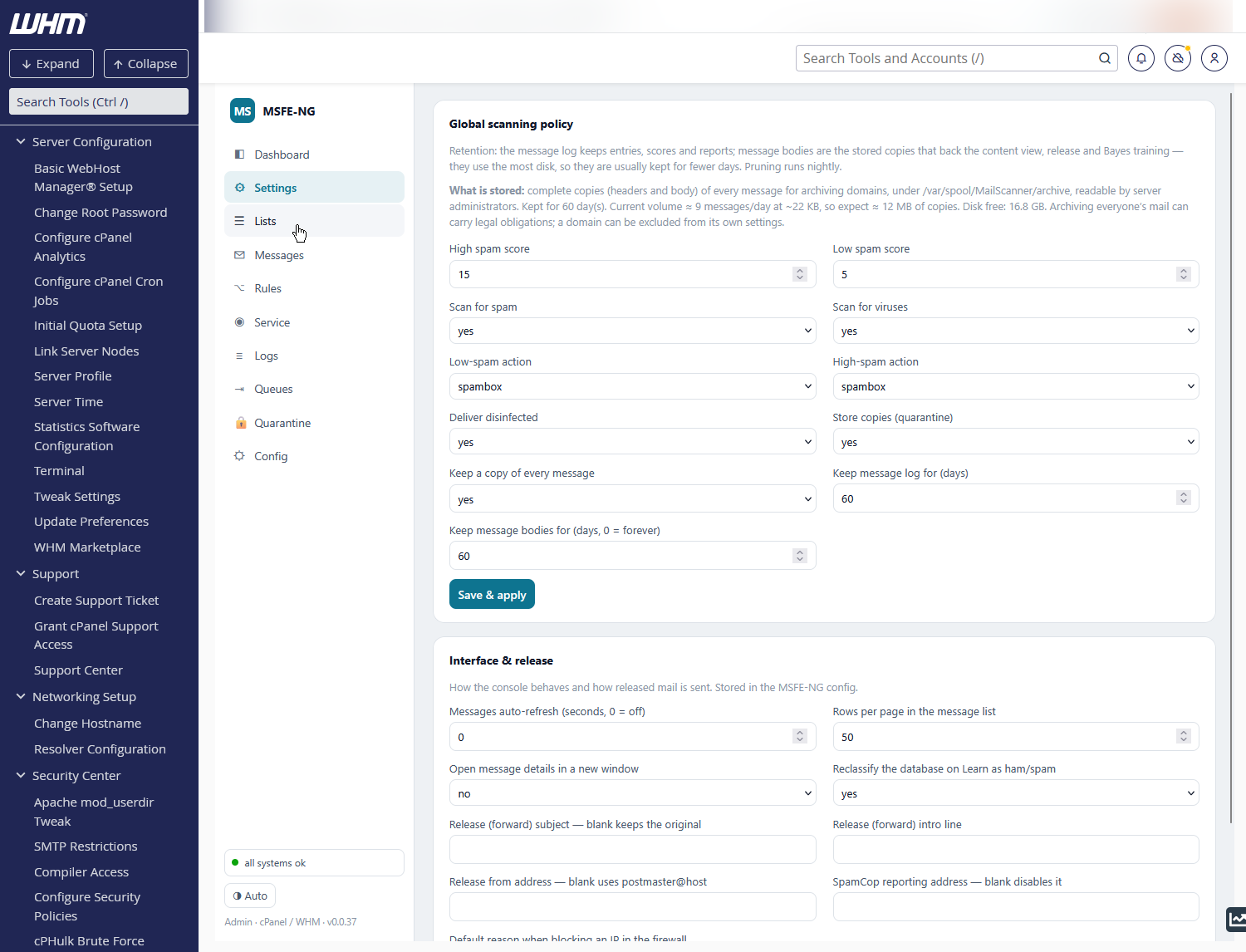
The server-wide defaults; account owners can override most of them per domain in the end-user panel. Save & apply regenerates the MailScanner rule files and reloads the scanner only if something changed.
| Field | Meaning |
|---|---|
| High / Low spam score | SpamAssassin thresholds for high spam and spam |
| Scan for spam / viruses | master switches |
| Low-spam / High-spam action |
deliver, delete, spambox (Junk folder) or forward
|
| Deliver disinfected | pass on messages ClamAV could clean |
| Store copies (quarantine) | keep held mail on disk so it can be reviewed and released |
| Keep a copy of every message | archive all mail (not only held mail) so Messages can show and re-send it — see below |
| Keep message log for (days) | retention of log rows (scores, reports, headers); pruned nightly |
| Keep message bodies for (days) | retention of stored copies; 0 = forever |
The line under the card tells you exactly what is on disk: whether full copies
are kept and where (archive_dir, default /var/spool/MailScanner/archive,
laid out as <YYYYMMDD>/<message-id>), the retention, the current volume
(messages/day × average size), the projected size and the free disk.
Copies are the largest thing MSFE-NG stores, and archiving everyone's mail can
carry legal obligations — keep the retention as short as is useful and use the
per-domain opt-out (archive=no in /etc/msfe-ng/policy/domains/<domain>.txt)
where it is not wanted.
Stored in /etc/msfe-ng/config.toml.
| Field | Meaning |
|---|---|
| Messages auto-refresh (seconds) |
0 = off; otherwise the Messages list reloads on that interval |
| Rows per page | message list page size |
| Open message details in a new window | otherwise the message view replaces the list (deep-linkable as #msg=<id>) |
| Reclassify the database on Learn as ham/spam | training Bayes also flips the message's spam flag in the log |
| Release (forward) subject / intro line | applied when releasing with forward |
| Release from address | envelope sender for released mail; blank = postmaster@<host>
|
| SpamCop reporting address | enables the Report to SpamCop button in the message view |
| Default reason when blocking an IP | pre-fills the csf comment in the IP modal |
The AbuseIPDB API key, for reporting an address from the
client-IP view, sits with the Telegram
settings in the Config tab (abuseipdb_key; a
secret — the API only says whether it is set).
MailScanner can add text to the body, tags to the subject and headers to every message, rewrite parts of it, and mail notices about what it blocked. This card gives each of those a switch, grouped:
| Group | Switches |
|---|---|
| Text added to the message body | Sign Clean Messages (the "scanned by MailScanner, believed to be clean" footer), Mark Unscanned Messages, Mark Infected Messages (inline warning where an attachment was removed), Highlight Phishing Fraud, Highlight Hidden URLs, Highlight Mailto Phishing, External Message Warning, Attach Image To Signature, Sign Messages Already Processed |
| Attachments | Warning Is Attachment (VirusWarning.txt), Zip Attachments |
| Subject tags | Spam / High Scoring Spam / Virus / Filename / Content / Size / Disarmed / Phishing / Scanned Modify Subject ({Spam?}, {Virus?}, …) |
| Headers added | Add Envelope From / To Header, Add Watermark, Spam Score, Detailed Spam Report, Include Scores In SpamAssassin Report, Always Include SpamAssassin Report |
| Content rewriting | Allow WebBugs (on = tracking images replaced), Use TNEF Contents (winmail.dat), Convert HTML To Text |
| Notices MailScanner sends | Notify Senders (and of viruses / blocked filenames / blocked size / other content), Send Notices, Notices Include Full Headers |
Each row shows what the setting does, a caution where switching it has a
cost (for example Add Watermark, which bounce-backscatter protection relies
on), the value in effect, and the file that sets it. MailScanner reads
MailScanner.conf and then conf.d/*.conf, and the last one wins; engine
default means the setting is not written anywhere. Settings this MailScanner
version does not know are listed at the bottom, without a switch.
Flip, then apply. Flipped switches are highlighted and collected in a bar
at the bottom. Apply changes checks the whole set with MailScanner --lint and restarts MailScanner once. If the check fails, nothing is written.
Only new mail is affected; mail already delivered keeps what it got.
-
Off writes the setting's off value (
no; for Allow WebBugs it isyes, meaning web bugs are allowed through untouched) on the line where it takes effect. That can be aconf.dfile, and a ruleset value such as%rules-dir%/external.message.rules(shown as per rules) is replaced too. -
On puts back the exact line an earlier switch replaced, including a
ruleset, a comment or the
start/endchoice. When there is no such line, it writes MailScanner's default (yes,start,replace,disarm…).
Remove all body text switches off the whole first group in one go.
Backups. Every apply first saves the exact lines it changes and a copy of
every footer template (Inline Text/HTML Signature, Inline Text/HTML Warning, in every language) in /etc/msfe-ng/footers/<date-time>/. That
directory is included in msfe-ng backup and snapshots, and the last 10 are
kept. Put back on a backup restores everything as it was before that
change, byte for byte. A line edited by hand in the meantime is left alone,
and the output says so.
Not offered, on purpose: Allow Script/Form/IFrame/Object Tags, Convert Dangerous HTML To Text, and the scanning and quarantine switches. Those are
protections, not cosmetics, and they stay in the Config tab.
From the command line:
msfe-ng footers status [--json]                             every switch, by group
msfe-ng footers set "Spam Modify Subject" off [...] [--dry-run]   switch one or more (pairs)
msfe-ng footers off [--dry-run]                             all body text off
msfe-ng footers restore [<backup>]                          put a backup back (default: the latest)
msfe-ng footers backups                                     list the backups
Webmail submits mail to Exim over authenticated SMTP on the server itself.
Exim's stock received_header_text prints the sending host for every hop, so
a message sent from Roundcube leaves with
Received: from localhost (server.example.com) [127.0.0.1]
	by server.example.com with esmtpsa ...
and every recipient sees the loopback address and the server's own name.
Neither MailScanner nor MSFE-NG rewrites trace headers (stripping Received:
lines after reception would break exactly the tracing you want to keep), so
the fix belongs in Exim's own template. This card installs a conditional
template through cPanel's supported override, the @CONFIG@ section of
/etc/exim.conf.local, which /scripts/buildeximconf honours — it survives
cPanel's nightly rebuilds and WHM's Exim Configuration Manager shows it.
The template is Exim's stock one with a single condition added: when the
connection was authenticated and came from loopback (127.0.0.0/8 or
::1), the from … clause is left out; with esmtpsa, the TLS version and
cipher, the envelope sender, the message id and the for clause stay as they
were. RFC 5321 allows a Received: line without a from clause, and
esmtpsa still records that the submitter authenticated. Every other hop —
external authenticated clients included, since they do not come from
127.0.0.1 — prints exactly as before.
The card shows the state Exim is actually in (read with exim -bP received_header_text): exposed (stock template), hidden (installed by
MSFE-NG), set by the administrator (an equivalent guard written by hand,
left alone), conflict (something else already sets received_header_text
in the built exim.conf; Exim refuses an option set twice, so nothing is
installed), or not cPanel. Where Exim allows it, a preview expands the
template for two simulated hops — a webmail session on this server and an
external authenticated client — so you can see both Received: lines before
and after.
Hide the loopback hop / Show it again does, in order: a byte-for-byte
backup of /etc/exim.conf.local into /etc/msfe-ng/localsub/<date-time>/
(included in msfe-ng backup; the last 10 are kept), the edit between the
markers # --- MSFE-NG local submission privacy start/end ---, a rebuild with
/scripts/buildeximconf, then a check: exim -bV must pass and the effective
template must (or, when switching off, must no longer) carry the guard. If
either fails, the backup is put back and Exim is rebuilt again — nothing
stays half-applied. Only then is Exim restarted. Put back on a backup
restores that exact file the same validated way. Everything is idempotent:
applying twice changes nothing.
The doctor check webmail submissions hide the loopback hop reports the state on every run: it warns while the stock template exposes the hop (with the switch as the fix and an Apply proposal that runs it), and warns again if the block is installed but no longer in effect — a cPanel or Exim update, or a hand edit — with the rebuild as the fix. The doctor never rebuilds Exim on its own, so an administrator's edit is not silently overwritten.
From the command line:
msfe-ng localsub status [--json]          state, effective template, preview, backups
msfe-ng localsub on [--dry-run]           install the template (backup, rebuild, validate, restart)
msfe-ng localsub off [--dry-run]          remove it the same way
msfe-ng localsub restore [<backup>] [--dry-run]   put a backup back (default: the latest)
msfe-ng localsub backups                  list the backups
Hiding the loopback hop leaves the chain without the real origin. Roundcube
can add its own Received: line naming the browser's address and host —
$config['http_received_header'] = true — and encrypt that address so only
you can decode it ($config['http_received_header_encrypt'] = true).
Receivers then see a sensible chain, browser then your server, and the real
source of webmail spam becomes visible to the client-IP view and to auto-ban.
Mind the privacy trade-off: unencrypted, it reveals your users' IP
addresses to every recipient. It is off by default on cPanel, and the card
only shows the current value: cPanel regenerates Roundcube's
config.inc.php on every update, so a custom value must be applied through
cPanel's own Roundcube customisation route, not by editing the file. MSFE-NG
does not write Roundcube's configuration.