Repository navigation
Service
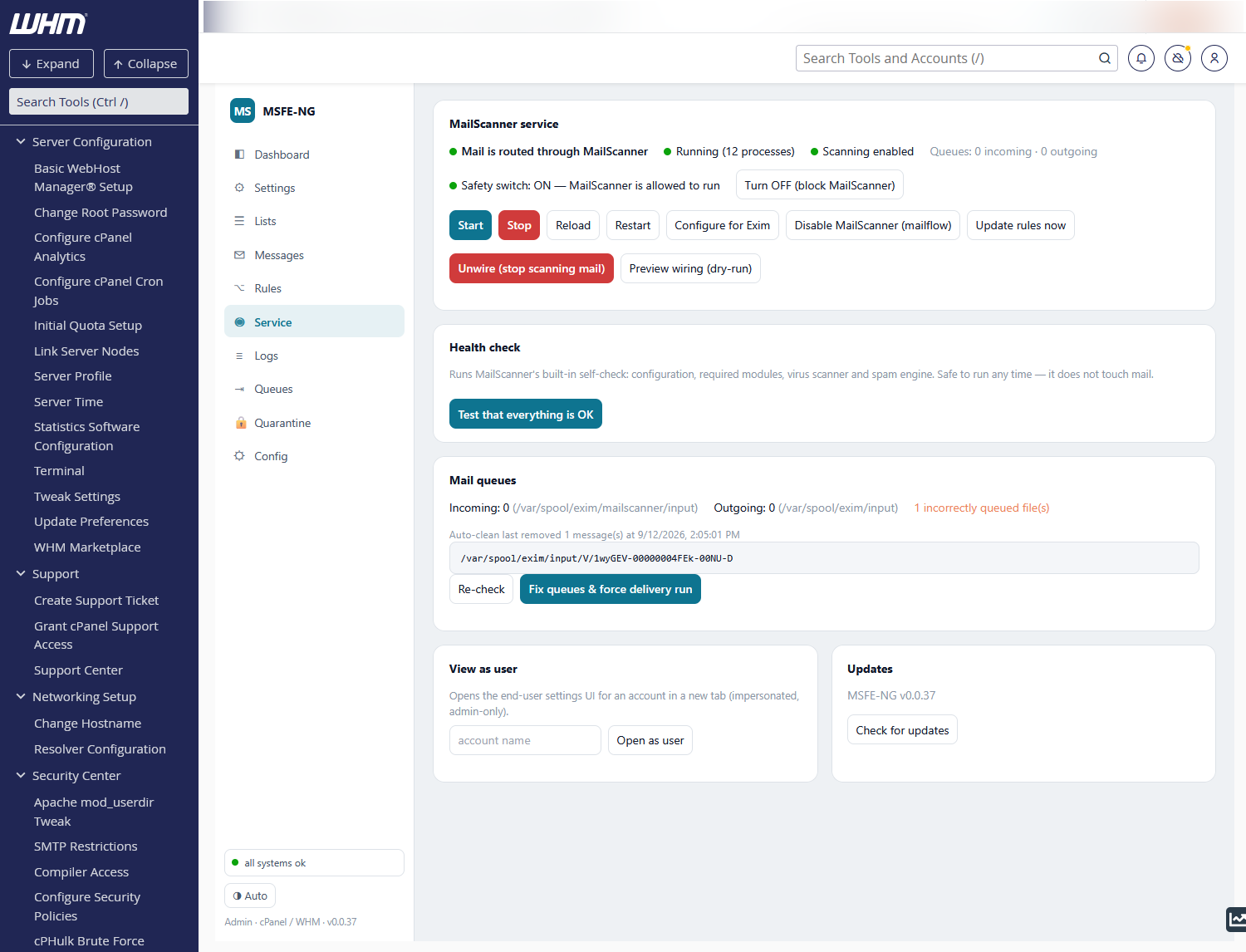
The status line answers three questions: is mail routed through MailScanner (Exim wiring), is the service running (with process count) and is scanning enabled (the mailflow toggle). Queue counts are shown on the right.
- Safety switch — MailScanner's own run/no-run latch. OFF means the service refuses to start; turn it ON before starting. Changing it does not alter mail flow.
- Start / Stop / Reload / Restart — the service itself. Stop warns you: while MailScanner is stopped, wired mail waits in the scanning queue and is not delivered.
-
Configure for Exim — sets up
MailScanner.conffor this server (queue directories, run-as user, sendmail paths; original backed up) and creates the incoming spool directory. Safe to re-run. - Enable / Disable MailScanner (mailflow) — the instant kill switch: with scanning disabled, mail bypasses MailScanner entirely (Exim delivers directly).
-
Disable cPanel SpamAssassin (double scan) (cPanel only) — cPanel's own
Apache SpamAssassin runs in Exim before MailScanner sees the message, for
every account with Spam Filters on (or all of them under WHM's Forced
Global ON): two scores, two thresholds, cPanel's own
+spamfolders. That Exim ACL has no off switch, so the button turns Spam Filters off for each such account through cPanel's own API (uapi SpamAssassin disable_spam_assassin), clears Forced Global ON if set, and remembers the accounts in/etc/msfe-ng/cpanel-sa-accounts; Restore turns them back on. An account can still re-enable Spam Filters in cPanel — the status line and the doctor check cPanel SpamAssassin double scan show it (remove the Spam Filters feature in WHM → Feature Manager to prevent that). Two WHM switches sit above the per-account flags and are honoured: the Apache SpamAssassin service off in Service Manager (/etc/spamddisable— Exim skips spamd for everyone) and Enable Apache SpamAssassin spam filter off in Tweak Settings (skipspamassassin=1— the feature is gone, cPanel's API refuses to touch it). With either off the status line and the doctor report off server-wide, stale.spamassassinenableflags left in account homes are ignored, and the button does nothing. CLI:msfe-ng exim <enable|disable>-cpanel-spamassassin. - Update rules now — runs a sync immediately (also every 10 min by cron).
- Wire Exim → MailScanner / Unwire — adds (or removes) the Exim named queue that holds incoming mail for scanning. Preview wiring (dry-run) prints the exact changes without applying them.
The Activity console below shows each command and its output, then follows the MailScanner journal for ~20 s so startup progress and errors are visible.
Test that everything is OK runs MailScanner's built-in self-check
(--lint: configuration, Perl modules, virus scanner, spam engine). It does
not touch mail and can take up to a minute. A red verdict shows the full output.
Incoming (waiting for scan) and outgoing (delivery) counts with the age of the
oldest message, plus a scan for incorrectly queued files — spool files that
sit where Exim will never look. Fix queues & force delivery run moves them
aside into msfe-ng-badqueue (never deletes) and kicks a queue run. The
last automatic clean is noted here too. Per-message work happens on the
Queues tab, which shows both queues in full.
Opens the end-user panel impersonating an account (root only) — handy to see exactly what a customer sees.
Check for updates compares MSFE-NG with its latest GitHub release and the MailScanner engine with the latest MailScanner v5 release. When something is newer, an Upgrade … now button appears:
- Upgrade MSFE-NG now — downloads the release, verifies its checksum and runs the installer (the same as the install one-liner). The daemon restarts in the middle; the console keeps polling and the page reloads once the new version answers. Settings, policy and wiring are kept.
-
Upgrade MailScanner now — only for the RPM engine (
/usr/sbin/MailScanner): installs the newer RPM, checks its perl dependencies, re-applies Configure for Exim and restarts MailScanner. Mail queues meanwhile. A ConfigServer engine (/usr/mailscanner) is not upgraded in place — see Migration.
Private DNS resolver appears as a card until unbound answers on loopback
and resolv.conf points there — see Troubleshooting, DNS
blocklists, for what the install does.
Migrate from ConfigServer MailScanner appears as its own card while the
legacy /usr/mailscanner tree exists — see Migration for what it
does, step by step.
All of these run as background jobs: transient systemd units that survive the
daemon's own restart, logging to /var/log/msfe-ng/jobs/<job>.log. The job
console under the card follows the log; reopening the tab while a job runs
picks it up again. CLI: msfe-ng upgrade [--check], msfe-ng engine install.