Commands
How to build a chat command in LuckyBot: the fields every command has, the two response modes, every variable available in a response, and the full list of steps available in an Advanced actions command.
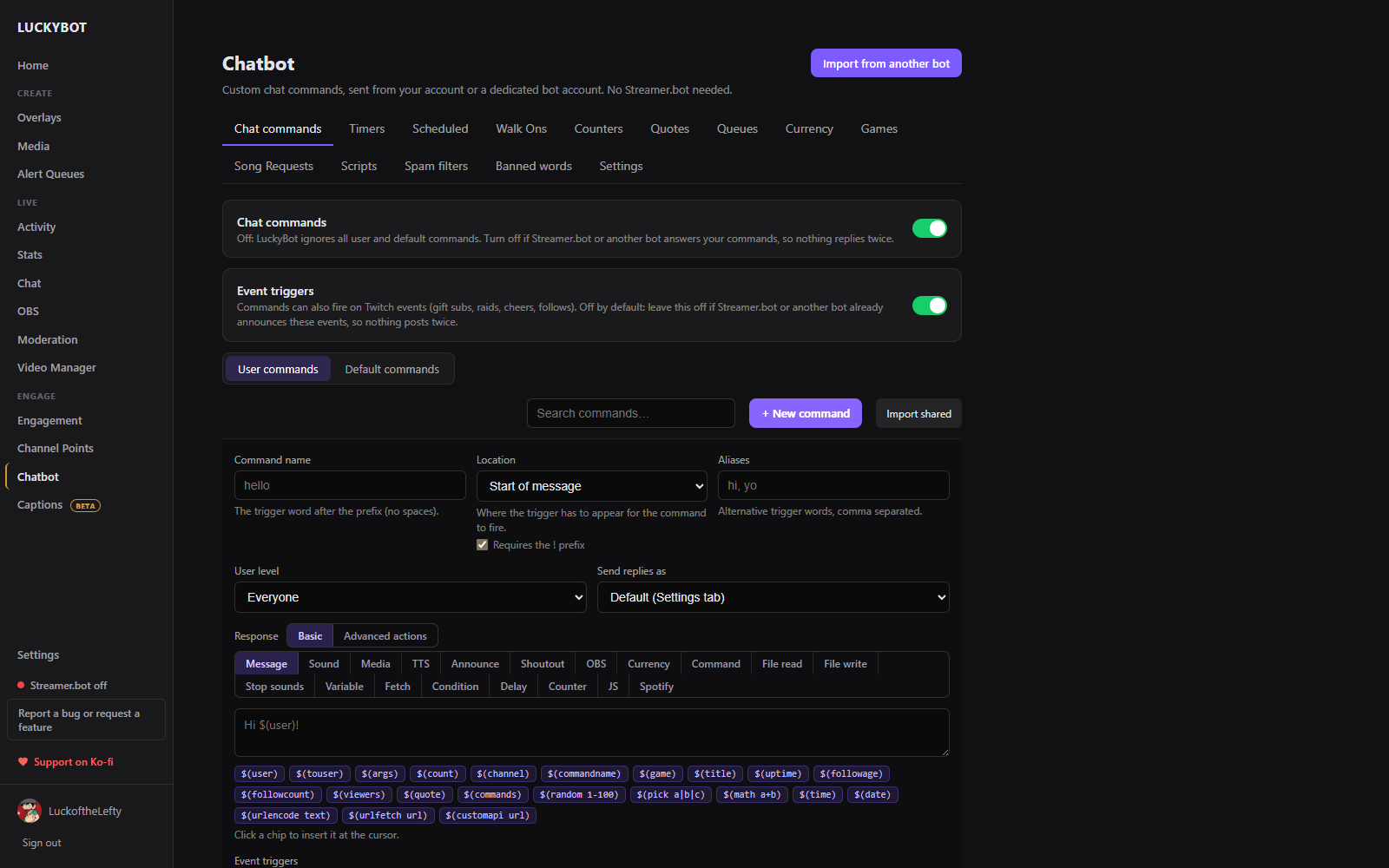
Go to Chatbot > Chat commands > User commands and click + New command. Every command has:
-
Name - the trigger word, typed after your prefix (
!by default). No spaces. - Location - where the trigger has to appear: at the start of the message (the default), the whole message exactly, anywhere in the message, or a regular expression. Requires the ! prefix can be turned off for phrase triggers.
- Aliases - extra trigger words that run the same command.
- User level - the minimum permission to use it: Everyone, Subscriber, VIP, Moderator, or Broadcaster.
- User cooldown and global cooldown, in seconds. User cooldown limits one viewer; global cooldown limits everyone combined.
- Stream state - fire when you are online, offline, or both.
- Send replies as - use the account chosen in Settings, or override it per command (your account or the bot account).
- Cost - currency charged to run it, when Currency is on.
- Response - Basic or Advanced actions, described below.
A command can also be set to fire on Twitch events (gift subs, raids, cheers, follows, thon grants) instead of, or alongside, its typed trigger, under Event triggers. A minimum amount can gate event triggers, for example only cheers of 100 bits or more.
One action. Pick its type from the row of chips:
-
Message - a text reply. Type it directly, or build it from
$(...)variables (see below). Multiple messages can be added; one is picked at random or in order each time the command runs. - Sound - plays a sound through a Sound Alerts overlay. Pick a file from the media library or paste a URL, set the volume, trim the start and end on a waveform, and choose which Sound Alerts overlay plays it (or any of them).
- Media, TTS, Announce, Shoutout, OBS, Currency, Command, File read, File write, Stop sounds, Variable, Fetch, Condition, Delay, Counter, JS, Spotify - the same single action as the matching step below, without building a list.
A step builder. Steps run top to bottom, in order, and each one can read variables set by an earlier step. Add as many as you like. The step picker is searchable and grouped: Chat, Sound and media, Apps and devices, Viewers and currency, Flow, and Data and code.
Any Message, Sound, TTS, or text field in a Multiple actions step can use these. Type $( to see the same list as insertable chips.
| Variable | Resolves to |
|---|---|
$(user) |
The viewer who ran the command |
$(touser) |
The first typed argument (with a leading @ stripped), or $(user) if there is none. The usual "target" for a command like !hug
|
$(args) |
Everything typed after the command, as one string |
$(1), $(2), $(3)... |
Individual typed arguments by position ($(1) is the first word after the command) |
$(count) |
The command's own counter value, if it has one |
$(channel) |
Your channel name |
$(commandname) |
The name of the command that is running |
$(game) |
The current stream category |
$(title) |
The current stream title |
$(uptime) |
How long the stream has been live |
$(followage) |
How long $(touser) has followed |
$(followcount) |
Your total follower count |
$(viewers) |
Current viewer count |
$(quote) |
A random quote from the Quotes list |
$(commands) |
A list of your available commands |
$(random 1-100) |
A random whole number in the given range |
$(pick a|b|c) |
A random choice from a |-separated list |
$(math 1+2*3) |
Evaluates a simple arithmetic expression |
$(time) |
The current time |
$(date) |
The current date |
$(urlencode text) |
URL-encodes the given text |
$(urlfetch url) |
Fetches a URL and drops its raw response inline |
$(customapi url) |
Fetches a URL and lets you reference specific parts of a JSON response |
An unrecognized $(...) is left in the response untouched rather than removed, which usually means the name is misspelled.
Each step's own fields can also use $(...) variables, including ones set by earlier steps in the same run.
| Step | What it does |
|---|---|
| Send message | Posts a chat message. Add more than one and one is picked at random or in order. |
| Set variable | Stores a value under a name, usable later as $(name). |
| Fetch URL | Calls a URL, optionally pulls one value out with a JSON path (data.0.name), and stores it in a variable. |
| Condition | Compares a left value against a right value (==, !=, >, <, >=, <=, contains, starts with, ends with, matches regex, is empty, is not empty). On failure, either stops the command or skips a chosen number of the following steps. |
| Play sound | Plays a sound through a Sound Alerts overlay, same options as the Sound response type. |
| Show media | Shows an image or video on a Sound Alerts overlay: position, duration, width, volume, and an optional weighted pool of extra files to pick from randomly. |
| Speak (TTS) | Speaks text aloud through a Sound Alerts overlay, with its own volume. |
| Announcement | Sends a Twitch announcement (highlighted in chat) in a chosen color. |
| Skip steps | Unconditionally skips a fixed number of the following steps. |
| Stop here | Ends the command; nothing after this step runs. |
| Confetti | Fires a confetti burst on a Sound Alerts overlay for a chosen number of seconds. |
| Enable/disable command | Turns another command on, off, or toggles it. |
| Enable/disable timer | Turns a timer on, off, or toggles it. |
| Reset timer countdown | Restarts a timer's interval from now, without changing its enabled state. |
| Run custom script | Runs one of your uploaded Python scripts (see Chatbot: Scripts). Arguments and the trigger context are passed in; whatever the script prints is stored in a variable. |
| Viewer queue | Opens, closes, toggles, clears, or advances a viewer queue, or joins the triggering viewer to one. See Chatbot: Queues. |
| Spotify | Play, pause, skip to the next or previous track, queue a fixed track by link, or turn $(args) into a song request. A song request sets $(track), $(artist), and $(trackUri) on success for later steps. Requires Spotify to be connected under Settings > Connections. |
| Shoutout | Runs a Twitch shoutout for a channel name (or $(touser)). |
| Run JavaScript | Runs a short script with user, args, argString, channel, count, and vars available. Whatever it returns is stored in a variable. |
| Delay | Waits before continuing: milliseconds, a duration in seconds/minutes/hours/days, or until a fixed date and time. Waits of 60 seconds or more are saved server-side and survive an app restart; they show up under the Scheduled tab until they run. |
| Change counter | Adds, subtracts, or sets a counter's value. |
| Give currency | Gives, sets, transfers a whole balance into another currency, or clears every balance in a currency. |
| Run command | Runs another command using this run's user and arguments. |
| Stop sounds | Stops whatever is playing and clears the queue on a Sound Alerts overlay. |
| Read from file | Reads a random line, a specific line, the whole file, or checks whether a file exists, storing the result in a variable. |
| Write to file | Appends a line to a file, or overwrites it, with text that can use $(...) variables. |
| OBS control | Shows/hides a source, switches a scene, turns a filter on or off, or mutes an input. A shown source can automatically revert after a chosen number of seconds. |
| Lumia Stream | Triggers a Lumia command, sets a light color (a hex value, a color name, or $(userInput) such as "red 40"), fires a Lumia alert, or returns Lumia to its default state. A color can play once, hold as a state for N minutes, or run as a temporary cycle. Requires Lumia Stream under Settings > Connections. |
| Press key | Sends a keystroke to the focused window: press, hold for a moment, key down, key up, toggle, or block a key temporarily. Made for hotkey-only apps such as a ReShade toggle; the app must be focused. |
| Repeat group | Runs a nested list of steps for a number of seconds or a number of cycles, with a pause between cycles. Pair it with Press key to tap a key repeatedly. |
A simple counter command. Response type Message: Deaths this stream: $(count), bound to a counter's view command.
A greeting with a random line. Response type Message with several message options added, one picked at random each time, for example Welcome, $(touser)! and Hey there, $(touser)..
A gamble command. Advanced actions: Condition checking $(args) is not empty (else stop with "Usage: !gamble "), Give currency to subtract the bet, a Condition on $(random 1-100) to decide win or lose, then a Send message reporting the result and a Give currency step paying out on a win.
A lookup command that calls an API. Advanced actions: Fetch URL with a JSON path pulling one field into a variable, then Send message using $(that_variable) in the reply.