Repository navigation
Plugin remote notifications
Sends OSPy status and event notifications to a configured remote PHP and SQL web service.
| Item | Value |
|---|---|
| Version | 1.0.0 |
| Category | Notifications and remote communication |
| Author | Martin Pihrt |
| License | GPL-3.0 |
| OSPy |
3.0.211 or newer |
| Python |
3.8 or newer |
| Permissions |
network, system
|
| Hardware | No dedicated hardware requirement declared |
| Dependencies | None |
| Python/OS packages | None |
| Interfaces | No provider or mobile API declared |
| Source | Open the plug-in directory |
Sends OSPy status and event notifications to a configured remote PHP and SQL web service.
Tested in Python 3+
The plug-in includes a plugin.json manifest and reports its worker, remote server, API-key presence, latest state cycle, notification, server reply and errors through the OSPy system health interface. The API key is never included in diagnostics.
This plugin can send Notifications on the Remote Webserver. This plugin requre SQL server and Webserver with PHP. This plugin send data as get command to remote PHP web pages. This plugin requred correct settings this plugins: UPS Monitor, Tank Humi Monitor. If I not have a public IP address, or for some reason can not connect directly to OSPy I use this plugin for display on the site, which is accessible from the Internet.
-
Check Use plugin. If checked send data to remote server is active.
-
Remote server address: Type your remote server address where are the php files. Ex: https://server.com/automatOSPy/
-
API for access: Type your API key, that is stored in a file save.php on the server. Ex: msd455fsvv4sd5dv445s5s6d5vsdvdsv
-
Status: Status window from the plugin.
Visit Martin Pihrt's blog. for to demonstrate the function of watering my flowers.
Note: For this plugin we need a public web server with PHP support and access to SQL database into which data is written from this plugin.
- On the Web server will place these files (after unpacking the zip file). download automatOSPy.zip files from github
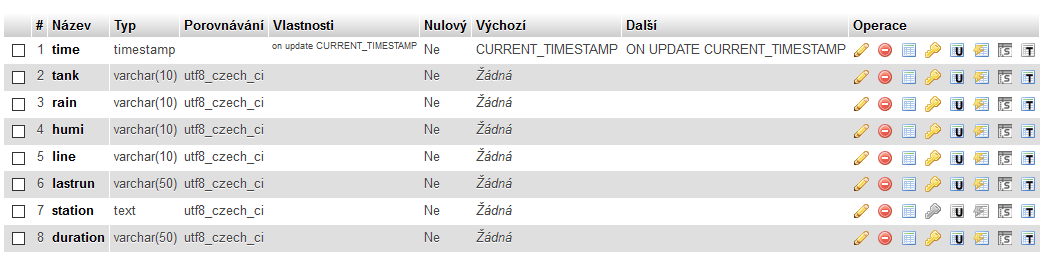
- On the SQL server we create new database with new table: ospy as in imagge:
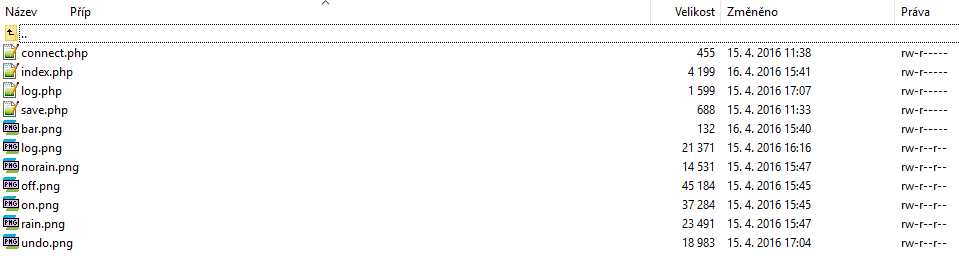
- On the WEB server we places files as in imagge:
- In file save.php we type own API key same as use this plugin.
- in file connect.php we type: server="address SQL server" user="user name SQL server" pass="password SQL server" db="ospy" name of table on the SQL server
The following notes are generated from the help page shipped with this plug-in. Field names are also explained directly in the OSPy settings page.
This plugin can send Notifications on the Remote Webserver. This plugin requre SQL server and Webserver with PHP.
This plugin send data as get command to remote PHP web pages.
This plugin requred correct settings this plugins: UPS Monitor, Tank Humi Monitor, Air Temperature and Humidity Monitor.
If I not have a public IP address, or for some reason can not connect directly to OSPy I use this plugin for display on the site, which is accessible from the Internet.
Plugin setup
- Check Use plug-in
If checked send data to remote server is active.
- Remote server address
Type your remote server address where are the php files.
Example: https://server.com/automatOSPy/
- API for access
Type your API key, that is stored in a file save.php on the server.
Example: msd455fsvv4sd5dv445s5s6d5vsdvdsv
- Status
Status window from the plugin.
Visit for to demonstrate the function of watering my flowers.
Note: For this plugin we need a public web server with PHP support and access to SQL database into which data is written from this plugin.
Server setup
- On the Web server will place these files (after unpacking the zip file)
download automatOSPy.zip files from github
-
On the SQL server we create new database with new table: ospy as in imagge
-
On the WEB server we places files as in imagge
In file save.php we type own API key same as use this plugin.
-
In file connect.php we type
-
server="address SQL server"
-
user="user name SQL server"
-
pass="password SQL server"
-
db="ospy" name of table on the SQL server


Check OSPy → Diagnostics first and remove passwords, tokens, private addresses and other secrets before sharing logs. Report reproducible plug-in problems in the OSPy-plugins issue tracker.