Home
SSH Pilot is a modern SSH and SFTP client for Linux and macOS. It is gives you a user-friendly graphical interface for managing your servers. SSH Profile is a terminal, a SSH config editor, and an SFTP file manager, with a lot of features.
These docs describe the current SSH Pilot release. For release notes, see GitHub Releases.
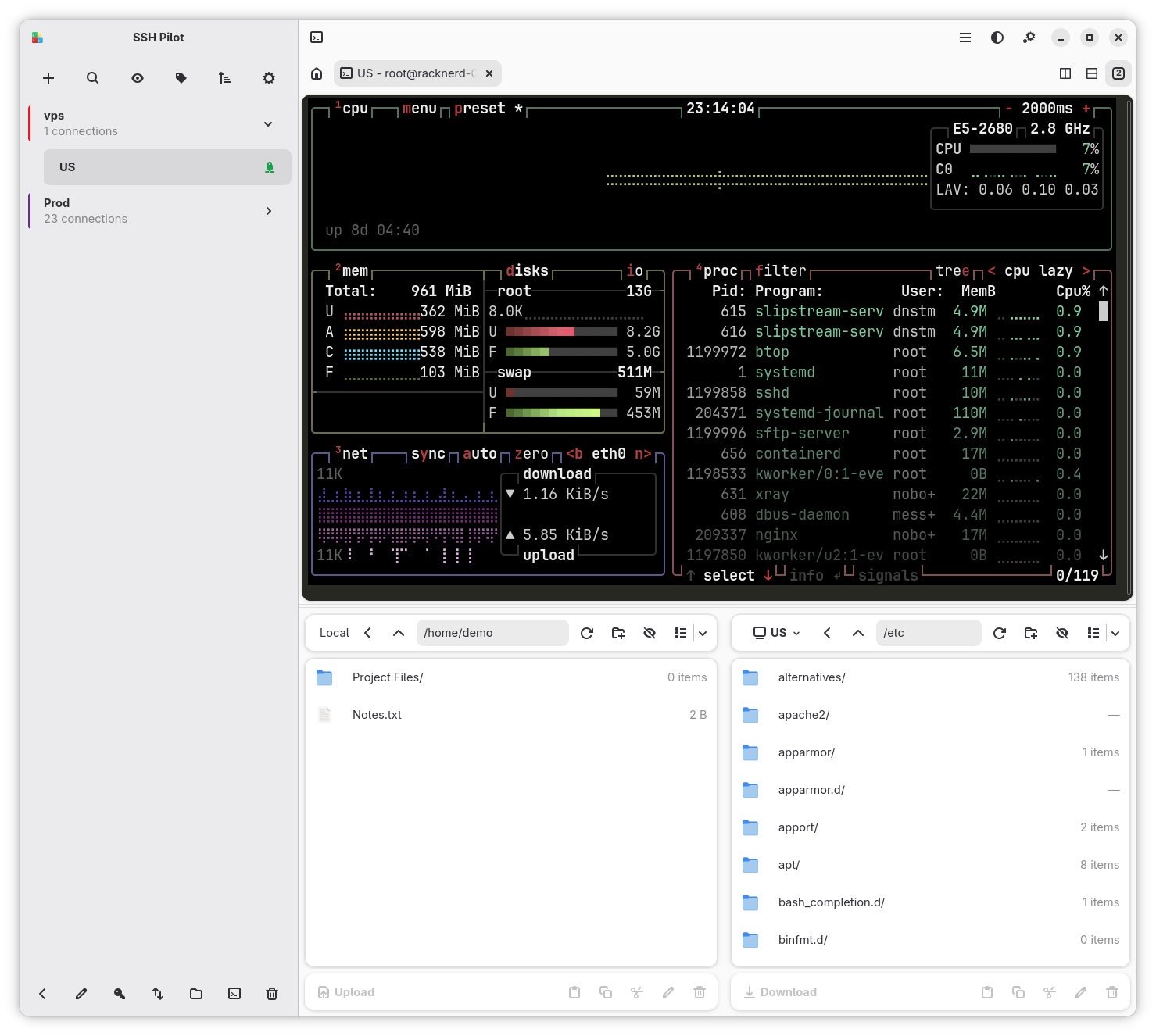
Sidebar, terminal, and SFTP panes in one window
SSH Pilot is designed to work with your existing SSH workflow, not replace it. It uses your ssh_config file as the authoritative source of truth, ensuring full compatibility with standard SSH tools. Edits made in SSH Pilot are written back to ~/.ssh/config. Changes you make directly in the file are picked up by SSH Pilot's config watcher (you may need to wait a moment, or reconnect, for the sidebar to refresh).
Here is a practical example:
Imagine you manage several servers and already have them defined in your ~/.ssh/config file:
Host web-prod
    HostName 203.0.113.10
    User admin

Host db-prod
    HostName 203.0.113.20
    User postgres
SSH Pilot discovers these entries and displays them in its interface. If you later add a new host using your favorite text editor, SSH Pilot reloads the config and shows the new host. Likewise, if you change the username or hostname from within SSH Pilot, the corresponding entry in ~/.ssh/config is updated automatically.
This means you can seamlessly switch between SSH Pilot and the commandline, while benefiting from SSH Pilot's graphical management, organization, and productivity features. There is no separate database to maintain and no need to keep multiple configurations in sync—your existing SSH configuration remains the single source of truth.
| Feature | What it does |
|---|---|
| SSH Config Integration | Reads your existing ~/.ssh/config automatically -- no re-entering servers |
| Password/Passphrase autofill | Secure askpass autofill from your credential vault (Security) |
| Tabbed Terminal | Open multiple SSH sessions in tabs, just like a web browser |
| Split View | View multiple terminals side by side in a resizable grid |
| SFTP File Manager | Dual-pane file browser for drag-and-drop uploads and downloads |
| SCP Transfers | Legacy quick upload or download of individual files |
| Key Management | Generate SSH keys and copy them to servers (ssh-copy-id) |
| Credential Storage | Choose between libsecret, KeePass, Bitwarden, and pass |
| Docker Console | Manage local or remote Docker/Podman containers |
| Command Snippets | Save and reuse frequently run commands |
| Groups & Colors | Organize servers into color-coded groups |
| Keyboard Shortcuts | Fully customizable shortcuts for power users |
| Plugin System | Extend SSH Pilot with new protocols and features |
| Backup & Restore | Export settings/secrets/keys locally or sync to Bitwarden/Vaultwarden |
New users -- start here:
- Installation -- Install SSH Pilot on your system
- Quick Start -- Make your first connection in under a minute
- Keyboard Quick Reference -- The fastest way to get productive
Explore more:
- Main Window -- Layout, start page, and tabs
- Sidebar -- Full and Minimal connection list
- Connections -- Create, edit, and organize your servers
- Groups -- Color-coded folders and nested groups
- Terminal -- Tabs, split view, broadcast mode
- File Manager -- Browse and transfer files visually
- Credentials -- Store passwords securely
- Key Management -- Generate and deploy SSH keys
- Known Hosts -- View and remove server host-key entries
- Authorized Keys -- Edit local or remote authorized_keys
- Keyboard Quick Reference -- The fastest way to get productive
- Omni-search -- Find connections, commands, and actions
- Snippets -- Save and run common commands
- Keyboard Shortcuts -- Every shortcut at your fingertips
- Plain Terminal Mode -- Hide the list for a wider terminal
- Docker Console -- Manage local or remote containers
- Protocols -- Telnet, Serial, Mosh, Docker exec, and Kubernetes
- Security -- Why storage and autofill are designed to be safe
- Bitwarden & Vaultwarden -- Cloud credentials and backup sync
- Settings -- Customize SSH Pilot to your liking
-
Isolated Mode -- Keep SSH Pilot separate from
~/.ssh - Backup -- Save and restore your settings
- Plugins -- Extend SSH Pilot with add-ons
- FAQ -- Common questions, short answers
- Troubleshooting -- Solutions to common problems
| Platform | Minimum Version |
|---|---|
| Ubuntu | 24.04 (Noble) |
| Debian | 13 (Trixie) |
| Linux Mint | 22 |
| Fedora | 43 |
| RHEL / CentOS Stream | 10 |
| Arch Linux | Rolling |
| macOS | 14 (Sonoma) |
On other Linux distributions, install the Flatpak version -- it works everywhere Flatpak does.
- Bug Reports: GitHub Issues
- Telegram Channel: t.me/sshpilot
- Source Code: github.com/mfat/sshpilot
- Support Development: Ko-fi