Repository navigation
Home Hub
Language: English · Português (Brasil)
The first screen after the boot is the home hub. It reads like the front page of an arcade roguelite rather than a list of options: what you will fly next is on screen, so is what you are about to unlock, and one gold button starts the run.
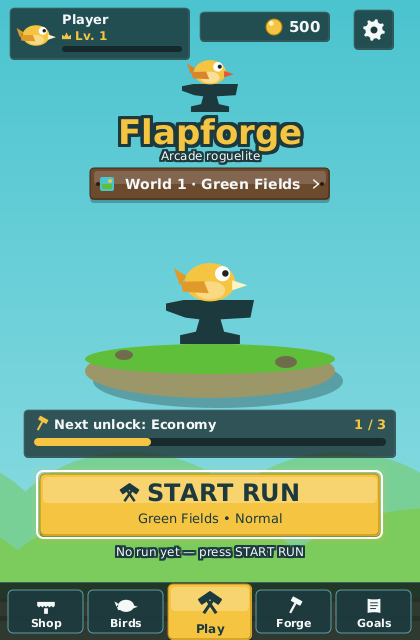
A fresh profile: Green Fields selected, level 1, the economy tree one level away.
| Element | What it shows | What it opens |
|---|---|---|
| Player card (top left) | Your selected bird as an avatar, "Player", a crown with your level, the XP track and the prestige badge once you have prestiged | The Profile: the same header, your lifetime statistics, the run history and the prestige panel |
| Coin chip (top centre) | Your coins, rolling up when a run just paid | The Shop |
| Gear (top right) | — | Settings |
| Emblem and title | The bird on the anvil, "Flapforge", "Arcade roguelite" | — |
| World plaque | "World 1 · Green Fields ›": the world the next run is played in, with a swatch of its palette | The World Select — see Worlds and Bosses |
| Forge scene | Your bird on the anvil, on a floating island in the selected world's palette, over that world's backdrop | — (it grows, see below) |
| Next unlock card | The nearest unlockable you can still earn, with its counter ("Economy 1 / 3") and a gold track | The screen where that kind of thing is earned or bought: Birds, World Select, Forge, Goals or the Shop |
| START RUN | The gold call to action, with "World • Difficulty" under it | The run, in the world and at the tier the plaque and the Birds screen name |
| Last run line | "Last run: 12 gates · +48 coins Best: 31" — or an invitation to press START RUN | — |
| Bottom navigation | Shop · Birds · Play · Forge · Goals | Each item opens its screen; Play starts the same run as START RUN |
The scene in the middle is a picture of your meta-progression. Every level bought in the upgrade trees (see Shop and Upgrades) adds to it:
| Upgrade levels bought | The forge |
|---|---|
| 0 | The island, the anvil and your bird, cold |
| 1 | The hearth lights with a pulsing glow and a hammer leans on the anvil |
| 6 | A barrel |
| 14 | A banner in the world's accent colour |
| 22 | A second barrel and a brazier |
| 36 | Gold trim on the anvil, a taller flame and the occasional spark |
A prestiged profile carries the gold trim at any stage. The island, the sky and the letterbox follow the selected world, so Storm Sky is a dark island under lightning and the Void is almost black.

Iron Forge selected: the plaque, the palette, the backdrop and the START RUN subtitle follow.
- Forge on the navigation opens the whole upgrade workshop — the flight, economy and forge trees, on the screen titled Upgrades. It is not the forge tree alone, nor the Iron Forge world, nor Cinder the forge bird.
- Goals gathers the seven challenges, the 41 achievements, the milestones and the collections in four tabs — see Challenges and Goals.
- Birds is where you pick the bird, its colours and its loadout, and where the run's world, difficulty tier and mode are set behind a one-line setup bar — see Birds and Abilities and Game Modes and Difficulty. It carries this same bottom navigation, with Birds on the gold plate.
- The Profile behind the player card is where the two-step prestige lives.
- Arrows and
Tabmove the focus: START RUN is focused on entry,Downreaches Play in the navigation,Left/Rightwalk the row and wrap at its ends,Upclimbs to the next-unlock card, the plaque and the HUD band.EnterorSpaceactivates; every control also reacts to hover, click and tap. -
Esc(or Back on Android) asks "Press again to quit"; a second press within three seconds closes the game. Opening any screen in between cancels the request. On the desktop, Settings › About also has a Quit row. - Leave the hub alone for twenty seconds and a bot plays a demo run behind it, dimmed under the hub's chrome. Any key, click or pointer movement brings the hub back.
Tip: the hub is live. Buying a bird in the Shop, selecting a world, prestiging or finishing a run is reflected the moment you return — no restart, no re-entry.
When the game runs without a save (the headless launch, some tests), the hub still shows the player card, the gear and START RUN, greys out Shop, Birds, Forge and Goals, and hides the coin chip, the plaque and the next-unlock card. Everything else behaves the same.