YamlCardThermo
The card type cardThermo can be used to control a thermostat at home
You need/can define the following card attributes and slots with references to items in openHAB:
| card attribute | default value from skin file | optional / Mandetory | Description |
|---|---|---|---|
| min | 5.0 ° | O | Minimum temperature which can be selected |
| min | 30.0 ° | O | Maximum temperature which can be selected |
| steps | 0.5 ° | O | Steps for up and down |
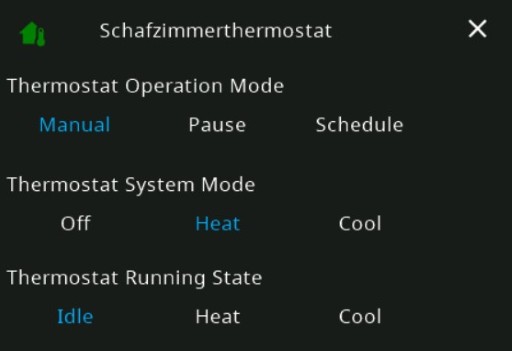
| details | False | O | Activate popup card with 3 input_sel slots the slots 3-6. The fist 3 items with type: input_sel can be controlled over the popup card |
| Slot number | OH item type | slot types | default value | optional / Mandetory | Description |
|---|---|---|---|---|---|
| 1 | Number | number | - | M | Target themperature 1 |
| 2 | Number | number | - | O | Target themperature 2. If this slot is set to None. The second themerature is not shown |
| 3-6 | any | text, input_sel | - | O | Shows the state of up to 4 items as text. If you enable |
| 7-14 | Switch | switch | - | O | 8 different switch items which can be controlled over icons |
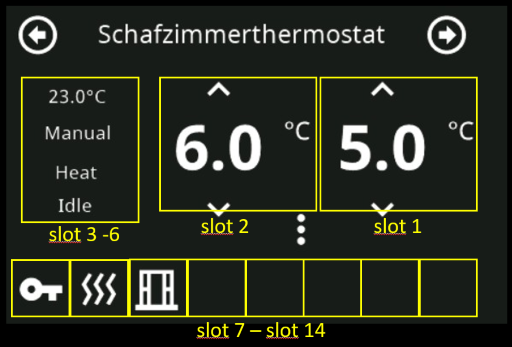
Item configuration for a Bosch Thermostat II used in this example:
Group gThermostatSchlafzimmer "Schlafzimmerthermostat"  {ga="Thermostat" [ thermostatTemperatureRange="5,30" ], alexa="Thermostat"}
Number:Temperature H_Schlafzimmer_SetHeatTemp "Zieltemperatur [%.1f°C]" <temperature> (gThermostatSchlafzimmer) { ga="thermostatTemperatureSetpoint", alexa="TargetTemperature"}
Number:Temperature H_Schlafzimmer_Temperatur "Temperatur Schlafzimmer [%.1f°C]" <temperature> (gThermostatSchlafzimmer) { ga="thermostatTemperatureAmbient", alexa="CurrentTemperature"}
Number:Temperature H_Schlafzimmer_SetCoolTemp "Zieltemperatur [%.1f°C]" <temperature>
Switch H_Schlafzimmer_Lock "Lock"
Switch H_Schlafzimmer_boost "Boost"
Switch H_Schlafzimmer_windowOpen "Window Open"
String H_Schlafzimmer_OpMode "Thermostat Operation Mode" {stateDescription=""[options="manual=Manual,pause=Pause,schedule=Schedule"]}
String H_Schlafzimmer_SysMode "Thermostat System Mode" {stateDescription=""[options="off=Off,heat=Heat,cool=Cool"]}
String H_Schlafzimmer_RunState "Thermostat Running State" {stateDescription=""[options="idle=Idle,heat=Heat,cool=Cool"]}
Example card without cooling and popup:
cards:
  - name: Thermo
    title: Schafzimmerthermostat
    type: cardThermo
    slots:
      - class: ohItem                     #Target temperature
        type: number
        item: H_Schlafzimmer_SetHeatTemp
      - class:                            #Cooling temperature slot is skipped!
      - class: ohItem                     #slot 3 shows current temperature as text
        type: text
        item: H_Schlafzimmer_Temperatur
      - class: ohItem                     #slot 4 shows current operation mode
        type: text
        item: H_Schlafzimmer_OpMode
      - class: ohItem                     #slot 5 shows current system mode
        type: text
        item: H_Schlafzimmer_SysMode
      - class: ohItem                     #slot 6 shows current running state
        type: text
        item: H_Schlafzimmer_RunState
      - class: ohItem                     #slot 7 shows icon with current lock state and can be touched and changed
        type: switch
        item: H_Schlafzimmer_Lock
        iconColor: "yellow"
        icon: key
      - class: ohItem                     #slot 8 shows icon with current boost state and can be touched and changed
        type: switch
        item: H_Schlafzimmer_boost
        iconColor: "red"
        icon: heat-wave
      - class: ohItem                     #slot 9 shows icon with current window open state and can be touched and changed
        type: switch
        item: H_Schlafzimmer_windowOpen
        iconColor: "yellow"
        icon: window-open-variant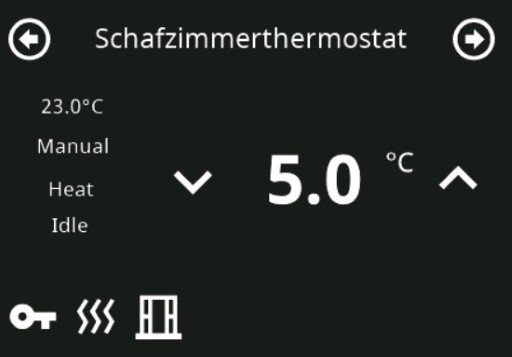
Example card with cooling, popup and all card attributes:
  - name: ThermoExt
    title: Schafzimmerthermostat
    type: cardThermo
    min: 5.0
    max: 30.0
    steps: 0.5
    details: True
    slots:
      - class: ohItem
        type: number
        item: H_Schlafzimmer_SetHeatTemp
      - class: ohItem
        type: number
        item: H_Schlafzimmer_SetCoolTemp
      - class: ohItem
        type: text
        item: H_Schlafzimmer_Temperatur
      - class: ohItem
        type: input_sel
        item: H_Schlafzimmer_OpMode
      - class: ohItem
        type: input_sel
        item: H_Schlafzimmer_SysMode
      - class: ohItem
        type: input_sel
        item: H_Schlafzimmer_RunState
      - class: ohItem
        type: switch
        item: H_Schlafzimmer_Lock
        iconColor: "yellow"
        icon: "\uE305"
      - class: ohItem
        type: switch
        item: H_Schlafzimmer_boost
        iconColor: "red"
        icon: "\uFA44"
      - class: ohItem
        type: switch
        item: H_Schlafzimmer_windowOpen
        iconColor: "yellow"
        icon: "\uF1DB"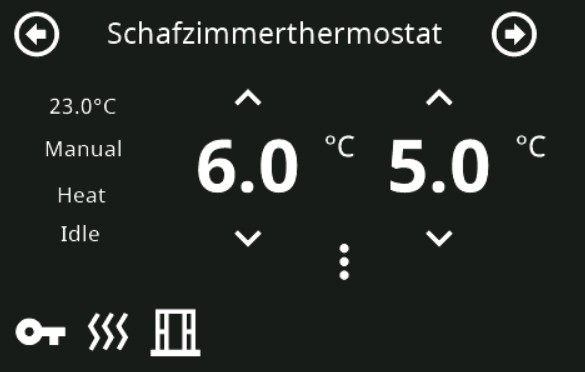
As you can see attribute details: True. The 3 dots can be clicked and a popup with the 3 input_sel items in slot 4-6 can be controlled over it:


Introduction
NSPanel Preparation
- Preparation
- Prepare NSPanel (extern)
- Flashing Tasmota to NSPanel (extern german)
- Configuring NSPanel and flash HMI jobr99 (extern)
- Flash latest HMI versions of ticaki (extern german)
- NSPanel Emulator (external german)
Installation of the Bridge
Yaml configuration
Further Concepts
Compatible HMI projects
Usefull Links