YamlScreensaver2
A screensaver2 is similar to sceensaver but has more weather forcast slots and 6 attitonal item slots.
The screensaver2 card can have up to 6 slots
| Slot number | slot type | default value | optional / Mandetory | Description |
|---|---|---|---|---|
| 1 | openwathermap | empty | O | Current weather information |
| 2-4 | openwathermap | empty | O | 3 weather forcasts for near future without time stamp |
| 5-10 | openwathermap | empty | O | 6 weather forcasts with time stamp |
| 11-15 | all status item types | empty | O | 5 slots with different openhab item status. Note: There is an issue in the current HMI implementation of lovlace UI. The button event is send twice when you click on one of this items. That means the state of the item in openHAB is toggled twice (for example OFF -> ON -> OFF)! |
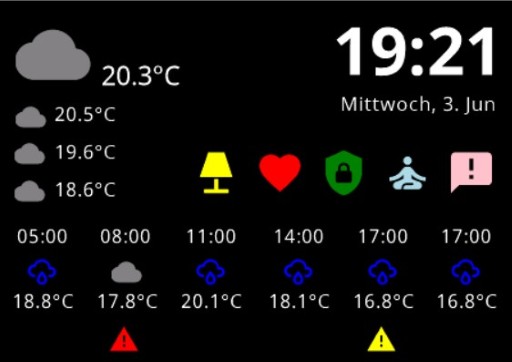
Example yaml:
- name: testpanel.screensaver #name of the nspanel where this screensacer should be shown + ".screensaver" suffix
    type: screensaver2
    backgroundColor: #0f0f0f
    slots:
      - class: ohItem               #current weather
        type: openweathermap
        item: W_IconID_0
        textItem: W_Temperatur_0
        timeItem: W_Messung_0
      - class: ohItem               #first weather forecast
        type: openweathermap
        item: W_IconID_3
        textItem: W_Temperatur_3
        timeItem: W_Messung_3
      - class: ohItem               #second weather forecast
        type: openweathermap
        item: W_IconID_6
        textItem: W_Temperatur_6
        timeItem: W_Messung_6
      - class: ohItem               #third weather forecast
        type: openweathermap
        item: W_IconID_9
        textItem: W_Temperatur_9
        timeItem: W_Messung_9
      - class: ohItem               #forth weather forecast
        type: openweathermap
        item: W_IconID_12
        textItem: W_Temperatur_12
        timeItem: W_Messung_12
      - class: ohItem               #sixth weather forecast
        type: openweathermap
        item: W_IconID_15
        textItem: W_Temperatur_15
        timeItem: W_Messung_15
      - class: ohItem               #senventh weather forecast
        type: openweathermap
        item: W_IconID_18
        textItem: W_Temperatur_18
        timeItem: W_Messung_18
      - class: ohItem               #8th weather forecast
        type: openweathermap
        item: W_IconID_21
        textItem: W_Temperatur_21
        timeItem: W_Messung_21
      - class: ohItem               #9th weather forecast
        type: openweathermap
        item: W_IconID_24
        textItem: W_Temperatur_24
        timeItem: W_Messung_24
      - class: ohItem               #10th weather forecast
        type: openweathermap
        item: W_IconID_24
        textItem: W_Temperatur_24
        timeItem: W_Messung_24
      - class: ohItem               #button 1
        type: switch
        icon: lamp
        iconColor: OFF=grey,ON=yellow
        item: Switch_1
      - class: ohItem               #button 2
        type: switch
        icon: cards-heart
        iconColor: OFF=grey,ON=red
        item: Switch_2
      - class: ohItem               #button 3
        type: switch
        icon: shield-lock
        iconColor: OFF=grey,ON=green
        item: Switch_3
      - class: ohItem               #button 4
        type: switch
        icon: meditation
        iconColor: OFF=grey,ON=lightblue
        item: Switch_4
      - class: ohItem               #button 5
        type: switch
        icon: message-alert
        iconColor: OFF=grey,ON=pink
        item: Switch_5


Introduction
NSPanel Preparation
- Preparation
- Prepare NSPanel (extern)
- Flashing Tasmota to NSPanel (extern german)
- Configuring NSPanel and flash HMI jobr99 (extern)
- Flash latest HMI versions of ticaki (extern german)
- NSPanel Emulator (external german)
Installation of the Bridge
Yaml configuration
Further Concepts
Compatible HMI projects
Usefull Links