YamlScreensaver
A screensaver card is active after a timeout which you can configure in the ini file. You can assign the default screensaver to a dedicated panel over the panel name with extention .screensaver (name: panelname.scrennsaver) Than this card will be used as screensaver card for the panel with name panelname
By default screensaver cards show only the current time and date. But you can define 1 slot which shows the current weather and 4 additional slots which shows a weather forecast for different times.
The currenty supported waether forecast is based on the openwathermap binding.
For this is a special slot type defined see openweathermap slot type.
You can also control all colors of the screensaver with the following card attributes:
| card attribute | default value from skin file | optional / Mandetory | Description |
|---|---|---|---|
| backgroundColor | #101010 | O | Background color |
| tTimeColor | #FFFFFF | O | Color of the time |
| timeAMPMColor | #FFFFFF | O | Color of AM/PM in 12h time format |
| tDateColor | #FFFFFF | O | Color of date string |
| tMainTextColor | #FFFFFF | O | Color of current weather text |
| tForecast1Color | #FFFFFF | O | Color of weather forcast 1 text |
| tForecast2Color | #FFFFFF | O | Color of weather forcast 2 text |
| tForecast3Color | #FFFFFF | O | Color of weather forcast 3 text |
| tForecast4Color | #FFFFFF | O | Color of weather forcast 4 text |
| tForecast1ValColor | #FFFFFF | O | Color of weather forcast 1 value |
| tForecast2ValColor | #FFFFFF | O | Color of weather forcast 2 value |
| tForecast3ValColor | #FFFFFF | O | Color of weather forcast 3 value |
| tForecast4ValColor | #FFFFFF | O | Color of weather forcast 4 value |
| barColor | #FFFFFF | O | Color of bar |
| tMainTextAlt2Color | #FFFFFF | O | Color of alternative text |
| tTimeAddColor | #FFFFFF | O | Color of time add |
The screensaver card can have up to 6 slots
| Slot number | slot type | default value | optional / Mandetory | Description |
|---|---|---|---|---|
| 1 | openwathermap | empty | O | Current weather information |
| 2-4 | openwathermap | empty | O | 3 weather forcasts |
| 5 | openwathermap | empty | O | 4th weather forcast. Not visible if slot 6 is defined |
| 6 | openwathermap | empty | O | Alternative slot for wather forcasts |
Example definition of a screensaver with openweathermap forecast:
cards:
  - name: flur.screensaver #name of the nspanel where this screensacer should be shown + ".screensaver" suffix
    group: home
    type: screensaver
    backgroundColor: #0f0f0f
    barColor: blue
    slots:
      - class: ohItem               #current weather
        type: openweathermap
        item: W_IconID_0
        textItem: W_Temperatur_0
        timeItem: W_Messung_0
      - class: ohItem               #first weather forecast
        type: openweathermap
        item: W_IconID_6
        textItem: W_Temperatur_6
        timeItem: W_Messung_6
      - class: ohItem               #second weather forecast
        type: openweathermap
        item: W_IconID_9
        textItem: W_Temperatur_9
        timeItem: W_Messung_9
      - class: ohItem               #third weather forecast
        type: openweathermap
        item: W_IconID_15
        textItem: W_Temperatur_15
        timeItem: W_Messung_15
      - class: ohItem               #forth weather forecast
        type: openweathermap
        item: W_IconID_24
        textItem: W_Temperatur_24
        timeItem: W_Messung_24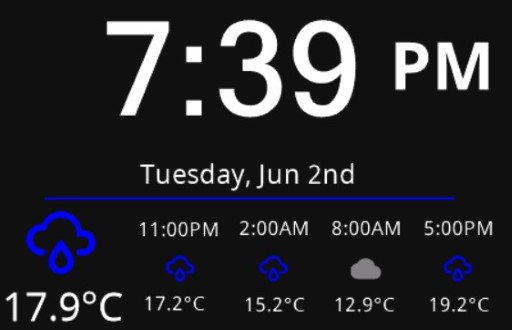
Example definition of a screensaver with alternative weather slot:
cards:
  - name: .screensaver #default screensaver name for all panels
    group: test_saver
    type: screensaver
    backgroundColor: #0f0f0f
    barColor: yellow
    slots:
      - class: ohItem               #current weather
        type: openweathermap
        item: W_IconID_0
        textItem: W_Temperatur_0
        timeItem: W_Messung_0
      - class: ohItem               #first weather forecast
        type: openweathermap
        item: W_IconID_6
        textItem: W_Temperatur_6
        timeItem: W_Messung_6
      - class: ohItem               #second weather forecast
        type: openweathermap
        item: W_IconID_9
        textItem: W_Temperatur_9
        timeItem: W_Messung_9
      - class: ohItem               #third weather forecast
        type: openweathermap
        item: W_IconID_15
        textItem: W_Temperatur_15
        timeItem: W_Messung_15
      - class: ohItem               #Unused forecast slot
        type: openweathermap
        item: W_IconID_24
        textItem: W_Temperatur_24
        timeItem: W_Messung_24
      - class: ohItem               #Alternative forecast slot
        type: openweathermap
        item: W_IconID_24
        textItem: W_Temperatur_24
        timeItem: W_Messung_24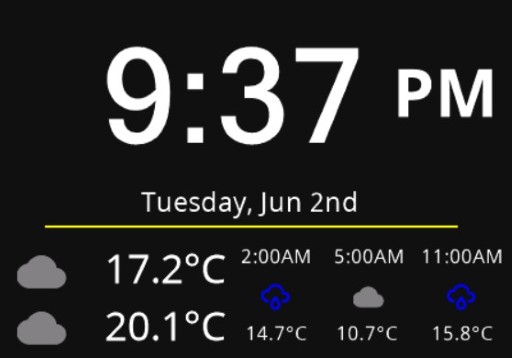
If you do not define any screensaver in yaml files a default screensaver with name .screensaver is created in group home
If you define a screensaver card in a secific group this screensaver is shown after the screensaver timeout. If you do not define a sceensaver in a group. The bridge will move back to group home and the show the screensaver defined in home after screensaver timeout.


Introduction
NSPanel Preparation
- Preparation
- Prepare NSPanel (extern)
- Flashing Tasmota to NSPanel (extern german)
- Configuring NSPanel and flash HMI jobr99 (extern)
- Flash latest HMI versions of ticaki (extern german)
- NSPanel Emulator (external german)
Installation of the Bridge
Yaml configuration
Further Concepts
Compatible HMI projects
Usefull Links