YamlCardMedia
The card type cardMedia can be used to control a adio or video player at home.
The card has no extra card attributes. The card has the following slots. Note that slot 1 is a special slot for the slot type player.

| Slot number | OH item type | slot types | default value | optional / Mandetory | Description |
|---|---|---|---|---|---|
| 1 | Player or String | player | - | M | special slot to hold the player item |
| 2 | input_sel | any item with options | - | M | Can be used to switch the main audio/video source of the player |
| 3-7 | any | any | disabled | O | Can be used to make any other setting on the player |
Example cardMedia:
cards:
  - name: YamahaPlayer
    title: Yamaha Receiver
    type: cardMedia
    slots:
      - class: ohItem
        type: player
        item: YamahaControl
        volumeItem: YamahaVolume
        powerItem: YamahaPower
        shuffleItem: YamahaShuffle
        shuffleIcon: Off=shuffle-disabled,Songs=shuffle,Album=shuffle-variant
        line1Item: YamahaStation
        line2Item: YamahaTitle
        line1Color: red
        line2Color: green
      - class: ohItem
        type: input_sel
        icon: menu
        item: YamahaInput
      - class: ohItem
        type: switch
        icon: OFF=volume-low,ON=volume-variant-off
        iconColor: ON=red,OFF=white
        item: YamahaMute
      - class: ohItem
        type: input_sel
        icon: radio
        iconColor: green
        item: YamahaPreset
      - class: ohItem
        type: input_sel
        icon: surround-sound
        iconColor: yellow
        item: YamahaSurround
      - class: ohItem
        type: input_sel
        icon: sleep
        iconColor: yellow
        item: YamahaSleep
      - class: ohItem
        type: button
        icon: Off=repeat-off,One=repeat-once,All=repeat
        iconColor: blue
        item: YamahaRepeat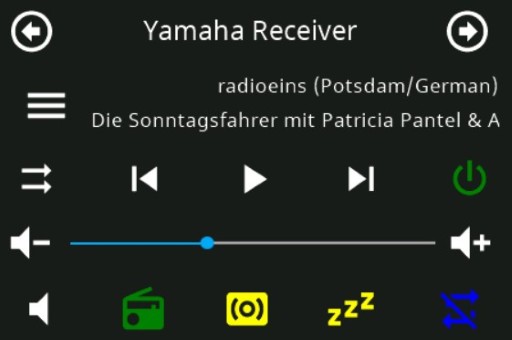

Introduction
NSPanel Preparation
- Preparation
- Prepare NSPanel (extern)
- Flashing Tasmota to NSPanel (extern german)
- Configuring NSPanel and flash HMI jobr99 (extern)
- Flash latest HMI versions of ticaki (extern german)
- NSPanel Emulator (external german)
Installation of the Bridge
Yaml configuration
Further Concepts
Compatible HMI projects
Usefull Links