Repository navigation
Device Card
From version 1.7.0.
A small card for one Thread device – for a room dashboard, without the whole map. It comes with Thread Pulse (same file, nothing extra to install).
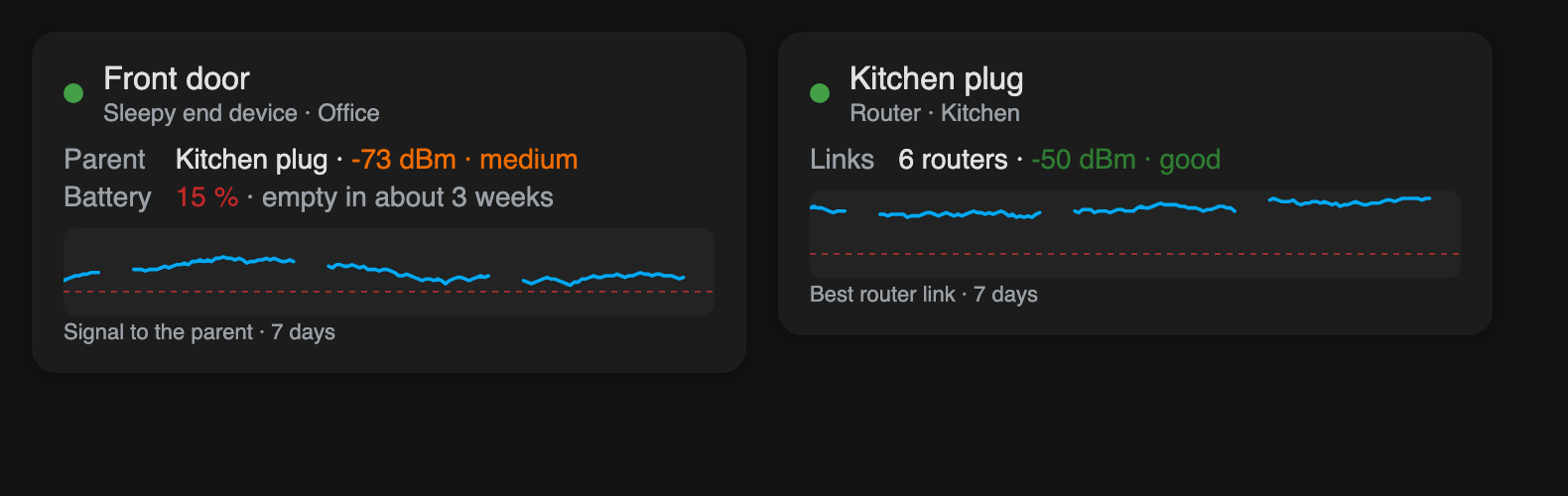
| Line | Content |
|---|---|
| Header | Name, role in the Thread network and area; a green dot when the device is reachable, red with not reachable when Home Assistant reports it unavailable |
| Parent | Battery and end devices: the router they talk through, with its signal (green / orange / red as on the map). The value measured by the router is used when the router reports it, as on the map |
| Links | Routers: how many other routers they reach, and the best signal |
| Battery | Level and, once there are 14 days of statistics and a measurable drop, the battery forecast |
| Chart | Signal of the last 7 days – to the parent, for routers the best router link. It is the trend that Thread Pulse records while its map is open somewhere; hours without an open map are gaps |
Wi-Fi and Ethernet devices only get their name and a note – they are not part of the Thread mesh.
Tap the card to open the Thread Pulse map with this device selected and zoomed to (option map_path), or – without map_path – the device page of Home Assistant.
In the dashboard editor: + Add card → Thread Pulse – device → choose the device. It takes the full width of a section and grows with its content; make it narrower in the editor if you like. Or in YAML:
type: custom:thread-pulse-device-card
device: 01d78d2a0af558eb4decc71b82676fee   # device ID – an entity ID of the device works too
name: Schalter Küche                       # optional
map_path: /dashboard-network/thread # optional: the view with the Thread Pulse map| Option | Description |
|---|---|
device |
Required. The device (device ID), or one of its entities (sensor.front_door_battery) |
name |
Name shown on the card; empty = the device name in Home Assistant |
map_path |
Path of the dashboard view with the Thread Pulse card. Tapping the device card opens it with ?tp_device=<device ID>, and the map selects that device. Empty: tapping opens the device page |
language |
Like the main card; empty = Home Assistant language |
demo |
true (battery device) or router – invented data, e.g. to try the look |
- Like the map, the card needs an administrator account (it reads the Matter diagnostics).
- To name the parent it reads the cached diagnostics of all Matter devices – once for all device cards on a page, at most every 5 minutes. No device is queried, battery devices are not woken up.
- The chart only has data where the Thread Pulse map was open (for example on a wall tablet). Without that, the card says so.