Repository navigation
Radio Channels
From version 1.7.0.
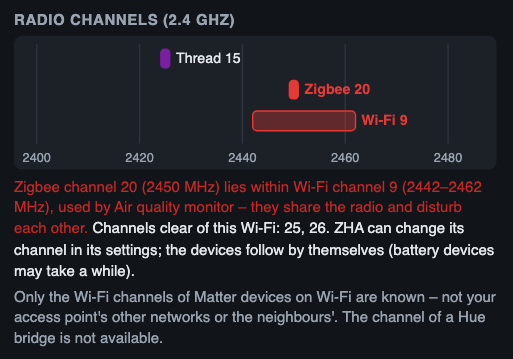
Thread, Zigbee and 2.4 GHz Wi-Fi share the same radio band. When a Thread or Zigbee channel lies inside a Wi-Fi channel, they compete for airtime – devices then lose messages, reconnect more often or drop off. Thread Pulse shows the channels it knows on one frequency axis and warns about overlaps.
- Tab Links of the network panel, at the top
- Panel of the border router
- Each overlap is also a hint in the tab Hints (labelled Radio channels) and in the text report; the text report also lists the other channels (Other radio channels: Zigbee 20 · Wi-Fi 9)
| Network | Source | Width |
|---|---|---|
| Thread | OpenThread Border Router, else the preferred Thread network, else what the devices report | 2 MHz, channel n at 2405 + 5 × (n − 11) MHz |
| Zigbee | ZHA (zha/network/settings) – only the channel is read, never the network key |
2 MHz, same numbering as Thread |
| Wi-Fi | The Wi-Fi channel each Matter device on Wi-Fi reports (5 GHz channels are ignored) | about 20 MHz around 2407 + 5 × k MHz |
Not known: the other channels of your access point, the neighbours' networks, Zigbee2MQTT, and the channel of a Hue bridge. Without a Matter device on 2.4 GHz Wi-Fi no Wi-Fi channel is known at all; the note under the diagram says so.
A Thread or Zigbee channel counts as inside a Wi-Fi channel when its centre is less than 11 MHz from the Wi-Fi centre. The diagram marks both in red, and the text says what to do:
- Zigbee inside Wi-Fi: the Zigbee channels that are clear of the known Wi-Fi – preferably also of the common Wi-Fi channels 1, 6 and 11 (usually 15, 20, 25, 26). ZHA can change its channel in its settings; the devices follow by themselves, battery devices may take a while.
- Thread inside Wi-Fi: changing the Thread channel is disruptive – every Thread device has to follow, and not every border router can do it. Thread Pulse therefore suggests moving the Wi-Fi to channel 1, 6 or 11, whichever is clear of Thread and Zigbee.
- Thread and Zigbee on the same channel: they share its airtime.
These are hints, not measurements: Thread Pulse does not see the actual radio traffic, only which channels are configured.