Repository navigation
Requirements Baseline
Functional behavior, technical requirements, and acceptance criteria
Version 2.6 · 26 October 2026 · Approved baseline
The operator directed "Set max players to10". QBrain remains authoritative for Word Pairs (PROD-WORDPAIRS), workspace wordpairs, layer layer-1. The atomic amendment and readback updates 19 existing records, preserving their IDs, 1,427 native mapping edges and prior notes. The full before snapshot preserves earlier criterion evidence; all 28 changed criteria remain unsatisfied pending new exact-source evidence. This documentation does not establish execution or acceptance.
New rooms and new match rosters support integral capacities 2 through 10; the creation default stays 4. Keep the separate 25-observer limit and maximum new-release audience of 35. Complete service and real-browser matrices each require 9 eight-round games, 54 player participations and 432 accepted round solves. Required boundaries include valid 2/8/10 and invalid 1/11/15/25, fractions and numeric strings at the appropriate transport/domain seam.
Current traceability is FR-ROOMACCESS-001#AC-01/02/24/CAP15-LEGACY, FR-LOBBYLIFECYCLE-003#AC-01/02/24, FR-ANCHORSELECTION-007#AC-04, FR-CATEGORIES-005#AC-04, TR-ANCHOR-RANDOMNESS-013#TR-13-C01, TR-ROOM-CODES-010#TR-10-C01/CAP15-LEGACY, TR-FREETIER-OPERATION-021#DEC-20, TR-MULTIPLAYER-INTEGRATION-034#TR-34-C01 and TR-ROOM-SYNCRECOVERY-038#LIVE-07, with their existing TEST IDs. CAP15-LEGACY is a stable historical criterion ID; its current text uses the 10-player boundary.
Historical larger running matches remain readable, replayable and finishable, with Leave and stored results preserved. Waiting/countdown rooms above 10 cannot admit another player above 10 or start an oversized new match; show compatibility feedback and Leave without forced eviction to fit the cap. A historical room with at most 10 players can start an allowed match. Existing migration files 001 through 013 remain byte-identical; new safeguards use forward migration 014. File immutability is not proof those migrations have been applied to either hosted database. Keep guest-only public play, private historical member identities, fixed-owner GitHub administration and the admin-only PWA. The canonical completion plan retains its filename for existing links. Wiki regeneration/publication remains pending source/test reconciliation.
The following amendment preserves the earlier 15-player scope as dated history. Where it differs, current v2.8 and current QBrain records above govern; no historical pass transfers to changed source.
QBrain is authoritative for product Word Pairs (PROD-WORDPAIRS). The operator approved new room capacities and match rosters of 2 through 15 players. The separate 25-observer limit remains, with a new-release audience of at most 40. The complete service and real-browser range is 14 eight-round games, 119 player participations and 952 accepted round solves; documentation alone does not establish their execution.
FR-ROOMACCESS-001#AC-01/02/24 and FR-LOBBYLIFECYCLE-003#AC-01/02/24 now use 2 through 15, including valid boundaries 2/8/15 and rejection below 2 or above 15. FR-ANCHORSELECTION-007#AC-04, FR-CATEGORIES-005#AC-04 and TR-ANCHOR-RANDOMNESS-013 use new rosters of 2 through 15. TR-FREETIER-OPERATION-021#DEC-20 uses the 40-person target. TR-MULTIPLAYER-INTEGRATION-034 and TR-ROOM-SYNCRECOVERY-038#LIVE-07 require the amended matrix.
FR-ROOMACCESS-001#CAP15-LEGACY preserves larger historical running matches, stored results and Leave. Existing waiting/countdown rooms above 15 reject oversized new admission/start, explain the compatibility state and wait for voluntary departures rather than forcing members out. Existing migration bytes and historical acceptance evidence remain unchanged; use forward safeguards for new writes.
Current public play is guest-only. Only verified GitHub owner sharpninja may use administration, with separate admin sessions and an admin-only PWA. Public OpenAI sign-in, role delegation, public nominations/suggestions and public PWA installation are inactive. New member profiles and historical member identities remain private in public projections. The selected deployment topology is two isolated Vercel production targets: wordpairs staging before the same reviewed commit on wordpairs-j9jf production. See the current release design and completion plan.
The linked UI decisions, case specifications and QBrain-generated exports retain their source/evidence revision. Their historical persistence receipts do not prove that later edits or pending criteria have passed. The release workflow reconciles and reads back current QBrain records before regenerating the exports.
All remaining sections, diagrams, numeric bounds, identity/deployment proposals and criterion text below retain the 26 October baseline as history. They are superseded where the current QBrain layer and the current v2.8/guest-admin amendments above differ. A historical 25-player result or original OIDC/public-PWA diagram is not the current release contract.
This document defines a real-time word-pair game for 2–25 players who join one room from their own devices. Each curated prompt belongs to a relationship category with a predefined background. Players submit guesses through a sequence of hint stages, with more points awarded for solving earlier. Players who solve before any hint can nominate candidate answers for future curated content.
The requirements record confirmed gameplay and the resolved v2.6 defaults. The selected application stack is Next.js with TypeScript and npm; Vercel and Supabase/Postgres are the deployment and persistence services specified by TR-20–TR-24. Detailed resolutions are recorded in the v2.6 decision register.
The game provides a landing page that introduces Wordpairs, displays a leaderboard, shows public lobby information, and explains the gameplay rules. Visitors can view this information before authenticating or joining a room. Public lobby details must follow the approved discoverability and privacy policy; the page does not expose private room state, non-public profile data, or private player-specific game data. The public leaderboard ranks lifetime game wins, then total points, then earliest recorded win, then stable profile ID. It shows a generated public alias only; profiles are included by default and can opt out. Guests may opt in under a generated alias. The public lobby cards show exact player count/capacity, waiting state, and room age; they expose no room code or player names.
| Term | Definition |
|---|---|
| Prompt word | The visible word shown at the start of a round. Players enter its predefined paired answer. |
| Word pair | The prompt and target answer stored under a relationship category. |
| Anchor player | The player selected by the game to choose the opening round’s category. |
| Hint stage | One answer opportunity with a fixed hint level. The first stage has no hint, followed by Hint 1, Hint 2, and Hint 3. |
| Solved player | A player whose submission matches the curated target or an approved accepted answer. |
| Elapsed answer time | Time from the start of a round until the player submits a correct answer. |
| First correct solver | The player whose correct submission the game service accepts first in a round. |
Players join by room code and play from their own devices. Each room supports 2–25 players. A player chooses an icon in their profile. That icon appears in the room, live round scorecard, round summary, and final standings.
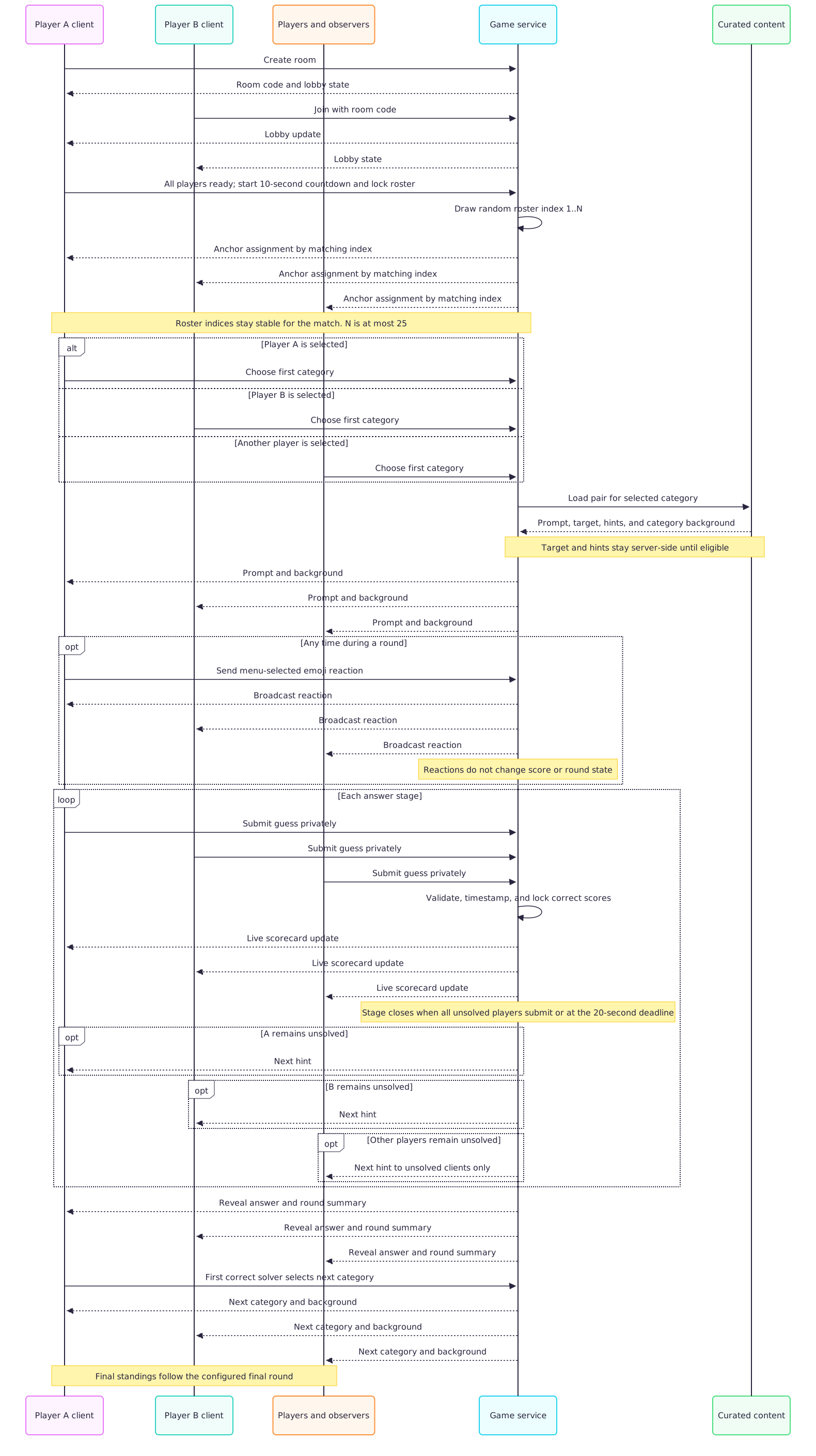
At the start of the game, the game numbers the active roster from 1 through the number of players, using the roster order captured when the game starts. It draws a random integer from 1 through the player count; the player whose index matches that number becomes the anchor player and chooses the first round’s category. The roster index remains stable for the match. After each round, the first player to answer correctly chooses the next category. The category determines the background artwork for every word pair in that category.
A round starts with the prompt word and no hint. Every answer stage lasts 20 seconds. Every unsolved player may submit once; the stage closes early when all unsolved players submit, or closes at the deadline. An unanswered player is treated as unsolved and advances to the next hint. Once all unsolved players have submitted or the deadline expires, the game reveals who solved the prompt. Players who remain unsolved receive Hint 1 and another answer opportunity. The same sequence continues through Hints 2 and 3. If nobody solves a round, the next category is selected uniformly from the six configured categories. A player who remains unsolved after Hint 3 earns zero points; the round ends when all players have answered or the final 20-second stage expires.
The scorecard on the active round page fills in as players solve. Each solved row shows the player, their points for that round, and how long they took to solve it. A separate summary screen ranks every player by current cumulative score after each round.
If a player leaves a full room before the game starts, the oldest observer is promoted to the final player position. The remaining players move up to close the vacancy, preserving their relative order. If no observers are waiting, the room simply has an open player slot.
At the end of the eight-round game, if players tie for the highest score, total answer time is the sum of accepted solve durations plus 80 seconds for each unsolved round. The lowest total ranks first; an exact remaining tie shares the rank.
| Solve stage | Points |
|---|---|
| Correct before any hint | 5 |
| Correct after Hint 1 | 3 |
| Correct after Hint 2 | 2 |
| Correct after Hint 3 | 1 |
| Still unsolved after Hint 3 | 0 |
- Heroes and Villains
- Colors
- Year and Event
- Director and Movie
- Singer and Song
- Opposites
The category examples define pair relationships, not individual word-specific art. Every pair in one category shares that category’s predefined background. The Colors category contains complementary color pairs. The initial curated catalog contains 10 pairs per category; a pair is not repeated within a match until every playable pair in that category has been used.
A player who solves a round during the no-hint stage may nominate a word as a candidate answer for future games. A candidate enters review after 10 unique player profiles nominate it. A profile can nominate a candidate only once and can submit at most one candidate per eligible no-hint solve. A content moderator other than the proposer must approve/reject with a reason; one appeal may be submitted to a senior moderator. The candidate enters the future-eligible answer pool only after moderation approval and a complete curated record. It must still be incorporated into a complete curated word-pair record, including its prompt, category, three hints, accepted answers, and category background, before it can be played. Nominations do not change the current round or its score.

Any player already in a room can invite others by sharing the room code or its deep link. A deep link opens the room directly and bypasses lobby browsing. Every player join checks the configured capacity. If the room is full, an invited player can choose read-only observer mode and follow the inviter’s player-specific view in real time; observing does not consume a player slot. A room accepts up to 25 observers. A signed deep link binds the inviter; if the invitee uses a manually shared room code, they select the inviting player from the current roster. Before the start countdown begins, if a player leaves a full room, the oldest observer is promoted into the final player position and remaining players move up to close the vacancy. A 30-second period without membership or readiness changes prompts all players once for that room version to mark ready; any such change resets the interval. When all but one player are ready, the holdout receives a five-second warning. If the warning expires in a room with more than two players and the holdout is still unready, remove them and begin the 10-second countdown with the remaining roster locked. In a two-player lobby, retain the holdout and wait until both players are ready. When all active players are ready, begin the 10-second countdown and lock the roster. A departure after countdown begins never promotes or substitutes another player. If fewer than two original roster members remain at countdown expiry, abort the game and close the room.

Rooms are private by default. A creator may opt in to discovery. Quick match selects the oldest discoverable waiting room with an open player seat, using stable room ID to break equal creation-time ties. If no room is available, the player can browse or create one.

Both entry modes provide a player identity and selectable icon for the current game. A guest profile persists in the same browser on the same device until the player clears site data; it does not sync across devices or link to an OIDC profile. Guest wins and aliases use that local guest identity.

The live scorecard may show solved status as soon as a correct answer is accepted. Submitted guess text remains private during the round. At each stage close, all players can see who solved before the next hint appears for the remaining unsolved players.
The game service owns the room state and validates answers. It sends prompt and category background to every player, sends later hints only to unsolved players, and broadcasts scorecard and standings updates without exposing submitted guess text. During a round, players can send a menu-selected emoji reaction that the service broadcasts in real time to players and observers in the room.

The three submitted pairs are suggestions and do not become playable automatically. Each pair must meet the existing content requirements, including prompt, target answer, hints, accepted answers, and category background.

The nomination and moderation path is separate from live round progression. A candidate must satisfy both the nomination threshold and moderation approval; neither condition alone is sufficient.

Deployment and provisioning begin only after coding Phases 1–6 are complete. Provisioning is run manually from a developer workstation with authenticated Supabase and Vercel CLIs. The script creates or links the Supabase and Vercel projects, applies versioned database migrations, and configures environment variables without committing credentials. A one-time Git integration connects sharpninja/wordpairs to Vercel. Subsequent branch pushes create preview deployments; merges to main create production deployments. GitHub Actions is not used or required.
FR-01 Room access — Confirmed. Players can create a room and set its maximum player capacity from 2 through 25, inclusive. Players can join from their own device by room code, discoverable-lobby browsing, quick match, or a deep link containing the room code. Joining as a player requires an available slot under the room’s configured capacity. If the room is full, an invited player can choose observer mode.
FR-02 Player profile — Confirmed. Each player can select an icon in their game profile before or while joining a room. The selected icon appears consistently in the room, live scorecard, round summary, and final standings. Players receive a generated public alias; a player may change the alias or opt out of public leaderboard display. Real identity-provider names are never public. Players may establish a profile by authenticating with OpenAI OIDC or enter as a guest.
FR-03 Lobby — Confirmed. The room view displays the room code, configured maximum capacity, available player slots, current players, and observers separately. A game cannot start with fewer than 2 players. Any player in the room can invite others by sharing its code or deep link. The room identifies the anchor player. Before the game start countdown begins, when a player leaves a full room, the oldest observer is promoted into the final player position and the remaining players move up to close the vacancy. If the lobby aggregate has no membership or readiness change for 30 seconds before the start countdown, all players are prompted once for that unchanged state version to mark themselves ready; any membership or readiness change resets the idle interval. When all but one player have marked ready, the holdout receives a five-second warning to mark ready. If they mark ready before it expires, the countdown begins immediately. If the warning expires in a lobby of more than two players and the holdout remains unready, they are removed and the countdown begins with the remaining roster locked. In an exactly two-player lobby, the holdout remains and the lobby waits without starting the countdown until both players are ready. The roster locks when the countdown begins; a player who leaves afterward is not replaced. The room creator has no special readiness or start authority; every player has the same lobby controls. Rooms are private by default; the creator may enable discovery. Quick match selects the oldest eligible room with a free seat and uses stable room ID to break ties. A 10-second countdown begins when all active players are ready. If a player leaves after countdown begins, nobody replaces them. If fewer than two original players remain when the countdown expires, the game is aborted and the room closes.
FR-04 Predefined content — Confirmed. Every playable word pair has a predefined category, prompt word, target answer, and three ordered hints. The game uses this content at runtime and does not generate prompts or hints dynamically.
FR-05 Relationship categories — Confirmed. The initial category set supports Heroes and Villains, Colors, Year and Event, Director and Movie, Singer and Song, and Opposites. Each pair belongs to one category.
FR-06 Category backgrounds — Confirmed. Each category maps to one predefined background asset. All word pairs in the same category use that background. The background must remain legible behind the prompt, hints, answer field, and scorecard. The operator's 27 October 2026 refinement requires distinct cel-shaded comic illustrations for all six initial categories and a frosted translucent content panel that reveals the artwork without distracting from the game. Artwork fills the page background, not a separate image panel. Every category provides both 9:16 portrait and 16:9 landscape compositions selected by viewport orientation. The authoritative refinement is FR-CATEGORYART-006#ART-COMIC-01, #ART-PANEL-01 and #ART-ASPECT-01; see artwork design and evidence.
FR-07 Category selection — Confirmed. At game start, the service snapshots the active roster in roster order and indexes players from 1 through N. It draws a random integer from 1 through N, inclusive; the player with the matching index becomes the anchor and chooses the first round’s category. The index remains stable for the match. After each round, the first correct solver chooses the next category. The game uses the earliest accepted correct submission to identify that player.
FR-08 Answer stages — Confirmed. The first answer stage has no hint. Each unsolved player gets one submission per stage. Once all unsolved players submit, the game confirms stage results and reveals the next predefined hint only to those who remain unsolved. This repeats for up to three hints.
FR-09 Scoring — Confirmed. The game awards 5 points for a correct answer before hints, 3 after Hint 1, 2 after Hint 2, and 1 after Hint 3. A player who remains unsolved after Hint 3 earns 0 points.
FR-10 Score lock and elapsed time — Confirmed. When a player submits a correct answer, the game locks that player’s score for the round and records elapsed time from round start to the accepted correct submission.
FR-11 Live round scorecard — Confirmed. The active round page shows every player and updates a player’s row when they solve. A solved row shows the player icon, points earned in the current round, and elapsed answer time. Incorrect guess text is not exposed to other players.
FR-12 Round reveal — Confirmed. When a round ends, the game reveals the correct paired answer. Players who remain unsolved after Hint 3 receive zero points for that round.
FR-13 Round summary — Confirmed. After every round, the game displays a ranking of all players by cumulative score. It also shows the points and elapsed time earned in the completed round.
FR-14 Game end and tiebreak — Confirmed. A match contains eight rounds. When the eighth round ends, the game displays final standings. If the highest score is tied, sum each player’s accepted solve durations and add 80 seconds for each unsolved round; the lowest total ranks first. Players still tied share the same rank.
FR-16 Future answer nominations — Confirmed. A player who correctly solves during the no-hint stage may nominate a word as a candidate answer for future games. The game records nominations by candidate word. A candidate becomes eligible for the future answer pool only after it has at least 10 nominations and passes moderation. Before it is playable, content editors must create a complete curated pair record with the required prompt, category, hints, accepted answers, and category background. Nominations do not affect current-round scoring or progression.
FR-17 Category and pair suggestions — Confirmed. After a player profile has won 10 games over its lifetime, the player can have one open suggestion at a time: one new relationship category with exactly three word pairs. Suggestions enter review and moderation; approval does not bypass the existing curated-content requirements. Approved pairs become eligible for future games only after their complete content records and category background are ready.
FR-18 Identity modes — Confirmed. Before creating or joining a room, a player can authenticate with OpenAI OIDC to establish or load a game profile, or continue as a guest. Both modes provide the player identity needed for room membership and allow icon selection. A guest profile persists in the same browser/device until site data is cleared; it does not sync across devices or link to an OIDC profile.
FR-19 Lobby discovery and matching — Confirmed. Players can browse discoverable open lobbies or use quick match to join an available lobby for this game. Any player in a room can share its room code or deep link to invite others; a deep link bypasses lobby browsing. Joining as a player requires an available slot under the configured capacity. An invited player who reaches a full room can choose observer mode. Before the game start countdown begins, if a player leaves a full room, the oldest observer is promoted into the final player position and the remaining players move up to close the vacancy. If player/observer membership or readiness has not changed for 30 seconds before countdown, all players are prompted once for that room version to mark ready; any such change resets the interval. When all but one player have marked ready, the holdout receives a five-second warning. If they mark ready before it expires, the countdown begins immediately. If the warning expires while the holdout remains unready in a room with more than two players, they are removed and the countdown begins. In an exactly two-player lobby, the holdout remains and the lobby waits without starting the countdown until both players are ready. The roster locks when the countdown begins, and a player who leaves afterward is not replaced. Rooms are private by default; the creator may enable discoverability. Quick match selects the oldest eligible room, breaking equal creation times by stable room ID. These joins use the same atomic capacity check.
FR-20 Full-room observer mode — Confirmed. If an invited player attempts to join a room with no open player slot, the invitee may choose to observe the game in real time from the perspective of the player who invited them. Observer mode does not take a player slot, submit answers, make category choices, or earn points. The observer sees only the game information available to the followed player. Before the game start countdown begins, if a player leaves a full room, the observer who entered earliest is promoted to the final player position; the other players move up to close the vacancy. Remaining observers keep their observer status. When all but one player have marked ready, the holdout receives a five-second warning to mark ready. If all players mark ready before expiry, the countdown begins immediately. If the warning expires in a room with more than two players while the holdout remains unready, they are removed and the countdown begins. In an exactly two-player lobby, the holdout remains and the lobby waits without starting the countdown until both players are ready. The roster locks when the countdown begins. If a player leaves after countdown begins, no observer or other player replaces them; if fewer than two original players remain at expiry, the game start is aborted and the room closes.
FR-21 Emoji reactions — Confirmed. During any active round, a player can open an emoji menu and display a selected emoji reaction to the room in real time. Reactions do not submit an answer, change round state, or affect scoring. Observers see reactions displayed by the player they are following and reactions broadcast to the room.
FR-22 Public landing page — Confirmed. An unauthenticated visitor can open the game landing page and view an approved leaderboard, public lobby information, and the gameplay rules. Lobby information is limited to approved public metadata for discoverable, joinable rooms and cannot expose private room codes, hidden answers, guesses, observer-only views, or credentials. The leaderboard uses lifetime wins, total points, earliest win, then stable profile ID; it displays generated aliases and honors opt-out. Public lobby cards expose exact player count/capacity, waiting state, and room age, with a 15-second refresh. The rules summary is concise and versioned.
FR-15 Responsive screens — Confirmed. Profile, lobby, active round, hint stage, scorecard, round summary, category picker, and final standings remain usable on phone-sized screens in portrait and landscape orientation.
The following paragraphs preserve the original v2.6 dependency plan. The completed implementation uses six runtime packages, explicit transport parsers and application-owned opaque sessions. Zod and @supabase/ssr are reviewed options, not installed dependencies. The exact current set and package purposes are in package.json and attributions; the implementation disposition is recorded in the architecture decision. Deployment-specific generator installation remains Phase 7 work. This status note does not change the functional requirements or acceptance criteria below.
The game is licensed under GNU GPL version 2 only (GPL-2.0-only), with the complete license text in the repository root LICENSE file. The planned runtime dependencies are Next.js, React, React DOM, @supabase/supabase-js, @supabase/ssr, openid-client, and Zod. Next.js provides the Vercel application framework; Supabase packages provide database and Realtime access plus server-rendered session handling; openid-client implements the OpenID Connect flow; Zod validates untrusted input at application boundaries.
The planned development and test dependencies are TypeScript and its Node/React type packages, Vitest, React Testing Library, @testing-library/user-event, @testing-library/jest-dom, jsdom, Mock Service Worker (MSW), Playwright, and @cyclonedx/cyclonedx-npm for build-specific software bills of materials. Vitest, Testing Library, and MSW support the required mock-first unit and component tests; Playwright covers browser-level acceptance flows with network calls intercepted or mocked where applicable. Every active acceptance criterion must have a named test and pass mock validation before any project implementation code is written. The global active-AC mock gate must pass before any application implementation. Post-coding deployment/build commands also fail closed on test and SWBOM failures; that deployment behavior is TR-only.
Exact compatible versions are selected and locked after Phase 0 approval and before project setup. Maintain package purposes, license identifiers, and upstream links in ATTRIBUTIONS.md; refresh it whenever a direct dependency or external asset changes. Before distributing code or assets as part of the game, verify their licenses are compatible with GPL-2.0-only and preserve their notices. Build and test tools are not bundled into the game. Follow the per-deployment artifact contract in SWBOM.md.
TR-01 Authoritative room state. A server-side game service owns room membership, round state, accepted answers, hint stage, scoring, solve timestamps, category choice, and match completion. Clients cannot award points or change a target answer.
TR-02 Real-time synchronization. The service synchronizes room membership and round updates to all connected players. A confirmed correct answer updates the live scorecard, and all clients progress through the same hint stage.
TR-03 Submission ordering. The service records an authoritative acceptance time for each submission. The first correct accepted answer determines the next-category chooser. If submissions arrive at effectively the same time, the service applies a deterministic ordering rule.
TR-04 Answer validation. The service validates each submission against the pair’s target and its approved accepted-answer list. Capitalization, whitespace, punctuation, and synonym handling follow an approved answer-matching policy.
TR-05 Answer confidentiality. The target answer remains unavailable to clients until round reveal. A hint is sent only to clients that remain unsolved. Solved players receive no later hints or answer controls for that round.
TR-06 Curated content integrity. Every playable pair has a category identifier, prompt, target answer, three ordered hints, accepted answers, and a category-background reference. A category cannot be enabled unless its required content and background are present.
TR-07 Background rendering. Category backgrounds load on supported phone screens. An overlay or equivalent treatment preserves text contrast. A missing asset must not make round controls unreadable.
TR-08 Clock consistency. Elapsed answer time uses a consistent server-controlled round start time and accepted submission time. Client clocks may animate locally, but scorecard and tiebreak values use authoritative times.
TR-09 Connection handling. A disconnect must not corrupt accepted scores or duplicate a submission. Reconnecting players retain membership for a two-minute grace interval; after it expires the room applies the normal departure rules. Client retries reuse the original command ID.
TR-10 Room code handling. Room codes identify the intended active room and reject invalid or expired codes. Each room stores a configured capacity from 2 through 25. Room-code joins and deep-link joins use the same authoritative slot check as lobby browsing and quick match. When full, a valid invite permits the player to request observer mode instead of a player slot. Before countdown, promote the oldest observer into the last player position when a player leaves a full room; break equal observer-arrival times by stable profile ID. Use an eight-character Crockford Base32 code, valid while the room is active and expired on close; close empty rooms after 30 minutes and limit invalid-code attempts to 10 per minute per session.
TR-11 Mobile input. Primary actions work with touch and keyboard input. Category art does not obstruct text entry, hints, score status, or buttons in either phone orientation.
TR-12 Accessibility and readability. Text and controls maintain clear contrast over every category background. Focus, selected icons, solved status, and score changes use labels or shapes as well as color.
TR-13 Anchor assignment. At game start, the service snapshots and indexes the active roster from 1 through N, where N is 2–25. It draws a random integer uniformly from 1 through N, inclusive, and assigns the matching player as anchor for the match. The index remains stable for the match. The service accepts the first category selection only from the anchor and synchronizes the assignment and selected category to all room clients.
TR-17 Lobby discovery and matching. The service lists only discoverable lobbies with available player slots under their configured capacity. Rooms are private by default. Quick match selects the oldest eligible room, then stable room ID; all player-seat assignments use the same atomic capacity check. Deep links containing a valid room code route directly to that room without lobby browsing, then use the same authoritative open-slot check. A valid invite to a full room may establish an observer session without reserving a player slot. Lobby discovery responses expose only approved lobby metadata, not private room state.
TR-19 Emoji reaction delivery. The service accepts only 👍, ❤️, 😂, 🎉, and 👀; each player may send one reaction every two seconds. It broadcasts reactions to connected players and observers in real time; reactions disappear after five seconds. Reactions are informational events and cannot mutate scores, answer submissions, hint state, category selection, or match state.
TR-18 Observer perspective and permissions. An observer session is read-only, limited to 25 observers per room, and is bound to the player who invited the observer. Signed links carry inviter context; a manual room-code observer selects an active inviter from the roster. Observer queue order is transactional, with stable profile ID as tie-break. The service streams the same player-authorized game view that the inviter’s client receives, including updates as the inviter’s view changes, while rejecting guesses, category choices, and other game-affecting commands from the observer. Observers do not count toward player capacity or scoring.
TR-16 Identity and authentication. The service supports OpenAI OIDC for account-backed profiles and guest identities without OIDC. It validates OIDC tokens before associating a profile with the subject and never trusts client-supplied identity claims. Guest identity persists in the same browser/device until site data is cleared; it does not sync or link to OIDC. Store generated public aliases and leaderboard opt-out separately from real identity claims. Guest identity persists only in the same browser/device until site data is cleared; guest profiles do not sync or link to OIDC accounts.
TR-15 Category suggestion eligibility and review. The service tracks game wins for each player and unlocks category-and-pair suggestions when the player reaches 10 wins. It stores the proposed category and its three proposed word pairs as one submission, tracks its review status, and prevents unapproved or incomplete content from entering the playable catalog. Win counts use a stable player profile and are cumulative for that profile’s lifetime.
TR-14 Candidate nomination and moderation. The service permits nomination submission only for a player who solved the current round before any hint. It stores each nomination against a normalized candidate word and records its nominating player and timestamp. Candidate eligibility requires both at least 10 nominations and an approved moderation status. Moderation status, nomination count, and eligibility state must be auditable. An eligible candidate cannot be played until a complete curated word-pair record exists.
TR-20 Vercel deployment target. Deploy the web application from the sharpninja/wordpairs GitHub repository to Vercel. Use Vercel’s Git integration: pushes to non-production branches create Preview deployments, and changes merged to main create Production deployments. Select the framework preset, project root, build command, and output directory to match the implementation once its framework is approved.
TR-21 Free-tier operation. The deployment must remain on free tiers: Vercel Hobby and Supabase Free. Do not enable paid add-ons, metered upgrades, or paid external services. The product is personal and non-commercial while using Vercel Hobby. Current Supabase Free constraints include a 500 MB database, 200 concurrent Realtime connections, 100 Realtime messages per second, 2 million Realtime messages per month, and automatic pause after one week of inactivity. Treat these as capacity limits and provide graceful handling when service quotas are reached.
TR-22 Persistence and real-time room state. Use Supabase Postgres as the durable source of truth for profiles, curated pairs, nominations, moderation records, completed matches, and scores. Use Supabase Realtime for active-room presence and event delivery within its free-tier limits. Do not rely on a Vercel Function’s process memory as shared or durable room state. Keep category background assets in the repository unless a future requirement needs uploaded files.
TR-23 Provisioning and schema changes. Provide a manually invoked, repeatable provisioning script using the Supabase and Vercel CLIs. It must create or link the projects, apply version-controlled database migrations, and set required Vercel environment variables for Preview and Production. The script must accept authenticated credentials from the operator’s environment, never commit or print secret values, and avoid configuring paid resources.
TR-24 GitHub Actions availability. Build and deployment automation must not depend on GitHub Actions. Use Vercel’s Git integration for automatic branch Preview and main Production deployments. Run infrastructure provisioning scripts manually from an authenticated developer workstation.
TR-25 Direct dependencies and attribution. Declare the approved runtime and test packages as direct dependencies in package.json; pin compatible resolved versions through the package manager lockfile. Maintain docs/ATTRIBUTIONS.md with each direct package’s purpose, license, and upstream source, plus attribution for any externally sourced visual, audio, or content assets. Update it when dependencies or assets change.
TR-26 Mock-first test gate. Before writing implementation code for an increment, define tests for every applicable acceptance criterion, validate the tests against mocks, and then implement the smallest behavior that makes them pass. The Vercel build must run the test suite before the production build. No GitHub Actions workflow is assumed or required.
TR-27 Per-build software bill of materials. Generate one CycloneDX JSON 1.6 software bill of materials (SWBOM) from the exact npm lockfile for every Vercel Preview or Production deployment. Include direct and transitive runtime and development components, declared licenses, package URLs, dependency relationships, build timestamp, Git commit SHA, deployment environment, and Vercel deployment URL. Generate it after the mock-first test gate and before the application build, then bundle it into that same immutable deployment at public/sbom/<git-commit-sha>.cdx.json. Never include secrets or environment-variable values. Document the artifact contract in docs/SWBOM.md.
TR-28 SWBOM in release archive. Every release must include a downloadable archive containing the release contents and the SWBOM generated for the exact release commit and published build. Place the report at sbom/<git-commit-sha>.cdx.json inside the archive. The release packaging step must verify that the SWBOM exists and that its commit SHA matches the release before publication. Do not depend on GitHub Actions for packaging or publication.
TR-29 Project license. License Wordpairs source and the game under GNU GPL version 2 only (GPL-2.0-only). Include the complete license text in the root LICENSE file and include that file in each source release archive. Preserve independent third-party license notices and check compatibility before redistributing any third-party code or asset as part of the game.
TR-30 Public landing data boundary. Serve the landing page and its gameplay rules without requiring authentication. Retrieve leaderboard and lobby display data through a read-only, server-controlled public projection that returns only approved fields. Restrict lobby results to discoverable, joinable rooms; exclude room codes, non-public profile fields and identifiers, observer perspective data, guesses, targets, moderation records, and secrets. Use bounded pagination, a documented refresh/cache policy, and recoverable empty/unavailable states. Do not expose service-role credentials or allow the public query to mutate game state.
TR-31 Testable domain and concurrency boundaries. Organize application behavior as a modular monolith with explicit domain boundaries and application use cases. Keep game policies independent of Next.js and Supabase frameworks; route persistence, identity, time, randomness, and realtime effects through injected ports/adapters. Keep each business rule in one canonical domain policy, with database constraints as invariant backstops rather than competing rule implementations. As a TR integration requirement, the persistence adapter serializes conflicting room mutations in one database transaction, enforces durable idempotency for retried commands, and commits the event/outbox record atomically before realtime delivery. These database guarantees are verified as TR integration evidence and do not count toward AC coverage.
The active AC set contains 45 criteria. Deployment and build/release automation requirements formerly represented by AC-34, AC-35, AC-36, AC-40, AC-48, and AC-49 are TR-only requirements and are verified through technical/operational checks, not AC coverage. These retired identifiers are reserved and will not be reused.
All 45 active acceptance criteria have fixed expected outcomes for the v2.6 baseline.
| ID | Given, when, then |
|---|---|
| AC-01 Room joining | Given a valid room code and 2–25 players on separate devices, when each joins, then every joined player appears in the same room with their selected icon. |
| AC-02 Player limit | Given a room has reached its configured player capacity from 2 through 25, when another player attempts to join, then the game rejects the additional player without changing existing room state. This is true for any configured capacity, including 2, 8, and 25. |
| AC-03 Profile icon | Given a player selects an icon, when that player enters the lobby and plays a round, then the same icon appears in the lobby, live scorecard, and standings. |
| AC-04 First category | Given a new game with 2–25 players, when the game indexes the start roster from 1 through N and draws a random integer from 1 through N inclusive, then the player with that index becomes anchor; when that player chooses a category, the first round uses the chosen category and its background. |
| AC-05 Category art | Given two word pairs in the same category, when each is played, then both rounds use that category’s predefined background. A pair in another category uses that category’s background. |
| AC-06 No-hint solve | Given a player submits the correct answer during the no-hint stage, when the game accepts it, then the player earns 5 points and their round score locks. |
| AC-07 Hint scoring | Given a player solves after Hint 1, Hint 2, or Hint 3, when the game accepts the answer, then the player earns 3, 2, or 1 point respectively. |
| AC-08 Unsolved result | Given a player remains unsolved after Hint 3, when the round ends, then the player earns 0 points and the game reveals the correct answer. |
| AC-09 Hint progression | Given multiple unsolved players, when all unsolved players submit for the current stage, then the game confirms stage results and shows the next hint only to players still unsolved. |
| AC-10 Live scorecard | Given a player solves, when the game accepts the answer, then the active scorecard shows that player’s icon, points earned, and elapsed time from round start. |
| AC-11 Category choice | Given at least one player solves a round, when the round ends, then the earliest accepted correct solver can select the next category. |
| AC-12 Round summary | Given a round ends, when the summary appears, then it ranks all players by current cumulative score and shows the completed round’s points and solve times. |
| AC-13 Final standings | Given the configured final round ends, when players have different total scores, then final standings rank them by total score. |
| AC-14 Time tiebreak | Given two or more players tie for the highest score, when final standings are calculated, then total answer time is the sum of each round’s accepted solve duration, with 80 seconds charged for an unsolved round; the lower total ranks first, and an exact tie shares the same rank. |
| AC-15 Orientation | Given a phone-sized viewport in portrait or landscape, when a player enters an answer or views a hint and scorecard, then text and controls remain visible without horizontal overflow. |
| AC-16 Content validation | Given a category is enabled, when the content catalog is checked, then every playable pair has a prompt, target answer, three ordered hints, accepted-answer policy, and category background. |
| AC-17 Nomination eligibility | Given a player solves during the no-hint stage, when the round results are shown, then that player can submit a candidate answer nomination; players who solve after any hint cannot nominate from that round. |
| AC-18 Nomination threshold and moderation | Given a candidate has fewer than 10 nominations or has not passed moderation, when the answer pool is checked, then it is not eligible for future games. Given it has at least 10 nominations and passes moderation, then it enters the future-eligible answer pool but is not playable until its full curated pair record exists. |
| AC-19 Category suggestion unlock | Given a player has fewer than 10 game wins, when they open the content suggestion flow, then category-and-pair submission is unavailable. Given they have won 10 games, then they can submit one proposed relationship category with three word pairs for review. The submission is not playable until approved and complete. |
| AC-20 OpenAI OIDC profile | Given a player chooses account sign-in, when OpenAI OIDC authentication succeeds, then the game establishes or loads the game profile associated with that authenticated identity and allows the player to select an icon. |
| AC-21 Guest play | Given a player chooses guest mode, when they continue without OIDC authentication, then the game creates a guest player identity, allows icon selection, and lets them create or join a room by code. |
| AC-22 Browse open lobbies | Given a discoverable lobby is waiting and has fewer players than its configured capacity, when a player browses lobbies, then the lobby appears as joinable; hidden, full, or started lobbies do not appear as joinable. |
| AC-23 Quick match | Given at least one discoverable lobby has an available player slot, when a player uses quick match, then the service assigns them to the oldest eligible lobby, breaking equal creation times by stable room ID, without exceeding configured capacity. Given none is available, then the player is offered browsing or room creation. |
| AC-24 Configured capacity | Given a player creates a room, when they set a maximum capacity from 2 through 25, then the room stores and displays that limit. Values below 2 or above 25 are rejected. |
| AC-25 Room invitations | Given a player is in a room, when they share its room code or deep link, then another player can use either invitation to reach the intended room, subject to an open slot. |
| AC-26 Deep-link join and full room | Given a valid room deep link, when a player opens it, then the game bypasses lobby browsing and checks the room directly. If a slot is open, the player joins; if the room has no open player slot, the invitee is offered observer mode. |
| AC-27 Full-room observer | Given an invited player follows an invitation to a full room, when they choose to observe, then they enter without consuming a player slot and are bound to the player who invited them. |
| AC-28 Observer perspective and permissions | Given an observer is following an inviter, when the inviter’s player-authorized view changes, then the observer sees the corresponding update in real time. Observer attempts to submit guesses, choose categories, or change game state are rejected; the observer earns no score. |
| AC-29 In-round emoji reaction | Given a round is active, when a player selects an emoji from the menu, then the reaction appears in real time to room players and observers and does not change scores, answer stage, or round state. |
| AC-30 Pre-countdown observer promotion | Given a room is full and the start countdown has not begun, when a player leaves and at least one observer is waiting, then the observer who entered observer mode earliest becomes the final player in the roster, existing players move up to close the vacancy while preserving their relative order, and any remaining observers stay observers. |
| AC-31 Ready countdown and roster lock | Given every player in the room has marked ready, when the final ready state is received, then the game start countdown begins immediately and the player roster locks. If a player leaves after the countdown begins, then no observer or other player is promoted or substituted into that player’s place. |
| AC-32 Holdout warning and removal | Given all but one player have marked ready, when the room enters the holdout state, then the unready player sees a five-second warning to mark ready. If they mark ready before it expires, the start countdown begins immediately. If the warning expires while they remain unready in a room with more than two players, they are removed and the start countdown begins with the remaining roster locked. If the room has exactly two players, the holdout is not removed and the lobby continues waiting; the countdown does not begin until both are ready. |
| AC-33 Idle lobby readiness prompt | Given the game start countdown has not begun, when no player/observer membership or ready-state change occurs for 30 seconds, then the game prompts all players once for that room version to mark themselves ready; any membership or ready-state change resets the interval. |
| AC-37 Free-tier quota handling | Given a Supabase Free quota is reached, when a room or database operation cannot be served, then the game reports a recoverable service-limit state and does not silently switch to a paid resource. |
| AC-38 Mock-first acceptance coverage | Given an implementation increment is ready to begin, when its test plan is reviewed, then every active acceptance criterion maps to at least one test and those tests pass against mocks before implementation code is written. |
| AC-39 Dependency attribution | Given a direct dependency or externally sourced asset is added or changed, when the change is prepared, then docs/ATTRIBUTIONS.md records its purpose, license, and upstream source, and dependency versions are locked in the package manager lockfile. |
| AC-41 SWBOM release archive | Given source files and a candidate SWBOM fixture for the same release commit are prepared, when a source archive is packaged, then the archive contains the complete source, LICENSE, and SWBOM at sbom/<git-commit-sha>.cdx.json; packaging rejects a missing, invalid, or mismatched report. This criterion is verified against temporary files and does not depend on a deployed artifact. |
| AC-42 GPL-2.0-only release | Given a candidate source archive is prepared, when its contents are inspected, then it contains the root LICENSE file with the complete GPL-2.0-only text, and every bundled third-party component retains its required attribution and license notice. This is validated against a temporary archive fixture and does not depend on a published or deployed artifact. |
| AC-43 Public game landing page | Given an unauthenticated visitor opens the game landing page, when the page loads, then it presents an all-time leaderboard ranked by lifetime wins, total points, earliest win, and stable profile ID; discoverable lobby cards with exact player count/capacity, waiting state, and room age; and a concise versioned rules summary. It uses generated public aliases, honors opt-outs, excludes room codes and private room/game data, and provides usable empty/unavailable states. |
| AC-44 Accessible game controls | Given a player uses a phone-sized viewport in portrait or landscape, when they operate primary game actions with touch or keyboard and view text over category backgrounds, then the actions remain operable, text and controls retain clear contrast, focus is visible, and selected icon, solved status, and score changes are indicated by labels or shapes as well as color. |
| AC-45 Authoritative answer handling | Given an unsolved player submits an answer for the current stage, when the server checks it against the target and approved accepted-answer list, then only a correct answer is accepted and scored once for that stage; an incorrect answer does not change score or expose guess text to other players; and the target answer remains unavailable to clients until round reveal. |
| AC-46 OIDC token validation | Given an OIDC identity provider is configured, when a sign-in callback presents a token with an invalid signature, issuer, audience, state, nonce, or expiry, then the service rejects the sign-in and does not create or associate an authenticated profile from the unverified identity. |
| AC-47 Moderation and catalog boundary | Given an actor is not authorized to perform moderation or catalog activation, when they attempt to change moderation status or publish content, then the service rejects the action; every change to nomination count, moderation status, and eligibility is auditable; and content cannot be selected for play until it has passed moderation and is complete in the curated catalog. |
| AC-50 Landing-page public data | Given an unauthenticated visitor requests landing-page data, when the service responds, then it returns only lifetime-win ranking fields, opted-in generated aliases, exact counts/capacity, waiting state, room age, and rules version for public content; it does not expose room codes, real identity, guesses, target answers, observer-only views, moderation records, or secrets. |
| AC-51 Testable, concurrency-safe domain boundary | Given game rules are exercised without production infrastructure, when domain use cases are tested, then they run through injected ports/fakes without requiring Next.js or Supabase runtime services. Given an application command targets a full or stale room, when its repository port reports a conflict, then the use case returns the canonical conflict result without repeating a domain side effect. |
These decisions make the acceptance baseline deterministic. Values are selected from the stated requirements and their proposed defaults; where the requirements left a choice open, the selected rule below is now the project default.
| Decision | Resolved outcome | Status |
|---|---|---|
| Match length and stage timer | Eight rounds. Each of the four answer stages has a 20-second deadline; a stage closes early when all unsolved players submit. | Resolved |
| No response and no solver | A missing answer counts as unsolved and advances to the next hint. After Hint 3 deadline the round reveals and awards zero to remaining players. If nobody solves, choose the next category uniformly from the six configured categories. | Resolved |
| Answer normalization | Apply Unicode NFKC, trim outer whitespace, collapse internal whitespace, and compare case-insensitively. Preserve punctuation. Only the canonical answer or an explicitly listed accepted alternative matches; no fuzzy matching. | Resolved |
| Total answer time and final tie | Sum server-measured solve durations; an unsolved round adds the 80-second maximum round duration. Sort tied scores by this total; exact remaining ties share rank. | Resolved |
| Content volume and reuse | Seed 10 complete pairs per category. Do not repeat a pair within a match until every playable pair in the selected category has been used; then reshuffle that category’s eligible pool. | Resolved |
| Colors category | Each Colors pair contains complementary colors. | Resolved |
| Nomination counting | Count unique player profiles per normalized candidate. A profile may nominate a candidate once and submit at most one candidate per eligible no-hint solve. Moderation begins at 10 unique nominations. | Resolved |
| Moderation workflow | Roles are Content Moderator and Senior Moderator. At threshold, content enters Pending Review. A moderator other than the proposer approves or rejects with a reason. The proposer may appeal once to a Senior Moderator. Approval alone does not make content playable; the complete curated record must pass validation. | Resolved |
| Suggestion eligibility | Wins are lifetime wins on one stable profile. A profile may have one open category suggestion at a time; each contains one category and exactly three pairs. | Resolved |
| OIDC provider | Keep OpenAI OIDC as specified in FR-02/FR-18/AC-20/46, using Authorization Code with PKCE and verified OIDC claims. Provider registration/entitlement is an external integration prerequisite, not an AC test oracle or deployed-artifact AC. | Resolved |
| Guest profile and labels | A guest profile persists in the same browser/device until site data is cleared; it does not sync or link to an OIDC profile. Every profile gets a generated public alias; users can change it or opt out of leaderboard display. Real identity claims are never public. | Resolved |
| Lobby discovery and quick match | Rooms are undiscoverable by default; creator may opt in. Quick match selects the oldest discoverable waiting room with a free seat, then stable room ID. The same atomic capacity-checked join command handles the selection. | Resolved |
| Observer behavior | Maximum 25 observers per room. Signed links bind the inviter. Manual room-code observers select an active player as inviter. Observer arrival order is assigned transactionally; ties use stable profile ID. | Resolved |
| Host authority and countdown | Creator has no special start/readiness privilege. All players have equivalent controls. All-ready starts a 10-second countdown and locks the roster. | Resolved |
| Countdown departure below minimum | Never replace a player who leaves after lock. If fewer than two original players remain at countdown expiry, abort start and close the room. | Resolved |
| Idle prompt and readiness races | The 30-second interval resets on player/observer membership or ready-state changes. Prompt once per unchanged aggregate version. Deadlines carry the expected version; stale jobs are no-ops. | Resolved |
| Room code, reconnect, creator departure | Use an eight-character Crockford Base32 code. Codes remain valid while the room is active and expire on close; empty rooms close after 30 minutes. Reconnect retains membership for a two-minute grace interval. Creator departure grants no special authority; remaining players retain control. Invalid/expired codes return the same generic not-found response; limit code attempts to 10 per minute per session. | Resolved |
| Reactions | Menu: 👍, ❤️, 😂, 🎉, 👀. A reaction is visible for five seconds; one reaction per player per two seconds. It cannot change game state or score. | Resolved |
| Public landing contract | Leaderboard is lifetime wins, then total points, earliest win, and stable profile ID. Show public alias only, include opt-in guests, honor profile opt-out. Lobby card shows exact player count/capacity, waiting state and room age, never room code/player names. Refresh lobby data every 15 seconds and leaderboard every five minutes. Rules are a concise versioned summary with an updated date. | Resolved |
| Quota behavior and initial load target | Initial supported target is one full 25-player room plus up to 25 observers. Quota rejection returns a recoverable SERVICE_LIMIT, preserves the last committed state, and allows retry with the same command ID; no paid fallback or non-idempotent automatic retry. |
Resolved |
| Persistence/security model | All writes and private reads go through server application commands; browser receives no service-role credential and no direct table grants. RLS remains enabled, with narrow public and actor-authorized views/functions. Moderator roles are server-managed. Raw incorrect guesses are not persisted. Audit events retain one year; published outbox rows seven days; idempotency results until 30 days after room close. | Resolved |
| Deadline scheduler | Store versioned deadline jobs in Postgres and process due jobs using Supabase Cron/pg_cron at one-second cadence; each job calls a transactional database function, with stale-version and duplicate delivery as no-ops. This is a TR technical choice; verify current Free-plan capability at Phase 7 deployment entry after coding. |
Resolved |
| Toolchain and test stack | Next.js with TypeScript, npm with committed lockfile, Vitest for domain/use-case tests, MSW/fakes for ports, Testing Library for UI, and Playwright for browser acceptance. Pin compatible versions after the Phase 0 license/version review and before setup. | Resolved |
| Source archive | Use .tar.gz containing the complete tracked source at the release commit, root GPL-2.0-only LICENSE, attribution/notices, and sbom/<commit-sha>.cdx.json; exclude secrets and generated dependencies. Include a SHA-256 sidecar. AC-41/42 validate temporary fixtures; live deployment inventory remains TR-only. |
Resolved |
Each content record keeps the prompt, answer, hints, accepted alternatives, and category reference together so each round is deterministic.
| Field | Requirement |
|---|---|
pair_id |
Unique stable identifier for the word pair. |
category_id |
Relationship category identifier. |
prompt_word |
Word displayed to players at round start. |
target_answer |
Canonical paired answer, held by the server until reveal. |
accepted_answers |
Explicit alternative spellings or forms accepted as correct. |
hints |
Exactly three ordered, predefined hint strings. |
background_id |
Reference to the category’s predefined background asset. |
A player identity record stores the selected entry mode (OpenAI OIDC or guest), the profile reference, generated public alias, leaderboard opt-out, and selected icon. Authenticated profiles are associated with the validated OIDC subject; guest identity persists in the same browser/device until site data is cleared.
Nomination records include the normalized candidate word, nominating player, submission timestamp, moderation status, nomination count, and future-pool eligibility state. A nominated word does not replace the required fields in a playable word-pair record.
Category suggestion records include the submitting player, proposed relationship category, exactly three proposed word pairs, submission timestamp, win-unlock evidence, and review status. Each proposed pair must be completed with the fields above before it can be played.