BOLO
A BOLO is a server-wide alert that tells every officer to watch for a specific person, vehicle or plate. Create one from the MDT and it's broadcast to all on-duty law enforcement — and it pops up automatically the next time anyone runs that name or plate.
📑 Related: Using the MDT · Query: People & Plates · Dispatch console
The BOLO tab sits in the MDT toolbar (Law Enforcement only). The tab shows a live count of active BOLOs, e.g. BOLO (3).
[Home] [Query] [Traffic] [Code 6] [Calls] [🔍 BOLO (3)] [Dispatch] …
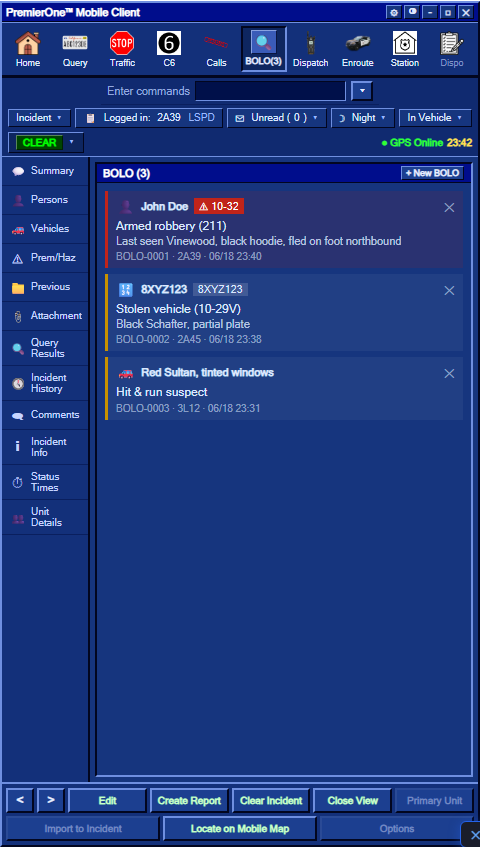
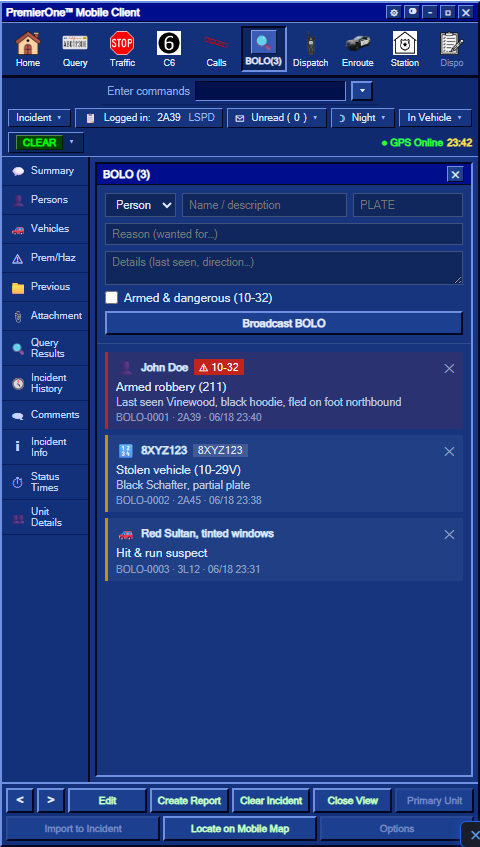
Click + New BOLO and fill in the form:
| Field | What it's for |
|---|---|
| Type |
Person, Vehicle or Plate
|
| Name / description | Subject name, or a vehicle description ("black Schafter, tinted windows") |
| Plate | The plate to watch for (used for auto-hits on plate runs) |
| Reason | Why they're wanted — "Armed robbery 211", "Stolen vehicle 10-29V" |
| Details | Last seen, direction of travel, anything else |
| Armed & dangerous (10-32) | Flags the BOLO red and adds a 10-32 warning everywhere it shows |
Press Broadcast BOLO. Every on-duty officer hears an alert tone and gets an on-screen notification with the subject (and a red 10-32 tag if it's flagged dangerous).
This is the part that makes BOLOs useful: you don't have to remember them.
- When anyone runs a person whose name matches an active BOLO, the person card shows a bright ACTIVE BOLO banner.
- When anyone runs a plate that matches a BOLO (directly, or a vehicle registered to the person), the same banner appears.
- Dangerous (10-32) hits are shown in red.
┌─────────────────────────────────────────────┐
│ John Doe                         [WARRANT]  │
│ 🔍 ACTIVE BOLO — Armed robbery 211 · ⚠ 10-32│
│ DOB: 1990-04-12 · Male                      │
│ …                                           │
└─────────────────────────────────────────────┘
See Query: People & Plates for how runs work.
- Every BOLO shows its ID (
BOLO-0007), who created it and when. - Press the ✕ on a card to cancel it.
- BOLOs expire automatically after 24 hours so the board doesn't fill with stale alerts.
- The board survives a server restart — active BOLOs are saved.
- Creating and cancelling BOLOs is logged for staff (admin audit) and posted to the dispatch log.
- A BOLO with no plate only auto-hits on person runs; add a plate to also catch vehicle/plate runs.
- BOLOs are shared across the whole department — anyone can create or cancel them, so keep them accurate and cancel them when they're resolved.