LASD CAD
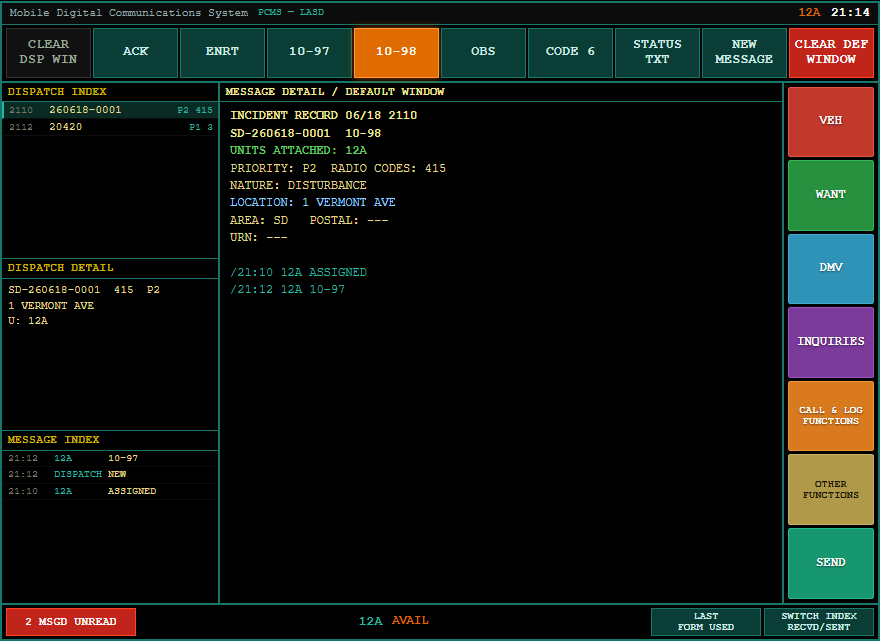
The CAD/PCMS terminal is the in-car computer for every agency except LAPD — Sheriff (LASD), Fire, EMS, Coroner, and any other department your server runs. It's modeled on the real LASD Toughbook PCMS (amber text, teal status keys), and shares the same incidents, units and records as the LAPD MDT and the dispatch console.
📑 Related: Using the MDT · Dispatch console · Citations & Charges
Go on duty with a non-LAPD department, then open your terminal the same way as the MDT:
/mdt        # opens the CAD/PCMS if your dept isn't LAPD
/lasd       # always opens the CAD/PCMS
LAPD officers get the PremierOne MDT instead; everyone else gets this terminal.
┌───────────────────────────────────────────────────────────────────────┐
│ PCMS — LASD                                   12A   15:23              │
├──────────────┬──────────────────────────────────┬─────────────────────┤
│ DISPATCH     │  MESSAGE DETAIL / DEFAULT WINDOW  │  VEH                │
│ INDEX        │                                   │  WANT               │
│  2110 0001   │   INCIDENT RECORD …               │  DMV                │
│  2112 0002   │   SD-260617-0001  10-97           │  INQUIRIES          │
│ ──────────── │   UNITS ATTACHED: 12A             │  CALL & LOG         │
│ DISPATCH     │   PRIORITY: P2  RADIO CODES: 415  │  OTHER              │
│ DETAIL       │   LOCATION: 1 VERMONT AVE         │  SEND               │
│ ──────────── │   …                               │                     │
│ MESSAGE      │                                   │                     │
│ INDEX        │                                   │                     │
├──────────────┴──────────────────────────────────┴─────────────────────┤
│ [ACK] [ENRT] [10-97] [10-98] [OBS] [CODE 6]      12A   AVAIL           │
└───────────────────────────────────────────────────────────────────────┘
- Dispatch Index — active calls (yours + bridged dispatch/911 incidents).
- Dispatch Detail — a condensed view of the selected call.
- Message Index — a live, timestamped activity feed across all incidents.
- Center window — the full incident record, query results, and forms.
- Function buttons (right) — VEH / WANT / DMV / inquiries, create a call, settings, SEND.
- Status row (bottom) — your unit status keys.
Select a call in the Dispatch Index, then use the status keys:
| Key | Meaning |
|---|---|
| ACK | Acknowledge — attaches you to the selected call and sets you ENROUTE |
| ENRT | En route |
| 10-97 | On scene |
| 10-98 | Available / clear — on a selected call this opens the clear/disposition form |
| OBS | Out of service / busy |
| CODE 6 | Code 6 (out investigating) |
Pressing ACK on a call works just like the LAPD console: you're attached and flipped to ENROUTE in one tap.
Attached units are shown right on the incident record (UNITS ATTACHED: 12A).
Right-click any incident in the Dispatch Index for a quick menu:
- ACK / Attach — attach yourself and go ENROUTE.
- Resolve incident — opens the clear/disposition form to close it out.
Pressing 10-98 on a selected call opens the clear form — pick a disposition (code), add a narrative, and confirm. The incident is resolved everywhere (CAD, dispatch console, audit log). This works for both LASD calls and bridged dispatch/911 incidents (PD-…).
The VEH / WANT / DMV buttons run the shared databases — plates, wants/warrants, and person files. Results render in the amber center window, including any file notes, citations and charges filed against the subject (see Citations & Charges) and active BOLO hits.
Use CALL & LOG FUNCTIONS to create a new Call for Service (CFS) from the terminal.