Repository navigation
Network and DNS
Network & DNS groups connection diagnostics, DNS presets, DNS-over-HTTPS registration, and a hosts-file manager. It changes network configuration directly, so read the confirmation text before applying a repair.

Network & DNS. Diagnostic tools sit at the top, DNS presets and DoH controls in the middle, and the hosts-file manager at the bottom.
| Button | Action |
|---|---|
| IP Config | Runs ipconfig /all and shows the output in a text dialog |
| Flush DNS | Runs ipconfig /flushdns and confirms when the resolver cache is cleared |
| Restart Wi-Fi | Disables and re-enables active Wi-Fi adapters |
| Full Repair | Releases/renews DHCP, flushes DNS, resets Winsock, and resets TCP/IP |
| Save Routes | Writes route print output to data\RouteTable.txt
|
| View Routes | Shows the current routing table in a text dialog |
Restart Wi-Fi only targets adapters that are currently up and whose description matches Wi-Fi or Wireless. If no active Wi-Fi adapter exists, WMT reports that and, when applicable, names the active Ethernet adapter instead.
The adapter disconnects and reconnects. Downloads, remote sessions, and VPNs that depend on that adapter are interrupted.
Full Repair asks for confirmation and then:
- Releases and renews DHCP leases on connected DHCP adapters.
- Flushes the DNS cache.
- Resets Winsock, which removes custom Winsock providers and can affect some VPN or security software.
- Resets the TCP/IP stack, which clears manually configured static IP, DNS, gateway, and route settings.
Current settings are written to the diagnostic log first. Adapters may briefly disconnect, and a restart is needed to finish. After the repair, static addresses and custom DNS must be configured again.
The DNS buttons apply a preset to every active, non-virtual adapter:
| Preset | Addresses |
|---|---|
| Google DNS |
8.8.8.8, 8.8.4.4
|
| Cloudflare |
1.1.1.1, 1.0.0.1
|
| Quad9 |
9.9.9.9, 149.112.112.112
|
| AdGuard |
94.140.14.14, 94.140.15.15
|
| Auto (DHCP) | Resets the adapter to automatic DNS |
| Custom... | Opens the Custom DNS dialog |
The operation applies to all matching adapters at once and flushes the resolver cache. Virtual adapters and vEthernet interfaces are skipped. A VPN or Hyper-V virtual switch may still override DNS for its own traffic.
DNS changes affect name resolution for every application on the system. If a preset makes sites unreachable, use Auto (DHCP) or set a working resolver.

Custom DNS. Enter IPv4 and IPv6 servers together, and optionally register a matching DoH template.
The dialog accepts multiple addresses separated by commas, spaces, semicolons, or new lines. It supports IPv4 and IPv6 together.
| Field | Purpose |
|---|---|
| DNS servers | One or more resolver addresses |
| Register DoH template | Registers the template with Windows for these servers |
| DoH template URL | HTTPS URL, for example https://cloudflare-dns.com/dns-query
|
| Remove DoH | Removes the registered template |
| Apply | Applies the addresses and optional DoH registration |
| Cancel | Closes without changing anything |
The DoH template must use HTTPS and should belong to the same provider as the DNS servers. WMT validates the URL and refuses invalid templates. If assigning the addresses fails, DoH registration is skipped.
| Button | Action |
|---|---|
| Register DoH | Registers Windows DoH templates for the bundled providers (Google, Cloudflare, Quad9, AdGuard) |
| Remove DoH | Removes the bundled DoH templates |
Registration uses Windows' native DoH support:
netsh dns add encryption server=<address> dohtemplate=<url> autoupgrade=yes udpfallback=no
After registration WMT flushes DNS and restarts the DNS Client service. Removing a template uses netsh dns delete encryption.
Important limits:
- Registering a template does not by itself change which DNS servers an adapter uses. Apply a matching DNS preset or custom servers as well.
- DoH support depends on the Windows version and the resolver. Older builds may ignore the template.
-
udpfallback=nomeans queries fail rather than fall back to plain DNS when DoH is unavailable. If name resolution breaks after registering DoH, remove the template or switch DNS back to automatic. - Encrypted DNS hides queries from the local network, not from the resolver operator.
The Windows hosts file (C:\Windows\System32\drivers\etc\hosts) maps host names to IP addresses and is checked before DNS. WMT can edit it, download an ad-blocking list into it, and back it up or restore it.
| Button | Action |
|---|---|
| Download AdBlock | Downloads a community ad-blocking hosts list, preserves existing user entries, and merges the list |
| Edit Hosts | Opens the Hosts File Editor |
| Backup | Copies the current hosts file to data\hosts_bk_YYYYMMDD_HHmmss.bak
|
| Restore | Restores a .bak file after confirmation |
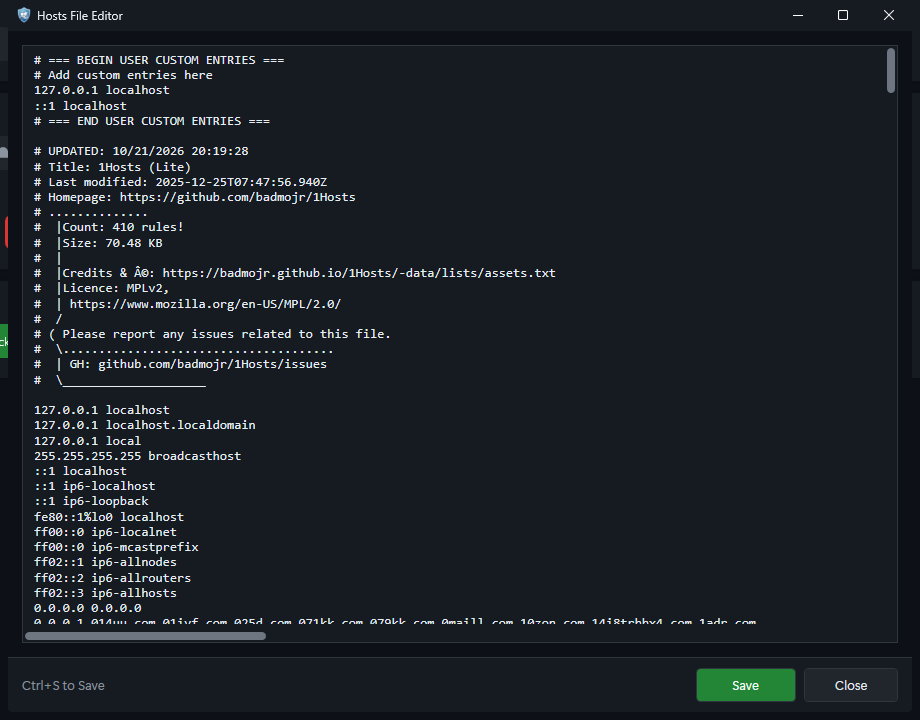
Hosts File Editor. Ctrl+S saves; the title shows an asterisk while there are unsaved changes.
-
Ctrl+S saves. The window title shows
*when there are unsaved changes. - Saving writes the hosts file and may flush DNS.
- Comment lines start with
#. - Each active line contains an IP address followed by one or more host names.
- Invalid syntax is not repaired automatically. A malformed hosts file can slow down or break name resolution.
Download AdBlock:
- Backs up the current hosts file to
data\hosts_backups. - Downloads a community ad-blocking hosts list.
- Keeps existing user entries and appends the downloaded block list.
- Writes the combined file and flushes DNS.
The download requires internet access. Large block lists can make the hosts file large and slightly slow name resolution. Some sites or applications may break because their telemetry or content domains are blocked. Restore a backup to undo the change.
Backup stores a timestamped .bak file under data. Restore lists backups and overwrites the current hosts file after a warning confirmation. Restoring is not merged; the selected backup replaces the file.