Repository navigation
Power Supplies
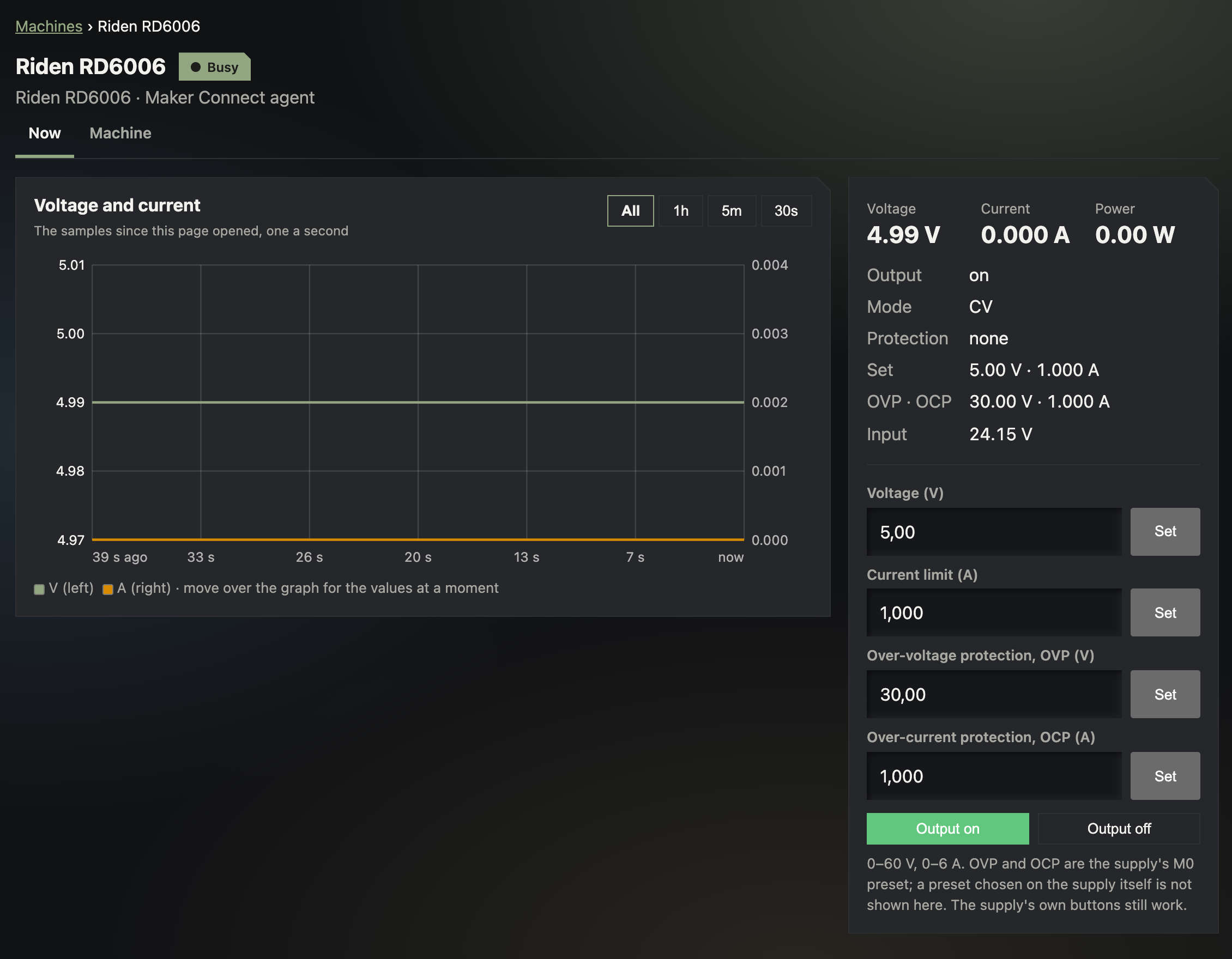
A bench power supply on the hub: its live volts, amps and watts next to your other machines, and its output switched and set from the browser. The first one is the Riden RD6006W, on the agent over USB. The driver is a port of riden-dongle (MIT), checked against riden-dongle's own code (audit: 69 of 71 cases identical; the other 2 are the RD6012P, which is not ported).
| Supply | Connection | Reference | Status |
|---|---|---|---|
| Riden RD6006W (stock firmware 1.36) | USB, through the agent (Modbus RTU) | riden-dongle 1ebbc76
|
Tried on the real supply |
| Riden RD6006W over its Wi-Fi dongle | the dongle with the Modbus firmware (Modbus TCP) | Not built yet (#294) | |
| Other RD60xx models | riden-dongle knows their ids | Not tried; the RD6012P is refused |
- Connect its USB port to the computer with the agent. It shows up as a serial port (a CH340,
/dev/ttyUSB0on a Raspberry Pi). - On the agent's page, under Riden RD6006 power supply, choose the port and the baud rate the supply is set to in its own menu, then Turn on (see The Agent). With no baud rate chosen the agent uses riden-dongle's default, 9600.
- Add it on the hub with the code the agent's page shows. It appears under its own kind, Power supply.
- Live values, once a second: the output's voltage, current and power, the input voltage, the mode (constant voltage or constant current), and the supply's firmware.
- A graph of voltage and current, with the windows All, 1h, 5m and 30s, as riden-dongle's own page has. It holds what the open page has seen; the hub keeps no history of the supply yet.
- Set: the voltage (0 to 60 V) and the current limit (0 to 6 A), tried on the real supply. The over-voltage and over-current protection (OVP, OCP) are shown and can be set too; setting those is built but not tried on the supply yet.
- Output on and off. On asks for a confirmation first, because it puts voltage on whatever is connected. Who may do either follows the machine's permissions.
- Protection: which one tripped, OVP, OCP or OTP.
OVP and OCP are those of preset M0. A preset chosen on the supply itself does not show in M0 (riden-dongle's README: "If they are set by selecting a preset, M0 does not reflect the new values."). The presets M1 to M9, Ah and Wh, and the supply's temperatures are not read yet.
The supply speaks the same protocol as every other device here: part 11 of the Prusa SDK Extension adds its telemetry keys and sets values with the SDK's own SET_VALUE.