Repository navigation
Tutorial 05 Populating the world
Part of the tutorial: page 5 of 12
▶ Watch this page: part 5 of the tutorial video (about 2 min), with narration and subtitles.
Give the world two peoples and a history, and let Generate settle it: towns, castles, roads, sea lanes, realms, duchies and counties, all named.
Start from: 04-rivers-and-faults.json, the map as it is at the end of Tutorial 04 Rivers and faults. Download it, then open Maps on the rail and click Import JSON; the map is listed under its name, and Load opens it. Or carry on with your own map from Tutorial 04 Rivers and faults.
With the land finished, the Generate tool works out where people would live on it and populates the whole map in one run. It reads the land you have shaped (the height and ruggedness of the ground, the climate, the biomes, the rivers and the coast), founds towns where the land can feed them, traces the trade between them, and divides the land into realms. Everything it makes is ordinary map content, which the next pages edit and add to by hand.
-
Click Generate on the rail, the first tool in the Populate group. Leave Seed empty: the run then uses the map's own seed, P0JBVA, so your run matches the tutorial's. World scales how many people the land feeds, how many live in towns, and how large realms and duchies grow; the tutorial keeps them at 1.

The Generate tool before its first run.
-
A map with no cultures has one people, everywhere. This world has two. Click + Culture in the Cultures section, type
Hillfolkand press Enter. The culture opens in the inspector:- Name style: Nordic, the language their places are named in.
-
Colour:
#5b7fa6. - Habitat, Height: click Upland, then drag the track's right-hand handle to the end: they suit the uplands and everything above.
- Homelands: click Add homeland, then click the uplands in the north of the continent, south-east of the snow-capped peaks. The culture spreads from there.

The Hillfolk in the culture inspector, with their homeland marked on the map.
-
Add a second culture the same way:
Valefolk, Name style English, Colour#c9a227, Height Lowland, and a homeland in the forests of the south of the continent. Then close the inspector. -
A run can pass through several ages, so the map has a history. In Ages, click + Age: the map now has Age 1 and Age 2: the present. Set Age 1's Era to Early medieval and its Strife to Peaceful, and the present's Event to Hillfolk invade: in the present age the Hillfolk come down from the hills and take land from the Valefolk.

Two ages: a peaceful early medieval age, then the present, with the Hillfolk invading.
Each age starts from the one before: towns tend to grow where towns stood, and roads and realms carry on where they can. What the age before leaves behind (ruins, abandoned castles and old roads) appears on the map, and page 9 looks back at it.
-
Click Generate at the top of the panel. The map is covered while the run works through its stages, age by age; it takes a few seconds to a minute, depending on your computer. When it finishes, the map has its realms, towns, castles and routes, all named.
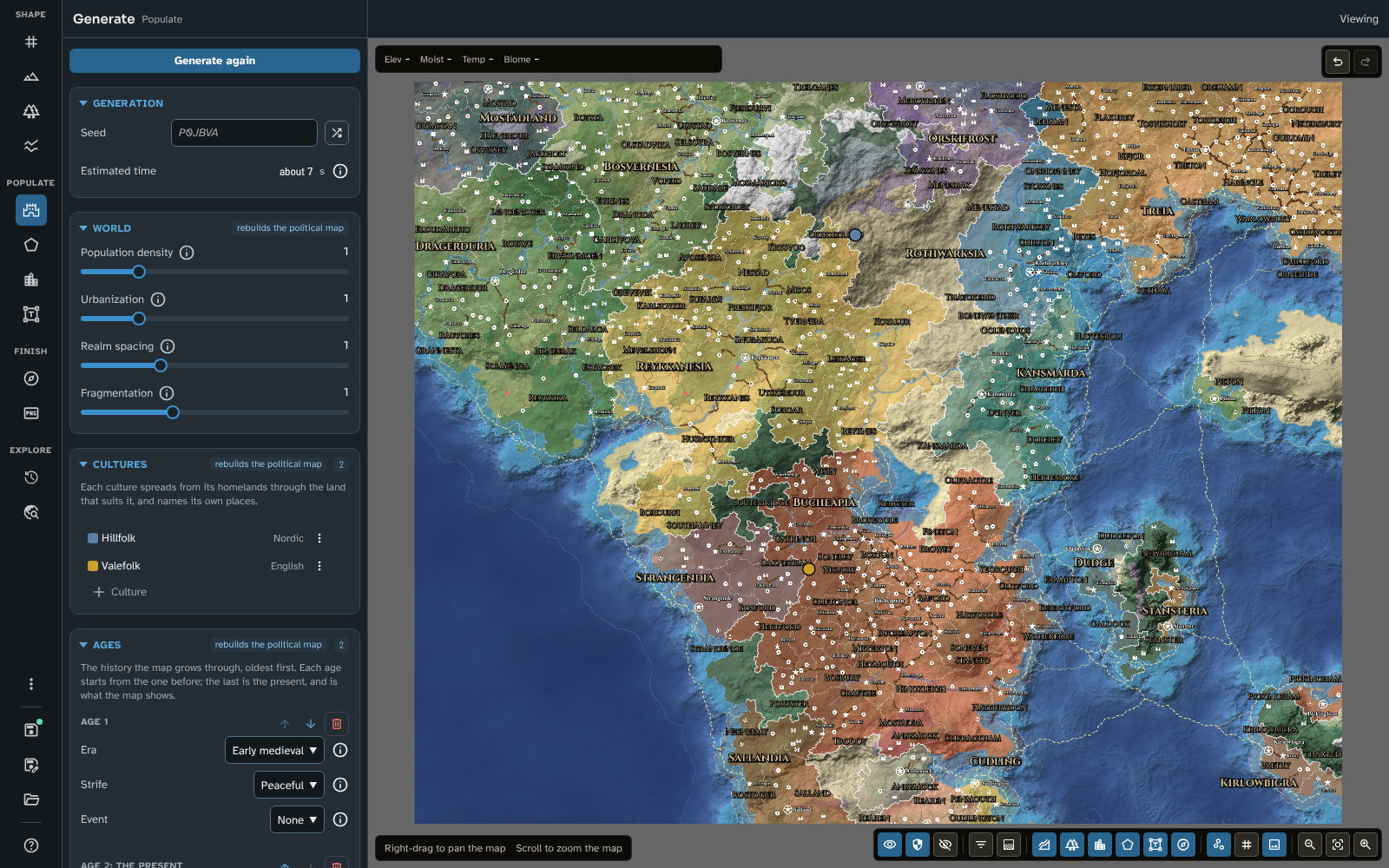
The world after its run: realms coloured, duchies and counties outlined, towns, castles and roads named.
-
A world map holds a lot. The Detail menu in the map controls (the first of the middle group) chooses how much is shown: World shows realms, capitals and cities; Province adds duchies and large towns; Regional counties and towns; Local and Everything the smallest places. Choose Province.

The map at the Province detail level.
-
Scroll to the foot of the panel. Results counts what the run left on the map (realms, duchies, counties, places of each kind, routes, ruins and old roads), its population, and each culture's share of it. The Hillfolk's invasion has given them more than half the people.

The run's results.
-
Save the map. Everything the run made is ordinary map content: the next pages change and add to it with the other tools.
The whole map divided into realms, with their duchies and counties, towns and castles across the land, roads between them, river trade along the rivers and sea lanes along the coasts. Names in the north are Nordic, the Hillfolk's; in the south, English, the Valefolk's.
To compare your map with the tutorial's, or to start the next page from exactly this map, download 05-populating-the-world.json and import it in Maps with Import JSON.
Everything on this page is the same in Foundry.
Shape the land first: the run reads it, and changing the terrain, climate or rivers afterwards marks the run out of date. Try a few seeds with the same settings: each gives a different but equally plausible world. When you generate again, anything you have edited or locked is kept and the rest is replaced, so lock the realms and towns you like before trying another seed. See Generate and Cultures for every setting, including the cultures' openness, density, coast and river preferences, and the Output switches that leave out duchies, counties, kinds of place or route.
Next: Tutorial 06 Realms and provinces
Related: Generate, Cultures, Map Canvas