Repository navigation
Development
English · 简体中文
Home · Cards · Builds · Enemies · Stages · Mechanics · Development · Changelog · Gallery · Brand · Validation
Use Bun 1.4.3 or newer; stable newer versions are allowed without an upper major cap. The stack is TypeScript, Phaser 4, Vite and Biome. No backend service is required.
bun install --frozen-lockfile
bun run dev
# Local PRE with balance laboratory:
bun run dev:pre
Keep servers on loopback. On the VPS, use an SSH tunnel to the chosen port; do not change firewall or DNS for routine work. Production output is dist/; PRE output is dist-pre/. Both must be served over HTTP(S), including assets, fonts and license files. base: "./" supports a subdirectory. Local preview is not Cloudflare PRE.
bun run docs:generate
bun run docs:check
bun run typecheck
bun run lint
bun test
bun run buildBuild before testing and install browsers matching the lockfile:
bunx --bun playwright install chromium firefox webkit
bun run test:browser
test:browser prepares the PRE build. In restricted environments, use a writable location consistently, e.g. PLAYWRIGHT_BROWSERS_PATH=/tmp/destiny-browsers, for installation and execution. Firefox/WebKit may require Xvfb and software WebGL on a headless Linux host. Read the current Playwright config before selecting projects. A browser launch failure is an environment failure until reproduced in the app. Automated touch is not physical-device acceptance; long sessions and real mobile browsers remain manual checks. Historical evidence.
| Path | Responsibility |
|---|---|
src/game |
Fixed-step simulation, pools, input coordinates, state and rules |
src/data |
Data-defined cards, enemies, stages, synergies and numeric profiles |
src/game/scenes |
Phaser rendering; no rule ownership |
src/ui |
Native DOM controls, help, rewards and build panels |
scripts/game-guide.ts |
Chinese rule prose and generated bilingual guide assembly |
scripts/guide-catalog.en.ts / docs/wiki-content
|
English catalog translations and maintained Wiki prose |
Simulation uses seconds and a 1/120s fixed step, independent of CSS pixels, frame rate and DPR. Arena geometry is selected at entry. Touch, safe areas, narrow rewards, background pause and keyboard focus must be preserved. Browser modules cannot import Bun/server APIs. See the architecture source and combat specification.
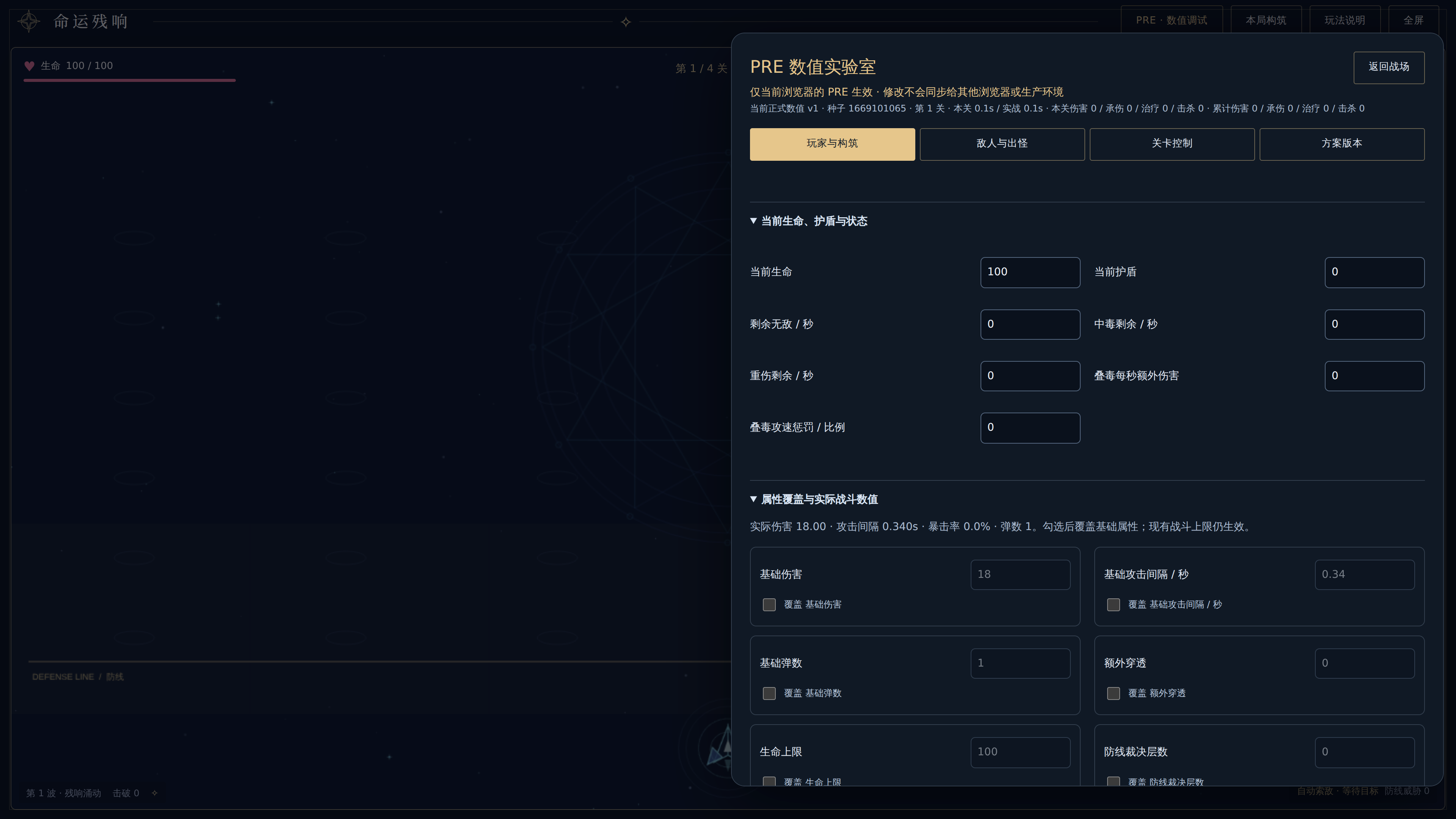
Open PRE · 数值调试 on PRE. Player/build changes last for the current run; temporary spawn rules affect later spawns in that stage. Existing enemies can be edited separately. Stage controls can keep the build, restore entry state or jump to campaign/endless stages. These are debugging actions, not natural-clear evidence.
Saved drafts and versions live in the current browser's PRE origin localStorage, isolated from other browsers, private contexts and PRO. Web Locks serialize writes; stale tabs refuse to overwrite newer content. Export the draft and refresh after a conflict. Storage/locking failures still allow session experiments and draft export. A running test fixes its selected version until restart; combat is not saved on refresh.
Profiles use schemaVersion 1 / baseline balance-v1, with player numbers, enemy baselines, endless tuning, per-source reward weights and up to 200 stage rules. Rules use inclusive from/to, null for unbounded, and precedence global → range → single stage. Equal-priority overlap is rejected. Guided rewards preserve foundation/family support; weighted rewards use weights directly, including epics, with 0 excluding a card. Eligibility and stack caps remain. Weights are not final choose-three probabilities. Exhausted pools allow a one-use no-reward continue; ineligible score-training milestones are consumed, not deferred.
Export contains configuration only, excluding temporary battle state. Maintainers apply it in a new worktree:
bun run balance:validate /path/to/echoes-balance.json
bun run balance:apply /path/to/echoes-balance.json
bun run docs:generate
# Review both languages and run all checks before publishing.
See the complete debugger contract for numeric validation, revision monotonicity, import and overrides. Applying a profile edits source; it does not deploy or publish anything.
Maintainers can run the production World without rendering in Bun, using fixed seeds to compare natural reward/target strategies, logical layouts and balance profiles. The CLI provides JSON/CSV/Markdown reports, paired baseline comparisons, budgeted one-factor sweeps and deterministic single-run replay:
bun run balance:simulate --profile official --preset smoke --out artifacts/balance/smokeSaved-profile JSON exported by PRE works directly as CLI input; experimental candidates use the existing profile import flow. The experiment entry validates a summary or case, displays diagnostics and prepares a fresh manual run with its profile, seed and logical width, preserving existing drafts and saved versions. A manual restart is not automatic playback; use the CLI for deterministic reproduction with the same strategy.
The tool changes neither production rules nor official.json, and never runs balance:apply, pushes or deploys automatically. Budget exhaustion, death and reaching an endless observation target are distinct outcomes; strategy statistics are not human completion rates. See the Balance Simulator guide for complete commands, metric definitions, configuration and limitations.
Start a new worktree/branch from current origin/main; preserve other tasks. Follow AGENTS.md: verify, atomic Conventional Commit, push, PR, exact-current-head Codex review, rebase merge, confirm content and clean only this task's worktree/branches. Do not force push or bypass checks.
Review Chinese prose in scripts/game-guide.ts and English templates/catalog together. docs/wiki-content/reviewed-rules.txt pins the rule digest against which English prose was checked. If rules change, re-review the translations before updating that digest; this is a review marker, not an automatic translation tool. Generate both languages and keep them in the same commit. docs:check fails on missing/stale pages, translations or assets. Default Wiki slugs are English; Chinese counterparts end in -zh-CN. Page headers link to their counterpart.
Before each release, update both Changelog sources with the date, version/tag or commit, changes, migration notes if needed, evidence and independent PRE/PRO status. Do not invent a release number or mark an environment deployed from a merge alone.
After review/merge, from the clean verified merged main:
bun run wiki:publish --dry-run
bun run wiki:publish
The native Wiki is a separate Git repository. Publication syncs generated pages plus versioned documentation assets, converts local links, preserves unmanaged pages, skips empty commits, normally pushes without force, and checks remote SHA. Reuse system Git/GitHub credentials. If a concurrent push rejects publication, inspect it and rerun safely. Full maintenance details: Wiki publishing source.
| Environment | Worker | URL |
|---|---|---|
| PRO | destiny-echo-web |
Production |
| PRE | destiny-echo-web-pre |
Preview |
Obtain the requested deployment scope, verify the existing CLI identity/account/permissions and the commit, then dry-run. PRO requires the same version to be verified in PRE first. The scripts use locked Wrangler for packaging and cf for prebuilt deployment; preserve those entrypoints.
bunx --bun cf auth whoami
bun run deploy:check:pre
bun run deploy:pre
# Only when PRO is authorized, after PRE verification:
bun run deploy:check
bun run deploy:pro
No application secrets or runtime server are required. _headers revalidates the home page, caches hashed assets immutably and adds security headers; missing assets should return 404. Check public HTML identity, assets, caching and real browser input after deployment. Source push, Wiki publish, local checks, PRE and PRO are separate results. This documentation update does not deploy the game.