Stream Title EN
Save stream titles and game categories as cards for easy management and quick synchronization with Twitch.
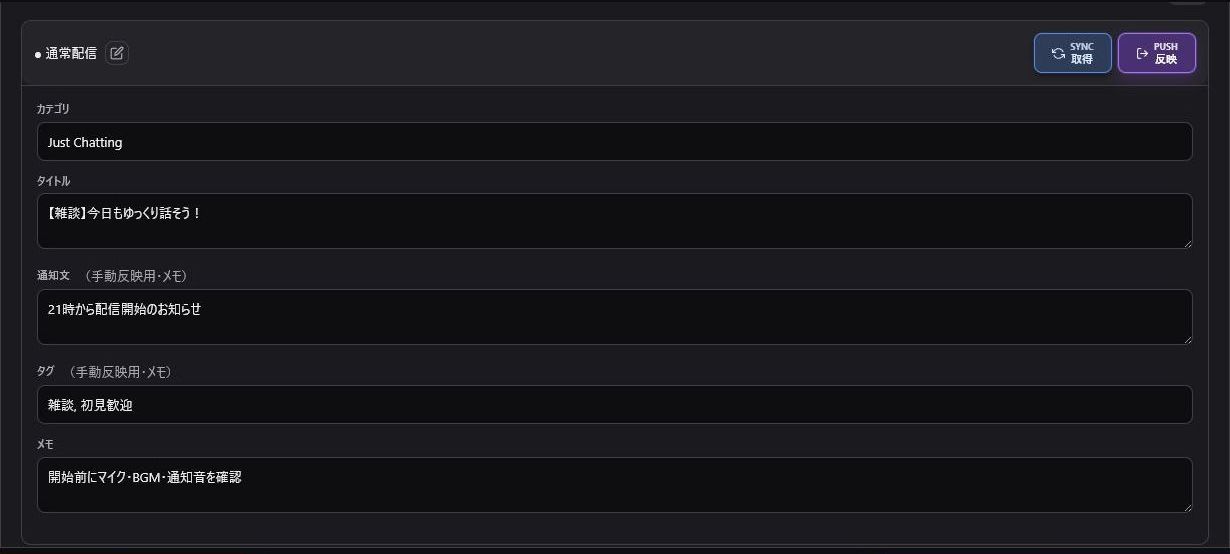
- Click "+ Add Template" to create a group for a specific game or event series.
- Click the "+" button on the top-right of a template to add a card.
- Enter the game category and stream title, then click Save.
Note: Notification text, tags, and notes stored in cards serve as your local stream preparation record. Only Title and Category are updated directly on Twitch.
- "Sync": Fetches your current title and category live from Twitch.
- "Apply": Sends the selected card's title and category to Twitch.
Categories require exact official Twitch category names. Fetching them via "Sync" after setting them once on Twitch helps avoid typos.
If OBS's native Stream Information dock does not reflect the update immediately, refresh that dock or press Ctrl + R.
Card titles can be edited using the pencil icon. Reordering or deleting cards should ideally be done before starting your stream to avoid misclicks.