Repository navigation
Screen Printer
Printer defaults, the statistics, Klipper and MCU restarts, and the mainboard firmware.
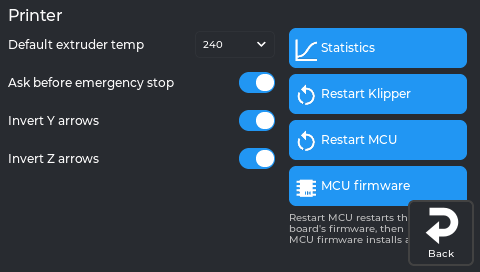
The real screen app, showing data from a printer running NebulaOS 1.0.0.
| Setting | What it does |
|---|---|
| Default extruder temp | 180–300 °C. Used by Load/Unload when no target is set. |
| Ask before emergency stop | On: Stop asks "Do you want to emergency stop?" first. Off: acts immediately. Default on. |
| Invert Y arrows / Invert Z arrows | Swap the jog arrows in the Homing panel. |
| Statistics | What this printer has printed, over its whole life — see Statistics panel. |
| Restart Klipper | Restarts Klipper. Asks first if a print is running (the print stops). |
| Restart MCU | Restarts the printer board's firmware, then Klipper (FIRMWARE_RESTART). Asks first if a print is running. |
| MCU firmware | Installs a new mainboard (MCU) firmware. |
Opens from Settings → Printer → Statistics. It shows what this printer has printed, over its whole life — including the time before NebulaOS was installed. Nothing on this page changes the printer; it only reads.
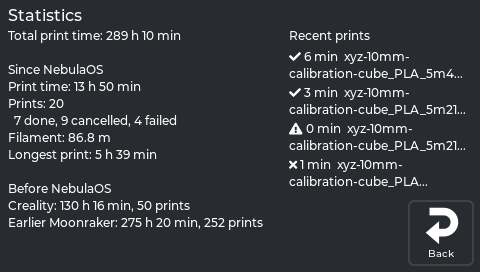
The real screen on a printer running NebulaOS 1.0.1.
| Line | What it means |
|---|---|
| Total print time | The printer's whole life: what it printed before NebulaOS plus what it has printed since. |
| Since NebulaOS — Print time | Time spent printing since NebulaOS was installed. |
| Prints | How many print jobs, then the split: done, cancelled, failed. |
| Filament | Filament used since NebulaOS, in metres. |
| Longest print | The longest single job since NebulaOS. |
| Before NebulaOS — Creality | Creality's own lifetime counter, and how many prints Creality still lists. |
| Before NebulaOS — Earlier Moonraker | An earlier Moonraker's history, if this printer ran one (OpenKE or the community helper script). |
Each Before NebulaOS line says none found when that system never ran here, or could not be read when the file exists but could not be understood.
The right column lists the four most recent jobs, newest first, each with its print time and a mark:
| Mark | Meaning |
|---|---|
| ✔ | finished |
| ✘ | cancelled |
| ▶ | running now |
| ⚠ | failed |
Each name is shown from its start, on at most two lines, ending in ... when it is longer. For the full list, open
Mainsail and use its History page.
Worth knowing, because two of these surprise people.
Print time is printing time. It is Klipper's print duration: from the first extrusion to the end of the job, not counting heating up or time spent paused. So it is always less than the wall-clock time you waited.
The total is not the sum of everything. The Before NebulaOS figure is the larger of the
two sources, never their sum. On a printer that ran OpenKE, Creality's counter and Moonraker's
history were both running and both counted the same prints; adding them would double the
printer's life. (combine_stats in the NebulaOS Moonraker component, firmware 3bd9675.)
Where each figure comes from:
- Since NebulaOS is Moonraker's own print history — the same database Mainsail's History page reads. That is why Mainsail's History lists only prints made under NebulaOS.
-
Before NebulaOS is read once from the printer's data drive and then remembered, in
/usr/data/nebulaos/system/stats-baseline.json. The reading happens the first time this page is opened, not when NebulaOS is installed - so a printer whose Statistics page has never been opened has not read anything yet. Creality's files are only ever read, never written: NebulaOS does not add its print time to Creality's counter. Creality's lifetime counter and print list come from Creality's own files; the earlier-Moonraker figures come from the old Moonraker database. All three are read and never written. - A source that is missing or unreadable is looked at again next time, so installing NebulaOS before the import has anything to find is not a problem.
These figures survive a cleanup. Clean up Creality files keeps
Creality's two statistics files and the old Moonraker database on purpose, so your printer's
history is not lost with the rest of the Creality system (firmware 3bd9675,
cleanup.STATISTICS_KEEP).
What does erase them: a clean NebulaOS reset removes everything NebulaOS keeps,
including its print history and the remembered Before NebulaOS figures. The before figures
are simply imported again at the next look, because the files they come from — Creality's and the
old Moonraker database — live outside the NebulaOS folder and a clean reset does not touch them
(firmware 3bd9675, nebulaos-clean-reset). The prints made under NebulaOS are gone for good.
| What you see | What it means |
|---|---|
| Adding up... | Still waiting for the printer. It is normal for a moment. |
| The printer could not read the statistics. | Moonraker answered with an error. Check that Klipper and Moonraker are running — Troubleshooting. |
| No answer from the printer. | The screen has no Moonraker connection. See Connect to Wi-Fi. |
| Recent prints — None yet. | No print has been recorded under NebulaOS yet. |
Behind the page: GET /machine/nebulaos/stats (JSON-RPC machine.nebulaos.stats). Screen source
src/statistics_panel.cpp at fd47cb6; the import is nebulaos-osconfig stats baseline at
firmware 3bd9675.
Previous: Settings → Display · Using NebulaScreen · Next: Settings → System