Repository navigation
Architecture
Published from
_docs/03-architecture.md— edit it there, not here. Changes made in the wiki are overwritten on the next sync.
How this module is organised, and why.
For the twin and the vendor boundary in general, see how it works; for the context pipeline, the engineering workflow.
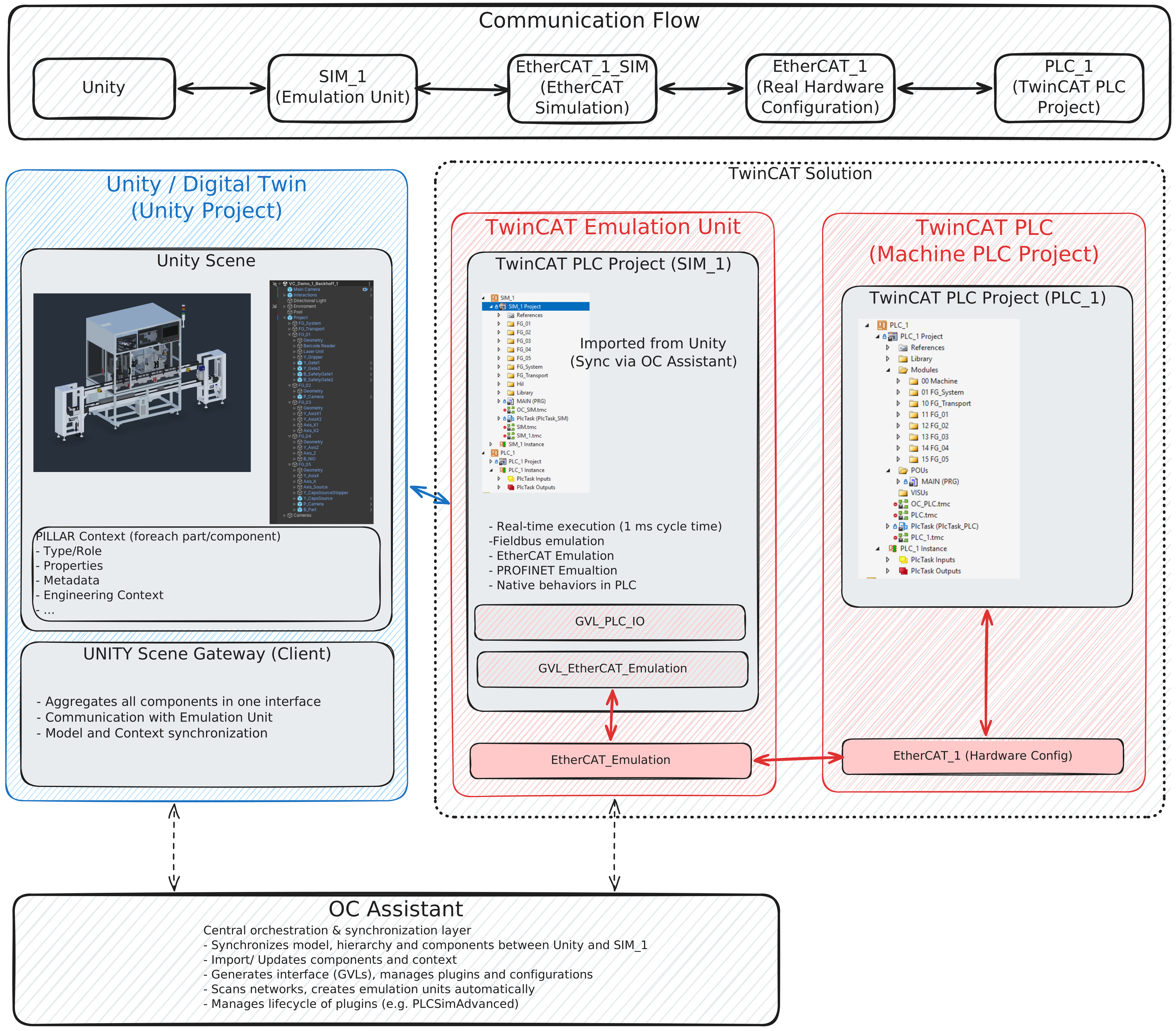
The Open Commissioning base setup is the twin plus an emulation unit; what this module adds is the control side — a second PLC project and the real hardware configuration behind an emulated bus.
   TwinCAT_1/PLC/TwinCAT.tsproj
     PLC_1   AmsPort 851   the control program (SPT framework), drives EtherCAT_1
     SIM_1   AmsPort 852   the twin device layer, OC Assistant's output, on EtherCAT_1_SIM

   Unity ── ADS ──> SIM_1
   PLC_1 ── EtherCAT ──> EtherCAT_1  ⇄  EtherCAT_1_SIM ── SIM_1
   TwinCAT_1/HMI (TE2000) ── ADS ──> PLC_1 as runtime PLC1 (bound by PORT 851)
PLC_1 never talks to Unity. It talks to EtherCAT terminals, exactly as it would on the real
machine. SIM_1 sits on the other end of those terminals holding one function block per twin device
— FB_Cylinder, FB_SensorBinary, FB_Camera and so on — and Unity binds those symbols.
That indirection is the entire point. The control program cannot tell it is running against a twin, so nothing about it has to change when it runs against steel. A test rig that the program is aware of proves much less.
The ⇄ between the two EtherCAT devices is a physical cable, not a software coupling.
EtherCAT_1 is a real master and EtherCAT_1_SIM is a TE1111 EtherCAT Simulation Device; each is
bound to its own network adapter, and the master's frames go out of one port and into the other over
a patch cable looped between them. Both adapters must be ones the TwinCAT real-time driver supports,
and the tsproj records the ones the project was saved on — so a fresh clone has to repoint them
before Activate Configuration. See 01 · Setup §4.
The simulation device runs unsynchronised with the master, which is why SIM_1 is on a 1 ms task
against the control program's 10 ms: the emulation has to be sampled faster than the thing it is
answering.
| Path | Written by |
|---|---|
TwinCAT_1/PLC/SIM_1/** — the {region generated code} blocks |
OC Assistant. Never edit; regenerated from the twin's device list |
TwinCAT_1/PLC/SIM_1/** — the Mapping action |
You |
TwinCAT_1/PLC/PLC_1/** |
You — the control program |
TwinCAT_1/PLC/Mapping_PLC.xml |
The I/O mapping build, imported in XAE |
| The machine pages | A generator. Swept on every run; never hand-edit |
| The curated reference | You — hand-written TwinCAT knowledge |
TwinCAT_1/PLC/SIM_1/Library/ |
You — device models the libraries lack or get wrong |
SIM_1/Library/FB_Sercos_VC and FB_Sercos_FSM are local copies of the OC_EtherCAT 1.1.8 blocks,
and they shadow the library by name: a project POU wins over an unqualified library POU, so the
generated Lift0x_Y_Lift : FB_Sercos_VC binds to the copy with no edit to the generated region.
They exist because the library's Sercos state machine reads control-word bit 13 inverted. On an
AX5000 a 1 there means run, so the library parked every NC-enabled drive in its Halt state,
reporting status 16#C010 — "drive ignores the command values" — and the NC never declared the
lift axes operational. The copy also keeps S4_SwitchOn at "10" instead of stepping back to "01".
Delete both files once OC_EtherCAT ships the fix; nothing else refers to them.
PLC_1 is built on the SPT framework (V3.9 — note that the published SPT documentation describes
V4, and disagrees with the shipped binary in several places). One equipment module per functional
group, under Modules/NN FG_xx/.
How the framework is meant to be used, the official build order, and which third-party claims about it are wrong: SPT framework.
When a source disagrees with the shipped binary, the binary wins.
Every twin device's process image is linked to an EtherCAT terminal channel. Which channel each signal is on, what is still free, and whether the link file and the project agree: the I/O map.
Signals that are unlinked on purpose are listed in unlinked signals, so a real gap is not hidden by a deliberate one.
One trap worth stating here because it fails silently: a TcLinkTo member path resolves on a
STRUCT, not on a FUNCTION_BLOCK instance. On an FB instance the compiler accepts the pragma,
reports nothing, and links nothing. A link is real when it appears in the tsproj <Mappings>.
The two lift carriages are NC axes, FG_Transport_Lift01_Y_Lift and FG_Transport_Lift02_Y_Lift, on an
AX5125 (SoE) with a velocity interface: the drive takes a velocity command and reports position,
and the position loop runs in the NC. In PLC_1 each is an FB_Component_BasicAxis, referenced on
its B_AxisMin sensor by FB_HomeRoutine_RefSensor; its AXIS_REF links
(TINC^NC-Task 1 SAF^Axes^...) live in Mapping_PLC.xml beside the terminal links.
In the simulation the drive is FB_Sercos_VC, and two of its numbers must agree with the NC:
| NC axis (XAE) | Value | SIM_1 FG_Transport.InitRun
|
|---|---|---|
| Encoder scaling factor numerator / denominator | 0.0001 / 1 - mm per increment | the sim encoder reports 0.0001 mm per increment; fixed in the block |
Drive output scaling (VeloScale) |
6 counts per increment/s |
stConfig.fNormalizationFactor := 60000000.0 with fReferenceVelocity := 1000.0
|
fNormalizationFactor counts mean fReferenceVelocity mm/s, and the sim never moves faster than
fReferenceVelocity. Change one side, change the other. A mismatch looks like a tuning problem
and is not: with the library defaults the sim ran flat out at its cap (10 mm/s set, 1000 mm/s
actual) and every reset ended in a following error; a factor of 6 off still showed as 60 mm/s.
The loop itself, per axis: position controller Kv 20 (the default 1 left a creeping tail of several seconds on every move), velocity pre-control 100 %, target-position window 0.1 mm, and position-lag monitoring on. The sim is an ideal integrator with a few milliseconds of dead time, so Kv has a lot of headroom; on a real drive it would be tuned against the mechanics.
The per-group TwinCAT pages are generated from two inputs: the twin's structure, and this module's own TwinCAT projects.
  the machine's structure       schema-versioned JSON, committed here
        +
  TwinCAT_1/PLC/**              the type model, read once into a committed snapshot
        ▼
  the machine pages             machine.md  fg-*.md  devices/*.md  plc-io.md
That structure file is the whole coupling to the main repository. This module never re-parses the Unity export. The file is schema-versioned, and a consumer that does not recognise the schema refuses rather than guessing — so a format change cannot be rendered from fields that may have moved.
The snapshot's validity is decided by hashing the PLC_1 sources with every comment stripped.
Prose can be rewritten freely and the snapshot stays valid; a declaration, member, pragma or located
variable changes it.
This matters because PLC_1.tmc is a git-ignored build artifact whose timestamp is not a usable
signal — a checkout rewrites source mtimes around it, and a comment-only edit would mark it stale
for a change that cannot alter a single type. A group page banners itself only when the snapshot is
genuinely behind.
| Fact | Lives |
|---|---|
| Which devices exist, their types and twin PLC paths | Main repo — generated from the twin |
| How a group sequences, interlocks, faults and recovers | Main repo — the behaviour contracts, platform-neutral |
Which FB_* a device becomes, its terminal channel, its HMI struct |
Here |
The verified control PLC path MAIN.Machine.<group>.<device>
|
Here — it is a TwinCAT fact |
A machine-level fact placed in this module would be invisible to the Siemens port that has to honour it. A TwinCAT fact placed in the main repository would have no generator to keep it true — the root builder does not even import a vendor tool.