UI ai panels
Source: src/components/editor/AiBlockPanel.tsx (243), AiSetupBanner in ai/AiSetupWizard.tsx:737
Reach: page editor → AI block button, or slash menu → AI
States: 4 — idle, unconfigured (banner), streaming, output
Two pieces, both inline rather than modal.
A dashed-border, full-width button reading "Set up AI — Grok, Claude, Codex CLI,
MCP… (<backend label>)", which opens the setup wizard.
It returns null when setupComplete is true. So it is present in a fresh
workspace and gone in a configured one, and it appears in three places —
AiBlockPanel, AiEditDialog (dialogs.md), and anywhere else the
wizard is reachable inline. Its presence or absence is always an Acceptable
Difference; only its content is rubric'd, and only when it is showing.
Not a dialog. A rounded-xl card on bg-muted/30 sitting in the block column, so it
is captured as part of the page, and scrolls with it.
Regions, top to bottom:
- Header — a filled 28 px square with a sparkle, the words AI block, and the resolved provider (or backend label) pushed right at 11 px
-
AiSetupBanner— conditional, as above - A one-line explainer naming the backends
-
Five presets — Summary · Todos · Table · Outline · Diagram. Each carries a
titletooltip (Condense the page,Extract action items,Markdown table,Hierarchical outline,Mermaid flowchart), so the accessible name is the short label and the hint is only a tooltip. -
Instruction row — a resizable
textarea(min-h-[64px],resize-y) and a Run/Stop button -
Stream panel — shown while
loading || streamPreview - Error, then output
-
Run becomes Stop while loading — same slot,
destructivevariant. Never both. Run is disabled until the instruction is non-empty. -
The stream panel and the output
<pre>are mutually exclusive. Output renders onlyaiOutput && !streamPreview. During a run you see the stream panel; after it clears you see the output block. A capture showing both means that invariant broke. -
The stream label is three-way:
status ?? (loading ? "Streaming…" : "Preview"). So a finished-but-not-cleared stream panel reads Preview with no spinner. - Presets differ from
AiEditDialog's five (Improve / Shorter / Expand / Fix grammar / Professional). Same shape, different verbs — this panel generates from page context, that one rewrites one block.
Never rubric a streaming capture. Model output is nondeterministic by construction. Capture idle and final only; the streaming state is specified here in prose deliberately, and asserted through the DOM if at all.
The panel renders its own
AiSetupWizard, so the wizard can open on top of the page from here — a third entry point beyond Settings andAiEditDialog.
| What | Selector |
|---|---|
| Panel |
[data-block-type="ai"] — the block wrapper |
| Header | text AI block
|
| Provider | the 11 px span at the header's right |
| Setup banner | role=button[name=/Set up AI/] |
| Presets | role=button[name="Summary"|"Todos"|"Table"|"Outline"|"Diagram"] |
| Instruction |
role=textbox with placeholder Custom instruction…
|
| Run / Stop |
role=button[name="Run"] | [name="Stop"]
|
| Stream panel | the bordered box containing Streaming… | Preview
|
| Output | the pre after the stream panel clears |
| Error |
.text-destructive paragraph |
Reach the panel through [data-block-type="ai"], not by text: AI block is also the
label of the button in the page-editor action row that creates it.
1. seed localStorage["forgenotes-ui-freeze"] = "1"
   (+ localStorage["workspace-v1"] = {"state":{"theme":"dark"},"version":0} for dark)
2. load /, viewport 1280x800
3. open a page, click "AI block" in the action row
4. wait for [data-block-type="ai"]
5. webview_screenshot --selector "[data-block-type='ai']"
| State | Extra |
|---|---|
| Idle, configured | complete the setup wizard first, or set setupComplete
|
| Unconfigured | fresh workspace — the banner shows |
| Streaming | do not capture; assert Streaming… in the DOM instead |
| Output | run a preset against a configured backend, wait for the stream panel to clear |
The output state needs a working backend. There is no mock path here (unlike the harness), so this is the one screen whose final state cannot be captured offline. Record that limitation rather than faking it.
| State | Wireframe |
|---|---|
| 1 · Idle | 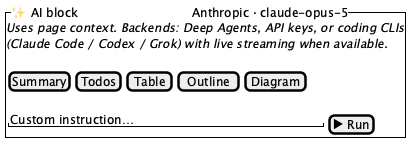 |
| 2 · Unconfigured (banner) | 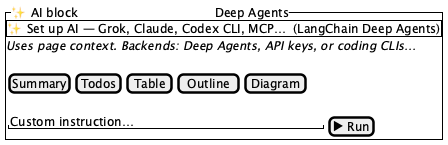 |
| 3 · Output | 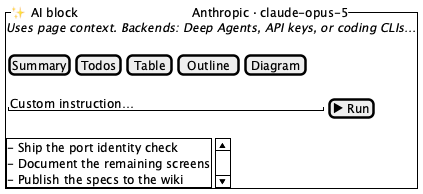 |
Tokens and always-acceptable items: tokens.md.
- A
rounded-xlcard on a muted fill, sitting inline in the block column — not a modal - Header: filled sparkle square,
AI block, provider label pushed right - Explainer line naming Deep Agents, API keys, and coding CLIs
- Five presets in order: Summary, Todos, Table, Outline, Diagram
- Instruction
textareaat least 64 px tall, with a resize handle - Run at the row's right, disabled while the instruction is empty
- Setup banner, when shown, is dashed-bordered, full width, above the explainer
- Provider / backend label — reflects real configuration
-
Setup banner present or absent — driven entirely by
setupComplete - All generated output text
- Presets wrapping to two rows at narrow widths
-
textareaheight (user-resizable)
- Both Run and Stop
- The stream panel and the output
<pre>at the same time - A spinner in a frozen capture
- The panel rendered as a modal or overlay
- Card escaping the block column or overlapping neighbouring blocks
- Output
<pre>growing pastmax-h-48instead of scrolling - Stream panel past
max-h-40 - Banner visible in a workspace where AI is configured
AiSetupWizard (ai-setup-wizard.md), AiEditDialog
(dialogs.md), model output quality, and the streaming transport.