UI dialogs
Source: markdown/MarkdownIODialog.tsx (296), markdown/LinkFolderDialog.tsx (130), editor/AiEditDialog.tsx (250)
Reach: sidebar or header — see each section
States: 6 — I/O export, I/O import, Link folder, AI edit (idle / streaming / preview)
Three Radix dialogs specified together because they share all their chrome and differ
only in body. Trash and Settings are not here — Sidebar owns those, so they live
in sidebar.md.
Every dialog here is components/ui/dialog.tsx, which supplies the overlay, centring,
focus trap, Escape handling, and a named Close control. Header is a title with a
leading icon, then a description. Widths differ: max-w-lg for I/O and AI edit,
max-w-md for Link folder.
Because Radix supplies dismissal, these behave unlike CommandPalette (hand-rolled,
scrim-click only) and HarnessPanel (hand-rolled, no trap at all). Do not generalise
one dialog's behaviour to the others.
Reach: sidebar → Import / export, or the header's ⬇ button (page or mount open)
Title: "Markdown import / export"
A segmented two-tab control — not Radix tabs, a hand-rolled pair of buttons inside
a bordered p-1 box. The active tab is filled bg-foreground text-background; the
other is muted with a hover fill. There is no role="tablist", so this is a pair of
buttons to an accessibility tree, addressable only by their text.
Shows the current page as icon + title, then:
- Checkbox Include child pages (folder hierarchy)
- Download as .zip — primary, disabled while busy or with no page; shows a spinner in place of its download icon while busy
-
Download single .md — outline, and disabled whenever
hierarchyis checked. That coupling is the non-obvious bit: ticking the checkbox disables a button that does not mention it. - A bordered Write to server folder sub-panel: a path
Input, a hint that paths must live under/workspace, and a secondary Write markdown dir button
- Checkbox Nest under current page
-
Import .md or .zip — primary; opens a hidden
<input type=file multiple> -
Import folder of markdown — outline; opens a second hidden input carrying
webkitdirectory - A closing note that folders become parent pages and content is copied, unlike linked mounts
Both file inputs are
className="hidden"and triggered byref.current.click(). Clicking either button opens a native OS file picker, which blocks all further automation exactly like aconfirm()does. Do not click them while driving the app.
Reach: sidebar → Link markdown Title: "Link markdown folder" — description stresses without importing
A Display name Input, then two bordered panels:
-
This computer — explains that the browser folder picker is used and files stay
on disk; Choose local folder button. Requires
window.showDirectoryPicker; where that is absent (including WebKit) it errors rather than degrading, so this path is effectively Chromium-only. -
Server path (sandbox / deploy host) — an
Inputplaceholdered/workspace/markdown-samples, a note that paths must be under/workspace, and a secondary Link server folder button.
Choose local folder also opens a native picker. Same warning as above.
The contrast with import/export is the whole point of the screen: this dialog links, that one copies. If a rubric cannot tell the two dialogs apart from a screenshot, the descriptions are not doing their job.
Reach: block ⠿ menu → Edit with AI (only when canAiEdit)
Title: "Edit block with AI"
Top to bottom: description (plus a provider line when configured), an
AiSetupBanner (ai-panels.md), an Original panel showing the
block text line-clamp-4 (or (empty)), five preset buttons, a custom-instruction
row, then conditional status, error and preview regions.
Presets, in order: Improve · Shorter · Expand · Fix grammar · Professional.
Note Expand is the label for the preset whose id is longer — the two do not
match, so select by label.
The Run button becomes Stop while loading — same slot, different variant
(destructive), different name. They are never both present. Run is disabled until
the instruction is non-empty; Enter in the field submits.
While loading: a spinning Loader2 plus status ?? "Generating…". The preview <pre>
is max-h-48, whitespace-pre-wrap, and drops to opacity-80 while still
streaming — so a mid-stream capture shows partial text at reduced opacity, which is
correct, not a render bug.
Apply to block appears only once preview is non-empty, full width, disabled
while loading.
Never rubric a streaming capture. The preview text is nondeterministic by construction. Capture idle and final only; the streaming state is specified here in prose deliberately.
AiEditDialogalso renders its ownAiSetupWizard, so the wizard can stack on top of this dialog — a second route to ai-setup-wizard.md.
| What | Selector |
|---|---|
| I/O dialog | role=dialog[name="Markdown import / export"] |
| Tabs |
role=button[name="Export"|"Import"] — not tablist/tab roles |
| Hierarchy checkbox |
role=checkbox in the export body |
| Export actions | role=button[name="Download as .zip"|"Download single .md"|"Write markdown dir"] |
| Import actions | role=button[name="Import .md or .zip"|"Import folder of markdown"] |
| Link dialog | role=dialog[name="Link markdown folder"] |
| Display name |
role=textbox under the label Display name
|
| Link actions | role=button[name="Choose local folder"|"Link server folder"] |
| AI dialog | role=dialog[name="Edit block with AI"] |
| Presets | role=button[name="Improve"|"Shorter"|"Expand"|"Fix grammar"|"Professional"] |
| Instruction |
role=textbox with placeholder Custom instruction…
|
| Run / Stop |
role=button[name="Run"] | [name="Stop"]
|
| Preview | the pre after the text Preview
|
| Apply | role=button[name="Apply to block"] |
| Close |
role=button[name="Close"] — supplied by the Radix wrapper |
Known gap: the checkboxes and several Inputs use a wrapping <label> rather than
id/htmlFor. getByLabel is unreliable through ref-forwarded components; target the
control by role within its dialog instead.
1. seed localStorage["forgenotes-ui-freeze"] = "1"
   (+ localStorage["workspace-v1"] = {"state":{"theme":"dark"},"version":0} for dark)
2. load /, viewport 1280x800
3. open a page (I/O export needs one; the AI dialog needs a block)
4. <per dialog, below>
5. wait for the dialog's role=dialog[name=…]
6. webview_screenshot
| State | Click path |
|---|---|
| I/O export | sidebar Import / export — opens on Export |
| I/O import | …then click Import |
| Link folder | sidebar Link markdown |
| AI idle | block ⠿ → Edit with AI
|
| AI preview | …then a preset; wait for Apply to block |
Never click Download as .zip, Import .md or .zip, Import folder of markdown, or Choose local folder while driving — each opens a native OS dialog that freezes automation. Capture their rest state only.
| State | Wireframe |
|---|---|
| 1 · I/O — Export | 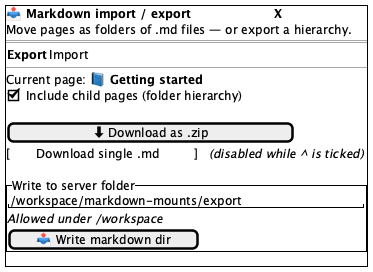 |
| 2 · I/O — Import | 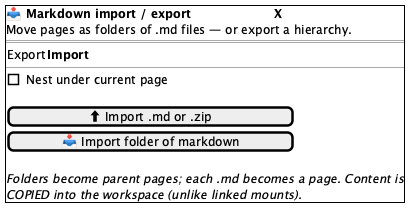 |
| 3 · Link markdown folder | 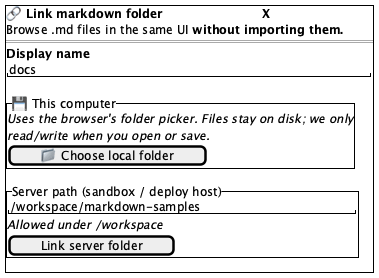 |
| 4 · Edit block with AI — idle | 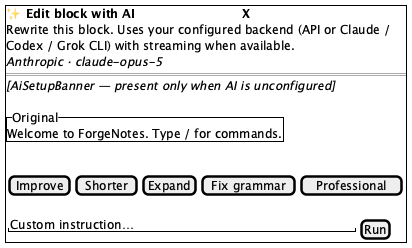 |
| 5 · Edit block with AI — preview | 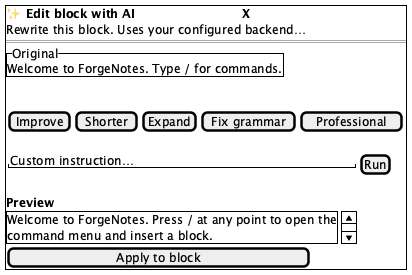 |
Tokens and always-acceptable items: tokens.md.
- Centred over a dimmed overlay, with a named Close control
- Title carries a leading icon; description sits directly beneath
- I/O: exactly two tabs, Export first, exactly one filled
- I/O export: hierarchy checkbox above both download buttons; server panel bordered and last
- I/O import: both import buttons stacked, explanatory note last
- Link folder: Display name first, then This computer, then Server path
- AI edit: Original panel above the presets; five presets in the stated order
- AI edit: instruction field and Run/Stop share one row, Run at the right
- AI edit: Apply to block full width, and only with a preview
- Page title/icon in the export line; default server paths
- Preview text and provider line — both reflect real configuration
- Preset buttons wrapping to two rows at narrow widths
- The
AiSetupBannerpresent or absent, depending on configuration
- Both Run and Stop
- A preview panel with no preview text
- Download single .md enabled while the hierarchy checkbox is ticked
- A native file picker or
confirm()dialog - The hidden
<input type=file>elements
- Body overflowing instead of the dialog scrolling
- Escape or Close failing to dismiss (Radix supplies both — absence is a regression)
- Preview
<pre>growing pastmax-h-48instead of scrolling - Import and Export tabs both filled, or neither
AiSetupBanner and AiBlockPanel (ai-panels.md), AiSetupWizard
(ai-setup-wizard.md), HarnessPanel
(harness.md), Trash and Settings (sidebar.md). Native OS
pickers are not this app's UI and cannot be captured.