UI ai setup wizard
Source: src/components/ai/AiSetupWizard.tsx (754 lines — the largest component in the repo)
Reach: / → sidebar Settings → Configure AI
States: 7 — six steps, and credentials branches into two genuinely different screens
A six-step modal that configures how the app talks to an LLM: an in-process Deep
Agents runtime, a direct provider API, or a local coding CLI (claude, codex,
grok) shelled out to on the host.
Layout. A Radix Dialog with three fixed regions: a header (title +
description), a step-chip row, and a scrolling body. The header and chips are
shared chrome across all steps, so the rubric specifies them once, here, and
each step's rubric covers only its body.
| Step | data-wizard-step |
Body |
|---|---|---|
| 1 | welcome |
Prose: the API path vs the CLI path |
| 2 | provider |
Radio list of five backends + a streaming toggle |
| 3 | credentials |
Two different screens — see below |
| 4 | mcp |
MCP server list, empty by default |
| 5 | skills |
Toggle list of five skills + Enable all |
| 6 | review |
Summary table + a connection test |
The credentials branch. When the selected backend is a CLI, the step renders
CliCredentialsStep (no API key — the CLI owns its own auth) instead of
CredentialsStep (key, model, temperature). These are not visual variants of one
screen; they share a step id and nothing else, which is why they get separate
wireframes.
Navigation. The step chips call setStepIndex(i) with no gating, so all six
steps are one click apart in any order. canNext gates the Continue button only.
That asymmetry is deliberate and is what makes this screen a good capture target.
Entry step is not always welcome. The component takes an initialStep prop.
Reached via Settings on a configured workspace it opens on provider, so a capture
recipe must select the step explicitly rather than assume the first.
It stacks on top of Settings. Opening the wizard does not dismiss the Settings dialog — Settings stays mounted and visible behind the backdrop. Every capture of this screen therefore contains a second, dimmed dialog. That is current behaviour, not a defect, but a rubric written from the wireframe alone would flag it, so it is recorded here and listed under Acceptable Differences.
| What | Selector |
|---|---|
| Active step |
[data-wizard-step] — attribute value is the step id |
| Step chip | [data-testid="wizard-step-<id>"] |
| Active chip | [aria-current="step"] |
| Dialog | role=dialog[name="AI setup · Deep Agents & coding CLIs"] |
| Close |
role=button[name="Close"] (supplied by the Radix wrapper) |
Ids: welcome, provider, credentials, mcp, skills, review.
1. seed localStorage["forgenotes-ui-freeze"] = "1"
   (+ localStorage["workspace-v1"] = {"state":{"theme":"dark"},"version":0} for dark)
2. load /, viewport 1280x800
3. click text "Settings"        (sidebar footer)
4. click text "Configure AI"    (inside the Settings dialog)
5. click [data-testid="wizard-step-<id>"]
6. webview_wait_for [data-wizard-step="<id>"]
7. webview_screenshot
Two traps, both cost real time:
-
After any
location.reload()from injected JS, restart the driver session. The reload strips the bridge'swindow.__MCP__helper, and every selector-based tool then fails withresolveAll is not a function— which reads like a broken bridge rather than a stale injection. -
Scope
webview_dom_snapshotwith--selector. Unscoped, it times out on this app's DOM.[data-wizard-step]is the right scope here.
| State | Wireframe |
|---|---|
| 1 · Welcome | 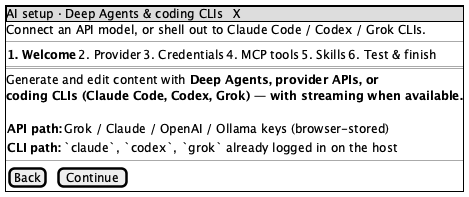 |
| 2 · Provider | 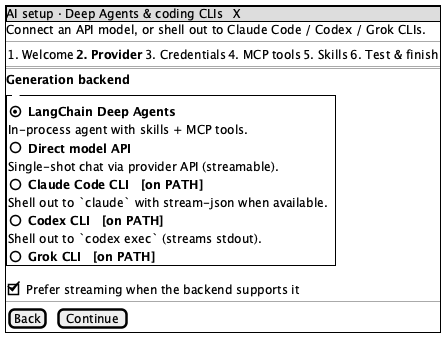 |
| 3 · Credentials (API) | 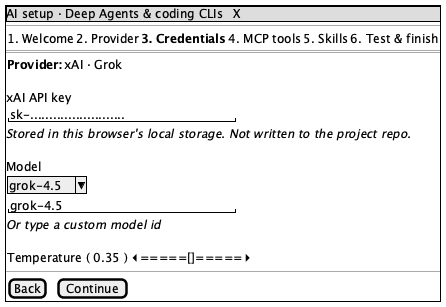 |
| 3b · Credentials (CLI) | 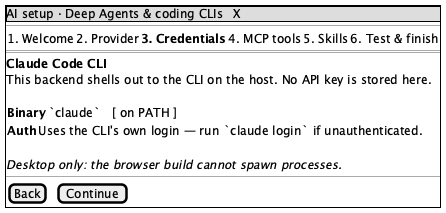 |
| 4 · MCP tools | 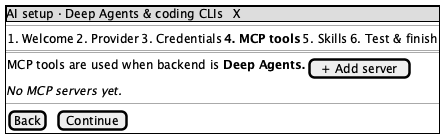 |
| 5 · Skills | 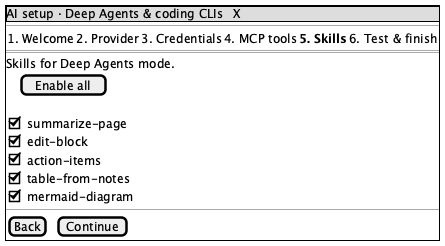 |
| 6 · Review | 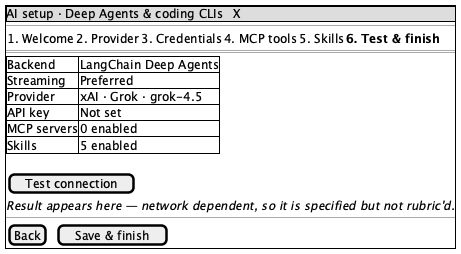 |
Sources are the matching .puml files. Regenerate with npm run ui:render.
Applies to every step; each step's rubric below adds only its body.
- Title reads "AI setup · Deep Agents & coding CLIs", with the description beneath
- Six chips, in order: Welcome, Provider, Credentials, MCP tools, Skills, Test & finish
- Exactly one chip is styled active, and it matches
[data-wizard-step] - A named close control is reachable
- Body scrolls independently; header and chips stay put
- Dialog is centred over a dimmed backdrop
- Dialog height (content-dependent), scrollbar presence, font hinting
- Chip wrapping at narrow widths
- The Settings dialog visible behind the backdrop — the wizard stacks on it rather than replacing it. The wireframes show the wizard alone, so every real capture will differ here. Verified current behaviour, not a defect.
- Sidebar and page content behind the backdrop, which vary with workspace state
- More than one active chip
- Spinners or toasts (freeze mode hides them)
- Body content overflows the dialog instead of scrolling
- Chips clipped or unreadable
- Light surfaces while
.darkis on the root
Must Match: both paths named — API (browser-stored keys) and CLI (claude, codex, grok logged in on the host); no form controls.
Must Match: five backends, in order — LangChain Deep Agents, Direct model API, Claude Code CLI, Codex CLI, Grok CLI; exactly one selected; each with its one-line description; the streaming toggle present.
Acceptable: the on PATH badge depends on what is installed, so its presence varies by machine.
Must Match: provider shown; API-key field masked; the "stored in this browser's local storage" note present; model select plus custom-model input; temperature control with a visible value. Must NOT Appear: a real API key in plain text.
Must Match: names the CLI; states no key is stored; shows binary and auth rows. Failure: an API-key field appearing here at all — that means the branch chose wrong.
Must Match: the "used when backend is Deep Agents" note; an Add server control; the empty state reads "No MCP servers yet."
Must Match: Enable all present; five skills — summarize-page, edit-block, action-items, table-from-notes, mermaid-diagram; each individually toggleable.
Must Match: summary rows for Backend, Streaming, Provider, API key, MCP servers, Skills; values agree with the earlier steps; a Test connection control; a final save/finish action. Acceptable: every value — it reflects configuration. Not rubric'd: the connection-test result. It is network-dependent; specified above, deliberately not asserted.
AiSetupBanner (line 737), the MCP add/test sub-flows, and the connection-test
result. All reachable from here; none belong in this screen's rubric.